PySimpleGUI 6: the former commercial release, reopened under LGPL3 with a closed contribution model
Python GUIs for Humans! Create any GUI simple or complicated in a way that's intuitive. Launched in 2018. NEW for 2026 - the LGPL3 Version 6. Transforms tkinter, Qt, WxPython, and Remi into a simple, intuitive, and fun experience for both hobbyists and expert users.
At a glance
- What is it?
- PySimpleGUI 6 is the PySimpleGUI 5 codebase with its licensing and security components removed, now published under LGPL3 on GitHub and PyPI. The list-based layout and event loop are unchanged, but contributions still run one way and the maintainer makes no promise about the long term.
- Who is it for?
- PySimpleGUI 6 suits Python developers who want a small desktop tool or form built from a nested list and a read loop, and who are fine depending on a project that does not accept pull requests. It is a weaker choice for teams that need a guaranteed long-term roadmap or a way to upstream their own fixes.
- Can I use it commercially?
- Yes, with conditions. LGPL-3.0 is a weak copyleft licence: you can use it inside commercial and closed-source software, but if you distribute changes to its own files, you must publish those changes under the same licence.
- Is it still maintained?
- Yes. The repository last received commits 11 days ago.
- What is it written in?
- Mainly Python, according to GitHub's language statistics.
Answers come from the project's GitHub data, last synced on November 13, 2026, and from our analysis. They are not legal advice.
Star history
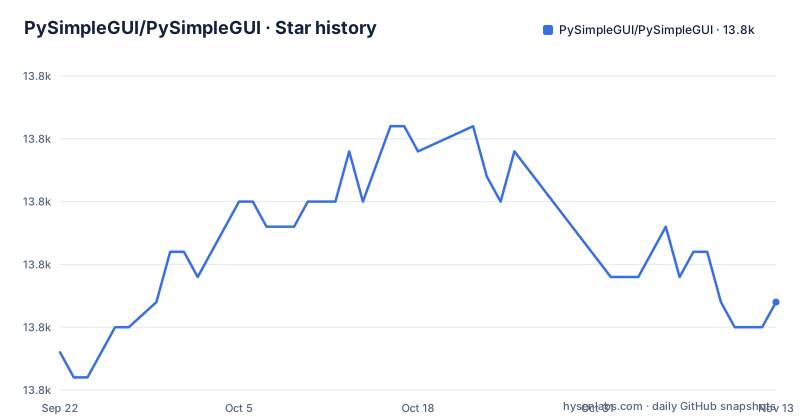
- PySimpleGUI/PySimpleGUI13,821 ★ · +2
| Repository | 2026-09-22 | 2026-11-13 |
|---|---|---|
| PySimpleGUI/PySimpleGUI | 13.8k | 13.8k |
2 Stars in the last 52 days, measured from the daily GitHub snapshot. Compare with other projects
Editorial analysis
Version 6 is PySimpleGUI 5 with the license checks taken out
PySimpleGUI went through a commercial phase under PySimpleSoft. In February 2025 the company announced it was shutting down, with support continuing through the end of 2025. That wind-down is complete. Rather than freeze the code, the maintainer released the PySimpleGUI 5 code as open source after removing its licensing and security components, and that is what ships as version 6 under the LGPL3 license on both GitHub and PyPI.
The practical consequence for users of version 5 is that there is no license key step anymore. For people who stayed on the older free 4.x line, version 6 is the first open release built from the commercial codebase. setup.py now reports version 6.4, Development Status 5 - Production/Stable, and a minimum of Python 3.6, with classifiers running through Python 3.14.
A nested list for layout and a while loop for events
PySimpleGUI wraps tkinter and other GUI libraries, with Qt, WxPython and Remi named alongside it, and replaces their object setup with a compact pattern. A window is a list of rows, each row a list of elements:
import PySimpleGUI as sg

# Define the window's contents
layout = [[sg.Text("What's your name?")],
          [sg.Input(key='-INPUT-')],
          [sg.Text(size=(40,1), key='-OUTPUT-')],
          [sg.Button('Ok'), sg.Button('Quit')]]

# Create the window
window = sg.Window('Window Title', layout)
The program then calls `window.read()` inside a `while True` loop. Each call returns an event and a dictionary of values keyed by element key, such as '-INPUT-'. The loop breaks when the event is `sg.WINDOW_CLOSED` or the Quit button, and elements are changed by looking them up with `window['-OUTPUT-']` and calling `update`. Everything happens in your own loop, so control flow stays readable for people with no GUI programming background.
PyPI, a GitHub zipball, or the frozen 4.60.5.1 line
The latest release installs from PyPI:
python -m pip install PySimpleGUIIf existing code depends on the old free series, pin it:
python -m pip install PySimpleGUI==4.60.5.1The GitHub repository carries newer code than PyPI and can be installed without cloning:
python -m pip install --upgrade https://github.com/PySimpleGUI/PySimpleGUI/zipball/masterSwapping master for a release number installs that tag, for example 6.1:
python -m pip install --upgrade https://github.com/PySimpleGUI/PySimpleGUI/zipball/6.1The trade-off is reproducibility: master moves, while a PyPI version or a tag zipball does not. setup.py declares an empty install_requires, so the package itself pulls in no other dependencies through pip.
Release 6.4 fixes Linux windowing and crashes on bad input
Version 6.4, released on 2026-11-02 after 6.3 in August and 6.2 in June, is mostly about edges. On Linux and Wayland window creation was reworked (#3507), `disable_minimize=True` no longer crashes, right-click menus close when you click away (#6664), and `auto_save_location` no longer crashes on `[None, None]` (#6904) or creeps down by the titlebar height. On Windows each program now gets its own taskbar identity, custom-titlebar windows get a taskbar icon, and `Menu.update` no longer leaves a blank strip.
Several changes stop crashes outright: `set_options` ignores unrecognized options, many color checks were reworked so bad colors no longer crash element creation, and `Button.update(image_data=...)` works on buttons without an image. New options include `resizable=(False, True)` for one-direction resizing, `sash_width` and `sash_cursor` on Pane, and `popup_error_with_traceback`, which puts the full traceback in a Multiline you can copy.
Pull requests are not accepted
PySimpleGUI has always been developed more like a proprietary product than an open source project, and that did not change with the LGPL3 release: pull requests are not accepted. The license lets you fork and modify the code, but there is no path for getting your fix into the official package.
The consequence is that if you hit a bug that blocks you, your options are to report it and wait, or to carry a patched copy yourself and re-apply your change on each upgrade. Teams that routinely upstream fixes to their dependencies should factor that maintenance cost in before choosing it.
Drag and drop lives in psgdnd, and macOS is untested
Drag and drop was a long-requested feature, and it now exists without changing PySimpleGUI itself: all the code runs in user space through a separate package, psgdnd, whose version 6.1 is on PyPI:
python -m pip install --upgrade psgdndIt works on Windows and Linux. On the Mac its status is described as still an unknown. If your application has to accept dropped files on macOS, you cannot plan around psgdnd until you have run it there yourself, and you may need a different approach for that platform.
The long-term outlook is stated as uncertain
The project is active right now: the last push was on 2026-11-02, and three releases landed between June and November 2026. The maintainer is also candid that he is not sure what the long-term future looks like, only that he is here for now, writing code and happy to help.
For a hobby script that is enough. For an application you will maintain for years, it means planning for the possibility that releases stop, which the LGPL3 license at least makes survivable since you can keep and patch the source. Extensive documentation remains at Docs.PySimpleGUI.com, and the separate PySimpleGUI Playground repository installs a set of single-file example programs plus a Toybox launcher with `psgplayground`.
Editorial conclusion
PySimpleGUI 6 suits Python developers who want a small desktop tool or form built from a nested list and a read loop, and who are fine depending on a project that does not accept pull requests. It is a weaker choice for teams that need a guaranteed long-term roadmap or a way to upstream their own fixes. Before committing, decide whether you need v6 or the 4.60.5.1 line, pin the exact version, and if you need drag and drop on macOS, test psgdnd there yourself.
Frequently asked questions
What happened to PySimpleGUI?
PySimpleSoft, the company behind the commercial version, announced its shutdown in February 2025 with support through the end of 2025. The PySimpleGUI 5 code was then released as open source version 6 under LGPL3, with licensing and security components removed.
What is PySimpleGUI?
PySimpleGUI is a Python wrapper for tkinter and other GUI libraries that builds windows from nested lists of elements and handles input through an event loop. No prior GUI programming experience is needed.
Is PySimpleGUI free?
Yes. Version 6 is released under the LGPL3 license on GitHub and PyPI, with the licensing components of the former commercial version removed.
How do I install PySimpleGUI?
Run python -m pip install PySimpleGUI for the latest v6 release, or install the newest code from GitHub with python -m pip install --upgrade https://github.com/PySimpleGUI/PySimpleGUI/zipball/master.
How do I install PySimpleGUI 4?
Pin the older release with python -m pip install PySimpleGUI==4.60.5.1.
How do I use PySimpleGUI?
Define a layout as a list of rows of elements, create sg.Window with it, then call window.read() in a loop to get each event and the values dictionary, breaking out when the event is sg.WINDOW_CLOSED.
Official sources
Add this badge to your README
If you maintain this project, the badge below links readers to this analysis and shows its maintenance status from the daily GitHub snapshot. Paste the markdown into your README; add ?metric=license or ?metric=stars to the image URL for a different field.

[](https://hysenlabs.com/projects/pysimplegui-pysimplegui)Star history chart for your README
[](https://hysenlabs.com/projects/pysimplegui-pysimplegui)Was this useful?