JZSub delivers against a declared target, and its burn-in needs a font it does not ship
JZSub: paste one video link and get back the highest-quality MP4 with its cover image and GPT-generated bilingual subtitles, automatically.
At a glance
- What is it?
- A Python tool that takes one video link and returns a cover, subtitles and a burned-in bilingual MP4, with four delivery targets selected by a flag. The interesting parts are the rules it states about itself: completion is judged against the declared target, subtitle targets fail loudly on platforms with no subtitles, and the burn-in font has to be fetched from the vendor because the repository will not carry it.
- Who is it for?
- JZSub suits someone who wants a finished, subtitled file rather than a download script, and the delivery targets are the part worth learning, since asking for `subs` instead of `full` avoids the video stream and the burn-in entirely. It is not a tool for content you cannot access, and its own notice says so.
- Can I use it commercially?
- Yes. MIT is a permissive licence: you can use, modify and sell software built on it, as long as you keep its copyright and licence notices.
- Is it still maintained?
- Yes. The repository last received commits 110 days ago.
- What is it written in?
- Mainly Python, according to GitHub's language statistics.
Answers come from the project's GitHub data, last synced on November 15, 2026, and from our analysis. They are not legal advice.
Star history
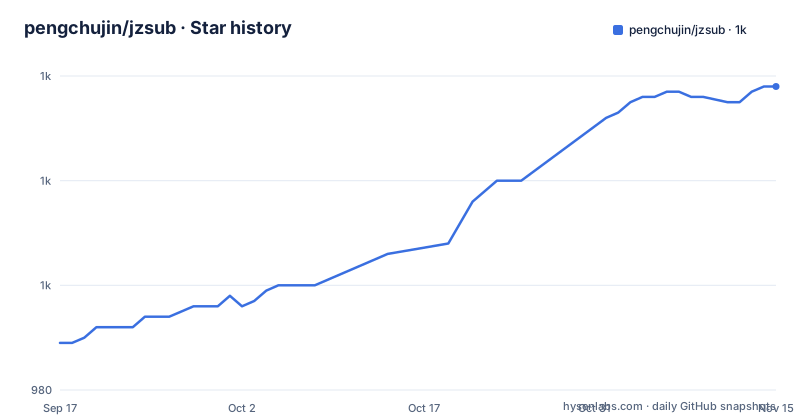
- pengchujin/jzsub1,038 ★ · +49
| Repository | 2026-09-17 | 2026-11-15 |
|---|---|---|
| pengchujin/jzsub | 989 | 1k |
49 Stars in the last 59 days, measured from the daily GitHub snapshot. Compare with other projects
Editorial analysis
Completion is judged against the target you declared
Delivery is a switch with four values, and the switch decides both what gets produced and when the run is over. `full` is the default and runs the whole pipeline, producing the video, the cover, the subtitles and a burned-in bilingual MP4. `video` produces the video and cover with no translation and no burn-in, and still saves the platform's original subtitle files when the platform has them. `subs` skips the video stream entirely and returns the original subtitles plus a derived SRT. `bilingual-subs` also skips the video and returns the original subtitles plus a translated, rendered bilingual SRT and ASS. The stopping rule is stated plainly: `video` and `subs` end as soon as the download finishes, while `full` and `bilingual-subs` continue into translation, and the delivery check decides the run is complete by comparing what exists against the declared target. That is why the tool is told not to sit in a download-only intermediate state. It is also why the subtitle targets fail loudly, since a `subs` run with no suitable platform subtitles reports an error rather than delivering an empty file.
Output names come from one manifest, and resume and verification share them
Filenames are not invented at each step. The documentation says the names are declared uniformly by the download manifest, and that resuming an interrupted download and verifying the delivery both use that same name. In practice the default Chinese run produces a cover called `封面-视频名.jpg` and an MP4 called `双语字幕版「视频名」.mp4`, with the video name set off by corner brackets inside the filename. The cover is fetched from the platform and converted to a plain JPEG so that no separate web image save is needed, which is why the cover is part of every delivery target rather than an extra. Non-ASCII characters in output names are a deliberate choice here rather than an accident, and they travel with the manifest, so any tool that resumes the job has to agree on the same string. That coupling is the mechanism: one declaration, three consumers, and a mismatch would show up as a verification failure rather than as a silently renamed file.
Translation runs on a compact queue and never opens the full manifest
The bilingual subtitle path is built around batching, and the batching is what keeps memory flat on long videos. Translation is done in compact batches, with context carried across batch boundaries so a sentence split between two batches still reads correctly, and the translated text is then re-split on sentence boundaries rather than left on batch edges. The original subtitle text is never modified, which matters because the delivered originals and the derived bilingual files are both artifacts of the same run. The target language defaults to Chinese and is selectable with `--target-lang` for Japanese, French or anything else. Two resource claims are attached to the same mechanism: the tool reads only the compact subtitle document rather than the complete manifest, and it does not stall in a state where the video is downloaded but nothing else is. The progress line for the burn-in stage is sampled rather than continuous, printing once every five percent, with a twenty-cell bar, the elapsed and total time, and a speed factor:
烧录 [██████████░░░░░░░░░░] 50% 01:11 / 02:23 0.68xBurn-in rendering depends on a font the repository refuses to carry
The subtitles are burned in with libass, stacked bilingually at the bottom of the frame, over a background the tool positions itself, and the layout adapts to portrait video by using a smaller font size and a larger bottom safe area so the text clears platform overlays. All of that needs one specific typeface, MiSans Bold, and the repository does not include it. The documentation is explicit that the font is not in this repository and that MiSans has to be obtained from Xiaomi's HyperOS official download page, which also means redistribution is not something this project is doing on your behalf. The macOS dependency line covers the other three tools and not that one:
brew install yt-dlp ffmpeg-full denoRead closely, that line installs neither Python nor the font, and it asks for `ffmpeg-full` rather than plain `ffmpeg` because libass support is the requirement rather than a general codec bundle. So a first run on a clean machine needs this line, a Python 3.10 or newer interpreter, and a font file placed where the renderer expects it.
Two runtimes, one Node-based installer, and one dependency with no stated role
The dependency list names Python 3.10 or newer, yt-dlp, Deno 2.3 or newer, FFmpeg and ffprobe built with libass, and MiSans Bold. Version floors are given for Python and Deno and for Node, but not for yt-dlp or FFmpeg, so the download and muxing side floats with whatever the package manager supplies. Deno is the interesting entry, because it is a hard requirement with a specific minimum version and the documentation never says what runs on it. The pipeline is described in terms of downloading, model translation, subtitle rendering, burning in and delivery checking, and the translation step is the obvious place a JavaScript runtime would appear, but the text does not commit to that. The result is an install where three runtimes are in play across the whole story: Python for the tool itself, Deno for something unnamed, and Node only if you take the one-line Codex installer.
Two install paths, one of which delegates to a third-party CLI
The recommended path is a single npx invocation that fetches the latest from GitHub and installs JZSub globally into Codex:
npx skills add pengchujin/jzsub --skill jzsub -g -a codex -yNode.js 18 or newer is required for it, and the flags are doing real work: the skill name, a global install, the target agent, and a confirmation bypass. That makes the fastest install depend on an external `skills` CLI that this repository does not contain. The manual path is three commands and no third party:
git clone https://github.com/pengchujin/jzsub.git
mkdir -p ~/.codex/skills
cp -R jzsub/skills/jzsub ~/.codex/skills/
From there a new Codex task is started with the skill trigger and a URL, which is the shape the documentation gives:
$jzsub https://www.youtube.com/watch?v=VIDEO_IDThe same Python entry point can also be run directly, with the target and the working directory given as flags:
python3 skills/jzsub/scripts/fetch_video.py "<url>" \
  --output-dir job --deliver video --browser-cookies auto
So the agent layer is a convenience over one script, and the flag that matters most in either path is `--deliver`.
Verification is two commands, and two directories are never mentioned
The developer path is short and lives behind a collapsed section. The main script carries its own check, and the test suite runs under unittest with discovery rooted inside the skill directory:
python3 skills/jzsub/scripts/fetch_video.py --self-test
python3 -m unittest discover -s skills/jzsub/tests -v
Two things sit in the tree that this page never explains. There is a `tests/` directory at the repository root as well as the `skills/jzsub/tests` path the discovery command points at, so the tree carries two test locations and only one is named. There is also a `TODO.md` and a `docs/` directory, neither of which appears anywhere in the documentation. The closing statements are the ones to keep in view when judging scope: only download content you have the right to access and save, with no bypassing of DRM, paywalls, captchas or platform security restrictions, and the platform logos and trademarks in the page belong to their respective owners. The supported-platform list itself is six brands shown as logos plus whatever yt-dlp handles, with the note that actual formats, subtitles and login requirements are decided by the platform.
Editorial conclusion
JZSub suits someone who wants a finished, subtitled file rather than a download script, and the delivery targets are the part worth learning, since asking for `subs` instead of `full` avoids the video stream and the burn-in entirely. It is not a tool for content you cannot access, and its own notice says so. Before the first run, check the two dependencies the one-line install does not cover, which are Python and the MiSans Bold font that has to come from Xiaomi's own download page, and read what Deno 2.3 or newer is required for, since the documentation names the version without saying what runs on it. If you install through Codex, note that the one-line path depends on a third-party installer CLI while the manual path is three commands you can read.
Frequently asked questions
What does JZSub need installed before it will run?
Python 3.10 or newer, yt-dlp, Deno 2.3 or newer, FFmpeg and ffprobe built with libass, and MiSans Bold. On macOS the documented line is `brew install yt-dlp ffmpeg-full deno`, which covers none of Python or the font, and the font has to be fetched from Xiaomi's HyperOS download page because it is not in the repository.
How do I get subtitles from JZSub without downloading the video?
Use the `subs` target for the original subtitles plus a derived SRT, or `bilingual-subs` for the originals plus a translated bilingual SRT and ASS. Both skip the video stream, and both report a clear error when the platform has no suitable subtitles.
How is JZSub installed into Codex?
Either with `npx skills add pengchujin/jzsub --skill jzsub -g -a codex -y`, which needs Node.js 18 or newer and pulls the latest from GitHub, or manually by cloning and copying `jzsub/skills/jzsub` into `~/.codex/skills/`. A new Codex task then starts with `$jzsub` followed by the URL.
Does JZSub bypass DRM or paid content?
No, and the project says so in its own notice: download only what you have the right to access and save. It states plainly that it does not bypass DRM, paywalls, captchas or platform security restrictions.
What does JZSub do when a video has no subtitles at all?
It delivers the video, the MP4 and the cover and stops there, rather than attempting translation. The subtitle style targets take the other branch and report a clear error instead of continuing.
Official sources
Add this badge to your README
If you maintain this project, the badge below links readers to this analysis and shows its maintenance status from the daily GitHub snapshot. Paste the markdown into your README; add ?metric=license or ?metric=stars to the image URL for a different field.

[](https://hysenlabs.com/projects/pengchujin-jzsub)Star history chart for your README
[](https://hysenlabs.com/projects/pengchujin-jzsub)Was this useful?