Keila, an Elixir newsletter tool with two sending paths
Open Source Newsletter Tool.
At a glance
- What is it?
- Keila sends newsletter campaigns and hosts sign-up forms from a deployment you control, over AWS SES, Sendgrid, Mailgun, Postmark or plain SMTP. Its repository documents the product well and its operations barely at all, which is the gap to weigh first.
- Who is it for?
- Keila fits an operator who wants newsletter sending and sign-up forms inside a deployment they own, and who is willing to read documentation that lives outside the repository. It does not fit a team that needs a documented API, a command line or a support contract on day one, because the repository supplies none of those.
- Can I use it commercially?
- Yes, with strict conditions. AGPL-3.0 is a network copyleft licence: if people use a modified version over a network, for example as a hosted service, you must offer them its source code under the same licence.
- Is it still maintained?
- Yes. The repository last received commits 1 day ago.
- What is it written in?
- Mainly Elixir, according to GitHub's language statistics.
Answers come from the project's GitHub data, last synced on October 23, 2026, and from our analysis. They are not legal advice.
Star history
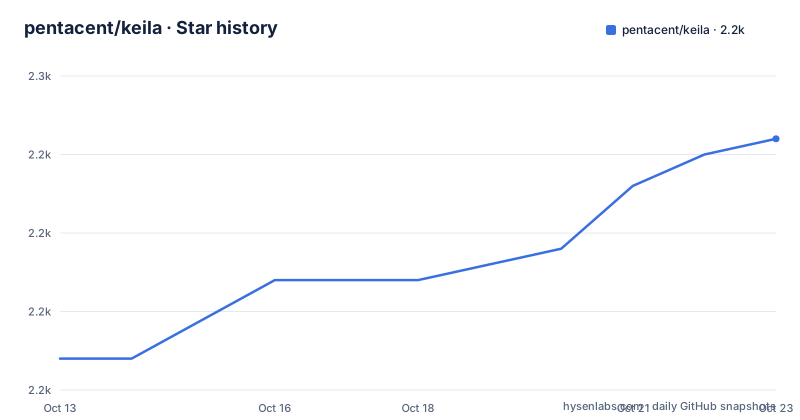
- pentacent/keila2,246 ★ · +14
| Repository | 2026-10-13 | 2026-10-23 |
|---|---|---|
| pentacent/keila | 2.2k | 2.2k |
14 Stars in the last 10 days, measured from the daily GitHub snapshot. Compare with other projects
Editorial analysis
A Mailchimp alternative that runs in a deployment you control
Keila is an open source newsletter tool written in Elixir, and its homepage presents it as an alternative to hosted services such as Mailchimp or Sendinblue. Two jobs sit inside it: sending out newsletter campaigns, and creating the sign-up forms that feed them. Both run in an instance you deploy, which is the whole point of the project. The repository root holds an ordinary Mix application, with the usual config, lib, priv and test directories, and a Docker path layered on top of it.
One split matters more than any other when you evaluate it, and that split runs along volume. For smaller newsletters you can use your own email inbox to send out campaigns. For larger newsletter projects, AWS SES, Sendgrid, Mailgun, and Postmark are supported in addition to SMTP. This boundary decides whether you need provider credentials on day one. It also tells you who the project is written for: an operator who already has a server and a sending relationship, not a marketer waiting for a trial to run out.
Two sending paths, one inbox and four named providers
Delivery has two tiers, and the line between them is volume. Under the small tier, the project tells you to use your own email inbox. No provider is named for that path, and nowhere in the repository does a rate limit, a deliverability note or a list size ceiling appear. Nothing explains which sending address a campaign uses, or whether the reply-to header follows the From address.
The larger tier is where the integration list sits: AWS SES, Sendgrid, Mailgun, and Postmark, in addition to SMTP. Four named transactional providers plus generic SMTP is a wider net than most self hosted tools draw, and it carries a practical consequence. Sending becomes a configuration choice rather than a code change, so moving to another provider should not mean forking the campaign pipeline. The price of that flexibility is that the repository stops describing behaviour right where it would matter. Credentials per provider, delivery callbacks, bounce handling, and what happens to a batch when a provider rejects it: none of these are documented. Treat the provider list as scope rather than a contract.
The inbox path carries the mirror-image risk. Running campaigns out of a personal mailbox ties deliverability to an account that was never provisioned for bulk mail, and no checklist in the repository tells you how many messages to expect before that breaks. If your first attempt uses the inbox, send to a list you can afford to lose.
The hosted signup comes before the self hosted Docker path
The first call to action in the repository is not a shell command. It is a hosted registration page at app.keila.io/auth/register, followed by a link to Keila Cloud pricing, and the section around it is headed "Give Keila a Try!". An open source repository that opens with a signup for its own hosted service puts two deployment models in one document. The order also tells you which one the project would rather you take first.
Self hosting is described next, and it is described by artefact rather than by instruction. You can use the official Docker image, or the sample Docker Compose config that ships in the repo:
pentacent/keila
ops/docker-compose.yml
For the actual steps, the README points outward:
https://www.keila.io/docs/installationRead what is missing before you plan the rollout. There is no run command, no port mapping, no environment variable name and no volume path in the prose at all. The image name and the path to the Compose sample are the entire self hosting surface the repository offers in words, so the first hour of any evaluation happens outside the repository. Want to see the product before touching a server? The hosted instance is the faster route.
Most of the twenty-three root entries are tooling, not runtime code
Most of the twenty-three top-level entries are not runtime code. Alongside mix.exs and mix.lock sit .formatter.exs and .tool-versions, then dprint.json, whose purpose no linked file explains. zizmor.yml sits next to .github/, and three separate editor and agent setups ship in the tree: .devcontainer/, .zed/ and .cla/. Three ways to open one application is a small signal about who works in it, and you only see it by reading the listing instead of the prose.
The application core is conventional. config/ holds settings, lib/ holds code, priv/ holds static files, test/ holds the suite, assets/ holds front end files, ops/ holds operations with the sample Compose config inside it, and extra/ holds whatever it holds. Three documentation files carry the remainder:
CONTRIBUTING.md
LICENSE.md
extra/README.md
On cadence, the last push landed on 2026-09-21, fifteen days after the 0.30.3 version dated 2026-09-06, and the two patches ahead of it, 0.30.2 and 0.30.1, landed four days apart in late June 2026.
One WYSIWYG campaign editor, one default template, one dated screenshot
The visible product amounts to one screen. The campaign editor carries a WYSIWYG editor and the default template, and sign-up forms are created in the same instance. Nothing describes template management beyond that default. No block type list, no form field list, and no statement about how many contacts or how many campaigns the tool expects to hold.
The single screenshot does not live in the repository. Its URL points at www.keila.io/_astro/keila-2024-05-01.BUp8L2VZ.png, a hashed build artefact on the marketing site, and the date in that asset name puts the capture on 2024-05-01. Set it beside the 0.30.3 version dated 2026-09-06 and the interface picture is about two and a half years older than the code. For anyone judging the UI, name that gap out loud: the documented view is a snapshot rather than a live reference, and the hosted instance is the only current picture the project offers.
The AGPL grant stops at the logo and the extra directory
Keila is free software distributed under the GNU Affero General Public License, and the README carves the Keila logo and every file in the extra directory out of that grant, with extra/README.md holding the explanation of what those files are. For an operator this is a packaging boundary rather than a question about the code: the runtime you deploy is covered, and the artwork plus whatever else sits in extra/ is not. Copying files out of that directory into a public facing deployment places them outside the grant, and no other terms are stated for them anywhere in the tree.
Contributions run through CONTRIBUTING.md, which the README names as the place to learn how to contribute code or translations. Translations as a first class path fit a newsletter tool, since what the tool emits is text that recipients read. What is missing is quieter and more consequential: no documented workflow for adding a sending provider, no stated compatibility range between the Elixir toolchain pinned in .tool-versions and any provider library, and no guide for moving an existing subscriber list in from another service.
The README names no ports, variables or day two steps
Here is where the repository runs out. There is no install command, no port number, no environment variable name, no database or migration instruction, no reverse proxy or TLS guidance in the prose. The README does not document backup, rollback, or how to move a database between hosts. It does not say whether the 0.30.3 version expects a migration step before it starts. Day two cost is not described at all, only deferred.
Two absences matter most for capacity planning. The first is delivery volume: whether the inbox path has a per hour ceiling, and whether the provider path draws against your SES or Sendgrid quota, is unanswered. The second is list handling. Unsubscribe, bounce suppression, double opt in and deletion requests are all silent, and for a mailing list those are the questions an operator ends up answering elsewhere.
This is a workable split rather than a broken project. Keep the code where its maintainers can see issues, and take the operational detail from whatever the external docs say, then check it against your own host before the first campaign goes out.
Keila against Mailchimp, and Keila against Keila Cloud
The README names Mailchimp and Sendinblue as the tools Keila replaces, and stops there. No feature matrix, no pricing comparison, no migration path from either service. The honest difference is deployment rather than features. Keila runs in an instance you deploy, sending through the provider you pick among AWS SES, Sendgrid, Mailgun, Postmark and SMTP, or through your own inbox for smaller lists. The subscriber list and the campaign templates sit on hardware you control, and the operator who can read the database is you.
Keila Cloud is the same project run on someone else's instance, reached through the registration page at app.keila.io/auth/register, with its prices on a separate page. Nothing in the repository states which features the hosted service gates, whether the hosted build and the self hosted build are the same, or whether a list can move from one to the other. For a reader deciding quickly, that is the practical consequence: the hosted route is the only way to see the product without first assembling a Docker deployment and a sending account.
Editorial conclusion
Keila fits an operator who wants newsletter sending and sign-up forms inside a deployment they own, and who is willing to read documentation that lives outside the repository. It does not fit a team that needs a documented API, a command line or a support contract on day one, because the repository supplies none of those. Check the Installation Docs for the config keys, any migration step and the port mapping before upgrading, then confirm your sending provider against a small test list, and keep the first send to a list you can afford to lose.
Frequently asked questions
How does Keila send newsletters, and which providers does it support?
For smaller newsletters you can send out campaigns from your own email inbox. For larger newsletter projects, AWS SES, Sendgrid, Mailgun, and Postmark are supported in addition to SMTP.
How do I install Keila on my own server?
Use the official Docker image pentacent/keila, or the sample Docker Compose config at ops/docker-compose.yml in the repository. The README does not give a run command, a port or any environment variable name, and sends you to the Installation Docs at https://www.keila.io/docs/installation for the details.
Is Keila free software, and what is not covered by it?
It is free software under the GNU Affero General Public License, version 3 of the License or any later version. The Keila logo and all files included in the extra directory are not subject to that license, and extra/README.md explains those files.
Does Keila create sign-up forms as well as send campaigns?
Yes, it sends out newsletter campaigns and creates sign-up forms in the same instance. The campaign editor provides a WYSIWYG editor and a default template.
What does Keila leave undocumented?
The README does not document ports, environment variables, backup, rollback or an upgrade path, and it does not state anything about unsubscribe handling, bounce suppression or data deletion. A hosted version exists at app.keila.io/auth/register, with pricing on its own page.
Official sources
Add this badge to your README
If you maintain this project, the badge below links readers to this analysis and shows its maintenance status from the daily GitHub snapshot. Paste the markdown into your README; add ?metric=license or ?metric=stars to the image URL for a different field.

[](https://hysenlabs.com/projects/pentacent-keila)Star history chart for your README
[](https://hysenlabs.com/projects/pentacent-keila)Was this useful?