Halogen inverts the memory advice and tells you to shrink the UMA carve-out
The fastest way to run Qwen3.8-Flash-Next on Strix Halo (gfx1151)
At a glance
- What is it?
- A containerized inference server written for one GPU and one model family, Qwen3.8-Flash-Next on AMD Strix Halo, served OpenAI-compatible on port 8731. Its first instruction is a BIOS one, its precision figure is derived by arithmetic instead of quoted from a format name, and speculation at temperature 0 is claimed byte-identical to greedy decode.
- Who is it for?
- This server is for someone who already has a Ryzen AI Max+ 395, has set the UMA carve-out down to its smallest value, and wants Qwen3.8-Flash-Next answered locally at a throughput they can quote with its conditions attached. It is not a general engine: there is no portability layer, no fallback path, and kernels aimed at one GPU and one model family.
- Can I use it commercially?
- Check first. The repository uses a licence we do not classify automatically, so read its LICENSE file before any commercial use.
- Is it still maintained?
- Yes. The repository received new commits within the last day.
- What is it written in?
- Mainly Shell, according to GitHub's language statistics.
Answers come from the project's GitHub data, last synced on November 15, 2026, and from our analysis. They are not legal advice.
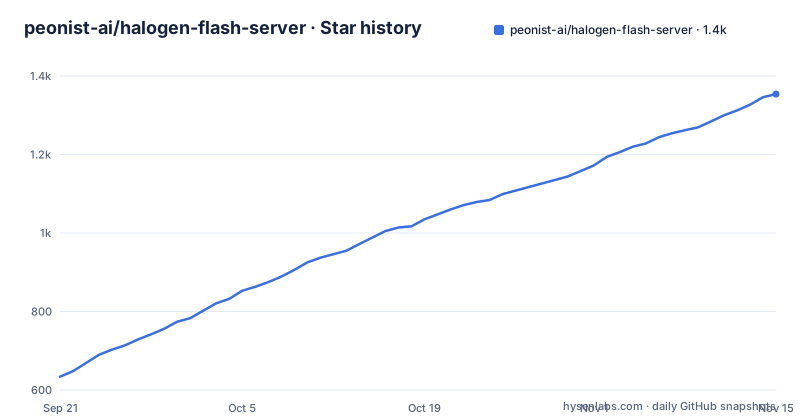
Star history
- peonist-ai/halogen-flash-server1,354 ★ · +720
| Repository | 2026-09-21 | 2026-11-15 |
|---|---|---|
| peonist-ai/halogen-flash-server | 634 | 1.4k |
720 Stars in the last 55 days, measured from the daily GitHub snapshot. Compare with other projects
Editorial analysis
The BIOS instruction reverses what other engines ask for
The quickstart opens with firmware advice rather than a container. Set the BIOS carve-out to its minimum: most engines on Strix Halo want as much dedicated VRAM as the firmware will give, and this one wants the opposite, with the UMA frame buffer, also called dedicated graphics memory, set to its smallest explicit value rather than Auto. The stated reason is concrete rather than advisory. On some boards Auto means 64 GiB, which hides half the machine from the operating system, and the weights then cannot load at all. The same passage asks you to read the measurement conditions before comparing a number from another box against one of these, naming the power envelope and the IOMMU setting as the two settings that move the result most.
111 GiB on first start, and the mkdir Podman insists on
The whole quickstart is one mkdir and one container run:
mkdir -p ~/halogen-models

podman run --rm -p 8731:8731 \
  --device /dev/kfd --device /dev/dri --group-add keep-groups \
  --ipc=host --ulimit memlock=-1:-1 \
  -e HALOGEN_DOWNLOAD=peonist-ai/halogen-qwen3.8-flash-next \
  -v ~/halogen-models:/models \
  ghcr.io/peonist-ai/halogen-flash-server:0.16.1
The weights come down on first start, about 111 GiB, and the transfer resumes if it is interrupted. Since 0.13.2 the log reports how many gigabytes have arrived every 30 seconds instead of counting files, which matters on a download that size. What comes up is an OpenAI-compatible endpoint on port 8731, reachable from your network. The mkdir sits in front of the run for a specific reason: Podman refuses a bind mount whose source does not exist, failing with `statfs ...: no such file or directory`, where Docker would have created the directory. Through 0.13.1 this block started at the container run and failed on a fresh machine.
A pinned tag, and a :latest that never asks the registry
The quickstart pins version 0.16.1 and says that it does so on purpose, while every release also publishes a :latest tag. The reasoning is about container runtime behaviour rather than about this project: a run does not ask the registry about a tag the machine already has, so a local :latest stays whatever it was on the day you first pulled it, and Podman and Docker are both named as behaving that way. The two ways forward are to add --pull=always to the run line, which fetches the newest build on every start, or to update by hand with podman pull. So a single command line carries two moving parts, a version that cannot drift and a convenience tag that only moves when something tells it to.
Prefill holds 97 percent of its rate at 131,072 tokens
The measured table is the reason this project exists, and its conditions are given before the numbers. The reference machine is an AMD Ryzen AI Max+ 395 with 128 GB, ROCm 7.14.0, the image's default configuration, and about 85 W of sustained package power. Prefill runs at 1,584 tok/s on an 8,192-token prompt, 1,567 tok/s at 32,768 tokens, and 1,517 tok/s at 131,072, which is 97 percent of the 32,768 rate, so the prefill curve barely decays with depth. The same rows show a follow-up turn at 100,000 tokens of context landing in about 2 seconds with the prompt cache on by default. Those are the figures worth holding on to, together with the insistence that the power envelope and the IOMMU setting travel with them. The same page names the two ways this goes wrong in practice: a server that will not start for want of memory, and one that starts but crawls on long prompts, which is where the frame buffer advice comes back around. A separate entry covers a load that fails on Fedora with a memory critical error, and another records the host settings these numbers were measured on. The contents also warn that an empty answer means the token budget ran out rather than that the model had nothing to say.
5.53 bpw, and 4.55 once the lookup table is set aside
Precision is quoted as 5.53 bpw and derived rather than named: the figure is measured from the checkpoint's own tensor table instead of being taken from a format name. It spans all 179.55B parameters, and it becomes 4.55 bpw when the trunk and experts are counted on their own with the FP8 n-gram lookup table left out. docs/QUANT.md carries the breakdown by tensor family and explains how the number is arrived at, which is the point of doing it that way, since the result can be checked with arithmetic instead of taken on trust. Since 0.7.0 the engine also opens a llama.cpp GGUF of this model directly, so a file you already hold, unsloth's UD-IQ4_XS for instance, runs on these same kernels with the same speculation and the same identity guarantee and no conversion step.
At temperature 0 the speculative output equals greedy byte for byte
The quality claim is narrow and checkable. At temperature 0 the output is byte-identical to serial greedy decode, so speculation here is a pure speed optimization rather than a quality trade, and the project says it is verified on every release. Since 0.6.0 there are two draft sources, the model's own draft head and the request's own text through prompt lookup, with the guarantee stated to cover both. The decode figures follow from that arrangement. Served with the draft head at 32,768 tokens of context the rate is 46.0 tok/s, a coding-agent turn with draft head plus prompt lookup reaches 55.7 to 56.3 tok/s, and serial greedy at 1,500 and 32,768 tokens of context gives 37.6 and 34.1 tok/s. The identity guarantee is what makes that last pair usable as a baseline rather than a separate engine.
One image, two roles, and an engine port left unpublished
docker-compose.yml spells out a two-container topology built from a single image, because the entrypoint takes engine or api as its argument and the two services therefore cannot drift apart. The split exists for restart reasons rather than for scaling: the engine needs the GPU and re-reads the weights, while the front end needs a tokenizer and starts in about a second, so a front-end change redeploys without a model reload. One volume is enough, because the weights repository ships the tokenizer inside it and HALOGEN_MODELS is pointed at whatever directory hf download wrote. The engine port is deliberately not published, on the stated grounds that the token protocol has no auth, which leaves the API as the only reachable edge. One line costs Docker users a step: keep-groups in group_add is a Podman extension, so the file targets podman-compose and under docker compose it becomes `group_add: ["video", "render"]`. Both services must run the same tag, and public issue #26 was an api at 0.4.4 sitting in front of an engine at 0.5.6.
Shell is the primary language and the licence metadata names nothing
The repository is shaped like a release rather than like a library. Its primary language is recorded as Shell, and the top level holds AGENTS.md, CLAUDE.md, CHANGELOG.md, CONTRIBUTING.md, LICENSE.md, THIRD-PARTY-NOTICES.md and TRADEMARKS.md next to docker-compose.yml, deploy/, docs/ and tools/. There are no GitHub releases at all, so the version quoted in the quickstart, 0.16.1, is tracked through the container registry and the changelog instead. AGENTS.md is advertised as the short form of the whole page for an AI agent deploying, driving or debugging this server, which tells you what reader the author has in mind. Several settings are opt-in and each asks for a different configuration, among them 1M context, an attention budget, and composable context, which is named a preview. Checking a checkpoint is a set of image modes rather than a separate tool, named verify, inspect, ppl for perplexity and KL against a reference file, and niah. The licence is the loose end: the recorded metadata says NOASSERTION while a LICENSE.md file sits at the root, and nothing here settles which of the two governs.
Editorial conclusion
This server is for someone who already has a Ryzen AI Max+ 395, has set the UMA carve-out down to its smallest value, and wants Qwen3.8-Flash-Next answered locally at a throughput they can quote with its conditions attached. It is not a general engine: there is no portability layer, no fallback path, and kernels aimed at one GPU and one model family. Before deploying, confirm your board lets you set the UMA frame buffer to an explicit value, read AGENTS.md instead of the whole page, keep the two compose services on a single tag, and settle the licence question with the author, because the recorded metadata and the LICENSE.md file at the root do not agree on their face.
Frequently asked questions
What hardware does the halogen-flash-server need?
AMD Strix Halo, the gfx1151 target, with an AMD Ryzen AI Max+ 395 and 128 GB in the reference setup. The BIOS carve-out has to be set to its smallest explicit value, because Auto can mean 64 GiB on some boards and hide half the machine from the operating system.
How do I start the halogen-flash-server container?
Create the bind-mount directory first, then run the published image with podman. The mkdir has to come before the run because Podman refuses a bind mount whose source does not exist, and the weights, about 111 GiB, download on first start and resume if the transfer is interrupted.
Does speculation change the output of halogen-flash-server?
No. At temperature 0 the output is byte-identical to serial greedy decode, and the guarantee is verified on every release. Since 0.6.0 it covers both draft sources, the model's own draft head and the request's own text through prompt lookup.
How many bits per weight does halogen-flash-server use?
5.53 bpw across all 179.55B parameters, measured from the checkpoint's own tensor table rather than quoted from a format name, and 4.55 bpw across the trunk and experts with the FP8 n-gram lookup table set aside. docs/QUANT.md carries the breakdown by tensor family.
Can halogen-flash-server run a GGUF file I already have?
Since 0.7.0 the engine opens a llama.cpp GGUF of this model directly, including a file such as unsloth's UD-IQ4_XS, on the same kernels with the same speculation and no conversion step.
Official sources
Where developers are discussing it
Posts on Hacker News, dev.to and Lobsters that link to this repository, found by our scan of those communities. 1 in the last 30 days; newest first.
- Qwen3.8-Flash-Next vs Claude Opus 5.5: Six-way benchmark on a real Rust featuredev.to · Oct 20, 2026 · 7 points · 2 comments
- Halogen – Fastest Way to Run Qwen3.8-Flash-Next on AMD Strix HaloHacker News · Sep 30, 2026 · 3 points · 0 comments
Add this badge to your README
If you maintain this project, the badge below links readers to this analysis and shows its maintenance status from the daily GitHub snapshot. Paste the markdown into your README; add ?metric=license or ?metric=stars to the image URL for a different field.

[](https://hysenlabs.com/projects/peonist-ai-halogen-flash-server)Star history chart for your README
[](https://hysenlabs.com/projects/peonist-ai-halogen-flash-server)Was this useful?