Subwave is a radio station with an AI DJ, and its manifest is three releases behind its tags
Personal internet radio: Agentic AI DJ
At a glance
- What is it?
- A self-hosted Icecast station where a model picks tracks and talks between them, with skills as editable files and six speech engines across two compose profiles. The repository ships a private manifest pinned at 1.13.0 while the newest tag is v1.16.0.
- Who is it for?
- Subwave is one of the few personal radio projects that treats the operator as the DJ's manager rather than its user, and the pieces that make that workable are the schedule grid, the persona roster and the fact that skills are plain files you can edit and rescan instead of code you redeploy. Two things to settle before putting it on a network.
- Can I use it commercially?
- Yes. MIT is a permissive licence: you can use, modify and sell software built on it, as long as you keep its copyright and licence notices.
- Is it still maintained?
- Yes. The repository last received commits 1 day ago.
- What is it written in?
- Mainly TypeScript, according to GitHub's language statistics.
Answers come from the project's GitHub data, last synced on November 15, 2026, and from our analysis. They are not legal advice.
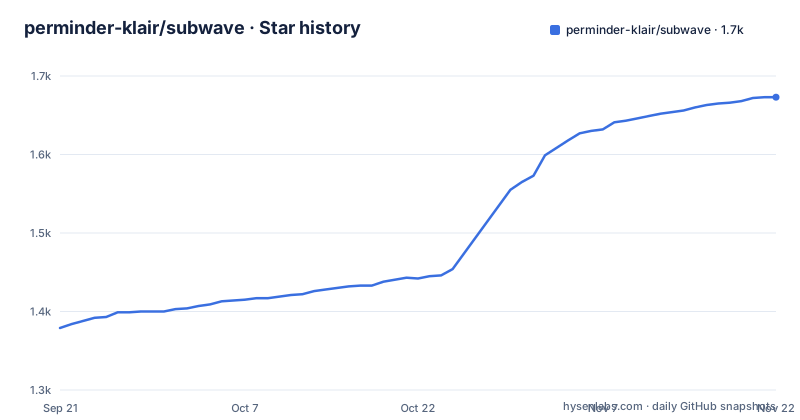
Star history
- perminder-klair/subwave1,660 ★ · +281
| Repository | 2026-09-21 | 2026-11-15 |
|---|---|---|
| perminder-klair/subwave | 1.4k | 1.7k |
281 Stars in the last 55 days, measured from the daily GitHub snapshot. Compare with other projects
Editorial analysis
The manifest says 1.13.0 while the newest tag is v1.16.0
The release history moves quickly: v1.14.0 on 2026-09-09, v1.15.0 two days later, v1.16.0 on 2026-09-14, with commits still landing on 2026-10-02. The manifest in the repository says something different. It is marked private, its version is 1.13.0, and its three runtime dependencies are a prompt library, a colour library and a TypeScript runner.
That gap has a plausible explanation rather than a mystery. The repository carries a release automation manifest and a matching configuration file at the root, which is the setup that bumps versions and cuts tags on merge. So the version in the manifest is the one the automation last wrote, and the checkout is three releases behind the tags. For anyone building from a clone, the practical rule is to pin an image tag rather than trusting the manifest, and to treat the private flag as a signal that the package is not published to a registry at all: the three dependencies exist to run a command line tool that drives Docker, not to be consumed as a library.
The default branch is develop rather than main, which is worth knowing before you clone and assume you have the released state.
npm run dev runs the first-run wizard, not a dev server
The script list is short and one entry is misleading by name. Both the setup script and the dev script run the same command, a setup subcommand of the project's own binary. The start script runs that binary with no subcommand. So the two commands a new contributor reaches for, start and dev, either launch the station or open the wizard, and only the wizard has a name that says so.
The rest of the list is honest about how the project runs. Two scripts drive the development compose file, one brings it up and one rebuilds it, and there are matching scripts for following logs and tearing it down. The web frontend is a separate script that delegates to its own directory, and a typecheck script does the same for the command line package, which means the repository holds at least three npm projects rather than one. Jingles are generated by a shell script rather than by anything in the manifest, which is the only non-JavaScript entry in the list.
The binary itself is declared in the manifest's bin section and is invoked with node directly, and the manifest requires Node 20 or newer. The wizard is what asks for the music source, the model provider and the DJ persona, so it is the real entry point for a new operator.
Only the edge proxy binds a port, and TLS is terminated in front of it
The production compose file is annotated at the top with the decisions that are easy to get wrong, and the first one is about exposure: only the proxy service binds a host port, and a CDN terminates TLS in front of it. Every other service talks over the internal network. The images come from a container registry first, with build blocks kept alongside so a checkout can rebuild locally.
Health checking is handled asymmetrically on purpose. The web service has no health check at all, since it is a static server that either started or did not, so the edge is gated on the controller and the broadcast service being healthy instead. The comment names the failure that motivated it: cold-boot 502s, where the proxy is up before the services behind it are.
Log growth is capped in the same file, at 10 megabytes with three files kept per service, which the comment puts at roughly 30 megabytes each. The reason given is that the default logging driver is unbounded and eventually fills the host disk. For a box that plays music all day, that is the kind of detail that separates a project someone runs at home from one that gets deployed.
State lives in a bind mount under the repository, and moving the stems path does not migrate anything
Persistence is a bind mount rather than a named volume, which has one useful consequence stated in the comment: tearing the stack down with volume removal will not touch your state. The same comment warns about the other hazard, keeping the directory clear of a recursive git clean, since a bind mount inside a working tree is exactly the kind of thing that command deletes.
The stem cache has its own mount with a nested default, pointing at a subdirectory of the state directory unless an environment variable overrides it. The comment explains the mechanics, including why the container path is fixed and how the per-station segment is appended for multi-station installs. Then it states the trap plainly: relocating it does not migrate what is already cached, so the old copy is left sitting there unreferenced until you move it across yourself.
That is an honest warning about a footgun in the project's own configuration, and it is the kind of line that usually exists only because someone hit it. The same pattern repeats for the time zone and for the web settings, all of which are overrides with defaults rather than required values.
Three variables are required, and the wizard takes ownership of everything else
The environment example opens by saying only three variables are needed to boot, and the required block below it holds an administrator user, an administrator password with a generation command beside it, and the public origin used for absolute URLs. The password is marked mandatory in production, and the controller is said to refuse to start without these when the environment says it is a production run. Everything else, including the music server, the model provider, the speech engine and the DJ persona, is collected by the first-run wizard served at an onboarding path once the stack is up.
The important architectural point is where that goes. The wizard writes its answers to a settings file inside the state directory, and that file becomes the runtime source of truth. The environment file keeps optional overrides for deployments where configuration should win over the interface, described as the twelve-factor, continuous integration and infrastructure-as-code style of deploy. So there are two configuration authorities with the state file as the default and the environment as the override, and the wizard is what keeps them from drifting.
One flag in that optional block is worth noting on its own: a setting that reveals alpha DJ Brain administration pages when true, described as a runtime flag that recreates the stack. The paid brain is therefore gated behind a flag rather than removed from the free build.
The DJ has a daily token budget, and running out of it means silence
The spend control is the most thoughtful line in the feature list. A daily token budget can cap what hosted models cost, and past the cap the music keeps playing without the chatter. That is a deliberate degradation: the station never stops, it just stops talking, so a budget overrun turns into an interval-music station rather than an outage.
The provider list explains why a cap is necessary. The model backend is swappable across a local runner, two hosted providers, a Chinese provider, two aggregators and an AI gateway, or anything speaking the OpenAI API shape, and it can be changed from the administration interface with no redeploy. A daily budget is the only thing standing between a hosted model and an unbounded bill on a box that talks all day.
The same page sells two paid options next to that. One is a metered brain with an optional cloud voice for a station you already self-host, priced from five pounds a month with a single key. The other runs the whole station for you on your own subdomain. The text says both fund the project and that the software in this repository stays complete and free, which is the usual arrangement: the operational surface is MIT and the convenience is not.
Between-track segments are files under the state directory, and rescanning is the deploy
What the DJ says between tracks is not code. The built-in segments, weather, news, traffic and your own, are scaffolded on first boot as editable files under a skills directory inside the state volume, one subdirectory per kind. From the administration console you can rewrite a brief or repoint the news feed from one publisher to your own feed, with no code change and no redeploy.
Adding one is a file operation too: drop a markdown definition, plus optional data-fetching code, into the skills directory, press Rescan, and enable it. Or write it in the built-in editor in the interface, or install one another operator shared through the community exchange. A separate document covers custom skills, and the state volume being a bind mount is what makes this work, since the files are on your disk and survive a container rebuild.
The same instinct shows in two other features. The bundled track analyzer measures tempo, key, loudness and how each track actually ends, so crossfades size themselves to the material, and vocal detection keeps the DJ from talking over a sung opening; that sentence breaks off mid-word before it reaches the stem blending option. And the Library Observatory plots every track the DJ has tagged as a map placed by genre and lit by energy, with a dossier per point holding tempo, key, mood, embeddings and nearest neighbours, served at its own path.
Six speech engines, two of them behind a compose profile
Voice is the part with the most moving pieces and the clearest cost curve. Two engines run inside the main process for fast local speech: one single-language voice model and one multilingual one. Four more sit elsewhere. A compose profile adds a sidecar that brings in a voice-cloning engine with zero-shot capability and one that claims six times real-time speed across six European languages. Cloud engines cover two hosted providers, and a remote engine points at any self-hosted HTTP endpoint and streams the audio over the wire.
The profile is opt-in through a command line, and the repository carries separate compose files for the heavy sidecar and for the track analyzer, both with GPU variants, so a machine without a GPU runs the default stack and a machine with one opts in per component. You can pick a different engine per kind of speech, which matters when station idents and a talk segment want different voices.
Output formats follow the same pattern of a safe default with opt-in extras. MP3 is always served at a configurable bitrate, explicitly so that hardware radios, cars and networked speakers keep working. Opus, AAC and lossless FLAC are separate mounts, each toggleable from the interface, and the web player chooses automatically. The persona roster is bounded too, up to twenty-four entries each with its own voice and style, and a single show can seat three guest co-hosts trading scripted banter with the host.
Editorial conclusion
Subwave is one of the few personal radio projects that treats the operator as the DJ's manager rather than its user, and the pieces that make that workable are the schedule grid, the persona roster and the fact that skills are plain files you can edit and rescan instead of code you redeploy. Two things to settle before putting it on a network. First the audio path: Piper and Kokoro run in process, everything else sits behind a compose profile or a cloud key, so decide which engines your hardware can carry before you promise a format. Second the surface area: a daily token budget exists precisely because hosted models cost money, and it degrades by muting the DJ rather than stopping the music, which is a design choice you may or may not want on air. Pin the image tag rather than latest, and read the compose comments before you move any directory.
Frequently asked questions
What is Subwave and what does the AI DJ do?
It is a personal internet radio station on a single Icecast stream where every listener hears the same broadcast at the same time. The DJ curates tracks, writes intros, and reads station idents, the time and the weather, and it takes plain-language requests like asking for something more upbeat.
Where does Subwave get its music?
From your own library through Navidrome over the Subsonic API, with no external catalogue involved. Shows can also anchor a scheduled slot to a Navidrome playlist rather than to a persona.
How do you add or change a Subwave DJ skill?
Built-in skills are scaffolded as editable files under state/skills on first boot, so a brief or a news feed can be rewritten from the admin console with no redeploy. New ones are added by dropping a markdown definition plus optional fetching code into that directory, pressing Rescan and enabling it.
What happens when the model budget runs out in Subwave?
A daily token budget can cap hosted-model spend, and past the cap the music keeps playing without the DJ chatter. The station does not stop, so an overrun turns into interval music rather than an outage.
What does it take to run Subwave in production?
Three environment variables are required, an administrator user, an administrator password and the public origin, and the controller refuses to start without them in a production run. Only the edge proxy binds a host port, state persists in a bind mount under the repository, and log growth is capped per service.
Official sources
Add this badge to your README
If you maintain this project, the badge below links readers to this analysis and shows its maintenance status from the daily GitHub snapshot. Paste the markdown into your README; add ?metric=license or ?metric=stars to the image URL for a different field.

[](https://hysenlabs.com/projects/perminder-klair-subwave)Star history chart for your README
[](https://hysenlabs.com/projects/perminder-klair-subwave)Was this useful?