Bumblebee: an on-disk inventory that never runs your package manager
Read-only developer endpoint scanner for on-disk package, extension, and developer-tool metadata, built to check exposure to known software supply-chain compromises.
At a glance
- What is it?
- Bumblebee is a read-only scanner that inventories packages, extensions, agent skills and MCP host configs from on-disk metadata on macOS and Linux developer endpoints, then matches that inventory against an exposure catalog. It reads lockfiles, package-manager install metadata, extension manifests and supported MCP JSON configs and nothing else, which makes it fast and safe to schedule but also fixes the limits of what it can see.
- Who is it for?
- Bumblebee fits a response workflow that already knows which package or extension an advisory names and needs a fast answer about which developer machines still carry it, because a single static binary with no third party dependencies runs happily on a fleet endpoint. It does not fit an audit that needs to know what actually executed, and it will not see loose skill directories, non-JSON MCP configs, or anything a package manager recorded only in a format v0.1 does not parse.
- Can I use it commercially?
- Yes. Apache-2.0 is a permissive licence: you can use, modify and sell software built on it, as long as you keep its copyright and licence notices.
- Is it still maintained?
- Yes. The repository last received commits 5 days ago.
- What is it written in?
- Mainly Go, according to GitHub's language statistics.
Answers come from the project's GitHub data, last synced on November 15, 2026, and from our analysis. They are not legal advice.
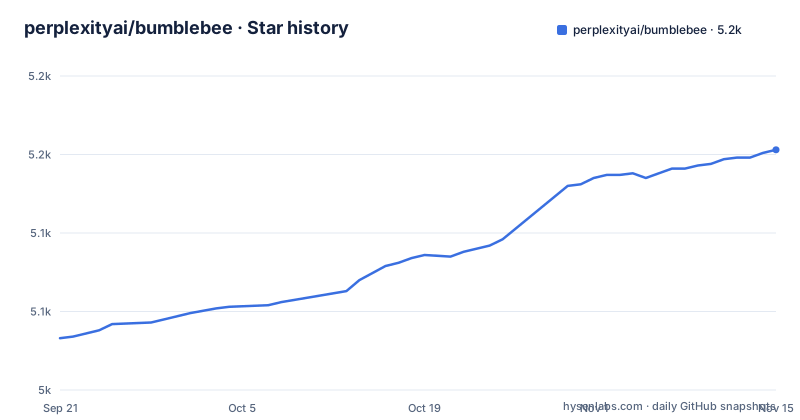
Star history
- perplexityai/bumblebee5,153 ★ · +120
| Repository | 2026-09-21 | 2026-11-15 |
|---|---|---|
| perplexityai/bumblebee | 5k | 5.2k |
120 Stars in the last 55 days, measured from the daily GitHub snapshot. Compare with other projects
Editorial analysis
One invocation, one scan, and cadence belongs to somebody else
Bumblebee is deliberately not a daemon. Each invocation performs a single scan and exits, and the README states plainly that cadence is the runner's responsibility: cron, launchd, systemd or MDM, whichever your fleet already uses. That choice is what keeps the tool small, since there is no background process to reason about.
The cost of that choice is that state lives on the receiving side. Two fields exist so a receiver can keep populations apart: every record carries a `profile` value, and each scanned root is labelled with a `root_kind`. Every run also ends with a `scan_summary` record, and that record is the signal a receiver uses to decide whether to promote the run to current state, so a truncated or failed run is visible rather than silently merged. Package records are NDJSON, one per line, and diagnostics go to stderr as NDJSON too, which keeps the two streams separable when you pipe stdout into a collector.
baseline and project refuse a bare home root
Three profiles split the work by population and cadence, and the split is not a matter of taste. `baseline` covers common global and user package roots, language toolchains, editor extensions, browser extensions and MCP configs. `project` covers configured development directories such as `~/code`, `~/src` or `~/work`. `deep` covers explicit `--root` paths, including broad roots like `$HOME`.
The guard rail matters: `baseline` and `project` refuse bare-home roots, and only `deep` walks them. That means a scheduled sweep can be pointed at a machine by mistake without turning into a full filesystem walk, while an incident responder who actually wants everything passes `--profile deep --root "$HOME"`. `deep` is also the profile the README pairs with `--ecosystem`, `--exposure-catalog` and `--findings-only`, which is the campaign-mode combination. You can see what a profile resolves to without scanning anything at all, since `bumblebee roots --profile baseline` prints one `<root_kind>` and path pair per line as a tab separated pair.
An exposure catalog can be one file or a flat directory
The matching side is a catalog you supply. `--exposure-catalog` accepts either a single JSON file or a directory of `*.json` catalogs, which is convenient when an advisory arrives as one artefact and the next arrives as a batch. Two rules apply to the directory form: the files are merged non-recursively, so nested subdirectories are ignored, and every file in the set must share the same `schema_version`, otherwise the merge has no defined meaning.
`--findings-only` changes what comes out rather than what goes in. It requires `--exposure-catalog`, and it suppresses package records while keeping findings, which is how you get a short answer instead of a full inventory dump. Other flags behave in the obvious way: `--root` is a repeatable filesystem path, required for `deep` and optional elsewhere, `--ecosystem` is repeatable and comma separated, and `--max-duration` bounds a run. A bounded incident scan looks like this:
bumblebee scan --profile deep \
  --root "$HOME" \
  --exposure-catalog ./catalog.json \
  --max-duration 10m
For a routine inventory you would skip the catalog entirely and redirect NDJSON to a file with `bumblebee scan --profile baseline > inventory.ndjson`.
MCP env blocks get parsed and then deliberately dropped
MCP host configs are the most sensitive input the scanner touches, because those files routinely carry environment values and credentials in their `env` blocks. The stated behaviour is that Bumblebee parses these configs for the server inventory it needs, and does not emit those values in its records. In other words the credential is read to identify the server entry, and the credential itself stays out of the NDJSON stream that will be shipped off the endpoint.
The recognized JSON host configs are named individually: `mcp.json`, `.mcp.json`, `claude_desktop_config.json`, `mcp_config.json`, `mcp_settings.json`, `cline_mcp_settings.json`, plus `~/.gemini/settings.json` for the Gemini CLI and Code Assist, and `~/.claude.json` for Claude Code user and project scoped `mcpServers`. The gap is equally explicit. Non-JSON configs are not parsed in v0.1, which means Codex `config.toml` and Continue YAML are invisible to a scan today. If your fleet runs an agent host configured through TOML or YAML, bumblebee will report no MCP servers.
Loose SKILL.md directories never appear without a lock file
Agent skills are inventoried, but only from lock files. The sources are the `skills.sh` and `vercel-labs/skills` lock files: a global `~/.agents/.skill-lock.json`, or `$XDG_STATE_HOME/skills/.skill-lock.json` when XDG state is in play, and a project-local `skills-lock.json`. Loose `SKILL.md` directories without a lock file are not enumerated at all.
That is the sharpest edge in the whole coverage table, because skills are frequently dropped into a repository by hand. A skill directory someone copied into a project, or into a user skills folder without running the lock-generating tool, produces no record, and therefore no finding. Two other partial-coverage cases behave the same way in miniature. Bun is read from `bun.lock`, with `bun.lockb` presence recorded only as a diagnostic, so a binary lockfile tells you something happened but not what is installed. And pnpm lockfiles and `.pnpm` package.json files are emitted under the `npm` ecosystem value, which matters if your receiver partitions findings by ecosystem and expects pnpm to be distinguishable.
No package manager is executed, so nothing here proves what ran
The read-only promise is enforced by what the scanner refuses to do. There is no package manager execution, and the README names the commands it will not run: `npm ls`, `pip show`, `go list` and the rest of that family. There are no source-file reads either. What gets read is a fixed list of lockfiles, package-manager install metadata, extension manifests and the supported MCP JSON configs, catalogued per ecosystem in docs/inventory-sources.md. The binary itself is a single static file, built with Go 1.25 or newer, with zero non-stdlib dependencies, so shipping it to an endpoint does not drag a language runtime along.
The tradeoff is straightforward. Package-manager execution would tell you what the toolchain believes is installed right now, including things a lockfile has drifted away from; bumblebee deliberately trades that for an inventory that cannot perturb the machine it inspects. For an incident response question of the form which machines show a match in on-disk metadata right now, that is the right trade. For a question about what actually executed on a developer laptop, it is the wrong tool, and the EDR answer is the one that fits.
selftest is the fleet deployment smoke test
After installing, there is a built-in end-to-end check that runs against fixtures compiled into the binary:
bumblebee selftest
# selftest OK (2 findings in 1ms)
The fixtures use deliberately fake package names such as `[email protected]` and make no network calls, so the check works on an isolated endpoint with no egress. Its failure mode is the useful part: a non-zero exit means the local install can no longer detect what it should. That makes it a fast pre-deployment smoke test for fleet rollouts, where a scanner that silently finds nothing is worse than a scanner that is not installed at all.
Stamping a build is equally explicit. `go build -ldflags "-X main.Version=v0.1.1" -o bumblebee ./cmd/bumblebee` overrides the version at build time, and the documented precedence is the `-ldflags` override first, then the module version recorded by `go install`, and finally the in-tree default tracked in the VERSION file at the repository root. `bumblebee version` then prints the version together with the VCS revision, the build time and the Go runtime, so a record emitted in production can be traced back to a specific build. Package records carry that stamp too, under `scanner_name` and `scanner_version`.
Two version numbers move at different speeds
Look closely at any record and you will find two independent version fields, and they are not the same number. `scanner_version` follows the binary, so a release tagged v0.1.2 reports v0.1.2. `schema_version` describes the record shape, and the worked example in the documentation carries `0.2.0`. A schema at 0.2.0 shipping inside a scanner at 0.1.x is normal for this project, but it means you cannot infer one from the other when you are writing a receiver.
The release history is short and easy to follow: v0.1.1 on 22 May 2026 and v0.1.2 on 18 June 2026, with the last push to the default branch main on 2 November 2026. The LICENSE file at the root is Apache-2.0, and the repository also carries SECURITY.md, CONTRIBUTING.md, a `.goreleaser.yaml` release configuration, and separate `cmd`, `internal`, `docs`, `threat_intel` and `tools` directories. The `docs` directory includes transport.md for HTTPS and file output and state-model.md for the receiver side current-state model.
Editorial conclusion
Bumblebee fits a response workflow that already knows which package or extension an advisory names and needs a fast answer about which developer machines still carry it, because a single static binary with no third party dependencies runs happily on a fleet endpoint. It does not fit an audit that needs to know what actually executed, and it will not see loose skill directories, non-JSON MCP configs, or anything a package manager recorded only in a format v0.1 does not parse. Before rolling it out, run `bumblebee selftest` on every image you deploy, check that your exposure catalog files share one `schema_version`, and read docs/inventory-sources.md to confirm the roots your machines use are on the list.
Frequently asked questions
how to install bumblebee
With Go 1.25 or newer, run `go install github.com/perplexityai/bumblebee/cmd/bumblebee@latest`, or pin a tag such as `@v0.1.1`. From a checkout, `go build -o bumblebee ./cmd/bumblebee` and `go test ./...` do the job. The result is a single static binary with zero non-stdlib dependencies, and `bumblebee selftest` verifies the install.
how to use bumblebee linux
Pick a profile and scan. `bumblebee scan --profile baseline > inventory.ndjson` writes a global inventory, `--profile project` covers configured directories such as `~/code`, and `--profile deep --root "$HOME"` walks the whole home directory for incident work. Only `deep` accepts a bare home root, and `bumblebee roots --profile baseline` previews the resolved roots without scanning.
Does bumblebee run npm, pip or go while collecting inventory?
No. The scanner executes no package manager commands, explicitly not `npm ls`, `pip show` or `go list`, and it reads no source files. It reads only lockfiles, package-manager install metadata, extension manifests and the supported MCP JSON configs, which is why it can run on an endpoint without disturbing it.
What happens to credentials stored in MCP config files?
MCP host configs can carry environment values and credentials in their `env` blocks, and bumblebee parses those configs for the server inventory while leaving those values out of the emitted records. Non-JSON configs such as Codex `config.toml` and Continue YAML are not parsed in v0.1.
Official sources
Add this badge to your README
If you maintain this project, the badge below links readers to this analysis and shows its maintenance status from the daily GitHub snapshot. Paste the markdown into your README; add ?metric=license or ?metric=stars to the image URL for a different field.

[](https://hysenlabs.com/projects/perplexityai-bumblebee)Star history chart for your README
[](https://hysenlabs.com/projects/perplexityai-bumblebee)Was this useful?