Petal Components asks for version 4.0, and its newest tag is v3.2.2
Phoenix + Live View HEEX Components. Petal Components Shadcn-style Phoenix components that AI assistants can actually use.
At a glance
- What is it?
- A shadcn-style component library for Phoenix LiveView, published three ways: as a Hex package, as a Claude Code plugin, and as a hosted model-context server that coding agents query for real component schemas. The recommended install mutates your project through an agent, and the public playground is a development build with the reloaders switched off.
- Who is it for?
- The library itself is well built and unusually well documented for its audience, with real component schemas exposed to agents instead of a guess, composable primitives rather than a theme, and a clear statement that the same guidance file is the canonical instruction set for whichever tool you use. Two things to settle first.
- Can I use it commercially?
- Yes. MIT is a permissive licence: you can use, modify and sell software built on it, as long as you keep its copyright and licence notices.
- Is it still maintained?
- Yes. The repository last received commits 3 days ago.
- What is it written in?
- Mainly Elixir, according to GitHub's language statistics.
Answers come from the project's GitHub data, last synced on November 13, 2026, and from our analysis. They are not legal advice.
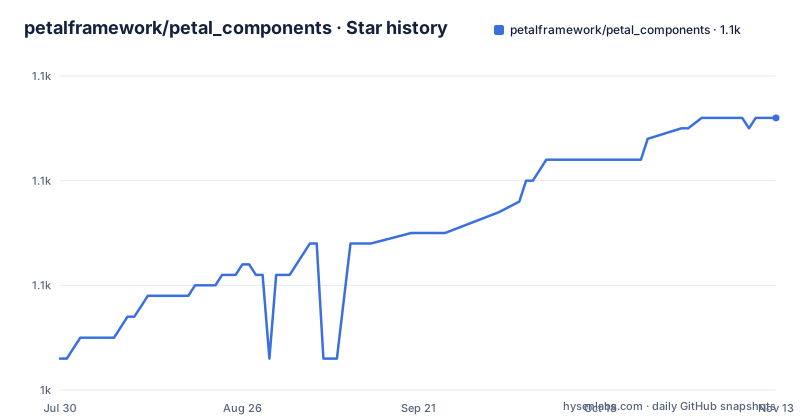
Star history
- petalframework/petal_components1,066 ★ · +23
| Repository | 2026-07-30 | 2026-11-13 |
|---|---|---|
| petalframework/petal_components | 1k | 1.1k |
23 Stars in the last 106 days, measured from the daily GitHub snapshot. Compare with other projects
Editorial analysis
The manual install asks for 4.0 while the newest release tag is v3.2.2
The manual dependency block tells you to add the package with a constraint of 4.0 or compatible within the 4.x line, and the release history tops out at 3.2.2. That tag is dated 2026-05-15, sharing the day with 3.2.1 about two hours earlier, and before that 3.2.0 from April. The repository root holds an upgrade guide, which suggests a major version bump is in progress rather than a typo, and the last push is dated 2026-09-02. Either way, a reader who follows the documented manual install ends up with a version constraint that no visible release satisfies, and the readme never says where to look for the 4.0 package. Worth resolving before you copy that line into a project you care about.
The AI story depends on a server the vendor runs, not on code in this repository
The pitch is that these are components AI assistants can actually use, and the mechanism is a hosted model-context server at a petal.build address that exposes every component's real schema. The install is one command, and the transport is HTTP to that remote host:
# 1. Install the MCP server once
claude mcp add petal --transport http https://mcp.petal.build/mcp
The readme is explicit that the server is the canonical component list and that the catalogue in the readme is only highlights, which is the right call for keeping documentation honest. It also means the feature that justifies the project is not auditable from the repository, and a component you were told exists may be renamed, changed or dropped without a dependency bump. Six tools are named as having their own install commands for that server.
The recommended install is an agent making four edits to your project
After the server is added, the instruction is to tell your AI to install the component package. What happens next is that the agent calls an install-instructions tool on the remote server, applies the result to your dependencies file, runs the dependency fetch, patches your stylesheet, and adds a use statement to your web module. The readme defends this as handling project shape variance the install would otherwise have to special-case, and says it works in umbrella apps and standard projects. That is a fair engineering argument. It is also a remote tool call that rewrites four places in a codebase, driven by a server you did not write, which is a different thing from a dependency and deserves different scrutiny. Alongside it the project publishes a rules file, also fetchable from the site, described as the canonical instruction set for any of the six tools. Its five rules are worth reading on their own: reach for an existing component tag before hand-rolling markup, learn the naming map from tag to module to class prefix, discover components through the server, follow three common compositions, and when in doubt call the list tool and then the detail tool.
The JavaScript hooks are imported straight out of the dependency directory
Registration of the bundled hooks is not a normal package import. Your application file reaches into its dependency directory by relative path, pulls the default export, and merges it into the socket hooks alongside any hooks you already have. The readme is honest about the scope: those hooks are needed for the password, copyable and clearable inputs and for the chat components, and the rest of the library is styling plus LiveView behaviour. The stylesheet side has a matching wrinkle, since you import Tailwind and then point its source scanner at a glob inside the dependency folder
@import "tailwindcss";
@source "../deps/petal_components/**/*.*ex";
@import "../deps/petal_components/assets/default.css";
. That third line is how class names used only inside the library get compiled at all, and it is a hard coupling to the dependency folder path that a build tool with its own content rules may not accept. The JavaScript is tested by a private package whose own description says it is a test harness, is not published, and exists because the hooks ship inside the Hex package instead.
The public playground is a development build with the reloaders switched off
The container file for the hosted component playground says so in its own first paragraph. It runs with the development environment on purpose, because the playground is the development server, with the conveniences disabled by a deploy flag: no code reloader, no live reload, no tailwind watcher, and a real secret key base. The comment then explains the consequence, that every runtime dependency it needs is scoped to the development environment in the project file, so a production build would have nothing to run. That is a candid admission and an unusual deployment posture for a public site. The image is pinned to a specific Elixir and Erlang release on a slim Debian base, installs a compiler because a native module may need building, and fetches the Tailwind binary at build time because the development script would otherwise download it on every start.
shadcn copies files into your repository, this ships as a dependency
The comparison section is the clearest statement of the trade. The philosophy is the same, composable primitives where you own the patterns and no monolithic theme to fight, and the AI integration is the same, an agent reading real schemas instead of inventing attributes. Two things differ. The runtime is HEEx rather than JSX, on Tailwind v4 rather than Tailwind 3 with CSS variables, working in live and dead views. And the distribution differs in the way that matters to you: shadcn is a CLI that copies component source into your repository, while this is a Hex package you update with the dependency command. The claim that you own the patterns is therefore true, and the claim that you own the components is not. Two hundred plus components can change under you on a dependency bump.
The readme names 38 components out of 200 plus, and ships three ways
The catalogue is organised into five groups and the highlights are a fraction of the whole. Layout and content has eight, forms has nine with the full list in one source file, actions five, feedback eight and data display eight. Two of the names are worth pausing on, a marquee component and an icon wrapper, both borrowed from the React lineage this is imitating. The chat components need an optional markdown dependency, which is the only optional entry in the manual install. Around the library the project ships three artefacts: the Hex package, a Claude Code plugin with its own skills directory and a marketplace manifest, and the hosted server. The playground that shows every component rendered runs from a local development server started with a single script sequence, on port 4000, with live reload on edits to the library source, and the test suite is one mix command. A paid production boilerplate built on the library is offered as the reference for composing it seriously, and a separate site hosts the visual grid while another hosts the interactive playground.
Editorial conclusion
The library itself is well built and unusually well documented for its audience, with real component schemas exposed to agents instead of a guess, composable primitives rather than a theme, and a clear statement that the same guidance file is the canonical instruction set for whichever tool you use. Two things to settle first. The component inventory lives on a server the vendor runs, so the headline AI feature depends on a network service that is not in this repository and can change its answers independently of your dependency version. And the install path a beginner is steered toward is an agent making four edits to your project based on what that server returns, which is a very different risk profile from adding a line to a dependencies list. If you want the boring path, take the manual one and check the version yourself, because the documented constraint and the newest tag do not currently agree.
Frequently asked questions
What does petal_components give a Phoenix application?
A set of HEEx components for Phoenix LiveView built on Tailwind v4, working in both live and dead views. The README names buttons, forms, modals, tables and cards among others, and says the library holds more than 200 components.
What is the petal_components MCP server for?
It exposes each component's real schema to AI coding tools from a hosted address, so an agent lists components and fetches one instead of writing raw Tailwind markup from memory. The README calls that server the canonical list rather than its own catalogue.
How do I install petal_components without an AI tool?
Add it to the dependencies in mix.exs, import Tailwind and the component stylesheet in assets/css/app.css, add use PetalComponents to your web module, and register the bundled JavaScript hooks. An optional markdown dependency is only needed for the chat components.
How is petal_components different from shadcn?
The philosophy and the AI-tool integration are the same, per the project. The runtime differs, HEEx instead of JSX and Tailwind v4 instead of Tailwind 3, and so does distribution: a Hex package updated with mix deps.update rather than a CLI that copies files into your repository.
What does the hosted playground actually run?
A development build. The container file sets the development environment on purpose and disables the code reloader, live reload and the tailwind watcher through a deploy flag, while supplying a real secret key base.
What license is petal_components under?
MIT. The repository carries the license as LICENSE.md at its root, and the published package is on Hex with documentation on HexDocs and a component gallery on the project site.
Official sources
Add this badge to your README
If you maintain this project, the badge below links readers to this analysis and shows its maintenance status from the daily GitHub snapshot. Paste the markdown into your README; add ?metric=license or ?metric=stars to the image URL for a different field.

[](https://hysenlabs.com/projects/petalframework-petal-components)Star history chart for your README
[](https://hysenlabs.com/projects/petalframework-petal-components)Was this useful?