Phoenix LiveView: server-rendered HTML with a socket underneath
Rich, real-time user experiences with server-rendered HTML
At a glance
- What is it?
- Phoenix LiveView renders the first page over plain HTTP, then keeps a WebSocket open and sends template diffs instead of markup. It ships inside every new Phoenix app, and the cost of that model lands on connection handling and deployment.
- Who is it for?
- Adopt Phoenix LiveView when your team already writes Elixir and Phoenix and wants real-time interfaces without owning a second language in the browser; skip it if the interface has to work offline or if one server process per connected user does not fit your deployment.
- Can I use it commercially?
- Yes. MIT is a permissive licence: you can use, modify and sell software built on it, as long as you keep its copyright and licence notices.
- Is it still maintained?
- Yes. The repository last received commits 2 days ago.
- What is it written in?
- Mainly Elixir, according to GitHub's language statistics.
Answers come from the project's GitHub data, last synced on November 13, 2026, and from our analysis. They are not legal advice.
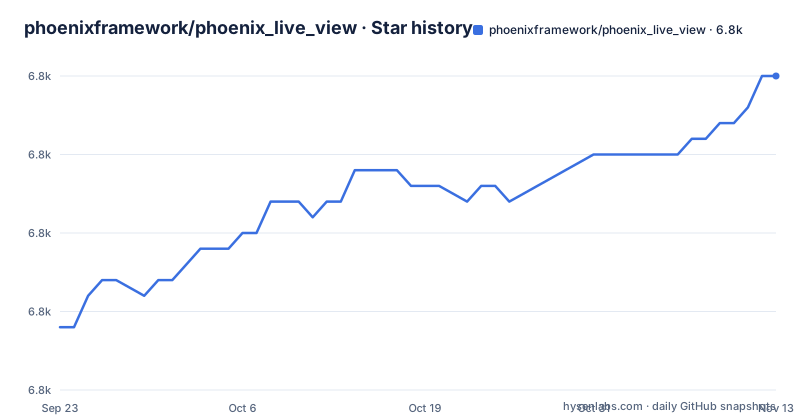
Star history
- phoenixframework/phoenix_live_view6,840 ★ · +16
| Repository | 2026-09-23 | 2026-11-13 |
|---|---|---|
| phoenixframework/phoenix_live_view | 6.8k | 6.8k |
16 Stars in the last 51 days, measured from the daily GitHub snapshot. Compare with other projects
Editorial analysis
The first paint is an HTTP response, the updates are diffs
Phoenix LiveView renders the first page as part of an ordinary HTTP request, which is why indexers see real markup and why the project can talk about quick times for First Meaningful Paint. A persistent connection takes over from there. Instead of pushing HTML over the wire on every change, the server works out which parts of the template actually moved and sends only those diffs, and the client applies them. The README claims 5 to 10 times faster updates than solutions that replace whole HTML fragments. Transport is WebSockets, with an optional LongPolling fallback for networks where the upgrade never completes. The same connection carries user events back up. Applications must still authenticate the session and authorize actions in the relevant LiveView callbacks.
HEEx templates, and the seven component libraries competing for them
Templates are HEEx, which brings function components, slots, HTML validation and verified routes into the same file as your server code. A new Phoenix app arrives with a minimal component system that exists only to power the Phoenix generators, and if you want more the project points at seven outside libraries rather than shipping one itself. Bloom extends Phoenix Core Components with an opinionated set, Doggo is headless, Petal Components and Mishka Chelekom are HEEx kits, PrimerLive reproduces GitHub's Primer design system, SaladUI follows shadcn and Fluxon UI goes for accessibility. What none of them settles for you is pinning. The README describes each as sitting at a different stage of development, so which version of which library your app ends up on is a decision your team makes in mix.exs and revisits at every upgrade.
Live forms and uploads, with the recovery story tucked into the guides
Forms get real-time validation out of the box, and the same machinery handles uploads, nested inputs and recovery after a crash or a dropped connection. Uploads get progress indicators and image previews, and uploads can be processed on the fly or submitted to your desired cloud service. The boundary sits in the documentation rather than the front page: recovery after crashes or disconnects is a link into the form bindings guide, not a paragraph here. If your uploads are large or your users sit on unreliable networks, that section is the first thing to read, not a footnote.
Two commands, or a guide pinned at v0.20.1
LiveView is already inside every app the Phoenix generator produces, so the entire install for a new project is two commands once Elixir itself is on your machine from elixir-lang.org.
mix archive.install hex phx_new
mix phx.new demo
The first line installs the phx_new archive, the second generates an app with LiveView already wired in. Existing applications get a different answer: the README points them at the previous installation guide, and that link is pinned to the v0.20.1 tag. A guide frozen at 0.20 describes a LiveView from before the 1.x line. The working tree keeps mix.exs, mix.lock and a guides directory at the root, so the instructions that matter for a current version live there rather than on the README.
Three bundles on npm, and an empty dependencies block
The JavaScript client is a separate npm package that lives in the same repository. Its package.json describes it as the Phoenix LiveView JavaScript client, sets the version to 1.3.0-dev and declares type module, so the ESM build is the native one, with a CommonJS file and a minified file kept for other loaders.
"module": "./priv/static/phoenix_live_view.esm.js",
"main": "./priv/static/phoenix_live_view.cjs.js",
"unpkg": "./priv/static/phoenix_live_view.min.js"
The dependencies object is empty, which is unusual for anything bundling a DOM patching engine and a socket layer, and it means you inherit whatever the client already carries with no version to negotiate. The devDependencies tell the other half of the story: jest, jest-environment-jsdom, typescript, prettier and eslint for the build, plus phoenix 1.8.9 and a morphdom dependency pointed at a fork's main branch. That fork reference tracks a branch rather than a release, so check package-lock.json when rebuilding the bundle from source.
Jest without a browser, sitting next to a Playwright dependency
The testing bullet promises no more running a whole browser alongside your tests, and the tree supports that at first glance: jest.config.js, setupTests.js, jest-environment-jsdom and jest-monocart-coverage for coverage. The same devDependencies list also carries @playwright/test and eslint-plugin-playwright, so a browser driver has not left the project. Read it as a split rather than a contradiction: the jsdom environment plus LiveView's own test helpers cover state, events and rendering, and the cases that need a real browser still route through Playwright. Debugging has a separate answer in software-mansion/live-debugger, which shows a live view of LiveView processes, their component hierarchy, their assigns and their lifecycle callbacks. A demo of the kind of application this produces runs at livebeats.fly.dev.
v1.2.12 in September, 1.3.0-dev on main, MIT on both sides
Releases have been steady: v1.2.11 on 2026-08-27, v1.2.12 on 2026-09-16 and v1.2.13 on 2026-10-20, with the last push landing on 2026-11-02 and the repository not archived. Note the gap between the released tag and the working tree, where package.json already reads 1.3.0-dev, so what you read in the repository is ahead of what the Hex package page offers. CHANGELOG.md sits at the root next to SECURITY.md, and CI lives in the .github directory. The licence is MIT in both halves of the project, LICENSE.md for the Elixir code and the license field in package.json for the client, so the library you deploy and the bundle you hand a browser carry the same terms.
Where a server-rendered socket stops paying off
The design keeps all rendering and all state on the server, and that is exactly where it stops being the right tool. A socket per connected user is a cost the stateless model you replaced never carried. It also cannot render on the device, so an offline-first interface or a native shell built from the same components is out of reach. The project's own examples show where the model bends rather than where it ends: a Twitch clone built with LiveView and Elixir WebRTC, and a social music app.
Editorial conclusion
Adopt Phoenix LiveView when your team already writes Elixir and Phoenix and wants real-time interfaces without owning a second language in the browser; skip it if the interface has to work offline or if one server process per connected user does not fit your deployment. Before committing, check the recovery section of the form bindings guide against your crash cases, and read the jsdom and Playwright entries in package.json to see which of your tests will still need a browser.
Frequently asked questions
What is Phoenix LiveView?
It is the library that adds real-time behaviour to server-rendered HTML in Phoenix applications. It ships by default in new Phoenix apps, renders the first page as part of a regular HTTP request, then keeps a WebSocket open and sends template diffs for updates, with an optional LongPolling fallback.
How does Phoenix LiveView work?
The server renders HTML over HTTP on the first request, so indexers and fast first paint both work. A persistent connection then carries events up and diffs down instead of whole HTML fragments, and events use the established connection. Applications must still authenticate the session and authorize actions in LiveView callbacks. Templates are HEEx, with function components, slots, HTML validation and verified routes.
Does Phoenix LiveView require me to write JavaScript?
Mostly not. LiveView enriches the server with a declarative model, and you write templates rather than client code. JavaScript comes back in specific places: phx-click, phx-focus, phx-blur, phx-submit and phx-hook for cases the model does not cover, and Phoenix.LiveView.JS commands for optimistic updates and transitions.
Official sources
Add this badge to your README
If you maintain this project, the badge below links readers to this analysis and shows its maintenance status from the daily GitHub snapshot. Paste the markdown into your README; add ?metric=license or ?metric=stars to the image URL for a different field.

[](https://hysenlabs.com/projects/phoenixframework-phoenix-live-view)Star history chart for your README
[](https://hysenlabs.com/projects/phoenixframework-phoenix-live-view)Was this useful?