Claude Code Development Kit: setup, context, and review workflow
Claude Code Workflow for beginners & intermediate users. Tutorial and Installer included
At a glance
- What is it?
- Claude Code Development Kit adds persistent project documentation, slash commands, hooks, and optional review workflows to Claude Code. It is aimed at beginners and intermediate users who want repeatable context loading and release checks, but its optional integrations and project-specific templates require configuration.
- Who is it for?
- Claude Code Development Kit fits individual Claude Code subscribers and small projects that need a documented context and review loop. It is less suitable for teams that already standardize prompts and context files elsewhere, or for users unwilling to maintain project-specific commands.
- Can I use it commercially?
- Yes. MIT is a permissive licence: you can use, modify and sell software built on it, as long as you keep its copyright and licence notices.
- Is it still maintained?
- Yes. The repository last received commits 108 days ago.
- What is it written in?
- Mainly Shell, according to GitHub's language statistics.
Answers come from the project's GitHub data, last synced on November 7, 2026, and from our analysis. They are not legal advice.
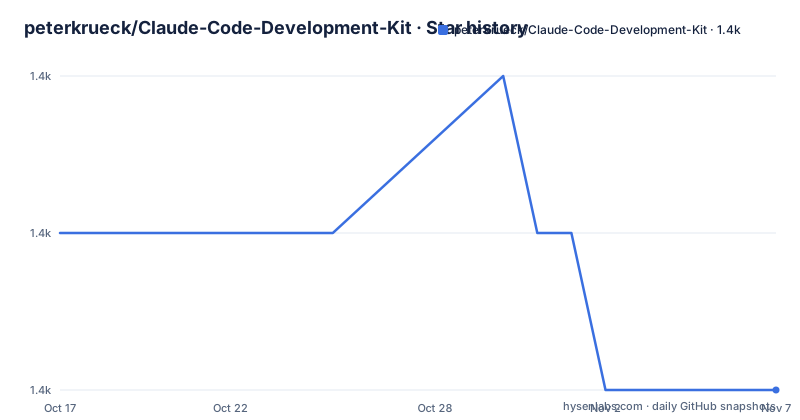
Star history
- peterkrueck/Claude-Code-Development-Kit1,387 ★ · -1
| Repository | 2026-10-17 | 2026-11-07 |
|---|---|---|
| peterkrueck/Claude-Code-Development-Kit | 1.4k | 1.4k |
-1 Stars in the last 21 days, measured from the daily GitHub snapshot. Compare with other projects
Editorial analysis
Why Claude Code Development Kit targets context decay
Claude Code Development Kit addresses a specific problem in long-running coding sessions: project knowledge is easily separated from the code it describes. Its README argues that a static `CLAUDE.md` can become stale after a few sessions as context fills and decisions must be reconstructed. The project therefore treats documentation as a maintained working layer rather than a one-time instruction file.
The intended audience is explicit. It is for people with a Claude Code subscription who are beginning an application or side project, or who already use Claude Code but lack a consistent routine for restoring context, reviewing changes, updating notes, and merging work. It also targets users who do not want Claude Code to execute commands such as `git push --force`, `rm -rf`, `sudo`, or `git reset --hard` without a guardrail.
This is not an autonomous coding agent or a general-purpose development framework. It is a collection of commands, hooks, permissions, documentation templates, and optional skills installed into a project. That distinction matters. Its value depends on the project owner filling in commands and documentation that match the actual application, test suite, deployment target, and review policy.
The four-stage Claude Code operating loop
The documented workflow begins with `/prime`, which loads project documentation into the Claude Code session. By default, the README describes a light prime of roughly 4,000 to 6,000 tokens. The command also supports a full mode and a deployment-oriented mode, allowing the user to choose how much infrastructure context enters the session. This tiering is a practical response to limited context: routine sessions do not need every deployment file by default.
After implementation work, `/review-work` can spawn parallel Claude sub-agents to inspect the uncommitted diff. The described roles include a Bug Hunter, a Rules Auditor, and an optional Architect. The quality-gate documentation also says external API claims are checked through Context7 and discarded if they cannot be verified. These features are optional rather than part of every minimal installation.
Documentation maintenance comes next through `/update-docs`. The skill updates `docs/ai-context/`, uses a density-first approach, and skips trivial changes. The final documented stage is `/merge`, which checks whether the documentation is current and the working tree is clean. It is intended to catch silent clean-merge breakage through a build or test pass and supports both ordinary branches and `git worktree`.
`/verify` sits beside that loop as the observed-behavior check. The README says it should run the application or its tests, rather than treating successful compilation as proof that a change works. Because this command is a cross-stack template, the actual commands must be supplied for the project.
Installer choices and the first Claude Code session
The README offers a remote installer and a clone-based path. The remote command downloads `install.sh` from the repository and pipes it to Bash. The clone path keeps the repository visible locally before running `setup.sh`. Both approaches are presented as access routes to the same installer experience, which offers Full, Customize, and Minimal profiles and can be rerun to add features.
For a direct installation, the documented command is:
curl -fsSL https://raw.githubusercontent.com/peterkrueck/Claude-Code-Development-Kit/main/install.sh | bashThis command executes the installer without first placing it in the working tree. The alternative preserves a local copy of the repository:
git clone https://github.com/peterkrueck/Claude-Code-Development-Kit.git
cd Claude-Code-Development-Kit
./setup.sh
After installation, enter the target project and start Claude Code:
cd your-project
claude
Inside the Claude Code session, issue the first documented context-loading command:
/primeAccording to the README, Claude Code should read the installed project documents, summarize the project, and establish context for subsequent work. The command shown in the README is presented as a prompt line rather than as a shell command, so it belongs inside the interactive Claude Code session.
Core files, permission hooks, and optional additions
The core installation places command definitions under `.claude/commands/`, hooks under `.claude/hooks/`, skills under `.claude/skills/`, and permissions in `.claude/settings.local.json`. It also creates `assets/` and `docs/ai-context/` scaffolding. The four context documents have distinct roles: `spec.md` records what the product does, `project-structure.md` describes the codebase, `progress.md` tracks work, and `deployment-infrastructure.md` covers infrastructure.
Two core safeguards deserve attention. The `security-scan.sh` hook is described as blocking API keys and secrets from leaking to MCP plugins. The permission configuration also uses a deny list and allowlist to block selected destructive commands while permitting safe read-only shell utilities and documentation-domain fetches. These controls reduce particular classes of accident, but the README does not claim that they replace secret scanning, branch protection, review, or repository security policy.
Optional components expand the installation surface. `/second-opinion` consults another model, with OpenAI Codex as the documented default and Google Gemini available through installer choices. That feature requires the corresponding CLI. Visual skills add dependencies such as Python 3, Pillow, and numpy, while `/image-gen` requires `GEMINI_API_KEY`. The deploy skill is also a template whose commands must be supplied by the user. Audio notifications are listed for macOS and Linux.
The repository includes `AGENTS.md` and `GEMINI.md` templates for external consultants. This makes the kit useful as a multi-tool briefing layer, but it also means adopters may need to maintain equivalent context for more than one assistant.
Where the quality gates depend on project-specific work
The largest limitation is visible in the templates. `/verify` does not provide a universal set of correct commands because no single command works for every application. A Node service, Python package, shell utility, and mobile project require different build, start, and test operations. The person installing the kit must edit the cross-stack template so it exercises observable behavior in the target repository.
The optional deploy skill has the same constraint. Its documented sequence is detect changes, run tests, deploy, verify, and report, but the README does not define the user's deployment provider or its credentials. Likewise, `/second-opinion` requires a separate CLI and may involve external AI services. The core security scanner has documented patterns, but its supported secret formats and false-positive policy are not fully described.
The review workflow can also add latency and usage cost because it launches parallel sub-agents and can consult external models. The README presents these as optional quality gates, which makes that tradeoff manageable. However, teams should not interpret `/review-work` as a security audit, proof that all bugs were found, or a substitute for human approval.
A plain `CLAUDE.md` plus a team review checklist is the real alternative for projects that already have a reliable context-maintenance process. The kit's distinguishing approach is to turn context, documentation updates, verification, and merge checks into reusable Claude Code slash commands, with hook-based guardrails and optional multi-agent review.
Maintenance state, licensing, and ongoing template upkeep
The repository is not archived, and its last push was on 2026-07-22. Its most recent listed release is `v3.1.0`, dated 2026-05-18, with new commands, dual-mode `/merge`, and an expanded maintenance-engine README. Those facts indicate recent project activity, but they do not guarantee that every optional integration is compatible with future Claude Code changes.
The maintenance cost falls mainly on the adopting project. Generated context documents can become inaccurate if developers change architecture without updating `spec.md`, `project-structure.md`, or deployment notes. The `/update-docs` command reduces that burden, yet it remains a skill guided by repository content and a density rule. Verification and deployment templates require deliberate edits whenever build systems, package managers, test commands, or infrastructure providers change.
Hooks also introduce platform concerns. Audio notifications are documented only for macOS and Linux. Visual skills carry explicit dependency and credential requirements. `/second-opinion` depends on third-party command-line tools. An adopter should therefore separate the always-installed core from optional integrations during upgrades and re-check shell permissions rather than repeatedly accepting new local settings.
The project uses the MIT license. That identifies the repository's published licensing model, but it does not by itself settle questions about external AI services, generated documentation, deployment credentials, or organization-specific policies.
A practical path from scaffold to reviewed merge
A sensible first adoption is the Minimal or Customize profile, followed by a single `/prime` session that exposes missing or inaccurate documentation before advanced review features are added. The project owner can then populate the four context files, replace the sample `/verify` operations with real application and test commands, and confirm that the generated permission rules match local workflows.
The next meaningful checkpoint is `/review-work` on a small uncommitted change. Its output should be read as a structured review of that diff, not as certification. After the change is corrected, `/update-docs` can determine whether project context needs modification. The `/merge` stage is the final boundary, where a clean tree, current documentation, build, and test results are checked before shipping.
For Claude Code Development Kit, adoption is justified when repeated sessions need project-specific context and a command-driven review routine. It is the wrong choice when an existing team already manages equivalent context centrally or when no one will maintain the verification and deployment templates. The first project-specific check should be whether `/prime` loads accurate documentation and `/verify` runs commands that can fail when the application fails.
Editorial conclusion
Claude Code Development Kit fits individual Claude Code subscribers and small projects that need a documented context and review loop. It is less suitable for teams that already standardize prompts and context files elsewhere, or for users unwilling to maintain project-specific commands. Before adoption, inspect `install.sh`, choose the installer profile deliberately, and verify that `/verify` contains real run, build, and test commands for the target stack, because the repository supplies a template rather than a universal execution recipe.
Frequently asked questions
How do I install Claude Code Development Kit?
The README provides a remote installer command that downloads `install.sh` and runs it with Bash. It also supports cloning the repository and running `./setup.sh`; both paths lead to Full, Customize, and Minimal installation choices.
What does /prime do in Claude Code Development Kit?
The `/prime` command loads the project's core documentation into Claude Code. The README describes a light mode of roughly 4,000 to 6,000 tokens by default, plus `--full` and `--deploy` modes.
Does Claude Code Development Kit include automatic security and quality checks?
The core installation includes a hook that blocks API keys and secrets from leaking to MCP plugins, plus command deny rules. Optional review workflows can inspect uncommitted changes, but they are not a replacement for a security audit or human approval.
Official sources
Add this badge to your README
If you maintain this project, the badge below links readers to this analysis and shows its maintenance status from the daily GitHub snapshot. Paste the markdown into your README; add ?metric=license or ?metric=stars to the image URL for a different field.

[](https://hysenlabs.com/projects/peterkrueck-claude-code-development-kit)Star history chart for your README
[](https://hysenlabs.com/projects/peterkrueck-claude-code-development-kit)Was this useful?