nfdump turns router flow exports into something you can filter and aggregate
Netflow processing tools
At a glance
- What is it?
- nfdump is a suite of C tools for collecting, processing and analysing NetFlow, IPFIX and sFlow data, with a collector, a filter language shaped like tcpdump, flow aggregation, geolocation and Tor enrichment, and exporters for CSV, JSON, InfluxDB and Prometheus. It is a build-from-source project with an autotools configure step, and the maintainers are asking for testers on the 1.8.x branch.
- Who is it for?
- nfdump suits network engineers who already have flow exporters on their routers and need to answer questions about traffic that a packet capture cannot answer cheaply. It is the wrong tool for an environment without routers that can export flows, and it is the wrong choice if you want a web interface rather than a command line, since that is what NfSen provides on top of it.
- Can I use it commercially?
- Check first. The repository uses a licence we do not classify automatically, so read its LICENSE file before any commercial use.
- Is it still maintained?
- Yes. The repository last received commits 23 days ago.
- What is it written in?
- Mainly C, according to GitHub's language statistics.
Answers come from the project's GitHub data, last synced on November 7, 2026, and from our analysis. They are not legal advice.
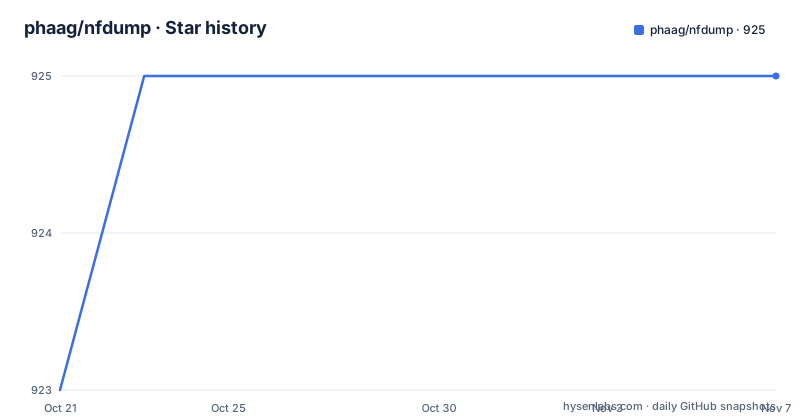
Star history
- phaag/nfdump925 ★ · +2
| Repository | 2026-10-21 | 2026-11-07 |
|---|---|---|
| phaag/nfdump | 923 | 925 |
2 Stars in the last 17 days, measured from the daily GitHub snapshot. Compare with other projects
Editorial analysis
Flow data is a different shape of evidence from packets
nfdump is a suite of tools for collecting, processing and analysing NetFlow, IPFIX and sFlow data from network devices. The subject is flow records, not packets, and the distinction decides which questions the tool answers well.
A flow record is the summary a router or switch produces when it notices a conversation: who talked to whom, on which port, how many bytes and packets, in which direction, and when. The README lists the formats it collects, NetFlow v1, v5 and v7, v9 and IPFIX, plus sFlow, and notes that it can convert live or PCAP-file traffic to flow data.
That coverage matters because the exporter side of a network is rarely uniform. One device speaks IPFIX, another speaks NetFlow v9, a switch vendor might do sFlow. A tool that reads all of them means you do not need per-vendor plumbing before you can ask a question.
The processing side is where the tool earns its keep. It offers advanced flow filtering and aggregation with a filter syntax similar to tcpdump but optimised for flow data, supports user-defined flow aggregation, enriches records with geolocation, AS and Tor exit node information, and writes output in text, CSV, JSON or user-defined formats. It is also multi-threaded for high-performance processing and sorting.
The audience is network engineers and monitoring engineers who have flow data available and want to slice it without writing their own parser.
The pipeline runs exporter, nfcapd, nfdump, export
The README lays out the data flow in one line, and it is the clearest description of the toolset.
Exporter, then nfcapd, then nfdump, then analysis and export to CSV, JSON, InfluxDB or Prometheus.
The collector is nfcapd for NetFlow and IPFIX, and sfcapd for sFlow. Starting a collector means giving it a directory to write flow files into and a port to listen on.
nfcapd -D -S 2 -w /flow_base_dir/router1 -p 23456The -S option sets how many collector processes to run, and -w sets the base directory where the rotated flow files land, with the port given by -p. Once data is arriving, reading it back is the second command.
nfdump -r /flow_base_dir/router1/nfcapd.202501011200The -r flag reads from a flow file rather than a live source, and the file name in the example shows the collector's naming pattern, which embeds a timestamp.
The pipeline shape has an implication for retention. nfcapd writes rotating files on disk, so the flow data is bounded by the disk you give it and the rotation settings, and everything downstream reads from those files. That makes flow capture cheap to replay and easy to archive, and it means the tool is naturally a batch processor with a live-ish front end.
Export to monitoring stacks is handled by companion projects rather than by nfdump itself, nfinflux for InfluxDB and nfexporter for Prometheus-compatible tools.
The configure flags decide which binaries end up on your disk
nfdump uses the GNU autotools build system, and the default build produces the collectors nfcapd and sfcapd, nfdump for processing flows, and the additional tools nfanon, nfexpire, nfreplay, geolookup and torlookup. The full list comes from ./configure --help.
Several optional binaries are off by default and are worth knowing about. nfpcapd creates NetFlow from interface or pcap traffic, which is how you get flow records without a router exporter. The JA4 fingerprinting modules, JunOS special NAT event logging, reading flow data from pcap files inside nfcapd, a converter from flow-tools to nfdump, and nfprofile and nftrack each sit behind their own --enable flag, and the last pair is required by NfSen.
The configure script also changed shape in this series. Many tools that previously needed explicit enabling are now built automatically, and the old --enable-xxxpath=path options have been replaced by the standard --with-xxx=path form. Compression libraries are located and integrated when found, and an individual library and its compression method can be switched off with the --enable-xxx=no format.
A few options have also disappeared. NSEL support is built in by default now, and the output format for NSEL and NAT is a matter of adjusting the fmt formats in the config file nfdump.conf if you prefer the legacy line or long output.
Building from source, and why --enable-native is a local-only choice
The general build is four steps.
./autogen.sh
./configure
make
sudo make install
The system requires autoconf 2.71, and older Linux distributions may need libbsd and libbsd-dev installed. There is also a documented path for older platforms, CentOS 7.x with the devtoolset packages and Ubuntu 18.04 LTS with clang-10, and a Docker build described in extra/docker/README.md.
If the tools will run on the machine that builds them, the README describes an alternative configure that turns on two extra optimisations.
./autogen.sh
./configure --enable-native --enable-lto
make
sudo make install
The native option adds -march=native, which tunes the binary to the build host's processor and enables vectorisation and instruction set tuning for that CPU. The lto option lets the compiler optimise across source files at link time, which the README says improves performance and reduces binary size.
This is the one configuration decision in the whole project where a wrong answer causes a problem, and it is worth stating plainly. The README recommends native builds for local use and not for portable binaries. A binary compiled with -march=native on one machine can fail on an older CPU, so if you are building a package for a fleet of collectors, leave that flag off.
The project is also asking for help on a newer line. A tip in the README says that nfdump 1.8.x is nearing release and asks testers to try the 1.8.x branch and report whether it works.
The filter language is the reason most people keep the tool around
Filtering is where flow data becomes answers, and nfdump's syntax is deliberately familiar. The README describes a filter syntax similar to tcpdump, but optimised for flow data, so the field names are network fields and the operators are the ones you already type.
A filter and an aggregation in one command looks like this.
nfdump -r flowfile 'src ip 192.0.2.1 and dst port 443' -A srcip,dstipThe expression selects flows whose source address is 192.0.2.1 and whose destination port is 443, and the -A flag aggregates the result by source and destination IP. That combination is the workhorse: filter to the traffic you care about, then group it by a key so you get counts rather than a wall of lines.
Enrichment sits alongside that. geolookup and torlookup attach geolocation, autonomous system and Tor exit node information to records, and the README says they optionally integrate GeoDB, with geolookup and Maxmind, and TorDB, with torlookup. The databases have to be enabled and configured, and the details live in the man pages for those two tools.
The output formats are text, CSV, JSON and user-defined, and the README links a filtering cheat sheet for the full syntax. That cheat sheet is the reference to bookmark, because the field list is long and the README itself only gestures at it.
Legacy flow files are a separate compatibility problem
The current release series is nfdump-1.7.x, codename unicorn, and it is fully compatible with files created by nfdump-1.6.18 or newer. Files from earlier versions may lack certain fields, and the README says to use nfdump-1.6.17 to update such records where necessary.
The conversion is a single command with the -y and -w options.
./nfdump -r old-flowfile -y -w new-flowfileThere is one hard constraint here. Only nfdump can read legacy nfdump-1.6.x files, and every other program in the suite requires the new format. So an old archive on disk is not just an old format, it is a format that only one binary can open, and if you need it in another tool you have to convert it first.
NfSen users are pointed at the latest GitHub version for full compatibility. The README also notes that some legacy binaries such as nfprofile and nftrack are still available but may be deprecated in future releases, and that they may move into a separate archive in a future release.
On the state of the project, the last push to the repository was on 2026-10-16, and the recent releases are v1.7.10 from 2026-09-07, v1.7.9 from 2026-09-06 and v1.7.8 from 2026-04-28. The licence metadata on the repository reports a custom licence that GitHub cannot classify, so the LICENSE file together with the BSD-license.txt and COPYING files at the root of the repository are the documents to read before you redistribute the binaries.
Editorial conclusion
nfdump suits network engineers who already have flow exporters on their routers and need to answer questions about traffic that a packet capture cannot answer cheaply. It is the wrong tool for an environment without routers that can export flows, and it is the wrong choice if you want a web interface rather than a command line, since that is what NfSen provides on top of it. Verify first that your exporters speak a protocol the collectors accept, NetFlow v1, v5, v7, v9, IPFIX or sFlow, and check whether your existing flow files are in the legacy 1.6.x format, because only nfdump can read those and every other program needs the new format.
Frequently asked questions
How do I build and install nfdump?
nfdump uses the GNU autotools build system and needs autoconf 2.71. Run ./autogen.sh, ./configure, make and sudo make install. For a build that runs on the same machine, add --enable-native --enable-lto, which the README recommends for local use but not for portable binaries.
Which flow protocols does nfdump collect?
The README lists NetFlow v1, v5 and v7, v9 and IPFIX, plus sFlow. The collectors are nfcapd for NetFlow and IPFIX and sfcapd for sFlow, and the optional nfpcapd can create NetFlow from interface or pcap traffic instead.
How do I filter and aggregate flows with nfdump?
Pass a filter expression and an aggregation key, for example nfdump -r flowfile 'src ip 192.0.2.1 and dst port 443' -A srcip,dstip. The filter syntax is similar to tcpdump but optimised for flow data, and a filtering cheat sheet is linked from the README.
Can nfdump read flow files created by older versions?
Only nfdump can read legacy nfdump-1.6.x files, and the current 1.7.x series is fully compatible with files from 1.6.18 or newer. Older records can be updated with nfdump-1.6.17, and the README shows the conversion as ./nfdump -r old-flowfile -y -w new-flowfile.
How do I export nfdump data to InfluxDB or Prometheus?
The README points to the companion projects nfinflux for InfluxDB and nfexporter for Prometheus-compatible tools. Geolocation and Tor enrichment is done by the geolookup and torlookup tools, which optionally integrate GeoDB and TorDB databases.
Official sources
Add this badge to your README
If you maintain this project, the badge below links readers to this analysis and shows its maintenance status from the daily GitHub snapshot. Paste the markdown into your README; add ?metric=license or ?metric=stars to the image URL for a different field.

[](https://hysenlabs.com/projects/phaag-nfdump)Star history chart for your README
[](https://hysenlabs.com/projects/phaag-nfdump)Was this useful?