my-git: a Git handbook indexed by failure rather than by topic
Git as the control plane for AI-native software engineering.
At a glance
- What is it?
- my-git is a change-control handbook for software engineering where an AI assistant writes much of the code. Its argument is that an assistant can run the commands but cannot decide which options you can see or on what basis you accept a result, so the handbook spends its length on judgement and verification. The structure is ten numbered chapters, a symptom-to-article index, six learning paths and a set of interactive labs built on throwaway repositories.
- Who is it for?
- Read it if your team now accepts large diffs from coding assistants and you need shared language for reviewing them, and start from the symptom index rather than the table of contents. Do not expect a tool, because this is documentation with a small lab harness and no install step.
- Can I use it commercially?
- Yes. MIT is a permissive licence: you can use, modify and sell software built on it, as long as you keep its copyright and licence notices.
- Is it still maintained?
- Yes. The repository last received commits 67 days ago.
- What is it written in?
- Mainly HTML, according to GitHub's language statistics.
Answers come from the project's GitHub data, last synced on November 15, 2026, and from our analysis. They are not legal advice.
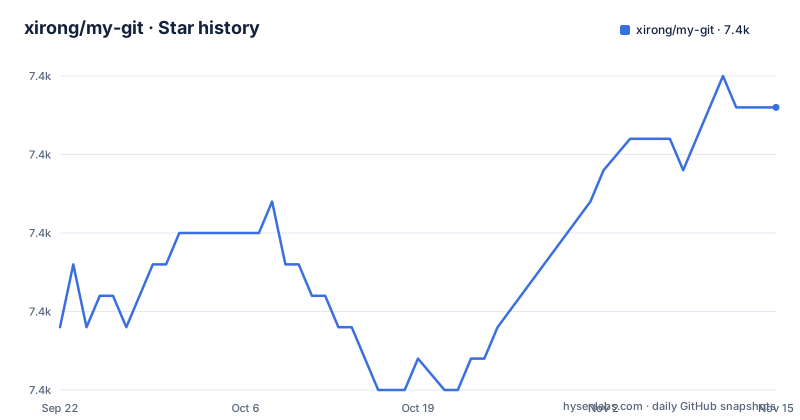
Star history
- xirong/my-git7,404 ★ · +7
| Repository | 2026-09-22 | 2026-11-15 |
|---|---|---|
| xirong/my-git | 7.4k | 7.4k |
7 Stars in the last 54 days, measured from the daily GitHub snapshot. Compare with other projects
Editorial analysis
The premise is that an assistant can run the command but not pick the question
The handbook opens by asking why a human still needs to learn Git when an assistant exists. The answer it gives is specific: an assistant can do the commands on your behalf, but understanding is what determines which options are visible to you, what questions you are able to ask, and on what basis you accept a result. Without a concept in your head, the argument runs, you cannot think of it when a problem appears. That framing sets the tone for the rest of the repository, and the stated shift in emphasis is from fluent execution towards understanding, judgement and verification. The handbook does not dismiss practice, since it says operating the commands is still worth training, especially reading the important ones and recognising risk, and it puts practice in the role of testing understanding. That is a defensible position for a repository whose subject is change control rather than command recall.
Numbered sections, from 00 to 10
The repository is a documentation site, and its top level is the argument for reading it in order:
00-meta/
01-getting-started/
02-daily-workflow/
03-team-collaboration/
04-github-engineering/
05-ai-native-development/
06-troubleshooting/
07-large-repo/
08-templates/
09-resources/
10-company-practices/
interactive/
labs/
Each chapter states what it covers: Git basics and the mental model first, then everyday commands with branch merging, rebase, stash and worktrees, then team workflow with pull requests and code review, then GitHub engineering with branch protection, rulesets, ownership files, CI and releases, then the AI chapters, then recovery from mistakes including conflict handling and secret removal, then large repositories and monorepos with partial clone, sparse checkout and large file storage, then templates, and finally engineering practice cases from larger companies. The numbering is the curriculum, and it is also a maturity ladder from one developer to a team.
The symptom table is the fastest way in, and it is the unusual part
Most handbooks are indexed by topic. This one carries a table that starts from the problem you are having and names the file that answers it. A commit landed on the wrong branch points at a recovery page. You have run reset, rebase or a force push and do not know how to get back points at the troubleshooting playbook. Your team cannot decide between three branching models points at the workflow guide. A pull request has grown so large that review has stalled points at the pull request guidance. An assistant changed many files and you do not know how to review it points at a worked example of reviewing an agent's changes. Large generated diffs point at splitting commits and at stacked pull requests. Protecting the main branch, a busy main branch that keeps breaking, slow clones in a large repository, and copying your team's templates each get their own file. So the handbook is navigable by failure, which is how people actually arrive.
Six paths, and the AI one is longer than the beginner one
There are six learning paths, and their sizes are informative. The beginner path is five items, starting with why learning Git matters in the age of assistants, then the mental model, the ten-topic course navigation, the basic commands and the everyday commands. The team path is seven items and includes both branching models and both review guides, GitLab flow and GitHub flow side by side with trunk-based development and Gitflow. The GitHub governance path is eight items, moving from the governance handbook and an enterprise configuration stack through branch protection, rulesets, a merge queue, infrastructure as code and release management to agent governance. The AI-native path is the longest in the repository at twelve items, and it covers accepting agent changes through a control loop, continuous integration for generated changes, background agent tasks, worktrees for agents, stacked pull requests for large diffs, AI collaboration metrics, and the division of labour between an AI reviewer and a human reviewer. A beginner path shorter than the agent path tells you what the author thinks the new problem is.
The labs run against throwaway repositories, which is the point
The online material is interactive rather than a slide deck. It uses animations, articles and experiments in temporary repositories to explain snapshots, the object graph, refs, how history changes, the remote, worktrees and storage, with ten topics in one consistent order. The page is candid about which of those exist: the first three correspond to interactions that were already there, and the rest are new. It also says the materials and scripts can be inspected, while the reader's understanding still has to be verified by predicting an outcome, reproducing it, and transferring it to a new case. That last part is the pedagogical claim, and it is a modest one. A lab that tells you the answer teaches less than a lab where you commit to a prediction first, and the repository is built around the second kind.
The audience list names four coding assistants explicitly
The handbook states who it is for, and the list is more specific than most: people new to Git who want a correct mental model; ordinary developers who often deal with conflicts, rollbacks and mistaken commits; senior developers who care about pull requests, review, CI and release collaboration; technical leads who need to design team workflows and governance rules; and users of AI coding who need to control the change risk that tools bring. That last group is named with four products, which is the detail worth noticing. There are dedicated pages for working with Codex and Claude Code, for the Git integration of AI coding tools generally, and a comparison of an AI reviewer with a human reviewer. So the advice is written for a specific toolchain, which makes the agent chapters more immediately useful and less transferable than the Git chapters beside them.
The releases are documentation milestones, and the newest is dated to the last push
The release titles describe content rather than code. Version 2.2.0, published on 2026-09-09, is about Git learning labs and AI collaboration practices. Version 2.1.0, from 2026-06-11, is about AI agent governance and conventions. Version 2.0.1, from 2026-06-07, covers open source governance and maintenance updates. The last push on the default branch is dated 2026-09-09, the same day as the newest tag. The record lists HTML as the primary language, which fits a repository whose substance is articles, templates, books and videos with a small script directory beside them. So the practical reading is that this project ships by revision of prose, and an upgrade means reading what changed rather than pulling a new build. The project is MIT licensed, has a maintainers file and a roadmap, and is not archived.
Editorial conclusion
Read it if your team now accepts large diffs from coding assistants and you need shared language for reviewing them, and start from the symptom index rather than the table of contents. Do not expect a tool, because this is documentation with a small lab harness and no install step. Before you reorganise anything around it, read the chapter on accepting agent changes and the one on team workflow, and check that the interactive material is maintained for the Git version your team actually runs.
Frequently asked questions
What is my-git?
It is a Git change-control handbook written for software engineering where an AI assistant produces much of the code. It explains how snapshots record state, how objects reuse content, how refs organise history and how collaboration handles divergence, then moves on to everyday commands, team workflow, GitHub governance, reviewing agent changes and recovering from mistakes. The material is organised into ten numbered chapters of articles, interactive labs and templates.
how to use my-git
Start with the knowledge map to decide whether you need the principles, one engineering change or team collaboration, then follow the path for your role. Or skip both and use the problem table, which maps symptoms such as committing to the wrong branch, recovering after a force push, or a pull request too large to review, straight to a specific article. The interactive labs let you experiment in throwaway repositories instead of on real work.
Does my-git cover AI coding tools?
Yes. Its AI-native learning path is the longest in the handbook, with twelve articles, including accepting agent changes through a control loop, continuous integration for generated changes, background agent tasks, worktrees for agents, stacked pull requests for large generated diffs, AI collaboration metrics, and the split between an AI reviewer and a human reviewer. The audience list names Codex, Claude Code, Cursor and Cline, and there is a dedicated Codex / Claude Code page.
Official sources
Add this badge to your README
If you maintain this project, the badge below links readers to this analysis and shows its maintenance status from the daily GitHub snapshot. Paste the markdown into your README; add ?metric=license or ?metric=stars to the image URL for a different field.

[](https://hysenlabs.com/projects/xirong-my-git)Star history chart for your README
[](https://hysenlabs.com/projects/xirong-my-git)Was this useful?