PINA: a PyTorch Lightning library for physics-informed networks and neural operators, still at 0.3
Physics-Informed Neural networks for Advanced modeling
At a glance
- What is it?
- PINA is a Python library for scientific machine learning that organises PINNs, neural operators and data-driven models around a four-step Problem, Model, Solver, Trainer pipeline. It is pre-1.0, it renamed core classes in 0.3, and its README install line for extras does not match its package metadata.
- Who is it for?
- PINA suits researchers and engineers who already use PyTorch and want PINNs, neural operators or data-driven surrogates organised as swappable problems, models and solvers, with Lightning handling the training loop. It is a risky base for code that must stay frozen, because the version is below 1.0 and 0.3 renamed core classes.
- Can I use it commercially?
- Yes. MIT is a permissive licence: you can use, modify and sell software built on it, as long as you keep its copyright and licence notices.
- Is it still maintained?
- Yes. The repository last received commits 2 days ago.
- What is it written in?
- Mainly Python, according to GitHub's language statistics.
Answers come from the project's GitHub data, last synced on November 26, 2026, and from our analysis. They are not legal advice.
Star history
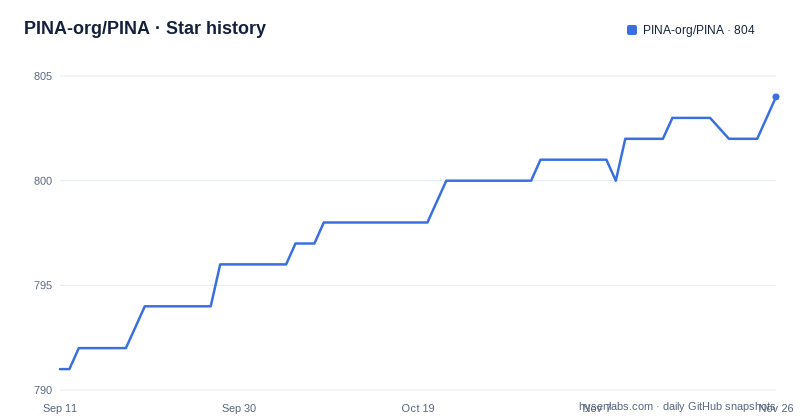
- PINA-org/PINA804 ★ · +13
| Repository | 2026-09-11 | 2026-11-26 |
|---|---|---|
| PINA-org/PINA | 791 | 804 |
13 Stars in the last 76 days, measured from the daily GitHub snapshot. Compare with other projects
Editorial analysis
The package is pina-mathlab on PyPI but pina in your imports
PINA describes itself as an open-source Python library for scientific machine learning, covering physics-informed neural networks, neural operators and data-driven modeling. The name on PyPI is pina-mathlab, and the install command quotes it that way:
pip install "pina-mathlab"The import name is simply pina, as the pyproject's packages setting shows, and the README's own example imports Trainer from pina. The mismatch matters because a package named pina may exist elsewhere, and installing the wrong one will give you a library with no solvers in it. To work from the repository instead, clone it and install from the master branch:
git clone https://github.com/pina-org/PINA
cd PINA
git checkout master
pip install .Four steps: problem, model, solver, trainer
Solving a differential problem follows a four-step pipeline. You define the problem and its constraints through the Problem API. You design the model in PyTorch or PyTorch Geometric, or import one from the Model API. You select or build a solver through the Solver API. Then you train with the Trainer API, which is powered by PyTorch Lightning.
The design goal is that each step can be replaced without touching the others, so a problem definition can be reused across several solvers and several models. It also means you inherit Lightning's behaviour for training, logging and devices. The README claims native multi-device training and performance close to hand-crafted implementations with minimal overhead. It gives no benchmark figures for that claim, so measure your own workload.
The extras install line names an extra that pyproject.toml does not define
The README's extras instruction reads pip install "pina-mathlab[extras]" and then lists dev, test, doc and tutorial as the available extras. The pyproject.toml defines optional dependency groups named doc, test, dev and tutorial, and nothing called extras. So the literal command in the README asks for a group that does not exist, and pip will warn that it is unknown instead of installing the packages you expect.
Use the real group names instead. The tutorial group brings jupyter, smithers, torchvision, tensorboard, scipy and numpy, the test group brings pytest, pytest-cov and scipy, the doc group brings sphinx and theme packages, and dev brings black. The core dependencies are torch, lightning, torch_geometric and matplotlib, with Python 3.10 or newer required and no version caps on the core four.
Version 0.3 renamed AbstractProblem to BaseProblem
The news section lists a series of 0.3 changes. Solver internals were redesigned around a mixin architecture, with single-responsibility mixins for preprocessing, forward and postprocessing that can be composed freely, and residual computation and loss aggregation separated. Evaluation logic moved out of the solver and into the condition through an evaluate method. Core internals migrated to a _src pattern, and AbstractProblem was renamed BaseProblem.
That rename is the kind of change that breaks existing scripts. Code written against an earlier release that subclasses AbstractProblem will not run unchanged on 0.3. The same release added an autoregressive solver, multi-model solver support, time series and graph time series conditions, a reorganised equation zoo with Burgers added, and Kolmogorov-Arnold Networks with vectorized spline basis and analytical derivatives. Pin the version you tested.
Agentic PINA adds AI guidance, but the README gives few details
The v0.3.2 news item announces Agentic PINA: AI agents that guide users through the PINA pipeline, with dedicated skills for problem setup, model and solver selection, and training configuration. The repository contains .agents, .claude and .opencode directories, along with AGENTS.md and CLAUDE.md files, which is where such configuration would live.
The practical limit is that you must use a compatible coding assistant for this to help, and the README says nothing about how well the skills perform. Treat them as an aid to choosing among solvers, not as a check that your physics is formulated correctly. A neural network trained to a low residual can still encode the wrong equation or boundary conditions, and no assistant verifies that for you.
Monthly post-release tags sit on top of a 0.3.2 base version
The three newest releases are v0.3.2.post2611 on 2026-11-01, v0.3.2.post2610 on 2026-10-01 and v0.3.2.post2609 on 2026-09-01. The suffix reads like a year and month stamp, and the tags land on the first of each month. The package metadata still says 0.3.2, and the build uses setuptools-git-versioning, so the visible version comes from the git tags.
The last push to the repository was on 2026-11-02. The tag stream shows steady monthly output, but the version has not moved past 0.3.2 across three releases, so changes that arrive in a post release do not carry a semantic version bump. Read the release notes on GitHub before you upgrade, since the minor-version changes listed in the news section were not signalled by a new major number.
Governance files and a licence line that need a second look
The top level of the repository includes CHARTER.md, GOVERNANCE.md, MAINTAINERS.md, STEERING-COMMITTEE.md, TRADEMARKS.md and ANTITRUST.md, which is more project governance than most single-library repositories carry. The README links to the PyTorch ecosystem landscape.
There is also a licence detail to check. The pyproject declares MIT and GitHub reports MIT, but the README begins with a comment block carrying a copyright line for Contributors to the Pyro project and an SPDX identifier of Apache-2.0. The repository's licence file is LICENSE.rst. The comment looks inherited from a template, but if licence terms matter for your use, read LICENSE.rst yourself instead of relying on the README header or the badge.
Editorial conclusion
PINA suits researchers and engineers who already use PyTorch and want PINNs, neural operators or data-driven surrogates organised as swappable problems, models and solvers, with Lightning handling the training loop. It is a risky base for code that must stay frozen, because the version is below 1.0 and 0.3 renamed core classes. Before you start, install the package under its real name, pina-mathlab, and check the LICENSE file against the MIT line in the package metadata.
Frequently asked questions
What is PINA in scientific machine learning?
PINA is an open-source Python library for scientific machine learning that covers PINNs, neural operators and data-driven modeling, built on PyTorch, PyTorch Lightning and PyTorch Geometric.
How do I install PINA?
Run pip install "pina-mathlab" for a stable release, or clone the repository, check out master and run pip install . from source. Python 3.10 or newer is required.
What are the steps for solving a problem with PINA?
Define the problem with the Problem API, design a model in PyTorch or import one, select or build a solver, and train it with the Trainer API powered by PyTorch Lightning.
Official sources
Add this badge to your README
If you maintain this project, the badge below links readers to this analysis and shows its maintenance status from the daily GitHub snapshot. Paste the markdown into your README; add ?metric=license or ?metric=stars to the image URL for a different field.

[](https://hysenlabs.com/projects/pina-org-pina)Star history chart for your README
[](https://hysenlabs.com/projects/pina-org-pina)Was this useful?