PinchTab's daemon, bridge, and attach: a Go control plane that keeps agents on local sites
High-performance browser automation bridge and multi-instance orchestrator with advanced stealth injection and real-time dashboard.
At a glance
- What is it?
- PinchTab is a Go HTTP server that puts Chrome behind one control plane for AI agents, installable as a user-level daemon on port 9867. The interesting parts are not the browser driving but the defaults: a local-only browsing allowlist, attach switched off, and a container image that turns off Chrome's own sandbox.
- Who is it for?
- PinchTab fits a team that wants one local Chrome control plane for agents on a machine it owns: the daemon bound to 127.0.0.1, with the IDPI allowlist narrow and attach off, is a defensible default for single-user local automation, and the audit and compare commands are concrete enough to gate a release.
- Can I use it commercially?
- Yes. MIT is a permissive licence: you can use, modify and sell software built on it, as long as you keep its copyright and licence notices.
- Is it still maintained?
- Yes. The repository last received commits 4 days ago.
- What is it written in?
- Mainly Go, according to GitHub's language statistics.
Answers come from the project's GitHub data, last synced on November 14, 2026, and from our analysis. They are not legal advice.
Star history
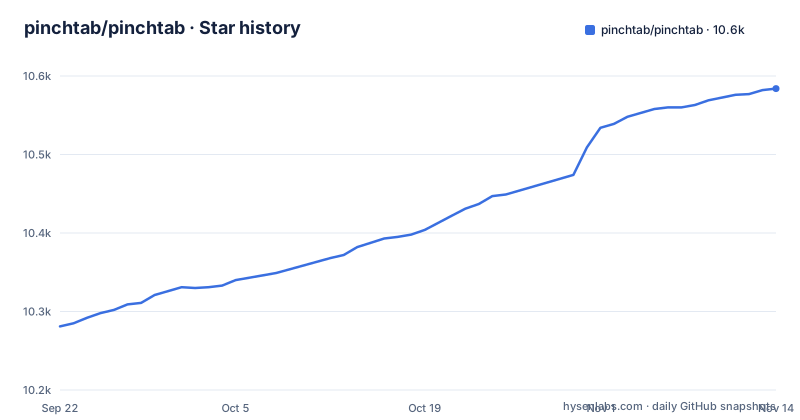
- pinchtab/pinchtab10,584 ★ · +303
| Repository | 2026-09-22 | 2026-11-14 |
|---|---|---|
| pinchtab/pinchtab | 10.3k | 10.6k |
303 Stars in the last 53 days, measured from the daily GitHub snapshot. Compare with other projects
Editorial analysis
Installing the daemon brings up a headless Chrome on port 9867
The quick path pipes the install script into bash, and the documented alternative calls the daemon installer directly. Either route installs the control-plane server and starts a default headless Chrome instance that is ready to accept requests from agents or from manual API calls, which is the point of installing it as a user-level daemon: agent tools reuse the same control plane running in the background. The journey after that is short. Install PinchTab, install and start the daemon with `pinchtab daemon install`, point your agent or tool at `http://localhost:9867`, and let the server act as your local browser service. If you would rather not keep a daemon around, `pinchtab server` runs the control plane in the foreground and `pinchtab bridge` runs a single browser instance as a lightweight runtime. Running bare `pinchtab` with no subcommand runs the security setup on first use, then prints server status, the security posture, and suggested next steps.
curl -fsSL https://pinchtab.com/install.sh | bash
# or
pinchtab daemon install
Server, bridge, and attach are three runtimes with different jobs
PinchTab is server-first, and the process model splits into three named roles that solve different problems. The server is the control plane and the main product entry point: it manages profiles and instances. The bridge is the runtime that manages one browser instance, so every managed instance sits behind a lightweight bridge process. Attach is a third mode for registering Chrome instances you already manage yourself, which is why attaching to a Chrome running in remote debug mode is an advanced, opt-in path instead of the default. Windows users are pointed at `pinchtab server` or `pinchtab bridge` rather than the daemon. The dashboard is not a separate service either. The Dockerfile builds the React dashboard with Bun in a first stage, copies the compiled assets into the Go embed directory, and renames the emitted `index.html` to `dashboard.html` so it does not collide with the automatic `index.html` handling that `http.FileServer` applies at `/dashboard/`.
One binary carries all of it: `go.mod` names module `github.com/pinchtab/pinchtab`, requires Go 1.26.0, and pulls in chromedp for CDP, `mark3labs/mcp-go` for the MCP server, cobra and pflag for the CLI, and `gopkg.in/yaml.v3` for config.
IDPI ships a local-only website allowlist that stops agents at the door
IDPI is enabled by default with a local-only website allowlist, so browsing is restricted to locally hosted websites only. An agent cannot navigate the public internet until you explicitly allow it, and the reason given is that the restriction exists to make the security implications of browser automation clear before wider access is turned on. That filtering is the first thing an agent meets, before any page loads. What this mechanism does not do is make remote browsing safe. Expanding to non-local or non-trusted websites is called a security-reducing choice, because hostile pages can still increase browser attack surface and interact badly with enabled automation features even when the content defenses are on.
For a reader whose agent has to open a hosted app or read a news site, the consequence is a decision you cannot delegate to the model. You edit the allowlist yourself, first, and if you widen it carelessly you have pointed an agent-driven browser at pages nobody intended it to load, with the wider surface still your problem.
attach and the sensitive endpoint families are off until you switch them on
The local-first defaults are specific and checkable: `server.bind = 127.0.0.1`, sensitive endpoint families disabled by default, `attach` disabled by default, dashboard session cookies marked `Secure` only when the dashboard is actually served over HTTPS, and the IDPI allowlist limited to local sites. Read together, those defaults say the same thing several ways, which is the point. What PinchTab does not provide is hardening for the case you most often want. The dashboard, HTTP API, MCP server, and remote CLI integrations are described as privileged operator control surfaces that are not designed for untrusted users, multi-tenant exposure, or direct public-internet access, and the project says it is not positioned as a turnkey internet-facing browser service. Remote, container, and distributed layouts exist, but they are advanced operator-managed deployments.
So the cost lands on whoever binds beyond loopback. Publishing a port or attaching a remote bridge makes tokens, network boundaries, TLS or reverse proxying, and the exact set of endpoint families you expose your own responsibility, and the guidance is to keep it on a private or closed network instead of the public internet. `docs/guides/security.md` is the guide for that, and `SECURITY.md` carries a private security contact path for before you expose anything.
Forcing server.cookieSecure turns a working dashboard login into a hard failure
Cookie security here is conditional rather than on. Dashboard session cookies are `Secure` only when the dashboard is actually served over HTTPS, so the same installation behaves differently depending on what sits in front of it. When you reach the dashboard over plain HTTP on a non-loopback address, PinchTab warns in the UI that the session is running without transport encryption and tells you to prefer HTTPS or localhost. The config knob `server.cookieSecure = true` is the strict mode, and its behavior is worth knowing before you set it: dashboard login requires HTTPS and fails explicitly on plain HTTP instead of looping silently.
That explicitness is the point and also the trap. The flag does not add a layer of encryption to a plain HTTP endpoint, it removes the option of logging in at all. If you set it on an internal address that has no TLS, the consequence is an operator locked out of the dashboard until someone puts a certificate in front of it or unsets the flag, and in a container or remote setup that can mean editing config through the shell rather than through the UI you were trying to reach.
A sitemap audit at sample size 2 proves two pages, not your site
The audit surface is where the concrete numbers live, and the flags are explicit about scope. A plain audit writes `report.json` and a `screenshots/` directory into the output directory you name. Adding `--sitemap` switches to crawling a sitemap, and `--sample-size 2` tells it how many pages to pull, which is small enough to read by hand and impossible to mistake for a full sweep. The audit collects screenshots, console errors, broken assets, an accessibility score, Core Web Vitals, and security findings at the browser level. `pinchtab compare` diffs two URLs visually and `--fail-on-diff` turns a mismatch into a non-zero exit for CI.
pinchtab audit https://example.com --output-dir ./audit          # report.json + screenshots/
pinchtab audit https://example.com/sitemap.xml --sitemap --sample-size 2 --output-dir ./audit
pinchtab compare https://example.com https://staging.example.com --fail-on-diff   # CI gate
`docs/audit.md` holds the full command reference, the report anatomy, and the CI examples. The repository is not archived, the last push landed on 2026-10-27, and the release line moved from v0.15.0 on 2026-07-18 to v0.15.1 on 2026-08-03 and v0.15.2 on 2026-08-26, which is reason enough to pin the tag your CI installs. What these commands cannot do is certify coverage: a passing compare gate says the two URLs you named matched, and a sitemap audit at sample size 2 says two pages matched.
The container image drops Chrome's own sandbox and has no display server
Running PinchTab in Docker moves the isolation boundary, and the image is deliberate about where it sits. Chrome starts with `--no-sandbox` because containers do not have user namespaces for sandboxing, and isolation is rebuilt around it with cgroups, seccomp, dropped capabilities, a read-only filesystem, and a non-root user. The runtime stage is `alpine:3.23` and it is intentionally headless-only: no X11, Wayland, Xvfb, or display server packages are installed. The shipped compose service matches that posture, with `read_only: true`, `shm_size: "2gb"` because shared memory is critical for Chrome stability, `cap_drop: ALL`, `no-new-privileges:true`, tmpfs mounts for `/tmp` and `/run`, and a `PINCHTAB_TOKEN` variable passed through from the environment.
Two limits follow from those files rather than from documentation. Headed work is out of reach inside the image, so the profile workflow described for a headed Chrome, logging into a named work profile with stored authentication, cookies, and extensions, needs the host install instead. And the compose service caps memory at `2g` and CPUs at `2.0`, so a heavy page is stopped by the container runtime rather than by anything PinchTab decides.
Editorial conclusion
PinchTab fits a team that wants one local Chrome control plane for agents on a machine it owns: the daemon bound to 127.0.0.1, with the IDPI allowlist narrow and attach off, is a defensible default for single-user local automation, and the audit and compare commands are concrete enough to gate a release. Pass on it if you need a multi-tenant or internet-facing browser service, because the dashboard, HTTP API, MCP server, and remote CLI integrations are described as privileged operator surfaces that were not built for untrusted users. Before anything runs beyond loopback, read docs/guides/security.md, list the endpoint families you actually need, and decide whether a two page audit sample is a coverage number you can defend in CI.
Frequently asked questions
what is pinch tab
PinchTab is a standalone HTTP server, written in Go, that gives AI agents direct control of Chrome over an HTTP API. It ships as one small binary with a server runtime, a bridge runtime, an opt-in attach mode, an embedded dashboard, and an MCP server.
how to use pinch tab
Install it with `pinchtab daemon install`, point your agent or tool at `http://localhost:9867`, and let the server handle profiles and instances. Running bare `pinchtab` runs the security setup on first use and prints server status, the security posture, and suggested next steps.
pinch tab vs playwright
The visible part of the README makes no comparison with Playwright. What it does document is its own shape: a server-first control plane on port 9867, one bridge runtime per browser instance, opt-in attach for externally managed Chrome, and its own `audit` and `compare` commands described in docs/audit.md.
pinch tab alternative
Inside PinchTab itself the lighter option is `pinchtab bridge`, which runs a single browser instance as a lightweight runtime, while `pinchtab server` is the full control plane that manages profiles and instances. For a different topology, docs/guides/security.md is where the README points for securing non-local deployments.
Official sources
Add this badge to your README
If you maintain this project, the badge below links readers to this analysis and shows its maintenance status from the daily GitHub snapshot. Paste the markdown into your README; add ?metric=license or ?metric=stars to the image URL for a different field.

[](https://hysenlabs.com/projects/pinchtab-pinchtab)Star history chart for your README
[](https://hysenlabs.com/projects/pinchtab-pinchtab)Was this useful?