Codex Switch is now Remote AI everywhere except the manifest
codex-switch & codex theme & codex mobile & chatgpt codex & codex relay & cc switch & cockpit-tools & codex skin & codexplusplus & CSwitch
At a glance
- What is it?
- A Tauri desktop workbench for the Codex command line client that manages several logged-in accounts, swaps credentials atomically, proxies third-party providers, and ships a mobile companion. The rename is complete in the prose and absent from the package identity, which is a fair summary of the whole repository.
- Who is it for?
- Remote AI is worth evaluating if you juggle several Codex logins, because the credential swap is atomic and the account cards show the usage windows and reset dates you would otherwise be guessing at. Three things to weigh first.
- Can I use it commercially?
- Yes. Apache-2.0 is a permissive licence: you can use, modify and sell software built on it, as long as you keep its copyright and licence notices.
- Is it still maintained?
- Yes. The repository last received commits 1 day ago.
- What is it written in?
- Mainly TypeScript, according to GitHub's language statistics.
Answers come from the project's GitHub data, last synced on October 21, 2026, and from our analysis. They are not legal advice.
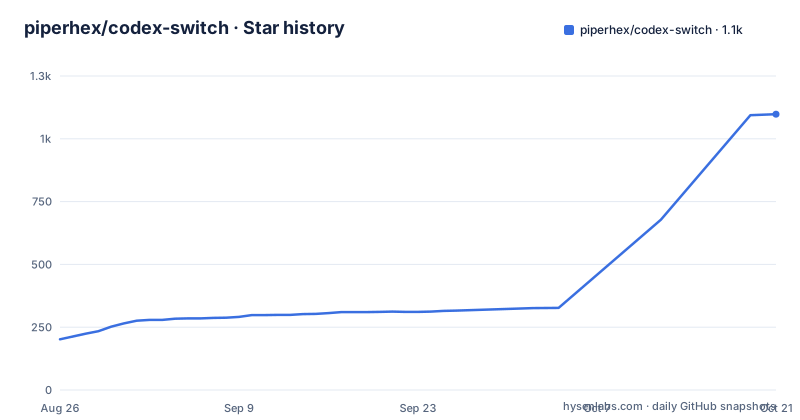
Star history
- piperhex/codex-switch1,098 ★ · +896
| Repository | 2026-08-26 | 2026-10-21 |
|---|---|---|
| piperhex/codex-switch | 202 | 1.1k |
896 Stars in the last 56 days, measured from the daily GitHub snapshot. Compare with other projects
Editorial analysis
The rename is in the readme, the tags, and not in the package identity
There is a prominent notice at the top of the readme saying the product has been renamed, that the repository has moved to a different address, and that you should update your star and follow the new one.
Then the rest of the repository says otherwise. The package manifest is still named for the old product. Every workspace in the monorepo carries the old prefix. The Linux package you download is the old filename, and the command you run afterwards is a three-letter abbreviation of the old name.
The deep link scheme that lets a web page hand a relay station's credentials to the desktop app is also still the old three letters followed by a colon and two slashes.
Only the release tags have caught up. The three most recent releases are named for the new product, one of them from the day the readme was written.
So there are two names in live use, and which one you need depends on what you are touching. The download page, the release tags, and the documentation use the new name. The installer file, the binary on your path, the manifest, the workspace identifiers, and the URL scheme your browser invokes all use the old one.
There is also a version mismatch in the same file: the manifest declares a patch version one ahead of the newest release tag.
The Linux install path is the clearest single example. The package you download is the old filename, and the command that starts the app is a three-letter abbreviation of the old product name, both written in the same block:
sudo apt install "./codex-switch.deb"
csw
On a headless server the same binary runs under a virtual display, which is the supported way to keep the workbench alive with no monitor attached:
xvfb-run -a dbus-run-session -- csw --headless --port=18080The interface defaults to the loopback address on that port, so exposing it deliberately is a separate decision with a separate credential.
Credentials live in the Rust backend and on disk without encryption
The feature list contains the strongest security claim in the project and the security notice contains the strongest caveat, and they sit in different sections.
The claim: account and provider keys are stored only in the Rust backend and are not exposed to the desktop interface or to application logs. That is a real design choice. The desktop front end never holds a credential, so a front-end compromise does not yield one, and the split is enforced by which process owns the store rather than by convention.
The caveat: local account credentials, provider API keys, and the desktop cloud login token are kept in the application data directory with no additional encryption at rest. So the backend boundary protects you from the interface and not from anyone who can read the directory.
The backup file is called out separately because it is the part people move around. It contains recoverable account credentials and provider keys, and it has to be protected the same way the credential file itself is.
Cloud sync is optional and is described with the same care. When you enable it, account credentials and provider keys are uploaded to a server you configure, and the mobile app additionally receives a short-lived access token so the phone can query the official API directly without going through the desktop. The notice ends with the obvious advice: trusted devices only, never commit or share the credential files or backups, and read a diagnostic export before you send it anywhere.
The rate limit handler disables the account and returns the last error anyway
The upstream rate limit behaviour is described in one sentence and it is worth reading twice.
When the upstream returns a rate limit response, the client retries with progressively longer waits of one, three, and five seconds, continuing for up to a minute by default. Once that budget is exhausted, it does one of two things according to your settings: it disables the account automatically, and then returns the last rate limit response to the client.
So the client that made the request gets a rate limit error even in the branch where the account was successfully taken out of rotation. That is defensible, because the request did fail, and it means the caller cannot distinguish a transient upstream limit from a permanent account retirement from the status code alone.
The second half of the feature is the part that makes this a scheduler rather than a retry loop. In official account mode, once an account's quota is exhausted, the client can refresh the accounts, pick whichever available account has the lowest utilisation in its primary usage window, and switch the credentials to it.
Combined with the atomic replacement of the credential file and the best-effort restart of the running client, that is a full account rotation path. Which brings us to the caching problem, which the documentation also names: a running process may still be holding the old credentials, which is why the restart action exists as a manual step rather than something the switch performs for you.
A quota is a starting budget, not a ceiling
The proxy can be shared across a local network, and each key can carry a total budget in dollars. The semantics are laid out precisely enough that they are worth reading rather than skimming.
Blank means unlimited. Zero means temporarily no available budget. Those are different states and the interface distinguishes them, which is the kind of detail that usually gets collapsed into a single falsy check.
Three behaviours follow, and all three surprise people.
First, cost accumulates at the model price configured when the request finishes, so changing the price affects only subsequent requests and never retroactively revalues what has already been spent.
Second, clearing sessions or token history does not reset the accumulated figures. Those totals are a separate ledger from the usage history.
Third, and this is the one that matters for budgeting: once a budget is exhausted the key stops accepting new generation requests, but requests already in flight are allowed to finish, so the accumulated cost can exceed the budget you set.
There is a fourth case for partial data. If some requests did not return complete usage, the key is marked as pending confirmation and a key with a budget suspends new requests. An administrator reconciles the cost, adjusts the budget, and ticks a confirmation box when editing to resume. The confirmed totals are kept rather than recomputed.
The proxy key and the web login key are not the same key
Sharing the local proxy across a local network introduces a second credential type, and the documentation is careful to keep it distinct.
Each key has a name, an enabled flag, and a budget. On first use you add a key, give it a name, and leave the secret blank, at which point it is generated for you. Copy it from the list afterwards.
The sentence that matters is short: this key is different from the access key used to log in to the web interface. Two credentials, two blast radii, and the interface is where the mistake would be made.
The listening toggle greys itself out when the list is empty or when no key is enabled. So there is no state in which the proxy is reachable on the network with no keys defined.
The downstream side is symmetric and slightly better than expected. When you add an upstream device's local address and key to another instance, it detects the key and shows the remaining budget. It can also be set to query this product specifically in its balance lookup settings, and after a budget is exhausted the balance can still be refreshed, though each key can only query its own.
What is not here is any per-key rate limit or concurrency cap. The controls are identity, enablement, and money.
The contract between the two languages is checked by a script
The optional cloud backend is a Go service, and the desktop and web front ends are TypeScript. Somewhere between those two there is a contract, and it is checked.
The backend check target runs three things in order: a node script that extracts and verifies a contract, the Go vet pass, and the Go test suite. The extract script is the interesting one, because it means the interface between the TypeScript side and the Go side is treated as a generated artefact with a verification step rather than as something the two sides agree on informally.
That matters more than it would in a smaller project, because the optional backend holds the synchronised credentials described in the security notice. A drifting contract there is a security problem before it is a correctness problem.
The top-level check target chains three separate ecosystems: the JavaScript workspaces run their own checks, the Go backend runs its contract and vet and tests, and the Rust side runs its own. A contributor needs all three toolchains green before a change lands.
Commit messages are checked too. A hook configuration directory and a commit message lint configuration sit at the root, so the repository enforces a commit message format at commit time rather than in review.
Three monorepo tools, a committed IDE folder, and ten development scripts
The monorepo uses three orchestration mechanisms at once. The manifest declares package workspaces, the release orchestration runs through one task runner across workspaces while ignoring one specific workspace, and a second task runner is configured separately with its own graph and affected-detection commands.
That is more than one tool needs. Two of the three are doing overlapping work, and the reason is usually history rather than design.
At the root there is also a directory belonging to a specific commercial IDE, committed to the repository. It normally belongs in the ignore file. What is actually useful from that toolchain, if you use it, is that the Rust and web configurations live there.
The script list tells the same story from the other side. There are more than ten development entry points, distinguished by target: the desktop app, the desktop web mode, an admin interface, a standalone web workspace, the Go backend, and a mobile workspace. Several of them differ only in which workspace they delegate to, and the documentation's own instructions for a credential-free browser preview point at the plain development command while a separate web-specific command exists in the manifest.
For a contributor that means the fastest way to know which command you want is to read the manifest rather than the documentation, since the manifest is the only place the mapping is unambiguous.
Editorial conclusion
Remote AI is worth evaluating if you juggle several Codex logins, because the credential swap is atomic and the account cards show the usage windows and reset dates you would otherwise be guessing at. Three things to weigh first. The security notice states plainly that credentials and provider keys sit in the application data directory with no additional encryption at rest, and that the backup file contains recoverable secrets, so treat that directory like a key file. The quota system can be exceeded on purpose, because a request already in flight is allowed to finish after the budget stops new ones. And the rename is only half done, so anything you automate should target the current repository and the binary name rather than the product name in the readme.
Frequently asked questions
What is Remote AI, formerly Codex Switch?
It is a desktop workbench built on the Codex command line client. It gives Codex a graphical workspace for tasks, manages several logged-in accounts by atomically replacing the client's credential file, adds a local proxy so third-party providers can be hot swapped, tracks token usage, and ships themes, a skills marketplace, and a mobile companion.
How does Remote AI switch between Codex accounts?
It replaces the credential file atomically, which by default is the one under the Codex home directory. The documentation warns that a running client process may still be holding the old credentials, which is why there is a best-effort restart action available from the interface or the tray rather than an automatic one.
Are Remote AI credentials encrypted on disk?
The security notice says local account credentials, provider API keys, and the cloud login token are kept in the application data directory without additional encryption at rest. They are held only in the backend process rather than the desktop interface or its logs, and the backup file contains recoverable secrets and must be protected accordingly.
Can a Remote AI key quota be exceeded?
Yes, by design. Once a budget is exhausted the key stops accepting new generation requests, but requests already in flight are allowed to complete, so the accumulated cost can go past the budget. Clearing session or token history does not reset the accumulated totals either.
How does Remote AI handle an upstream rate limit?
It retries with increasing waits of one, three, and five seconds for up to a minute by default. After that it disables the account according to your settings and returns the last rate limit response to the client, so the caller sees the error even on the branch where the account was retired.
Official sources
Add this badge to your README
If you maintain this project, the badge below links readers to this analysis and shows its maintenance status from the daily GitHub snapshot. Paste the markdown into your README; add ?metric=license or ?metric=stars to the image URL for a different field.

[](https://hysenlabs.com/projects/piperhex-codex-switch)Star history chart for your README
[](https://hysenlabs.com/projects/piperhex-codex-switch)