Toolcraft answers 30 to 60 minutes in its FAQ and 1 to 3 days in its own practice
Build your own design apps with AI.
At a glance
- What is it?
- This is a starter kit and component library for building small design tools, generated into a folder on your machine by a command line tool you install from npm. The interesting parts are all in the questions it answers badly on purpose: it says the cheapest agent plan is not enough, it says the product is not a service, and it puts its own delivery numbers next to the marketing ones.
- Who is it for?
- Use it if you have a small repetitive design task, a canvas plus a handful of controls is the right shape for it, and you already pay for an agent plan at the higher tier. What you get is generated code you own, a component library that already has curve editors and colour palettes, export workflows for images and video, and the skills and instructions that let the model work inside that design system rather than inventing its own.
- Can I use it commercially?
- Yes. MIT is a permissive licence: you can use, modify and sell software built on it, as long as you keep its copyright and licence notices.
- Is it still maintained?
- Yes. The repository last received commits 9 days ago.
- What is it written in?
- Mainly TypeScript, according to GitHub's language statistics.
Answers come from the project's GitHub data, last synced on November 15, 2026, and from our analysis. They are not legal advice.
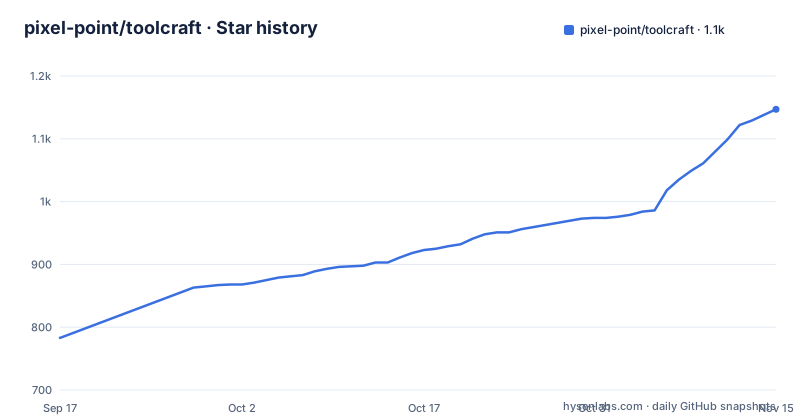
Star history
- pixel-point/toolcraft1,147 ★ · +364
| Repository | 2026-09-17 | 2026-11-15 |
|---|---|---|
| pixel-point/toolcraft | 783 | 1.1k |
364 Stars in the last 59 days, measured from the daily GitHub snapshot. Compare with other projects
Editorial analysis
The product is a batch of files, not a service
One of the questions in the documentation asks whether Toolcraft is an application or a cloud service, and the answer is a flat no. What you get is a batch of files copied into a folder you choose, whether you run the command line tool or ask an agent to, and those files are the starter, the component library and the instructions for working with them. There is no account and nothing running on someone else's machine.
The repository matches that, and it is thinner than you would expect. Five things sit at the top level: a readme, a licence file, a gitignore, a starter directory and an examples directory. There is no package manifest at the root, which means the thing you install from npm is not built from here. This repository is the template and the gallery; the installer lives elsewhere.
One detail worth knowing before you go looking for the app. The development server uses one port by default, and if it is busy on the first launch the tool takes the next available one and remembers that choice for the project. So the URL your agent prints may not be the one you expected, and a later run reuses it rather than negotiating again.
The copy-paste prompt runs the installer non-interactively
There are two documented ways in, and the difference between them is a pair of flags. The first is a prompt you paste into a coding agent, with a bracketed slot for your idea:
Install any missing prerequisites, including Node.js and npm. Set up Toolcraft
with `npx --yes @pixel-point/toolcraft create --yes`,
then build [describe your tool] and start a local dev server.
The second is the same command typed in a terminal, without the non-interactive flags:
npx @pixel-point/toolcraft createCount them and the intent is clear. The agent-facing version carries the flag that suppresses the installer's own confirmation as well as the one that suppresses the package runner's prompt, which is what makes it possible to paste four lines into a chat window and have the whole setup happen without you typing anything. The terminal version omits both so you can read what it is about to do.
After either one, the flow is the same and it is deliberately thin: follow the prompts, open the generated folder in your agent, describe the tool, and ask for a local preview. The example given for that description is an image effect with a preview. There is no configuration file to write and no build command to remember, because the agent does the next step too.
Thirty to sixty minutes in the question, one to three days in the practice
The documentation has a question about how long generation takes, and it gives two answers in the same block. The first is that you can usually expect a first working result thirty to sixty minutes after your initial prompt, and that complex work takes longer, with reverse engineering a reference, combining multiple shader effects and building 3D tools named as examples.
Then it says Toolcraft is not a magic tool that lets you create anything instantly. Then, in the maker's own voice, it says that at their studio they often spend one to three days on a single app and go through thirty to fifty iterations with an agent before reaching a version that matches what they envisioned, and sometimes more.
That gap is the most useful number in the document. Thirty to sixty minutes is the time to something that runs; one to three days and thirty to fifty rounds is the time to something you would show a client. Both are true about different things. Schedule against the second, and treat the first as the point at which you find out whether the approach is wrong.
The tool tells you the cheapest agent plan is not enough
There is a question about whether a twenty-dollar-a-month plan for one of the coding agents is enough, and the answer is no, with a floor attached: use a plan costing at least a hundred dollars a month. That is an unusual thing for a free tool to say about its own ecosystem, and it is more useful than it first looks.
The reason is in a different answer. The documentation defines which agents work with it as any coding agent that can read and edit project files, run commands and follow the project's instructions. That three-item list is the real integration contract. The starter ships the skills, instructions and checks the agent needs to work inside that design system, and the generated project comes with unit, browser, acceptance and performance checks. So the loop is: the model reads instructions, writes code, runs commands including the tests, and iterates on failures.
That loop is token-hungry by construction. Thirty to fifty iterations on a real app, each involving reading a component library, writing code and running four kinds of check, is not a twenty-dollar month's worth of work. The floor is the author reporting their own usage, and it is the most actionable line in the documentation for anyone deciding whether this is viable.
The example clone command pins a version and the blank-slate one does not
If you would rather start from something that already works, the route is a gallery of example apps with a clone button on each page. Clicking it copies the setup command for that specific example, and the documentation shows what one of those looks like:
npx @pixel-point/toolcraft@latest create --template prism-flowCompare that with the two commands from earlier and the asymmetry is exact. The example route pins an explicit version tag on the package and names the template to start from. The blank-slate route names no version at all, so it resolves whatever is current at the moment you run it.
That is defensible in both directions. A template is a thing you want reproducible, because you are copying a specific design and you want the same starter to arrive. A blank project is a thing you want current, because you are starting from whatever the tool has become. The documentation does not explain the difference, which means you have to notice it.
The gallery is worth a look before you commit. There are at least twenty-five example directories, and the names read as codenames rather than descriptions: a hero section, a draw tool, glass, grass, an editorial pattern studio, frozen matter, liquid metal, a logo sphere, a neon iceberg, particle typography, micrographics, a donut studio, a dot ring studio. Several come in near-identical pairs, which suggests variants of one idea rather than unrelated examples.
The Figma answer is a conditional rather than an endorsement
The longest answer in the documentation is about design tools, and it is written as a test rather than a pitch. Use this when a custom app would solve your task faster or better than an existing design tool, and first consider what your existing software can already do, including its own AI features, and account for the build time.
The worked example is a brand's visual language built around procedural graphics, where managing hundreds of small layers and repeatedly applying adjustments becomes cumbersome. The argument for a custom app is not that it draws better, it is that you decide which controls exist, how the design responds to them, which export formats you need including video, and you get a repeatable workflow that produces consistent assets in batches. The last line of the example is the one that matters commercially: you can share the app with your client so they create assets themselves.
That is a real argument and it is narrow. The list of what this suits is specific: procedural graphics and gradient generators, image stylisation across several effects, shader and 3D experiments, animation and video tools, and branded asset generators. Nothing in it suggests layout work or interface design, where a general tool with hundreds of people refining it is the better bet. On licensing the answers are short: MIT, free, and explicitly permitted for commercial use, modification and distribution to clients.
Editorial conclusion
Use it if you have a small repetitive design task, a canvas plus a handful of controls is the right shape for it, and you already pay for an agent plan at the higher tier. What you get is generated code you own, a component library that already has curve editors and colour palettes, export workflows for images and video, and the skills and instructions that let the model work inside that design system rather than inventing its own. Do not reach for it because you want a design tool you do not have to build, and do not plan a client deadline around the FAQ number. Before you start, check three things. What your existing design software already does, including its own AI features, because the project's own test for whether to use it is whether a custom app beats that, and it tells you to account for build time in the comparison. Whether your task is the right shape, since it names procedural graphics, stylisation effects, shader experiments and branded asset generators and nothing else. And how much iteration budget you actually have, because the vendor's own figure is thirty to fifty rounds per app.
Frequently asked questions
What is Toolcraft?
It is an open-source starter kit and UI library for building custom design apps with AI, published under the MIT licence. You generate it into a folder on your own machine and then customise the code, which includes a canvas with pan and zoom, a component library of controls, layers and keyframes, image and video export, plus the skills, instructions and checks that let an AI coding agent work inside that design system.
Is Toolcraft an application or a cloud service?
Neither, according to its own documentation. It is a batch of files copied into a folder of your choice when you run the command line tool or ask an agent to do it. Those files are the starter, the component library and those agent instructions. The local development server uses port 3002 by default and picks the next free port if that one is busy, remembering the choice for the project.
How long does it take to generate an app with Toolcraft?
The documentation gives two figures. You can usually expect a first working result thirty to sixty minutes after your initial prompt, with more complex work taking longer. The maker's own practice is one to three days on a single app and thirty to fifty iterations with an agent before the result matches what they had in mind, sometimes more.
Is a twenty-dollar-a-month coding agent plan enough to build a Toolcraft app?
The documentation says no, in general, and recommends a plan costing at least a hundred dollars a month. The loop it describes involves the agent reading project instructions and skills, writing code, running commands and iterating on unit, browser, acceptance and performance checks, which over thirty to fifty rounds adds up.
Can I use apps I build with Toolcraft for client and commercial work?
Yes. The starter uses the MIT licence, which the documentation says allows commercial use, modification and distribution, and it states you can build tools for paid client work. It also works on Windows, Mac and Linux, and any coding agent that can read and edit project files, run commands and follow the project's instructions will work with it.
Official sources
Where developers are discussing it
Posts on Hacker News, dev.to and Lobsters that link to this repository, found by our scan of those communities. 0 in the last 30 days; newest first.
- Show HN: Toolcraft – open-source AI harness and starter for building design appsHacker News · Sep 11, 2026 · 1 points · 0 comments
Add this badge to your README
If you maintain this project, the badge below links readers to this analysis and shows its maintenance status from the daily GitHub snapshot. Paste the markdown into your README; add ?metric=license or ?metric=stars to the image URL for a different field.

[](https://hysenlabs.com/projects/pixel-point-toolcraft)Star history chart for your README
[](https://hysenlabs.com/projects/pixel-point-toolcraft)Was this useful?