Pixeval: the README claims .NET 10 while its own badge links the .NET 8 page
Wow. Yet another Pixiv client!
At a glance
- What is it?
- A third-party Pixiv client in C#, halfway through a rewrite: the WPF and WinUI3 version is being replaced by an Avalonia one, the documentation is written in Chinese with English and Russian versions linked, and the release record contains one tag whose name and title disagree on the patch number.
- Who is it for?
- This is a client project rather than a library, so the useful questions are about the platform and the maintenance state rather than the API. Both have answers here.
- Can I use it commercially?
- Yes, with conditions. GPL-3.0 is a copyleft licence: if you distribute software that includes it, you must release that software's source code under the same licence. Running it internally without distributing it does not trigger that obligation.
- Is it still maintained?
- Yes. The repository received new commits within the last day.
- What is it written in?
- Mainly C#, according to GitHub's language statistics.
Answers come from the project's GitHub data, last synced on November 15, 2026, and from our analysis. They are not legal advice.
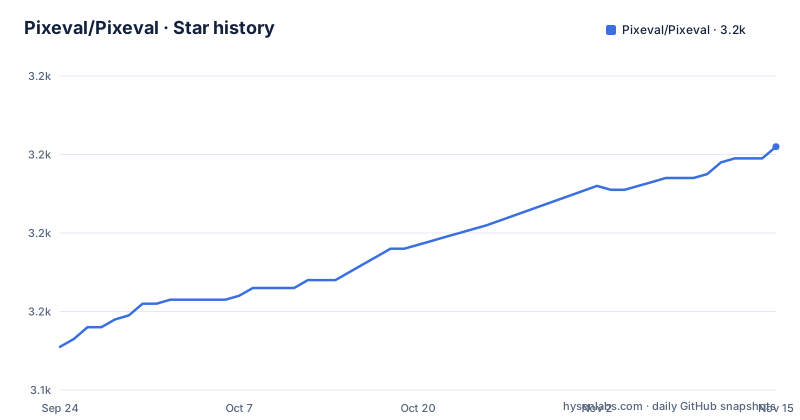
Star history
- Pixeval/Pixeval3,202 ★ · +51
| Repository | 2026-09-24 | 2026-11-15 |
|---|---|---|
| Pixeval/Pixeval | 3.2k | 3.2k |
51 Stars in the last 52 days, measured from the daily GitHub snapshot. Compare with other projects
Editorial analysis
The framework claim and the framework badge disagree
The README describes the current application as built on .NET 10 and Avalonia. One of the badges above that sentence points at the Microsoft download page for .NET 8. Both statements are in the same dozen lines, which means a reader who needs the SDK to build the project gets a version that is two majors behind the one the text names. The actual pin lives elsewhere: a global.json file sits at the root of the repository, which is where an SDK version belongs in a .NET project, and its contents are not shown in the tree listing. So there are three numbers in play, the version in the prose, the version in the badge target and whatever the global file says, and only the last one is authoritative for a build. The badges also cover a store listing, the licence file, and the issue chooser.
A desktop client is being replaced by a cross platform one
The bold paragraph near the top of the file is a migration notice rather than marketing. The Avalonia-based version is under active development, the old WPF and WinUI3 version is no longer heavily maintained, and readers are asked to move to the new one at a suitable moment. The reasons given are a better interface, a better project structure and a better development experience, with no benchmark or comparison attached to any of the three claims. So the repository is in a state where two implementations coexist and the older one is the one most users are running today, which is the situation to keep in mind before filing an issue or following a tutorial. The primary language recorded for the repository is C#, consistent with both lines, since the rewrite changes the user interface framework and not the language.
The platform list ends with an Android 16 floor and a commented out browser
The supported platform list is five entries: Windows 8 and higher, macOS, Linux, Android 16 with API level 36 or higher, and iOS 13 or higher. Two of those deserve a second look. An Android floor of API 36 excludes a very large share of devices in use, and it is a much higher bar than the iOS 13 floor beside it, so the two mobile targets are not calibrated to each other. Below the list there is a sixth entry, a browser target, that has been commented out in the source of the README itself rather than deleted. That is a small signal about direction: a desktop and mobile client that at some point intended to run in a browser, with the browser target currently switched off.
One of the three releases has a tag and a title that disagree
The release record has three entries and two of them are internally consistent. The newest is 5.0.13, tagged 5.0.13 and titled Pixeval 5.0.13, published in August 2026. Before it, 4.3.23 appears in April 2026 with matching numbers. The third is the interesting one: the tag reads 4.3.18 while the release title inside it reads Pixeval 4.3.17, published in June 2025. So the artefact named by the tag and the name written on the release page differ by one patch number, and any script that parses release titles rather than tags will record a version that was never published under that name. The major version jump from the 4.3 line to 5.0 is also where the framework rewrite would land, which makes the sequence worth reading rather than assuming.
Three README languages, a translation service, and no README in the listing
The documentation story is a language selector near the top offering Simplified Chinese, English and Russian, each pointing at a different README file in the root. A crowdin configuration file sits alongside it, so translations are managed through a hosted service rather than by pull request. What the top level listing does not contain is any of those three files, nor the contributing guide the text sends developers to when they want to follow the rewrite's progress. That listing holds fifteen entries and the links point outside them. Whether that is an artefact of how the listing was produced or a genuine gap in the default branch, the practical effect for someone starting out is the same: the README you are reading is the description of the project, and the files it points you at are the parts to verify first.
The solution file was renamed and the settings file kept the old name
The build configuration tells a migration story of its own. The solution is a slnx file, which is the newer XML form, while the Rider settings file beside it is still named after the old .sln name, so a tool that looks for settings by matching the solution name will not find them. A XAML styler settings file sits next to that, which is how the project keeps its markup formatted consistently. Directory.Build.props holds the properties shared across the build, nuget.config controls where packages are restored from, and a .gitmodules file means part of the tree arrives by submodule rather than by clone. There is also an .agents directory, an editor configuration file, a scripts directory and the src directory that holds the projects.
Mac and Linux install through a tap in another repository
The only install instructions in the README are for macOS and Linux, and they are not instructions at all. They are a paragraph pointing at a self-hosted Homebrew Tap maintained in its own repository, with the install and uninstall steps kept in that tap's own readme. The badge above the paragraph points at the tap's continuous integration workflow rather than at the application, so even the badge tracks the distribution repository, not this one. For Windows the README offers a store listing badge and nothing further. The reason for the split is not stated, but the practical result is that on Windows there is a badge to click and on the other two platforms there is a second repository to visit before you can install anything.
Three feedback channels in a stated order of preference
The section for reporting problems gives three channels in an explicit priority order, which is unusual enough to notice. First, open an issue on GitHub through the issue chooser, which is a template-based form rather than a blank page. Second, send an email to a single named address. Third, join a numbered chat group to talk with the developers directly. Publishing a personal address and a group number in the readme is a deliberate choice for a project of this size, and it does mean that the order is a real signal about what the maintainers prefer rather than a list of equals. The acknowledgements section closes the file with a link to the contributors graph and a note that it was generated with a third-party service.
Editorial conclusion
This is a client project rather than a library, so the useful questions are about the platform and the maintenance state rather than the API. Both have answers here. The Avalonia rewrite is the direction of travel and the older Windows-specific line is explicitly on its way out, so read the platform list before choosing an install route, especially the unusually high Android floor. And check the version you are actually getting, because one of the three published releases has a tag and a title that disagree. The documentation being Chinese-first with two linked translations is worth accounting for if your team does not read it, and the store badge is the only install route the README gives for Windows.
Frequently asked questions
What is Pixeval?
A third-party Pixiv client. The repository description calls it yet another Pixiv client, and the README presents the current version as a desktop application built on .NET and Avalonia.
Which platforms does Pixeval support?
Windows 8 and higher, macOS, Linux, Android 16 with API level 36 or higher, and iOS 13 or higher. A browser entry appears in the platform list but is commented out in the README.
Is the old WPF version of Pixeval still maintained?
Not heavily, by the README's own statement. It says the Avalonia version is under development and asks users to switch to the new one, and gives better interface, project structure and development experience as the reasons.
How do I install Pixeval on macOS or Linux?
Through a self-hosted Homebrew Tap kept in a separate repository under the same organisation. The README points there and leaves the install and uninstall steps to that tap's own documentation.
How do I report a problem with Pixeval?
In the order the README lists: open an issue on GitHub through the issue chooser, then email the address given, then join the chat group number published in the file.
Official sources
Add this badge to your README
If you maintain this project, the badge below links readers to this analysis and shows its maintenance status from the daily GitHub snapshot. Paste the markdown into your README; add ?metric=license or ?metric=stars to the image URL for a different field.

[](https://hysenlabs.com/projects/pixeval-pixeval)Star history chart for your README
[](https://hysenlabs.com/projects/pixeval-pixeval)Was this useful?