Linker ranks five tunnel strategies, and its Chinese README stops before the install step
Project brief: P2P (UDP+TCP IPV4+IPV6) + . Very distinctive, P2P hole punching (UDP+TCP, IPV4+IPV6) + server forwarding, realizing remote networking and intranet penetration. Make your connected devices scattered around the world as easy to access as if they were in the next room.
At a glance
- What is it?
- snltty/linker is a GPL-3.0 C# project that joins devices scattered behind different NATs using hole punching, mesh relaying, and virtual network adapters. Its documentation is written in Chinese, names nine deployment targets, and never shows a single install command, which is the first thing a reader has to work out alone.
- Who is it for?
- Linker is worth a look if the devices you need to reach sit behind carrier NAT on different providers and you already know how you want traffic to move between them, because the feature set is unusually deep and the self hosting advice is explicit. Check three things first.
- Can I use it commercially?
- Yes, with conditions. GPL-3.0 is a copyleft licence: if you distribute software that includes it, you must release that software's source code under the same licence. Running it internally without distributing it does not trigger that obligation.
- Is it still maintained?
- Yes. The repository last received commits 12 days ago.
- What is it written in?
- Mainly C#, according to GitHub's language statistics.
Answers come from the project's GitHub data, last synced on November 14, 2026, and from our analysis. They are not legal advice.
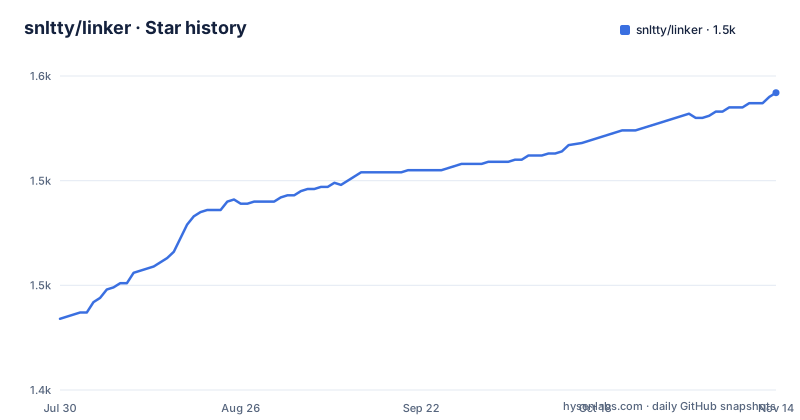
Star history
- snltty/linker1,542 ★ · +108
| Repository | 2026-07-30 | 2026-11-14 |
|---|---|---|
| snltty/linker | 1.4k | 1.5k |
108 Stars in the last 107 days, measured from the daily GitHub snapshot. Compare with other projects
Editorial analysis
The file header says v1.0.0 and an edit time four years behind the releases
The documentation opens with an editor comment block instead of a title. It records an author, a date of 2021-08-22, a last edit time of 2022-11-21 16:36:26, a version of v1.0.0, a misspelled label for the description field, and a file path of \client.service.ui.webd:\desktop\linker\README.md, a network share on a Windows machine. Every one of those values is stale against what the project actually ships. The newest release is v2.0.20, tagged v2.0.20.2026-08-21 and published on 2026-08-21, and the last commit to the repository is dated 2026-08-27, six days later. So the metadata attached to the one file a new reader opens first describes a 2022 snapshot of a project that is now two major versions ahead. The page is also mostly a badge row, an HTML centered wrapper, and a footer of links, with emoji prefixes on every section heading.
Five acquisition links and not one command to run
There is no installation section. Nothing in the file is a command, and nothing can be copied into a shell. What a reader gets instead is a row of links: an official site at linker.snltty.com, a documentation site at linker-doc.snltty.com, a Docker Hub repository named snltty/linker-musl, a QQ group invite carrying the key ucoIVfz4, and a donation page. The only artifact that names a real thing you can pull is the musl based Docker image. Licensing is unambiguous by contrast, since the project is GPL-3.0 with both a LICENSE file and a separate NOTICE file at the repository root. The gap between a well defined license and an absent install path is the first practical thing to resolve, and it is not resolvable from this file. Everything after that point describes what the software can do once it is already running.
The tunnel list is ranked, and IPv6 sits at the top
The connection methods are given as an ordered list, best effect first, and the order encodes the author's view of what works. First is direct IPv6, which needs both ends to have IPv6. Second is direct over UPNP, which needs a public IPv4 and offers three sub routes: UPNP itself, NAT-PMP, or a configured direct port. Third is TCP and UDP hole punching, described as having several punching methods and a comparatively high success rate. Fourth is a mesh network, where a client with a good connection can act as a relay for other clients. Fifth is server relay, with multiple relay nodes available. The hosting advice is separate and blunt: the project offers public servers at 1000Mbps and more along with free relay nodes that carry limits, and the author's own recommendation is to deploy a server of your own.
Two separate layers: getting the tunnel, then moving traffic over it
The Chinese README splits the design in two and says so explicitly. The first layer is how the tunnel is built, which is the ranked list above. The second layer is how clients reach actual services once that tunnel exists. Three choices appear there. Virtual network interface networking, which supports point to point, point to network, and network to network topologies and can assign virtual IP addresses automatically. One to one port forwarding, offered for the case where the virtual interface cannot be used or is unwanted, where the two ends map one to one and a port has to be named on each side. And Socks5, which the file contrasts with port forwarding precisely because port forwarding pins one port per pair while a Socks5 proxy covers every port and behaves more like point to network. The port forwarding mode is backed by a linked write up on managing forwarding state for several services over a single tunnel.
Nine deployment targets, and iOS excluded for a personal reason
The supported platform list runs to nine entries: Windows, Linux, Android, Docker, OpenWrt, NAS, PVE, LXC, and macOS. The shape of that list is the interesting part. OpenWrt is a router distribution, PVE and LXC are virtualization hosts, NAS is an appliance, and Docker is a container format, so the intended deployments cluster around the edge of a network rather than around laptops. iOS is the single exclusion, and the reason given is personal rather than technical: the author states they have no iPhone and no developer account, so support is deferred rather than ruled out. No version numbers, architecture names, or minimum system requirements appear next to any of the nine entries, and the file does not say which of them have binaries rather than source.
Application layer NAT and a firewall that replaces root iptables
Two features exist to remove a system dependency. NAT defaults to iptables on Linux and NetNat on Windows, and when neither system mechanism is usable the built in application layer NAT takes over, keeping the point to network and network to network topologies alive without touching the host firewall. A built in application layer firewall then gates the virtual interface, the port forwarding, and the Socks5 proxy, and the example given is narrow: permit client A to reach port 3389 on client B and let every other client be refused. Subnet mapping, written in the file as 网段映射, addresses the other common domestic problem, where several home networks all sit on 192.168.1.0/24 and their ranges collide. Subnet division goes further, carving lower subnets out of the virtual network with selectable main and sub ranges, isolation, and one way or two way communication.
Intranet exposure on a schedule, like FRP, plus a wake up path
Two entries treat the server as a way in rather than as a relay. Intranet exposure is described as comparable to FRP, reaching an internal service through the server by port or by domain, and it carries scheduled tasks, with the file's own example being an exposure that switches on at nine in the morning and switches off an hour later. Remote wake sits alongside it and lists three transports for a machine that is powered down: a WOL magic packet, a USB COM relay, and a USB HID relay. The file is explicit that a scheduled window is the intended shape rather than an always open port, which is a different default from most tools in this space. The discovery proxy, meanwhile, works in the other direction, finding cameras and printers on the local network through mDNS, SSDP, LLMNR, NBNS, WS-Discovery, and Hikvision SADP, with the note that more protocols will be added when they come up.
FEC, KCP, and batched syscalls do the reliability work
The last group is transport level and the descriptions are about throughput. Forward error correction is listed as strengthened with batch encoding, direct output of source packets, and batched decode output, and it supports deliberate redundancy or sending a packet several times over, spending bandwidth to hold a lossy link steady. A KCP implementation is listed with ACK Range, selective acknowledgement, fast retransmit, and batch flush, and its stated purpose is to let port forwarding and the Socks proxy run over UDP tunnels rather than being limited to TCP. TCP over TCP is handled by routing through a separate project, tun324, for speed. Batched UDP sending is called out by platform API, using the Windows WSASendTo USO path and Linux sendmmsg to cut the number of per packet calls into the kernel. The repository is a .NET solution, with global.json and version.txt at the root, and releases are cut by two Windows batch files named for the dev and master branches.
Editorial conclusion
Linker is worth a look if the devices you need to reach sit behind carrier NAT on different providers and you already know how you want traffic to move between them, because the feature set is unusually deep and the self hosting advice is explicit. Check three things first. Decide whether you will run your own relay, since the free public servers are described as rate limited. Read the Chinese documentation, because the English facing README carries no install step and no flag reference. And pick your transport deliberately, since the ranking it gives for tunnel methods assumes IPv6 on both ends and a public IPv4 for the second option.
Frequently asked questions
Which platforms does snltty/linker support?
The documented list is Windows, Linux, Android, Docker, OpenWrt, NAS, PVE, LXC, and macOS. iOS is not supported, and the stated reason is that the author has no iPhone and no developer account.
How does Linker connect two devices that are behind different NATs?
The connection methods are ranked best first: direct IPv6 when both ends have IPv6, direct over UPNP or NAT-PMP or a configured port when there is a public IPv4, TCP and UDP hole punching, a mesh network where a well connected client relays for others, and server relay through relay nodes.
What is the difference between Linker's port forwarding and its Socks5 mode?
Port forwarding is one to one, with each end mapped to a named port, and the file points to a separate write up on managing forwarding state for several services over one tunnel. Socks5 covers all ports, which the file says gives it an effect closer to point to network.
Does Linker need a public server to work?
Public servers above 1000Mbps and some free relay nodes are offered but carry limits, and the project recommends deploying a server of your own instead. The mesh mode is the alternative, where a client with a good connection relays for the others.
What license is snltty/linker released under?
GPL-3.0. The repository root carries both a LICENSE file and a separate NOTICE file.
Official sources
Add this badge to your README
If you maintain this project, the badge below links readers to this analysis and shows its maintenance status from the daily GitHub snapshot. Paste the markdown into your README; add ?metric=license or ?metric=stars to the image URL for a different field.

[](https://hysenlabs.com/projects/snltty-linker)Star history chart for your README
[](https://hysenlabs.com/projects/snltty-linker)Was this useful?