clock-weather-card: a Home Assistant clock with the forecast drawn as bars
An iOS-inspired clock and weather card for Home Assistant, with animated icons, hourly and daily forecasts, and a layout you build yourself.
At a glance
- What is it?
- clock-weather-card is a Lovelace custom card for Home Assistant that shows the current date, time and a weather forecast, with the trend across coming days rendered as temperature range bars rather than as numbers. It is distributed through HACS as a single JavaScript module and configured entirely from YAML.
- Who is it for?
- Use clock-weather-card when you want one element on a Home Assistant dashboard that carries both the time and the weather trend, because the forecast bars compress several days of range into a single glance in a way a list of numbers does not. Do not adopt it if you need a stable release line, since the recent tags are 3.0.0-beta releases and the package metadata still records 2.9.7 as the version.
- Can I use it commercially?
- Yes. MIT is a permissive licence: you can use, modify and sell software built on it, as long as you keep its copyright and licence notices.
- Is it still maintained?
- Yes. The repository last received commits 4 days ago.
- What is it written in?
- Mainly TypeScript, according to GitHub's language statistics.
Answers come from the project's GitHub data, last synced on November 7, 2026, and from our analysis. They are not legal advice.
Star history
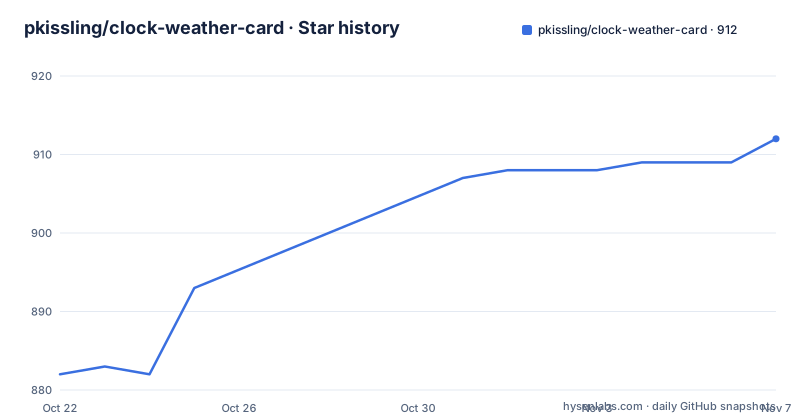
- pkissling/clock-weather-card912 ★ · +30
| Repository | 2026-10-22 | 2026-11-07 |
|---|---|---|
| pkissling/clock-weather-card | 882 | 912 |
30 Stars in the last 16 days, measured from the daily GitHub snapshot. Compare with other projects
Editorial analysis
One card carrying the clock and the forecast
The card is a Home Assistant dashboard card available through the Home Assistant Community Store, and it does two jobs in one element: the current date and time, plus a weather forecast. It is built as a Lovelace custom card, so it appears in the dashboard the same way a built-in card does once the resource is registered. The stack behind it is modern and small. The runtime dependencies are custom-card-helpers at version 2, home-assistant-js-websocket at version 9, lit at version 2.8 and luxon at version 3.4. Lit is the component framework the card is written in, home-assistant-js-websocket handles the connection back to Home Assistant, and luxon does the date and time formatting. The build is Rollup with Babel, TypeScript and terser, and the published artefact is a single file named clock-weather-card.js, which is what you register as a module resource.
The forecast bars show a range, not a number
The most interesting thing on the card is the forecast display, and its logic is not obvious at first glance. Each bar represents the temperature range for a given day. In the example image the 9 degree figure on Thursday represents the low across all of the forecast days and the 21 degree figure represents the highs, meaning every bar runs from 9 to 21. The colored portion of a bar is the range of temperatures actually forecast for that day, so on Monday it is 12 to 21. The circle is the current temperature, at 16 in the example, which sits roughly midway in that day's range. So the uncolored remainder of each bar is a comparison against the overall span of the forecast, not an error bar. The stated goal is to understand the weather trend for the upcoming days in a single glance, and that is what the design achieves.
Minimal configuration is two lines
The smallest useful configuration names the card type and the weather entity it should read.
type: custom:clock-weather-card
entity: weather.home  # replace with your weather providers's entity id
Everything else has a default. The full configuration shows the range the card supports.
type: custom:clock-weather-card
entity: weather.home  # replace with your weather providers's entity id
title: Home
sun_entity: sun.sun
temperature_sensor: sensor.outdoor_temp
humidity_sensor: sensor.outdoor_humidity
weather_icon_type: line
animated_icon: true
forecast_rows: 5
locale: en-GB
time_pattern: HH:mm
time_format: 24
date_pattern: ccc, d.MM.yy
hide_today_section: false
hide_forecast_section: false
show_humidity: false
hide_clock: false
hide_date: false
hourly_forecast: false
use_browser_time: false
time_zone: null
show_decimal: false
apparent_sensor: sensor.real_feel_temperature
aqi_sensor: sensor.air_quality_index
The options table that follows documents each name with its type, whether it is required, its description and its default, so the full list is longer than this example, but the shape of the configuration is clear: one weather entity is required, and everything else is optional and layered on top.
Installing the card as a JS module resource
There are two routes. The manual one downloads the release file clock-weather-card.js, places it in the Home Assistant config/www folder, and then registers it in ui-lovelace.yaml as a module resource.
resources:
  - url: /local/clock-weather-card.js
    type: module
The HACS route asks for a little more: the HACS component has to be installed and working first, you search for clock-weather-card in HACS and install it, and then you register the resource the same way. If you manage Lovelace resources through YAML the entry goes in ui-lovelace.yaml.
resources:
  - url: /hacsfiles/clock-weather-card/clock-weather-card.js
    type: module
If you manage resources through the interface instead, the README gives the equivalent values to enter in the Lovelace resources screen, reachable from Settings, then Dashboards, then Resources, then Add Resource, with the URL /hacsfiles/clock-weather-card/clock-weather-card.js and the type JavaScript Module. Either way, Home Assistant is restarted afterwards, and the card configuration goes into ui-lovelace.yaml or through the UI.
The v2 migration changed three things that break silently
The migration notes from v1 to v2 list three changes, and two of them fail quietly rather than loudly. The configuration property forecast_days was renamed to forecast_rows, because the attribute works for hourly forecasts as well as daily ones. The date-fns library was replaced by luxon for date and time formatting, which means any date_pattern you configured has to be rewritten in luxon tokens, and the weekday is no longer hardcoded. The third change is a default flip: use_browser_time is now false by default, so by default the card shows the time of the current Home Assistant time zone rather than the time of the browser. A card that displays the wrong hour on a remote dashboard is the classic symptom of that third item, and the fix is either to set use_browser_time back to true or to set a time_zone.
If today is missing, the provider is the problem
The card's own FAQ answers the most common complaint directly. If you do not see the current day in the forecast, the reason is usually the weather provider rather than the card, because your provider may not provide today's weather as part of its weather forecast. The suggested remedy is to switch providers, and Open Meteo is named as the default weather integration in Home Assistant and as one that does provide today's weather. That is worth knowing before you file an issue. The second FAQ entry answers what the display actually means, which is the bar description described earlier, and it credits the explanation to a contributor who wrote it up in issue 143.
Beta releases and a version number that lags behind
The release history shows a project in a transition. The most recent tags are v3.0.0-beta.4 on 2026-10-14, v3.0.0-beta.3 on 2026-10-11 and v3.0.0-beta.2 on 2026-10-11, and the last push to the repository was on 2026-10-19. Yet the package metadata in the repository still records the version as 2.9.7. That gap is normal for a package whose version is bumped at release time rather than on every commit, but it means the version field in package.json is not a reliable indicator of what a user is running. For a dashboard card, that matters less than for a library, because a Home Assistant user installs a specific release from HACS and does not upgrade automatically in the way a package manager would. The licence field on the repository says MIT, and the author is recorded as Patrick Kissling.
Where this card is the wrong choice
Three situations argue against it. If you need a stable, non-beta line, the current tags are all 3.0.0-beta releases and the 2.x line is what the package metadata still describes. If your weather provider does not expose today's forecast and you cannot change providers, the card will show you a forecast that starts tomorrow no matter what you configure. And if you are looking for a general weather card rather than a clock, the card's scope is deliberately narrow: it is a clock with a forecast attached, its forecast display is the range bar design described above, and the configuration options are focused on time formatting, sun position, optional temperature and humidity sensors and icon styling. The animated icon option and the choice of icon type, line or otherwise, come from the weather icon set credited to basmilius, which the card uses for the forecast conditions.
Editorial conclusion
Use clock-weather-card when you want one element on a Home Assistant dashboard that carries both the time and the weather trend, because the forecast bars compress several days of range into a single glance in a way a list of numbers does not. Do not adopt it if you need a stable release line, since the recent tags are 3.0.0-beta releases and the package metadata still records 2.9.7 as the version. Verify first that your weather provider actually returns today's forecast, since the card's own FAQ says some providers do not and points at Open Meteo as the default, and that your date_pattern is written in luxon tokens rather than the old date-fns patterns, since the v2 migration replaced that library.
Frequently asked questions
How do I install the clock-weather-card in Home Assistant?
Through HACS, search for clock-weather-card, install it, then register the resource as a module. In ui-lovelace.yaml the entry is a resources list with url /hacsfiles/clock-weather-card/clock-weather-card.js and type module, and Home Assistant needs a restart afterwards.
What do the bars in the forecast mean?
Each bar is the temperature range for a day, drawn inside the overall span of the forecast. The uncolored remainder shows the range between that day's low and high and the overall low and high across all forecast days, the colored portion is the range forecast for that day, and the circle is the current temperature.
Why is the current day missing from my forecast?
Your weather provider may not include today's weather in its forecast. The card's own guidance is to switch provider, and Open Meteo is named as the Home Assistant default integration that does provide today's weather.
My card shows the wrong time, what changed?
Since the v2 migration, use_browser_time defaults to false, so the card shows the time of the current Home Assistant time zone rather than the browser's. Set use_browser_time to true or set a time_zone to change it.
What is the difference between forecast_days and forecast_rows?
forecast_days was renamed to forecast_rows in the v2 migration, because the attribute applies to hourly forecasts as well as daily ones. The hourly_forecast option switches between the two readings.
Official sources
Add this badge to your README
If you maintain this project, the badge below links readers to this analysis and shows its maintenance status from the daily GitHub snapshot. Paste the markdown into your README; add ?metric=license or ?metric=stars to the image URL for a different field.

[](https://hysenlabs.com/projects/pkissling-clock-weather-card)Star history chart for your README
[](https://hysenlabs.com/projects/pkissling-clock-weather-card)Was this useful?