ME Analyzer reads Intel firmware containers and names what it finds
Intel Engine & Graphics Firmware Analysis Tool
At a glance
- What is it?
- ME Analyzer is a single Python script with a bundled database that parses Intel Engine, Intel Graphics and independent firmware, then tells you the family, version, SKU, platform, size and health status of the image. Its value is the database behind it and the fact that it reports firmware that no community repository has seen yet.
- Who is it for?
- ME Analyzer is worth adopting if you work with Intel platform firmware, because it replaces a hex editor and a pile of forum knowledge with a repeatable identification and validation step, and it tells you when an image is one nobody has catalogued. It is the wrong tool if you need to modify or reflash firmware, because it reads and reports rather than writes, and it is the wrong tool if your questions are about the host operating system rather than the on board controller.
- Can I use it commercially?
- Yes. BSD-2-Clause-Patent is a permissive licence: you can use, modify and sell software built on it, as long as you keep its copyright and licence notices.
- Is it still maintained?
- Yes. The repository last received commits 63 days ago.
- What is it written in?
- Mainly Python, according to GitHub's language statistics.
Answers come from the project's GitHub data, last synced on November 6, 2026, and from our analysis. They are not legal advice.
Star history
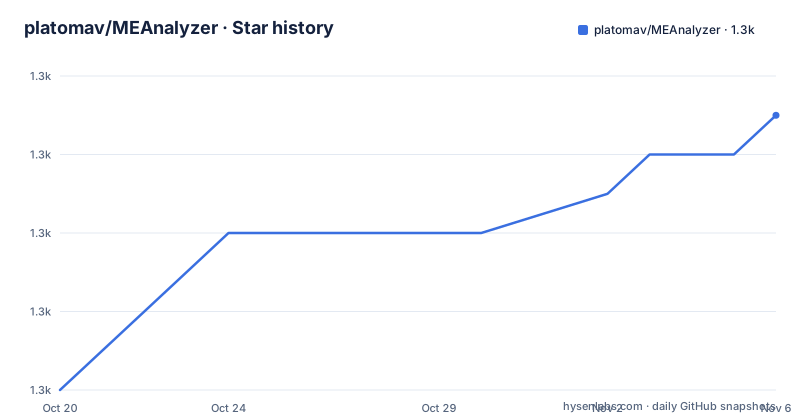
- platomav/MEAnalyzer1,347 ★ · +7
| Repository | 2026-10-20 | 2026-11-06 |
|---|---|---|
| platomav/MEAnalyzer | 1.3k | 1.3k |
7 Stars in the last 17 days, measured from the daily GitHub snapshot. Compare with other projects
Editorial analysis
One script, three data files, no installation ritual
ME Analyzer is an Intel Engine and Graphics Firmware Analysis Tool, and the repository is unusually small for something with this reputation. The top level listing contains Changelog.txt, FileTable.dat, Huffman.dat, LICENSE, MEA.dat, MEA.py and README.md. That is one Python program, MEA.py, and four data or documentation files.
The reason a tool like this can be a single script is that the hard part is not the code, it is the knowledge. The program has to know where every field lives in every firmware structure across a dozen Intel product families, and that knowledge is what the database files carry.
The scope of the parsing is stated precisely. ME Analyzer parses Intel Engine, Intel Graphics and their Independent firmware from these families: the Converged Security Management Engine, meaning ME 2 through 10 and CSME 11 through 15, the Converged Security Trusted Execution Engine, TXE 0 through 2 and CSTXE 3 through 4, the Converged Security Server Platform Services, SPS 1 through 3 and CSSPS 4 through 5 in its BA, HA, ME and PU variants, the Graphics System Controller GSC 100 which is DG1, the Power Management Controller PMC across APL to MCC, the Platform Controller Hub Configuration PCHC across ICP to MCC, the USB Type C Physical layer PHY across ICP to TGP, and the Graphics Option ROM OROM for DG1.
The primary language of the repository is Python, and the licence is BSD-2-Clause-Patent, which is the licence variant that carries an explicit patent grant, a sensible choice for a tool that reads undocumented vendor formats.
The audience is firmware researchers, modders and the people who answer questions on forums about why a board will not flash, and the readme points at a news feed, a discussion thread and the firmware introduction thread on the winraid forum, which is where this community lives.
The container formats it walks through
The structural part of the readme is the list of structures the tool can parse and unpack, and it is the clearest statement of what the program does.
The Flash Partition Table, FPT, is the top level map of the flash image, the set of partitions. The Boot Partition Descriptor Table, BPDT, also called IFWI, is the integrated firmware image structure. The CSE Layout Table, LT, and the CSE File Table, FTBL, also known as EFST, describe the layout of the Converged Security Engine filesystem and the files inside it. The CSE Virtual File System, VFS, is the filesystem itself. And the GSC OROM PCIR structures, VBT and EFI, are the graphics option ROM equivalents.
The readme puts it as being capable of full parsing and unpacking of the CSE and GSC code and file systems, and the feature list confirms the ability to fully unpack all supported CSE, GSC and independent firmware.
So the pipeline is: read the flash layout, find the boot partition, read its layout table, read the file table, mount the virtual filesystem, and then read the individual files. Each step is a structure with a known layout, and each step either succeeds with a defined field set or fails in a way the tool can report, which is where the coloured output and the error messages come from.
The FileTable.dat and Huffman.dat files in the repository root are part of that chain. The file table is the knowledge of which files exist in which firmware, and the Huffman file is the table for the compressed firmware representations, which is the part of Intel's format that is genuinely awkward, since the compression scheme differs between generations.
MEA.dat is the database, and it is the part that ages
The database deserves its own section because the tool's usefulness and its maintenance burden are the same thing.
ME Analyzer allows end users and researchers to quickly analyse and report new firmware versions without the use of special Intel tools, FIT or FITC, FWUpdate, or hex editors. To do that effectively a database had to be built, and the Intel Engine, Graphics and Independent Firmware Repositories is described as a collection of every (CS)ME, (CS)TXE, (CS)SPS, GSC, PMC, PCHC, PHY and OROM firmware that has been found. The readme is explicit that its existence is very important for ME Analyzer, because it allows the work to continue, new firmware types to be found, and same major version releases to be compared for similarities.
The bundled file is called MEA.dat, and it is required for the program to run. It includes entries for all engine, graphics and independent firmware available to the project, and it supports two actions: detecting each firmware's family via unique identifier keys, and helping to find new engine firmware sooner by reporting it at the repositories thread.
The second point is the mechanism that makes the project a research project rather than a lookup table. A user runs ME Analyzer on an image nobody has seen, the tool cannot find a match, and it reports the image as new and unknown. Somebody then uploads it to the community thread, the database grows, and the next user gets an identification. The tool is a way of contributing to the dataset it consumes.
That is also the operational caveat. The database is only as current as the last upload, so an image of a very recent platform may be reported as unknown even though ME Analyzer supports the family, and the tool has a feature to automatically scan for newer ME Analyzer and database releases, which is a hint about how often the database changes.
What it reports, and how it validates
The reporting side is broad, and the feature list is the best index of it.
It detects firmware details, meaning the family, version, SKU, date and platform. It detects the release, distinguishing production, pre-production and ROM-bypass. It detects the type, whether that is region, extracted or update. It detects the security and update version numbers, SVN and VCN. It detects the independent firmware information for the Power Management Controller, the PCH configuration, the USB Type C physical layer and the graphics option ROM. It can detect and analyse integrated firmware images, IFWI and BPDT. And it can validate the RSA signature and the checksums of the firmware it parses, plus perform advanced detection and validation of the firmware size.
The signature and checksum validation is the part with real consequences, because it is the difference between a tool that describes an image and one that tells you whether the image is intact. A firmware blob that has been tampered with or truncated will fail the check, and the tool reports it rather than leaving you to discover it later.
The output is designed for human reading. It shows coloured text to signify the importance of notes, warnings and errors, it produces user friendly messages with proper handling of unexpected code errors, and it can analyse multiple files by drag and drop or by input path, which is what you want when you have a batch of images from a device to triage. It also has command line parameters to enhance functionality and assist research, so it is usable in a script over a directory of dumps.
And it reports the negative results, which is the part that distinguishes a research tool from a viewer. It reports firmware that are not found at the repositories, and it reports new, unknown, problematic and incomplete firmware, plus any firmware that requires attention.
The family coverage is wide, and it is a moving target
The supported versions table in the readme is worth reading as a map of Intel's platform history rather than as a feature list, because it shows where the interesting engineering is.
The Management Engine column runs from version 2 to 12 in single steps, and then the 13, 14 and 15 families appear with sub-variants, 13 covering 0, 30 and 50, 14 covering 0, 1 and 5, and 15 covering 0 and 40. The Trusted Execution Engine runs 0 to 4. The Server Platform Services run 1 to 3 and then 4 and 5 with their BA, HA and PU variants. The Graphics System Controller is only 100, the DG1 generation.
And then the platform columns, which are coded by the platform name rather than a number: the Power Management Controller runs APL, BXT, GLK, CNP, ICP, LKF, JSP, CMP, TGP, MCC and DG1, the PCH configuration runs ICP, LKF, JSP, CMP, TGP and MCC, and the USB Type C physical layer runs ICP, LKF, CMP, TGP and DG1.
The readme also says that any Intel engine, graphics or independent family and version will be reported, which is the important promise: even a family the tool does not fully parse can be identified and reported rather than rejected.
The practical consequence is that coverage is a moving target in two directions at once. Intel keeps shipping new platforms, and the community keeps discovering older firmware that nobody catalogued, which is why the database has entries going back to ME 2. A tool like this is never finished, and the honest way to read its coverage is as a snapshot that the community extends as it finds images.
Where the reporting loop actually lives
The community infrastructure around the tool is as much a part of it as the code, and the readme documents it explicitly.
There is a news feed for ME Analyzer, a discussion topic dedicated to the tool, an introduction thread covering Intel Converged Security Management Engine drivers, firmware and tools, and the firmware repositories thread where every catalogued image is listed.
That last thread is the loop. When ME Analyzer cannot identify an image, the user is directed there to report it, and the readme describes the tool's ability to check for any firmware that has not been stored at the equivalent community supported repositories yet. The tool is the detector, the thread is the database in public, and MEA.dat is the compiled snapshot of it.
The tool also scans for newer ME Analyzer and database releases automatically, which is what keeps the packaged data in step with the public thread. Without that, a user running a year old copy of the program would silently misidentify anything released since.
For a researcher this has a pleasant side effect. The same tool that identifies a firmware image also validates its signature and checksum, reports it if the image is incomplete or problematic, and tells you whether the community has seen it before. That combination, identification plus integrity plus novelty, is the actual product, and the code is only the part that makes it convenient.
A permissive licence, a revision named release
The licence is BSD-2-Clause-Patent, which is the two clause BSD form with the patent grant added. For a tool that reads undocumented vendor formats, that grant is the part that matters, and the project describes itself as an open source project under a BSD permissive licence with comment assisted code.
The release naming is unusual and worth a moment. The releases are v1.312.0-r378, v1.311.0-r377 and r376, with dates 2026-09-06, 2026-03-22 and 2025-12-22. The revision number, r376, r377, r378, is the database revision, and the version number tracks the same sequence. So a release name encodes both the program version and the state of the knowledge base, which is a sensible design for a tool whose behaviour is as much a function of its data as of its code.
The gap between r377 in March and r378 in September is also informative about the cadence of the underlying work, since each revision is a new dataset rather than a new feature.
The repository is not archived, the default branch is master, and the last push was on 2026-09-06, the same day as the newest release. There is no separate home page, and the documentation is the readme plus the linked forum threads, which is consistent with a project whose community already lives on those forums.
One thing the readme does not cover is how to run the tool without downloading a release, and it does not describe a packaging story beyond the bundled MEA.dat. For most users that is not a gap, because the releases are the supported path and the tool is a single script, but it does mean the project is not aimed at a CI pipeline that wants to pin a source build and manage its own data lifecycle.
Editorial conclusion
ME Analyzer is worth adopting if you work with Intel platform firmware, because it replaces a hex editor and a pile of forum knowledge with a repeatable identification and validation step, and it tells you when an image is one nobody has catalogued. It is the wrong tool if you need to modify or reflash firmware, because it reads and reports rather than writes, and it is the wrong tool if your questions are about the host operating system rather than the on board controller. Before you rely on a verdict, check that the bundled MEA.dat covers the family you are looking at, and note that the current release is v1.312.0-r378 from 2026-09-06 with the repository pushed to on the same day.
Frequently asked questions
What is ME Analyzer and what does it do?
It is a Python tool that parses Intel Engine, Intel Graphics and their independent firmware, reporting details such as family, version, release, type, date, SKU, platform, size and health status. It can fully unpack the CSE, GSC and independent firmware structures and validate the RSA signature and checksums.
What firmware structures can ME Analyzer parse?
The Flash Partition Table, the Boot Partition Descriptor Table also called IFWI, the CSE Layout Table, the CSE File Table also called EFST, the CSE Virtual File System, and the GSC OROM PCIR structures VBT and EFI. These are the flash layout, the boot partition, the filesystem and the files themselves.
What is MEA.dat and why does it matter?
MEA.dat is the bundled database file that is required for the program to run, and it holds entries for all engine, graphics and independent firmware known to the project. It lets the tool detect a firmware family through unique identifier keys, and it is what makes the tool able to report images that nobody has catalogued yet.
Which Intel platform families does ME Analyzer support?
The Converged Security Management Engine from ME 2 to 10 and CSME 11 to 15, the Converged Security Trusted Execution Engine TXE 0 to 4, the Server Platform Services SPS 1 to 5 including the BA, HA, ME and PU variants, the Graphics System Controller GSC 100, and the independent firmware families PMC, PCHC, PHY and OROM.
Can ME Analyzer flash or modify firmware?
No. The readme describes it as an analysis and research tool that reports what it finds, validates signatures and checksums, and flags images that are new, unknown, problematic or incomplete. The README also does not describe a command line installation or build flow for the script itself beyond the downloadable releases.
Official sources
Add this badge to your README
If you maintain this project, the badge below links readers to this analysis and shows its maintenance status from the daily GitHub snapshot. Paste the markdown into your README; add ?metric=license or ?metric=stars to the image URL for a different field.

[](https://hysenlabs.com/projects/platomav-meanalyzer)Star history chart for your README
[](https://hysenlabs.com/projects/platomav-meanalyzer)Was this useful?