playcanvas ships a development, a production and a profiler build
Powerful web graphics runtime built on WebGL, WebGPU, WebXR and glTF
At a glance
- What is it?
- The PlayCanvas engine is a browser 3D engine built on WebGL2 and WebGPU, with rigid body physics, glTF streaming, WebXR and 3D Gaussian splatting. One package publishes three build flavours selected by export condition, the manifest version sits a beta ahead of the last release tag, and the documented build target asks for Node 18.
- Who is it for?
- The PlayCanvas engine fits a team that wants a full 3D runtime in the browser with no plugin, with WebGPU where the device has it, first-party React bindings, and a browser-based visual editor. It does not fit a project that needs a particular physics engine or asset codec of its own choosing, because both arrive as integrations the engine brings rather than interfaces you implement.
- Can I use it commercially?
- Yes. MIT is a permissive licence: you can use, modify and sell software built on it, as long as you keep its copyright and licence notices.
- Is it still maintained?
- Yes. The repository received new commits within the last day.
- What is it written in?
- Mainly JavaScript, according to GitHub's language statistics.
Answers come from the project's GitHub data, last synced on November 14, 2026, and from our analysis. They are not legal advice.
Star history
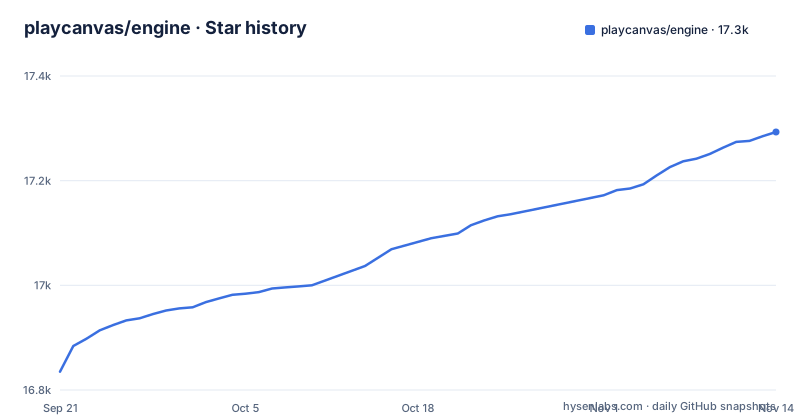
- playcanvas/engine17,293 ★ · +458
| Repository | 2026-09-21 | 2026-11-14 |
|---|---|---|
| playcanvas/engine | 16.8k | 17.3k |
458 Stars in the last 54 days, measured from the daily GitHub snapshot. Compare with other projects
Editorial analysis
Three builds ship from one package, chosen by export condition
The package manifest is where this project makes a decision most engines do not show you. One package, three flavours. The export map offers a development condition pointing at a build with a debug suffix, a profiler condition pointing at another with a profiling suffix, a production condition pointing at the plain build, and a default that falls back to production. On top of that there are explicit subpaths for the debug and profiler builds, a passthrough into the build directory, and a passthrough into the scripts directory. The module and CommonJS forms are both declared for each condition, and the package declares no side effects, which tells a bundler it may drop unused code. The practical consequence is that your flavour is chosen by your bundler rather than by you, and that a performance investigation is an import path change, not a flag you were supposed to remember.
The manifest is a beta and the newest tag is the minor before it
Version numbers here are worth a careful look. The manifest declares a two-part-four beta as its version, and the recent release tags are v2.23.1 on 2026-10-07, v2.23.2 on 2026-10-09 and v2.23.3 on 2026-10-15, while the last recorded push is 2026-11-02. So the branch you are reading is a prerelease of the next minor, the registry gives you the previous one, and the difference between them is several weeks of work. That is normal for a project shipping this often, and it means two things for anyone pinning. First, the version in the manifest is not the version you installed, so a bug report that quotes the manifest number is quoting a build the reporter may not be running. Second, if you want the newest code you are taking a prerelease, and the sensible way to find out what changed is the commit log between the tag you have and the one you want.
The hello world names its component with a string, and that is the component model
You install the package with one command:
npm install playcanvasor scaffold a whole project with the create command the file links. The quick example that follows is short enough to read in full, and one line in it tells you how the engine is put together:
import {
  Application,
  Color,
  Entity,
  FILLMODE_FILL_WINDOW,
  RESOLUTION_AUTO
} from 'playcanvas';

const canvas = document.createElement('canvas');
document.body.appendChild(canvas);

const app = new Application(canvas);

// fill the available space at full resolution
app.setCanvasFillMode(FILLMODE_FILL_WINDOW);
Later lines of the example resize the canvas on a window event, build the scene by creating an entity, adding a component to it by name with a plain object of settings, and adding the entity to the application's root. So a component is a registered name plus a settings object, not a class you subclass. The cost is the one you would expect from a string-keyed system: the component name is not checked by a type checker the way a class reference would be, so a mistyped name fails at runtime rather than at build time.
Physics and asset formats are where this engine inherits from other projects
Two lines in the feature list are really statements about other people's software. Physics is described as full integration with a 3D rigid body engine distributed as a JavaScript library, which means the solver, the collision shapes and the units in your code are that project's, not this engine's. Assets are described as an asynchronous streaming system built on a glTF 2.0 pipeline with two named compression schemes, one for geometry and one for textures, which means your asset pipeline has to produce files those two libraries can read. Sound is the same shape, positional audio on the browser's own audio API, and immersive support is the browser's own XR standard. None of that is a criticism, because a browser engine cannot ship a physics solver and a codec library without giving up its reason for existing. It does mean those three are the places where your requirements meet somebody else's roadmap.
Gaussian splatting has its own line, which says something about the direction
Gaussian splatting has its own line in the feature list, described as first-class support for loading and rendering 3D Gaussian splats, with its own manual page, and the feature keywords in the manifest include it. That is a captured-scene representation rather than a modelled one, which is a different pipeline: a scan or a capture rather than art. Its presence next to the conventional feature list tells you the asset side of this engine is being built for both authored scenes and captured ones, and it is the kind of addition that pulls in new requirements about what a loader has to accept before it renders anything.
The engine is one package in a family, and the React binding is first-party
The ecosystem table is short and it changes the shape of the decision. The core engine is one entry, and the others are a React renderer published by the same organisation, a web components package that gives you declarative 3D through custom elements, a scaffolding command, and a browser-based visual editor in its own repository. So the choice of integration is a real fork rather than a preference: React users are not hunting for a community wrapper, and if you would rather not have a framework at all, custom elements are a first-party path. The editor is the other half of that. The README lists it as a browser-based visual editor in its own repository.
The build table says all engine flavours, and the root carries a declaration file
The build section is short and specific. It asks for Node.js 18 or newer, an install of the dependencies, and then a table of commands: one that builds all engine flavours and the type declarations into a build directory, and one that builds the API reference documentation into a docs directory. Two details around the build are worth noticing. There is a declaration file, playcanvas.d.ts, at the repository root, separate from the one the build produces. And the root also holds a task runner configuration, a build script, documentation tooling configuration and three translated readmes, so the repository carries its own release and documentation machinery rather than delegating either.
Editorial conclusion
The PlayCanvas engine fits a team that wants a full 3D runtime in the browser with no plugin, with WebGPU where the device has it, first-party React bindings, and a browser-based visual editor. It does not fit a project that needs a particular physics engine or asset codec of its own choosing, because both arrive as integrations the engine brings rather than interfaces you implement. Before you adopt it, pick a build flavour deliberately, since the package exports three and your bundler selects between them by condition. Then check the version you are on, because the manifest carries a beta of the next minor while the newest tag is the previous one. And read the build section, which asks for Node 18 while the manifest pins a package manager version; check both before building.
Frequently asked questions
How do I install the PlayCanvas engine?
From a package registry with npm install playcanvas, which gives you the core engine, or with npm create playcanvas@latest to scaffold a project. The project also documents a guide for running the engine standalone in a local development environment, and the quick example is editable in a browser code pen.
What does the PlayCanvas engine include?
Two-dimensional and three-dimensional graphics on WebGL2 and WebGPU, first-class loading and rendering of 3D Gaussian splats, immersive support through WebXR, rigid body physics integrated with a JavaScript physics library, state-based animation, mouse, keyboard, touch and gamepad input, positional sound on the Web Audio API, an asynchronous asset streaming system built on glTF 2.0 with two compression schemes, and scripting in TypeScript or JavaScript.
Does PlayCanvas work with React?
There is a React renderer published by the same organisation as a separate package, alongside a web components package that offers declarative 3D through custom elements, a project scaffolding command, and a browser-based visual editor. So the React route is first-party rather than a community wrapper.
What Node.js version does building the PlayCanvas engine need?
The build instructions ask for Node.js 18 or newer, then an install of the dependencies. One command builds all engine flavours and the type declarations into a build directory and another builds the API reference documentation. The package manifest also pins a specific package manager version, which is a separate constraint from the Node version.
Official sources
Add this badge to your README
If you maintain this project, the badge below links readers to this analysis and shows its maintenance status from the daily GitHub snapshot. Paste the markdown into your README; add ?metric=license or ?metric=stars to the image URL for a different field.

[](https://hysenlabs.com/projects/playcanvas-engine)Star history chart for your README
[](https://hysenlabs.com/projects/playcanvas-engine)Was this useful?