plugdata: Pure Data as a plugin, with a JUCE interface and a commercial tier
Pure Data as a plugin, with a new GUI
At a glance
- What is it?
- A C and JUCE rewrite of the Pure Data front end that runs as VST3, LV2, CLAP or a standalone app, built around libpd so existing patches keep working.
- Who is it for?
- plugdata solved a specific problem that held Pure Data back for a decade, which is that patches did not travel into the DAW you already used. Wrapping libpd in a JUCE interface and shipping real plugin formats means a patch can sit on an audio track next to everything else in a session.
- Can I use it commercially?
- Yes, with conditions. GPL-3.0 is a copyleft licence: if you distribute software that includes it, you must release that software's source code under the same licence. Running it internally without distributing it does not trigger that obligation.
- Is it still maintained?
- Yes. The repository last received commits 1 day ago.
- What is it written in?
- Mainly C, according to GitHub's language statistics.
Answers come from the project's GitHub data, last synced on October 23, 2026, and from our analysis. They are not legal advice.
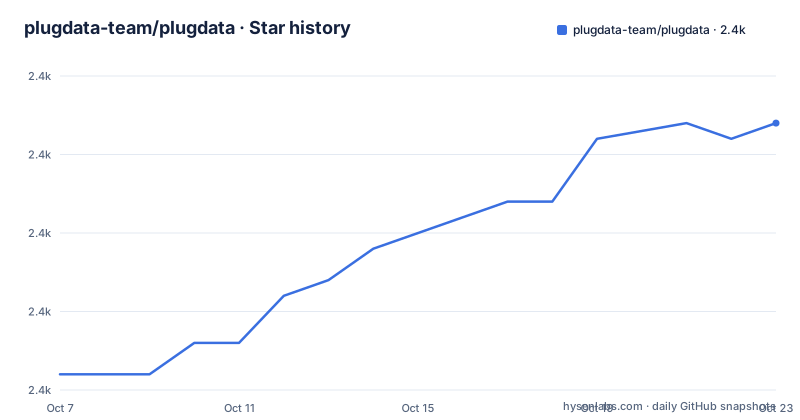
Star history
- plugdata-team/plugdata2,377 ★ · +16
| Repository | 2026-10-07 | 2026-10-23 |
|---|---|---|
| plugdata-team/plugdata | 2.4k | 2.4k |
16 Stars in the last 16 days, measured from the daily GitHub snapshot. Compare with other projects
Editorial analysis
What libpd wrapping actually buys you
Pure Data patches live in their own window and know nothing about the host application. That is the design that made Pd beloved by its users and invisible to everyone else. plugdata keeps the Pure Data engine and replaces the front end.
The engine is libpd, which exposes the Pd runtime as an embeddable library. Everything computational in a patch, the object graph, the signal math, the message passing, the file I/O, still runs through Pd exactly as before. What changes is the surrounding application: the interface is written in JUCE, and the whole thing is packaged as an audio plugin so the patch can be instantiated by a DAW.
The repository topics say it plainly: `juce-framework`, `libpd`, and `pure-data`. That combination is the project in three words.
The practical consequence is that a patch is no longer a program you launch but a plugin you insert. On a track in your DAW it takes audio input and output, it can be automated, and it gets a lifecycle managed by the host. The README also notes it can be used as a standalone replacement for pure-data, so the same build works either way.
One caveat the README states directly: this is still work in progress and there are probably still bugs. A project that describes itself that way after years of releases is being honest about the integration surface rather than apologising for the code.
Installing: plugins and standalone are different artifacts
The install instructions are split by platform and, more importantly, by artifact type, which trips people up on Linux.
On Windows and macOS you take the installer from the latest official release. On macOS a Homebrew cask exists, with the note that the maintainer does not keep it up to date, so it may be behind. A recent experimental build is also downloadable from the project website rather than from releases.
Linux is where the distinction matters. The OBS repository carries three separate packages: `plugdata`, `plugdata-vst3`, and `plugdata-lv2`, the last two named `vst3-plugdata` and `lv2-plugdata` on some distributions. The README spells out the consequence of getting this wrong: if you install a package without the repository configured, you only get the standalone version. So a Linux user who installs the base package and then wonders why their DAW sees no plugdata has usually made exactly that mistake.
The Arch User Repository has `plugdata-bin` for the latest stable version and `plugdata-git` for the latest experimental build, which is the usual distinction between a release build and whatever is on the branch.
Channels beyond the official ones include a Discord for patch sharing, bug reports and feature requests.
Building from source, and what the CMake options control
The build is CMake with git submodules, and the README is emphatic about the submodules since that is the usual failure:
git clone --recursive https://github.com/plugdata-team/plugdata.git
cd plugdata
mkdir build && cd build
cmake ..
cmake --build .
Without `--recursive`, or without a subsequent `git submodule update --init --recursive`, the build fails in ways that are not obviously related to submodules. The JUCE framework is a submodule, and on Linux it has its own dependency requirements documented separately in the JUCE repository.
The version requirement is specific: CMake 3.21 or later is needed to build the CLAP plugins, and with an older CMake the CLAP plugin builds are silently disabled. That is a detail worth knowing in advance, because you can otherwise spend time wondering why one plugin format is missing from your install.
Several build flags let you trade features against compile time. `-DQUICK_BUILD=1` skips the objects that take a long time to compile, named as All Gem objects plus the `sfz~` and ffmpeg based audio players. Each can be disabled individually with `-DENABLE_GEM=0`, `-DENABLE_SFIZZ=0`, and `-DENABLE_FFMPEG=0`. Performance tracing is available through `-DENABLE_PERFETTO=1`, which integrates Google's Perfetto library; you instrument functions with `TRACE_COMPONENT()`, or apply the provided Python script across matching `.cpp` files using clang tooling, and the README recommends building with `Release` mode on for representative profiling.
The project has been tested against Unix Makefiles, Xcode, Visual Studio 17 2022, and Visual Studio 16 2019, with the generator selectable through `-G`.
The release history is mostly project loading fixes
Reading the three most recent releases tells you where the project actually spends its effort.
v0.9.3, published 2026-02-14, added ASIO support on Windows, reduced installer sizes on macOS and Windows, and added Arch and openSUSE arm64 builds. Most of the rest is the Heavy exporter: colour, bold text and carriage returns in the Heavy console, an update to heavylib 0.4.1, a fix for an incorrect dfu-util exit status on Heavy to Daisy exports, a fix for the Windows DPF export ignoring `meta.json` settings, and a fix for Heavy triggering background updates to tracked folders.
v0.9.3-1 nine days later is almost entirely about DAW project loading. It fixes a crash on Windows when adjusting the global scale factor, broken store downloads on Linux, a broken GM synth, text rendering broken for graphs, `pdlua setmultiout` not working inside a plugin, and several problems loading DAW projects, including one where a project from Windows failed to load on macOS or Linux, plus patch version transition issues for `.plugdata` packages. It also fixes a crash in the text and code editor and invisible text in it.
Then v0.9.3-2 reverts one change from v0.9.3-1 that forced patches to load from file rather than DAW state when a `meta.json` file exists, because it broke saving array contents. The release note says you can skip that patch if you do not load patches from the Library panel.
The pattern is clear. Features arrive at a measured pace and the DAW integration edge consumes most of the fixing, including one change reverted eleven days after shipping. That is the honest state of a plugin format integration.
Shipping your own externals, and the bundled ELSE collection
Externals are how Pure Data grows, and plugdata supports adding your own, though not by dropping a binary anywhere.
The approach is to recompile the external alongside plugdata. The README gives two options: add your sources to the `externals` target inside `Libraries/CMakeLists.txt`, or place the source files in `Libraries/ELSE/Source`, where every `.c` file is compiled automatically. Then you register a setup function in `Source/Pd/Setup.cpp`, with the recommended location being inside `libpd_init_pdlua`. Registering through `initialiseELSE` or `initialiseCyclone` also works, with the stated side effect that your externals then also appear under the `else/` and `cyclone/` prefixes.
That prefix detail is the thing to remember, because it affects the patch text a user has to type.
By default plugdata ships with the ELSE collection of externals and abstractions, so a large body of existing Pure Data material works immediately. The Heavy exporter references in the release notes point to additional content from that ecosystem, including the LIRA-8 image shown in the README.
The `.plugdata` file format deserves a mention too, since patch version transition issues with those packages were fixed in v0.9.3-1. It is how a patch is bundled as a project asset rather than a loose `.pd` file, which is what makes the library panel and the DAW project loading paths possible.
Compiling your own external rather than loading a binary is a real constraint on a plugin host, and it is the main thing to account for if your workflow depends on a specific library that is not already bundled.
Project signals and where to look next
The repository is GPL-3.0 licensed, has 2,348 stars and 104 forks, and lists 238 open issues. It is not archived, and the last push was on 2026-09-24, well after the March 2026 releases, so development continues on the default branch. That branch is named `develop`, which is worth knowing because it differs from the `main` branch that appears in some of the README's own links, such as the license badge pointing at `plugdata-team/plugdata/blob/main/LICENSE`.
The fork to issue ratio is unusual: 104 forks against 238 open issues. For a visual patching tool that pattern usually means people are forking to change or build the external rather than to report, and it means the issue tracker carries more of the support load than a team would.
Documentation is spread rather than consolidated. There is a wiki linked from the README header, installation instructions on this page, a community Discord, a project website with downloads and documentation, and the `HowToDiscussDesign.txt` file at the repository root, which by its name is about how design conversations should be run. Release notes are detailed enough to be the primary functional documentation, since they record exactly which objects, file formats, and export paths were fixed.
The project lists corporate sponsors including Gig Performer and JitPack, which is a reasonable signal for a project whose value is in audio tooling. Where to start: build from source once with submodules initialised so you can see the flags that matter, then take a patch you already trust and load it into a DAW, because the DAW project loading path is where the recent releases spent their effort.
Editorial conclusion
plugdata solved a specific problem that held Pure Data back for a decade, which is that patches did not travel into the DAW you already used. Wrapping libpd in a JUCE interface and shipping real plugin formats means a patch can sit on an audio track next to everything else in a session. Two things to weigh before adopting it: the README labels the project work in progress and expects bugs, and the release history is heavily weighted toward fixing DAW project loading rather than adding features, which tells you the integration edge is where the remaining work is. The ELSE collection ships by default, so a patch you write may depend on externals the host does not have. Build from source with submodules initialised, install the OBS plugin packages on Linux, and open a patch you already trust before assuming it will survive a DAW restart.
Frequently asked questions
What are the differences between Pure Data and plugdata?
Pure Data is the original standalone application with its own windowed interface, and it knows nothing about a DAW. plugdata keeps the same Pure Data engine through libpd but replaces the front end with a JUCE interface and packages it as VST3, LV2, and CLAP plugins, so a patch becomes an insert you can automate on a track. The patching language and object graph are unchanged.
Why can't my DAW see the plugdata plugin on Linux?
You probably installed only the standalone package. The OBS repository carries `plugdata`, `plugdata-vst3`, and `plugdata-lv2` separately, and the README warns that a package installed without the repository configured contains only the standalone version. Install the VST3 or LV2 package as well.
Does plugdata work as a standalone application?
Yes. The README states it can be used as a standalone replacement for pure-data, and the Linux OBS repository ships a standalone package under the plain `plugdata` name alongside the separate plugin packages.
How do I add my own Pure Data external to plugdata?
You recompile it with plugdata rather than loading a binary. Add the sources to the `externals` target in `Libraries/CMakeLists.txt`, or drop `.c` files into `Libraries/ELSE/Source` where they compile automatically, then call the setup function from `Source/Pd/Setup.cpp`, preferably inside `libpd_init_pdlua`.
Official sources
Add this badge to your README
If you maintain this project, the badge below links readers to this analysis and shows its maintenance status from the daily GitHub snapshot. Paste the markdown into your README; add ?metric=license or ?metric=stars to the image URL for a different field.

[](https://hysenlabs.com/projects/plugdata-team-plugdata)Star history chart for your README
[](https://hysenlabs.com/projects/plugdata-team-plugdata)Was this useful?