WinDiskWriter Writes One Drive for Two Boot Modes and Removes the Checks Windows 11 Applies
🖥 Windows Bootable USB creator for macOS. 🛠 Patches Windows 11 to bypass TPM and Secure Boot requirements. 👾 UEFI & Legacy Support
At a glance
- What is it?
- A macOS application that builds bootable Windows USB installers for UEFI and Legacy BIOS, patches out the TPM and Secure Boot requirement checks, adds EFI booting to Windows Vista and 7, and splits the oversized image files that FAT32 cannot hold.
- Who is it for?
- WinDiskWriter fits the specific situation it was built for: a Mac user who needs to install Windows on a machine whose firmware cannot boot the media the official installer produces, whether that is an old desktop without EFI or a virtual machine without a TPM. It does not fit a Windows user, since there is no Windows build in the repository, and if you want the installer to keep Microsoft's Windows 11 checks, leave the opt-in Patch Installer Requirements option unused.
- Can I use it commercially?
- Yes, with conditions. GPL-3.0 is a copyleft licence: if you distribute software that includes it, you must release that software's source code under the same licence. Running it internally without distributing it does not trigger that obligation.
- Is it still maintained?
- Yes. The repository last received commits 69 days ago.
- What is it written in?
- Mainly C, according to GitHub's language statistics.
Answers come from the project's GitHub data, last synced on November 14, 2026, and from our analysis. They are not legal advice.
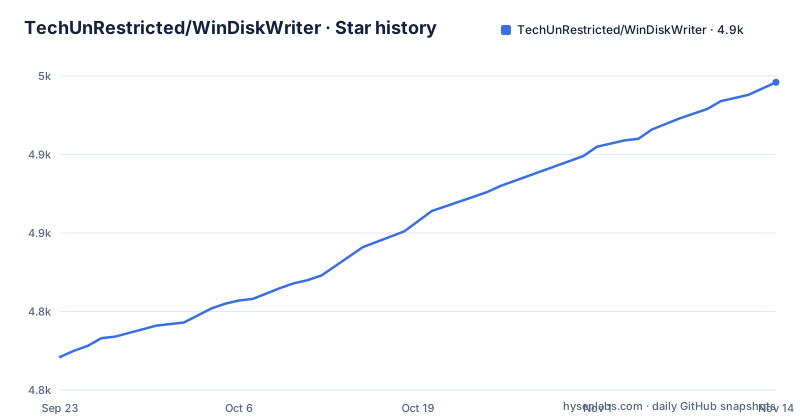
Star history
- TechUnRestricted/WinDiskWriter4,946 ★ · +175
| Repository | 2026-09-23 | 2026-11-14 |
|---|---|---|
| TechUnRestricted/WinDiskWriter | 4.8k | 4.9k |
175 Stars in the last 52 days, measured from the daily GitHub snapshot. Compare with other projects
Editorial analysis
The README opens by saying every other download site is fake
The first substantive thing in the file is a warning, and it is worth repeating verbatim in spirit because it changes how you should search for this software. The project says it only has a GitHub page, that all other websites are fake, and that the GitHub page is the only official place to download it. That is an unusual thing to lead with, and it tells you something about the project. Small utilities that write to disk images attract impersonation sites, and a search for a bootable USB creator on macOS will surface pages that look official. The repository structure supports the claim that this is a single small project rather than a company product: the root holds a .gitignore, a README, a licence file, a donations graphic, one source directory named WinDiskWriter, and an Xcode project directory:
WinDiskWriter/
windiskwriter.xcodeproj/
license.md
One application directory and one project file. There is no installer script in the repository, so the releases page and the Xcode project are the visible distribution routes.
One drive that boots both ways is the feature everything else serves
The stated purpose is creating bootable universal USB Windows installers that support both UEFI and Legacy BIOS modes, and the README says the resulting drive can be used to install Windows on a PC, an Intel Mac or certain virtual machines. The Legacy support is called out separately in the feature list, and the reason given is concrete: it is required if you want to install Windows on computers with old firmwares that do not support EFI booting. That is the whole reason this tool exists rather than a general-purpose imaging utility, and it explains the design. A drive written for one boot mode will not start on hardware that only speaks the other, and a modern laptop firmware will not necessarily fall back to legacy for you.
The Windows 11 patch removes the checks the installer applies
One feature is described in terms of what it disables rather than what it adds. You can bypass TPM, minimum RAM, Secure Boot and some other system requirements set by Microsoft for Windows 11, and the README is specific about how it happens: you click Patch Installer Requirements before writing the drive. Three observations are worth making. First, this is a media modification, not a firmware change, so it affects the installer you are about to run rather than the security state of the machine you are on. Second, what it produces is a Windows installation that was never checked against the platform's hardware and security requirements, which is exactly why those requirements exist. Third, the button is opt-in. It is not applied automatically, so a drive written without clicking it carries the unmodified installer, and a user who clicks it has made a decision about their own machine. That is the correct design for a feature with these consequences, and it is also the one that makes the tool's warnings worth reading rather than dismissing.
Splitting the image is a filesystem limit, not an optimisation
Two of the features solve problems that come from the destination medium rather than from Windows. The first is splitting the installer image. Newer Windows ISO files contain a large install.wim file, larger than 4GB, and FAT32, the filesystem a bootable Windows drive is normally formatted with, only supports files up to 4GB. The README says the tool splits it automatically. This is one of those constraints where knowing the cause makes the behaviour predictable: it is not compressing anything, it is splitting one large file into pieces the filesystem will accept and letting the Windows setup reassemble them. The second constraint is the compressed variant. Some Windows ISO files, usually repacks, use an .esd system image instead, and the planned changes section says that even an .esd file is sometimes too large to fit into FAT32, with support for splitting .esd files listed as work not yet done. So the tool handles the common case completely and the repack case partially, which is worth knowing if the image you are writing came from somewhere other than Microsoft.
Adding EFI booting to Vista and 7 means extracting a bootloader
The fourth feature goes backwards in time and is the most interesting one technically. Windows Vista and 7 do not support EFI booting out of the box, so additional steps are required to make those versions boot on EFI hardware, and the README describes those steps as extracting an EFI-capable bootloader from the installer, which the tool does for you. That is a bootloader transplant: take an EFI-capable bootloader out of the installer itself and place it where the firmware will find it. The same logic explains the Legacy support in the other direction, where the media must be made bootable by a firmware that predates EFI entirely. Both features are really the same idea, moving a boot path across a boundary the operating system did not draw. It is also why the compatibility table marks Windows Vista and 7 as verified for both boot modes, since without this step those rows would be unimplementable rather than merely untested.
You pick a whole disk today, and a partition is on the list
The planned changes section contains one item that describes a real limitation of the current version: support for selecting individual partitions. The explanation is that the destination device can currently only be chosen from a list of whole disks, and the planned feature would let you choose an individual partition of a USB drive or even of an internal disk. Until that lands, the tool's blast radius is a whole device, which is worth understanding before you start. The second planned item is support for splitting the compressed .esd image files, as described earlier. Both are honest gaps rather than surprises, and both are stated in the repository rather than discovered later. For a user, the practical implication is to have a spare drive and to double-check the selected device before writing, since there is no partition-level target to aim at and a mis-click writes to the entire disk.
Separate Intel and ARM builds, and two macOS versions marked untested
The compatibility information is given as two tables, one for Windows images and one for macOS versions. The Windows table is unambiguous: Windows 11, 10, 8.1, 8, 7 and Vista are all listed as supporting both UEFI and Legacy boot modes and all are marked verified, with x64 architecture for Windows 11 and both x64 and x32 for the rest. The macOS table is where the detail is. Both x86_64 and ARM64 are covered for the newest releases, starting with macOS Tahoe 26.0, which is additionally marked as needing a separate build. Moving back through Sequoia, Sonoma, Ventura, Monterey and Big Sur, both architectures are listed as verified. From Catalina through Lion the table narrows to x86_64 only, and the final entries, Lion and Snow Leopard, are marked not yet, with a parenthetical note that it should work. That parenthetical is the kind of phrase to read as untested rather than as working, and the architecture column is the other thing to check, since ARM64 is listed only for Big Sur and newer.
Editorial conclusion
WinDiskWriter fits the specific situation it was built for: a Mac user who needs to install Windows on a machine whose firmware cannot boot the media the official installer produces, whether that is an old desktop without EFI or a virtual machine without a TPM. It does not fit a Windows user, since there is no Windows build in the repository, and if you want the installer to keep Microsoft's Windows 11 checks, leave the opt-in Patch Installer Requirements option unused. Before you run it, verify three things: that you are on a macOS version listed as verified rather than as untested, that you understand the patch bypasses the TPM, minimum RAM and Secure Boot requirement checks, and that you downloaded it from the repository's releases page, since the README states plainly that every other site claiming to host it is fake.
Frequently asked questions
What does WinDiskWriter do?
It creates bootable universal USB Windows installers that boot in both UEFI and Legacy BIOS modes, so one drive can install Windows on a PC, an Intel Mac or certain virtual machines. It can also patch a Windows 11 installer to bypass the TPM, minimum RAM and Secure Boot requirements, add EFI booting to Windows Vista and 7, and split an oversized install.wim file because FAT32 cannot hold a file above 4GB.
what is windiskwriter
A macOS application for writing bootable Windows USB drives, licensed under GPL version 3 and written in C. It is distributed only from its GitHub page, and the README states in a warning that every other website claiming to host it is fake. The repository holds one application directory and an Xcode project, and the README notes a separate build for macOS Tahoe 26.0.
how to install windiskwriter
The repository holds no installer script, so the releases page is the route, and the README states it is the only official download location. Building from source means opening the included Xcode project on macOS. The compatibility table lists the supported macOS versions, with the newest needing a separate build and the two oldest entries marked not yet verified.
is windiskwriter safe to use
The README does not discuss safety directly, but three facts are relevant. It is GPL-3.0 licensed, it insists that its GitHub page is the only legitimate source and that other sites are fake, and its central feature deliberately bypasses the TPM, minimum RAM and Secure Boot requirements Microsoft sets for Windows 11. That patch is opt-in: you click Patch Installer Requirements before writing.
windiskwriter vs rufus
On its own terms, it runs on macOS, writes drives supporting both UEFI and Legacy boot modes, patches the Windows 11 requirement checks, adds EFI booting to Windows Vista and 7, and splits install.wim files too large for FAT32. Choosing the destination is currently limited to whole disks, with individual partition selection listed as a planned change.
Official sources
Add this badge to your README
If you maintain this project, the badge below links readers to this analysis and shows its maintenance status from the daily GitHub snapshot. Paste the markdown into your README; add ?metric=license or ?metric=stars to the image URL for a different field.

[](https://hysenlabs.com/projects/techunrestricted-windiskwriter)Star history chart for your README
[](https://hysenlabs.com/projects/techunrestricted-windiskwriter)Was this useful?