react-three-rapier: Rapier Physics for React Three Fiber
🤺 Rapier physics in React
At a glance
- What is it?
- react-three-rapier is a TypeScript wrapper around the Rapier WASM physics engine for React Three Fiber scenes. It exposes physics through components such as Physics, RigidBody, colliders, joints, sensors, events, manual stepping, and snapshots.
- Who is it for?
- Adopt react-three-rapier when the application is built with React Three Fiber and physical behavior should remain part of the React component tree. Do not choose it for a DOM-only interface or a scene that cannot accommodate Rapier and WASM integration.
- Can I use it commercially?
- Yes. MIT is a permissive licence: you can use, modify and sell software built on it, as long as you keep its copyright and licence notices.
- Is it still maintained?
- Yes. The repository last received commits 27 days ago.
- What is it written in?
- Mainly TypeScript, according to GitHub's language statistics.
Answers come from the project's GitHub data, last synced on November 7, 2026, and from our analysis. They are not legal advice.
Star history
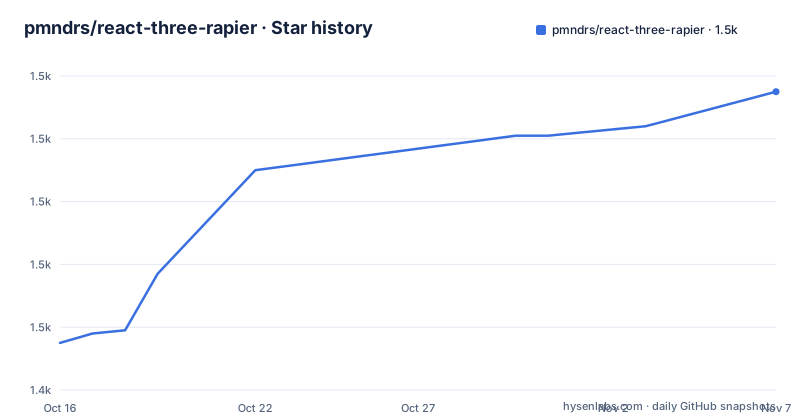
- pmndrs/react-three-rapier1,535 ★ · +80
| Repository | 2026-10-16 | 2026-11-07 |
|---|---|---|
| pmndrs/react-three-rapier | 1.5k | 1.5k |
80 Stars in the last 22 days, measured from the daily GitHub snapshot. Compare with other projects
Editorial analysis
The React Three Fiber boundary for react-three-rapier
react-three-rapier solves the problem of adding physics to a React Three Fiber scene without moving the entire simulation into a separate imperative application layer. The README describes it as a wrapper around Rapier, a WASM-based physics engine. It is aimed at developers who already use React Three Fiber or intend to build their 3D scene with it. The library does not replace React Three Fiber. Its components live inside a Canvas and work with meshes, colliders, and the scene graph.
This boundary matters when choosing a library. If a project renders its interface with ordinary React components and has no React Three Fiber scene, the package is not a direct fit. If the project already uses Canvas and wants bodies to fall, rotate, collide, trigger sensors, or respond to forces, the component model is more appropriate. The wrapper is specifically about connecting those physical behaviors to React-rendered 3D objects.
The project also has an explicit compatibility split. The release announcement says that version 2 adds support for @react-three/fiber v9 and React 19. Applications using React 18 are instructed to use @react-three/rapier v1 and @react-three/fiber v8. Dependency compatibility is therefore an adoption condition, not a minor installation detail.
Physics world creation and lazy Rapier initialization
The Physics component is the root of the simulation. The README says it creates the physics world and manages the simulation. It relies on Rapier being initialized lazily, so the component must be placed inside Suspense. In the documented configuration, Physics also receives global settings such as gravity, interpolation, and the default collider strategy.
A minimal tree therefore has three layers. Canvas provides the React Three Fiber rendering context. Suspense handles the lazy initialization boundary described by the project. Physics owns the Rapier world. RigidBody and collider components then describe the physical objects inside that world. This arrangement keeps rendering and physics responsibilities separate while allowing both to be expressed in one React tree.
The README does not provide a complete installation command or a package installation section. It does identify the package as @react-three/rapier and links to the npm package and API documentation. A new user should first select the package major compatible with the existing React and Fiber versions, then follow the package documentation for installation. The repository uses Yarn-related development configuration, but the README does not state a universal application install command, so adding one here would invent a setup step.
RigidBody and automatic collider generation
RigidBody connects rendered meshes to the physics world. A component can wrap one or more meshes, and by default the library creates colliders from the geometry of those meshes. The colliders prop controls the default shape generation at the RigidBody level. The Physics component can set a global default, while a RigidBody can override it locally. Setting colliders={false} disables automatic generation.
The documented automatic choices are specific. cuboid creates a CuboidCollider from the mesh bounding box. ball creates a SphereCollider from the bounding sphere. trimesh creates a TrimeshCollider from the mesh geometry. hull creates a ConvexHullCollider from that geometry. These options are useful when the visual geometry is also an acceptable physical approximation, but they can be wrong when the collision representation needs to be simpler or shaped differently from the visible mesh.
Automatic generation is therefore a convenience with a cost in expressiveness. It reduces boilerplate for common objects, but it also makes the physical shape depend on mesh geometry and the selected generation mode. Projects with complex or unusual collision requirements should inspect the generated shapes carefully or use explicit colliders instead of assuming that the visible mesh is always the best simulation shape.
Explicit colliders for compound and simplified shapes
Collider components let an application define collision shapes by hand. The README presents these as useful for complex shapes, simplified shapes, and detecting collisions on a specific part of a mesh. They can be attached to a RigidBody, which means one body can contain several physical volumes rather than requiring every visible mesh to become an independent body.
The documented example uses a RigidBody containing a Sphere and two BallCollider components. One collider is placed at the body's position and another is offset along the x axis. That creates a compound arrangement whose physical footprint does not have to match the visible mesh exactly. This is a better fit when a character, vehicle, tool, or assembly needs multiple collision regions but should move as one rigid unit.
The project also documents mixing automatic and explicit colliders. A RigidBody can use a default ball collider while a MeshCollider specifies trimesh geometry for another child. This avoids forcing one collision policy across an entire scene. It also exposes a design choice: automatic generation reduces component code, whereas explicit colliders require more declarations but make collision intent visible. Neither approach is universally better. The right choice depends on whether mesh geometry accurately represents the physical object.
A first torus scene with a separate floor collider
The README gives a working component example but does not give an installation command. It identifies the npm package as @react-three/rapier and directs users to the API documentation for available props. Before copying the example, check the React version. The documented pairing is @react-three/rapier v2 with React 19 and @react-three/fiber v9, or @react-three/rapier v1 with React 18 and @react-three/fiber v8.
The first use can remain close to the documented structure. The example imports geometry helpers from @react-three/drei, Canvas from @react-three/fiber, and Physics, RigidBody, and CuboidCollider from @react-three/rapier. Physics is wrapped in Suspense, the torus is placed in a RigidBody with hull colliders, and the cuboid collider represents a floor.
import { Box, Torus } from "@react-three/drei";
import { Canvas } from "@react-three/fiber";
import { Physics, RigidBody, CuboidCollider } from "@react-three/rapier";

const App = () => {
  return (
  <Canvas>
    <Suspense>
      <Physics debug>
        <RigidBody colliders={"hull"} restitution={2}>
          <Torus />
        </RigidBody>
        <CuboidCollider position={[0, -2, 0]} args={[20, 0.5, 20]} />
      </Physics>
    </Suspense>
  </Canvas>
);
The README example does not show the Suspense import, so a complete application must supply it through its React setup. It does show the intended nesting and the first meaningful behavior to check: a body with a hull collider and a separate floor collider. The debug prop enables the documented debug mode. No application installation command is included because the README does not provide one.
Events, time control, joints, snapshots, and maintenance
The documented topic list shows that react-three-rapier extends beyond basic collision geometry. Collision events and contact force events provide callbacks for interactions. Sensors represent regions that detect overlap or contact without acting as ordinary solid bodies. The README does not reproduce every callback signature, so an application should use the linked API documentation rather than infer event names or payload shapes.
Time control is another documented area. The library describes configuration for time-step size, advanced manual stepping, and on-demand rendering. These features matter when a simulation must be coordinated with a separate game loop or when rendering should not happen on every frame. They also introduce more moving parts than the default Physics component. A project that only needs gravity and falling objects can start with the documented basic configuration, then add manual control only when its loop requires it.
Joints include fixed, spherical, revolute, prismatic, rope, and spring joints. The range covers connections that hold parts together, permit rotation, constrain translation, emulate rope, or apply spring behavior. Snapshots are also documented. These features are concrete reasons to evaluate the library for assemblies and interactive simulations, but a project does not necessarily need every feature. The selected joint must match the intended mechanical relationship.
A genuine alternative is to use Rapier's JavaScript API directly in an imperative or engine-specific simulation loop. It offers an engine-specific approach to coordinating simulation and rendering. It also requires application code to manage the bridge between simulation state and scene objects. For an existing engine or custom loop, that may be preferable. For a React Three Fiber application built around component composition, react-three-rapier removes much of that synchronization work.
The repository is not archived, and the last push was on 2026-10-12. Recent releases include @react-three/[email protected] on 2025-11-03 and @react-three/[email protected] on 2025-04-06. The repository is licensed under MIT. Upgrading requires checking the major-version boundary because the README associates version 2 with newer React and Fiber releases. The MIT declaration permits use and modification under its terms, but this review does not provide legal advice.
Editorial conclusion
Adopt react-three-rapier when the application is built with React Three Fiber and physical behavior should remain part of the React component tree. Do not choose it for a DOM-only interface or a scene that cannot accommodate Rapier and WASM integration. Verify first that the selected package major matches the React and Fiber versions, because version 2 targets React 19 and Fiber 9 while version 1 is required for React 18 and Fiber 8. Then confirm the exact collider, event, joint, and stepping behavior against the API documentation.
Frequently asked questions
Does react-three-rapier support React 19?
Yes. The README says @react-three/rapier v2 supports React 19 and @react-three/fiber v9. It directs React 18 users to @react-three/rapier v1 and @react-three/fiber v8.
How do I create a physics world in react-three-rapier?
Use the Physics component as the root of the physics scene. The README says it creates and manages the world and should be wrapped in Suspense because Rapier initializes lazily.
How can I control collider shapes in react-three-rapier?
RigidBody and Physics accept automatic collider settings such as cuboid, ball, trimesh, hull, or false. For compound or simplified shapes, attach explicit collider components such as CuboidCollider or BallCollider to a RigidBody.
What license does react-three-rapier use?
The repository package metadata identifies the project as licensed under MIT. The README does not provide additional licensing terms beyond that declaration.
Official sources
Add this badge to your README
If you maintain this project, the badge below links readers to this analysis and shows its maintenance status from the daily GitHub snapshot. Paste the markdown into your README; add ?metric=license or ?metric=stars to the image URL for a different field.

[](https://hysenlabs.com/projects/pmndrs-react-three-rapier)Star history chart for your README
[](https://hysenlabs.com/projects/pmndrs-react-three-rapier)Was this useful?