PO UI: an Angular component library aimed at enterprise screens
Biblioteca de componentes Angular.
At a glance
- What is it?
- PO UI publishes @po-ui/ng-components, an Angular component library for business applications, with a separate @po-ui/ng-templates package for ready made page templates such as login and dynamic table, and an ng add schematic that wires the theme and the HttpClientModule for you. The current line targets Angular 21 and Node 20.11 or newer.
- Who is it for?
- PO UI suits a team building an internal enterprise application on Angular that wants a consistent set of data tables, forms and page shells rather than assembling them from a general purpose kit, and that is prepared to accept a component library with its own conventions.
- Can I use it commercially?
- Yes. MIT is a permissive licence: you can use, modify and sell software built on it, as long as you keep its copyright and licence notices.
- Is it still maintained?
- Yes. The repository last received commits 1 day ago.
- What is it written in?
- Mainly TypeScript, according to GitHub's language statistics.
Answers come from the project's GitHub data, last synced on November 7, 2026, and from our analysis. They are not legal advice.
Star history
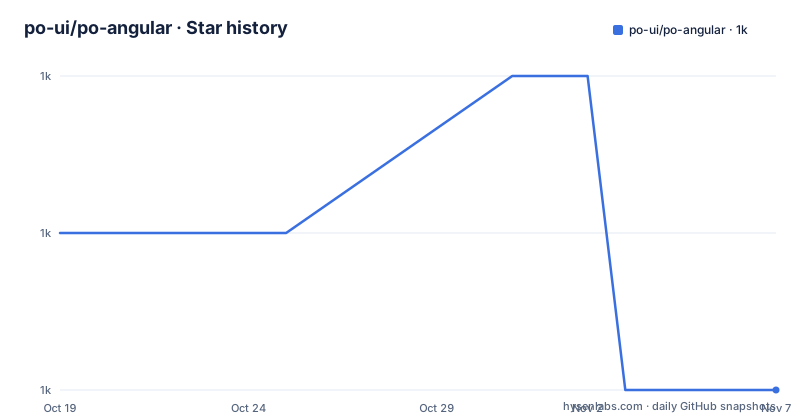
- po-ui/po-angular1,017 ★ · -1
| Repository | 2026-10-19 | 2026-11-07 |
|---|---|---|
| po-ui/po-angular | 1k | 1k |
-1 Stars in the last 19 days, measured from the daily GitHub snapshot. Compare with other projects
Editorial analysis
What PO UI is: a component library for business software, not a general kit
PO UI describes itself in Portuguese as a library of UI components for Angular, and the repository description is literally Biblioteca de componentes Angular. The interesting part is not the category but the intent. The topic list calls it enterprise, and the component names the documentation links give away the audience, po-page-login, po-modal-password-recovery, po-page-blocked-user and po-page-dynamic-table are not the components of a consumer app, they are the components of a back office system. The template package exists for exactly this reason, so a team can drop in a working login page or a paged, filterable data table rather than assembling one from primitives. The npm package is @po-ui/ng-components, the documentation site is po-ui.io, the licence is MIT, and the last push to the repository was on 2026-10-14.
Prerequisites: Node 20.11 or newer, the Angular CLI, and a version matrix you must check
The Prerequisites section states that to start using PO UI you need Node.js installed at version 20.11.x or above and your favourite package manager at its most current version, and if you do not already have the @angular/cli package you install it via npm or yarn, with the commands given for both. The version being installed is @angular/cli@21, so the library tracks a specific Angular major. Then there is the step that decides whether your day goes well or badly, checking your project's dependencies against the versions the library declares. The documentation is explicit that some of them need to match the Po and Angular versions, and that they can be found in the package.json at the root of the application, and it shows the expected set, with the Angular packages at about 21.2.17, rxjs at about 7.8.1, tslib at 2.6.2 and zone.js at about 0.15.0, and TypeScript at about 5.9.3 on the dev side. The library's dependencies are therefore a constraint on your application, not a suggestion.
npm i -g @angular/cli@21"dependencies": {
"@angular/animations": "~21.2.17",
"@angular/common": "~21.2.17",
"@angular/core": "~21.2.17",
"@angular/forms": "~21.2.17",
"@angular/router": "~21.2.17",
"rxjs": "~7.8.1",
"tslib": "^2.6.2",
"zone.js": "~0.15.0"
}Scaffolding a project, and the npm 7 peer dependency trap
If you do not have a project yet, the Angular CLI builds the whole initial structure, and the command is ng new my-po-project --skip-install, with the note that the skip-install parameter creates the project but does not install the dependencies automatically. That flag is deliberate here, because the next step is to align the dependency versions before installing anything. If you already have a project and just want to add the library, the documentation says to skip to step 1.1. Then you run the install, with npm install or yarn install, and the documentation carries a warning that with version 7 of npm a dependency version error may occur, in which case you use npm install --legacy-peer-deps. That warning is a small but honest signal about how tightly the package's peer ranges are declared, and the mitigation is the standard npm escape hatch rather than anything specific to PO UI.
ng new my-po-project --skip-install

npm install
ng add does the theme, the starter guide and the HttpClientModule for you
Adding the library uses the Angular CLI's ng add command, ng add @po-ui/ng-components, and the documentation explains what the CLI takes care of: it configures the theme, it installs the Po getting started guide, and it also imports the HttpClientModule. The command runs in the root of your project. You are then asked whether you want an initial structure included in your project with a side menu, a page and a toolbar, built from Po components, and if you want only the library you answer N. That prompt is the schematic doing the work that a starter repository would otherwise hold, so a project that starts from the schematic starts with a working application shell rather than a blank page. The separate templates package is added the same way later, with ng add @po-ui/ng-templates, and running that command installs the package and configures the PoTemplatesModules in the app.module.
ng add @po-ui/ng-components
ng add @po-ui/ng-templates
The monorepo is five libraries, and each has its own lint and test target
The package.json shows a monorepo with separate libraries and separate quality gates for each, which is a good sign about how the project is maintained. The root package is po-ui-sources at version 21.34.0, and the lint scripts are per library, for storage, sync, ui, templates and code-editor, all in the ng lint form with the stylish format. The test scripts follow the same pattern, and the unit tests run with --watch=false, --code-coverage, --browsers=ChromeHeadless and --source-map, so coverage is collected in headless Chrome. The schematic tests are separate again, built with gulp build:schematics and then run under jasmine against the dist output for each library, which is how the ng add behaviour itself is tested. There is also a test-all style script chaining the schematic suites, and an e2e script using ng e2e. The repository layout matches, with libs/ and projects/ directories, an mcp.json, a HOW_TO_DOCUMENT.md and a STYLEGUIDE.md.
The MCP entry, and what Context7 actually gives a developer
The README has a section headed MCP? Sim!, and it announces that the Angular library is now part of Context7, a platform that provides documentation and code snippets kept up to date for LLMs and AI-enabled code editors. The stated benefits are quick access to the most recent documentation and usage examples directly in your development environment, such as Cursor, Claude and other LLMs, and faster development with AI, since an editor with AI can be instructed to use the library and will have the whole context it needs to generate precise, working code. The technical framing is that the library is available through a Context7 MCP server, and MCP is described as an open standard designed to connect AI assistants intelligently to data sources such as the library documentation, so the AI has the right context to answer programming questions with more accuracy. The practical instruction is simply to mention the library name in your interactions with an LLM that supports Context7. The repository ships an mcp.json, so the integration is configured in the tree rather than only described.
Running it, and the state of the project
To see the result you run ng serve and open http://localhost:4200 in the browser, and from there the documentation says to open your editor or IDE and start working, adding the templates package when you want the page-level components such as po-page-login, po-modal-password-recovery, po-page-blocked-user and po-page-dynamic-table. The project is published to npm as @po-ui/ng-components with public access, the homepage is po-ui.io, and the repository carries an MIT licence. The CI badges show a Travis branch build, and the repository has a .husky/ directory with a lint-staged config, a .prettierrc, a .eslintrc.json and a commitlint.config.js, so formatting, linting and commit message conventions are enforced on commit. The last push was on 2026-10-14, the repository is not archived, and there are no GitHub releases, since the release artefact is the npm package and the version line is tracked in the package manifest rather than by a tag.
ng serveEditorial conclusion
PO UI suits a team building an internal enterprise application on Angular that wants a consistent set of data tables, forms and page shells rather than assembling them from a general purpose kit, and that is prepared to accept a component library with its own conventions. It is the wrong choice if your application has a bespoke design system, because adopting a library means adopting its layout, density and interaction model, and a poor fit for a small project, since the dependency check step ties you to a specific Angular and dependency version matrix. Before adopting it, compare your package.json against the dependency table in the documentation, because the library states which versions it is compatible with, and note that installing the templates package is a separate command that also registers PoTemplatesModules in your app module.
Frequently asked questions
What is PO UI?
It is a library of UI components for Angular, published to npm as @po-ui/ng-components and aimed at enterprise business applications, with a separate @po-ui/ng-templates package for ready made page templates such as po-page-login and po-page-dynamic-table. The documentation site is po-ui.io and the licence is MIT.
What do I need before using PO UI?
Node.js version 20.11.x or above, your favourite package manager at its current version, and the Angular CLI installed as @angular/cli@21 via npm or yarn. You also need to check your project's dependencies against the versions the library declares, which are in the package.json at the root of the application.
How do I add PO UI to an existing Angular project?
Run ng add @po-ui/ng-components from the project root. The CLI configures the theme, installs the Po getting started guide and imports the HttpClientModule, and it asks whether you want an initial structure with a side menu, a page and a toolbar built from Po components.
What does the PO UI templates package add?
The @po-ui/ng-templates package provides ready made template components such as po-page-login, po-modal-password-recovery, po-page-blocked-user and po-page-dynamic-table. You add it with ng add @po-ui/ng-templates, which installs the package and configures the PoTemplatesModules in the app module.
Does PO UI work with AI code editors?
The library is available through a Context7 MCP server, an open standard for connecting AI assistants to data sources such as documentation. The README says to mention the library name in your interactions with an LLM that supports Context7, and the repository ships an mcp.json.
Official sources
Add this badge to your README
If you maintain this project, the badge below links readers to this analysis and shows its maintenance status from the daily GitHub snapshot. Paste the markdown into your README; add ?metric=license or ?metric=stars to the image URL for a different field.

[](https://hysenlabs.com/projects/po-ui-po-angular)Star history chart for your README
[](https://hysenlabs.com/projects/po-ui-po-angular)Was this useful?