PolyArch humanize is a two-model review loop, and its name attracts the wrong searches
From Automated Idea Factory to Realization
At a glance
- What is it?
- The humanize plugin drives an iterative build where one model implements and a second, separate model reviews with severity markers until the acceptance criteria are met. Nothing in it rewrites text to look human, which is what almost every search for the name turns up instead.
- Who is it for?
- Use this if you already run a coding agent and a separate review CLI and want the two kept structurally apart, because the value is in the separation rather than in the loop itself. Two things to check before you adopt it.
- Can I use it commercially?
- Not without permission. GitHub finds no licence file in the repository, and without a licence all rights are reserved by default: you may read the code but not reuse it. Check the README, or ask the authors, before using it.
- Is it still maintained?
- Yes. The repository last received commits 80 days ago.
- What is it written in?
- Mainly Shell, according to GitHub's language statistics.
Answers come from the project's GitHub data, last synced on November 15, 2026, and from our analysis. They are not legal advice.
Star history
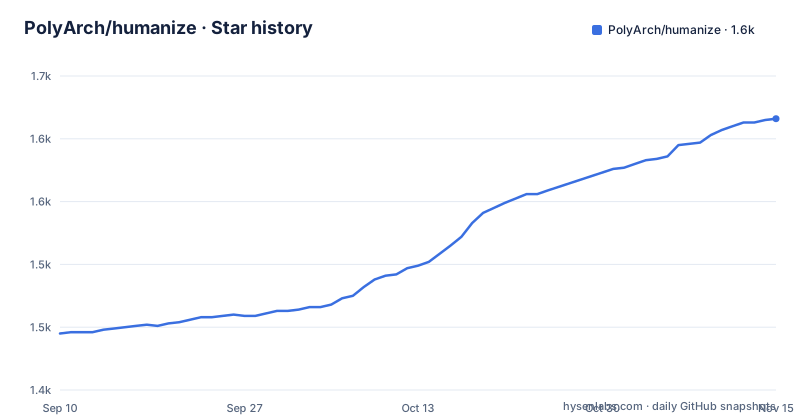
- PolyArch/humanize1,616 ★ · +171
| Repository | 2026-09-10 | 2026-11-15 |
|---|---|---|
| PolyArch/humanize | 1.4k | 1.6k |
171 Stars in the last 66 days, measured from the daily GitHub snapshot. Compare with other projects
Editorial analysis
The two models are deliberately different
The central mechanism is a split between implementer and reviewer, stated as one build plus one review: Claude implements and Codex independently reviews. The page claims no blind spots for this arrangement, which is a stronger claim than a second pass by the same model would earn.
The loop itself is named twice. It expands to Ralph Loop with Codex Review, and the same letters also read as reinforcement learning with code review. It is described as inspired by an official loop plugin and extended with the independent review step. Two phases run inside each iteration. During implementation, Claude works and Codex reads the summaries. Then a code review phase follows, in which Codex checks code quality using severity markers. Issues feed back into implementation until they are resolved.
That structure explains why an external command is a hard requirement rather than an optional extra. The reviewer is a separate process, not a mode of the same session.
The loop keeps going until the acceptance criteria are met
Termination is defined by criteria rather than by iteration count. Iterative refinement continues until all acceptance criteria are met, and parallel execution is available through an optional swarm mode.
The stated philosophy is iteration over perfection: instead of expecting a correct result in one shot, issues are caught early and refined incrementally. That is a reasonable position for long running work, and it puts the burden on the plan, since the loop can only check what the plan asked for.
The other core concept is a checkpoint on the human. Before the loop starts, the plugin verifies that you understand the plan you are about to execute, and the page states the reason plainly: the human must remain the architect. This is the one step where the tool deliberately refuses to proceed automatically, and it is documented in a usage page rather than in the quick start.
Ideas and plans are files, and the directory is named
Every artefact is written to disk with a predictable location, which matters because a loop this iterative generates a lot of text.
The optional first command turns a loose thought into an idea draft, written by default to a directory named after the tool with a slug and a timestamp in the filename. Passing a markdown path instead expands existing rough notes, and a flag controls how many parallel directions explore the idea, defaulting to six.
From there a plan is generated from the draft by naming an input and an output path, and a third command refines an annotated plan. That last step expects annotations in one of three formats, either paired marker text, a paired single tag, or a paired comment tag, which tells you reviewers are expected to write back into the plan file rather than report elsewhere.
The repository root carries that tooling directory at the top level alongside command, config, hooks, skills and template directories, so the generated artefacts live beside the plugin rather than in a temporary location.
The monitor is a sourced shell function, not a subcommand
Progress can be watched through four filter modes: the loop itself, every skill invocation across both external tools, invocations of the review command only, or invocations of the research command only.
The setup is unusual. The monitor is not a subcommand of the plugin. You source a shell script from a path inside your checkout, with the page suggesting you add that line to your shell profile, and then call the monitor by name. So the monitoring surface only exists once you have edited your shell startup file, and the path in the example is a placeholder you must resolve yourself.
The page is explicit that this runs in another terminal and not inside the coding session. That is a reasonable constraint for watching a long loop, but it means the dashboard is unavailable to anyone who has not set up the sourced function, and a fresh clone gives you nothing to run until you do.
Install names two channels and the version is stated in prose
Installation happens through a plugin marketplace, and the page offers two of them. One adds the main marketplace, and the other adds the same entry with a development branch suffix, described as the way to get experimental features. A third command installs the plugin by name from that marketplace:
# Add PolyArch marketplace
/plugin marketplace add PolyArch/humanize
# If you want to use development branch for experimental features
/plugin marketplace add PolyArch/humanize#dev
# Then install humanize plugin
/plugin install humanize@PolyArch
The version is not a tag you can look up. It is a line of prose in the README stating the current version, which means checking whether your install matches the documentation requires reading the file rather than querying a release, and the repository publishes no releases.
The review capability has a hard external requirement: a separate command line tool, with a full installation page for prerequisites and alternative setup. Three further pages cover installing the plugin as a skill runtime for the review tool and for a third-party CLI, plus a configuration page describing a shared config hierarchy and override rules. The breadth of those pages suggests the plugin is expected to work across several agent runtimes, not only the default one.
Provenance, a successor project and a homepage are all in the header
The README opens with three notices before it describes anything. The first points to a successor project under a different organisation and says it is under active development and looking for feedback. The second announces a hosted homepage for the tool. The third states that this project is derived from another one, credited by name and linked.
That ordering is a signal. A project that leads with its successor is telling you its own roadmap is bounded, and the version line in the README describes the current state of a codebase whose main continuation lives elsewhere.
The derivation credit also frames the design. The plugin inherits an approach from a project whose own premise is treating a repository as context, and this one applies that to a build and review cycle. Nothing in the header states a license identifier beyond a single word near the end of the file, and no license field accompanies the project either, so the terms appear once in prose and in no file at all.
Reviewers write into the plan, so the plan format is a contract
The refine command exists because review output has to come back somewhere, and the page fixes the shape. Comments are expected as paired markers, or as a paired tag, or as a paired comment tag. A loop that checks acceptance criteria and a refine step that reads annotations are two halves of one contract, and the file format is the join.
This has an obvious consequence for anyone extending the tooling. Change the output keys of a plan and the refine step stops recognising the annotations, which is the same class of coupling described elsewhere in the documentation for shared configuration.
The optional research command is separate again and delegates to a third-party command line tool, so the plugin touches at least three external binaries in total: the coding session it runs inside, the reviewer it depends on, and the research tool it can optionally call. Only the reviewer is described as required.
Editorial conclusion
Use this if you already run a coding agent and a separate review CLI and want the two kept structurally apart, because the value is in the separation rather than in the loop itself. Two things to check before you adopt it. The plugin depends on an external review command being installed and authenticated, so the review half can fail for reasons that have nothing to do with your code. And the directory the tooling writes into is checked into the repository with its own ignore rules, which means generated drafts and plans will appear in diffs unless you decide otherwise. Judge it on whether a second opinion from a different model catches things your first model will not, not on the branding.
Frequently asked questions
What is the PolyArch humanize plugin for?
It drives iterative development with independent review. A coding session implements while a separate command line tool reviews with severity markers, and issues feed back into implementation until the acceptance criteria in the plan are met.
Does humanize rewrite text so it reads as human?
No. Nothing in the repository concerns text rewriting or detection. The name is used for a development plugin that alternates between an implementer and an independent reviewer, which is why searches for a text humanizer or a detector accuracy find a different subject.
What does humanize require to run?
The review half depends on the codex CLI being installed, and the optional research command needs a Gemini CLI. Installation otherwise goes through a plugin marketplace, with a separate development branch channel available for experimental features.
Where does humanize put the files it generates?
Idea drafts go to a directory named after the tool with a slug and timestamp in the filename, plans are written to a path you name, and refinements read annotations written back into that plan file in one of three supported comment formats.
How do I monitor a running humanize loop?
By sourcing the monitor script from your checkout into your shell, then calling the monitor by name in a separate terminal. It offers four filters: the loop, all skill invocations, reviewer invocations only, or research invocations only.
Official sources
Add this badge to your README
If you maintain this project, the badge below links readers to this analysis and shows its maintenance status from the daily GitHub snapshot. Paste the markdown into your README; add ?metric=license or ?metric=stars to the image URL for a different field.

[](https://hysenlabs.com/projects/polyarch-humanize)Star history chart for your README
[](https://hysenlabs.com/projects/polyarch-humanize)Was this useful?