Postman MCP Server, where remote Full is /mcp and local Full is --full
Postman MCP Server — connect AI agents (Claude Code, Cursor, VS Code Copilot, Gemini CLI) to your Postman collections, OpenAPI specs, and environments via Model Context Protocol (MCP)
At a glance
- What is it?
- The Postman MCP Server gives an agent direct access to your Postman workspaces, collections, specs, and environments in four modes, over a hosted URL or a local process. The configuration surface is small and well worth reading closely, because the remote and local spellings do not match, OAuth works on one host only, and the shipped Dockerfile advertises a port a stdio server never opens.
- Who is it for?
- Point an agent at the remote server if you want OAuth and a five line config, and at the local package only if you need it to reach services on your own machine, because the remote server has no network access to your workstation and the local server cannot do OAuth at all. Before you choose Full, check the tool count against what your agent will actually call, since 100+ tools changes prompt size and review burden.
- Can I use it commercially?
- Yes. Apache-2.0 is a permissive licence: you can use, modify and sell software built on it, as long as you keep its copyright and licence notices.
- Is it still maintained?
- Yes. The repository last received commits 2 days ago.
- What is it written in?
- Mainly TypeScript, according to GitHub's language statistics.
Answers come from the project's GitHub data, last synced on November 14, 2026, and from our analysis. They are not legal advice.
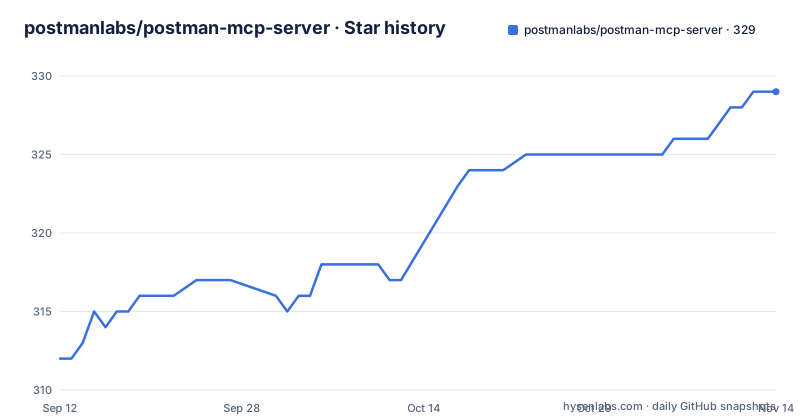
Star history
- postmanlabs/postman-mcp-server329 ★ · +17
| Repository | 2026-09-12 | 2026-11-14 |
|---|---|---|
| postmanlabs/postman-mcp-server | 312 | 329 |
17 Stars in the last 63 days, measured from the daily GitHub snapshot. Compare with other projects
Editorial analysis
Remote Full lives at /mcp while the local flag is called --full
The quick start gives two spellings for the same four modes, and they do not line up.
For the remote server you add a URL and the modes are path segments, with /minimal as the default:
https://mcp.postman.com/minimalChange /minimal to /code or /mcp for Code or Full mode. For the local package the modes are flags instead:
npx @postman/postman-mcp-serverAdd --code or --full for Code or Full. So Full is /mcp on the remote and --full on the local, and the difference is not explained anywhere. It costs a reader one failed request rather than anything worse.
Four modes means four manifests at the repository root: manifest-minimal.json, manifest-code.json, manifest-full.json, and manifest-learn.json. Minimal is the default and carries only the tools needed to edit a single Postman element. Code sits in between and exists to generate client code from public and internal API definitions, which is the mode to pick when the agent needs API context rather than editing rights. Full is described as 100+ tools aimed at collaboration and Enterprise work.
OAuth works on one host only, so a local install means an API key
The authentication section is one sentence followed by a hard edge.
OAuth is the recommended path on the remote server at https://mcp.postman.com, described as fully compliant with the MCP Authorization specification and requiring no manual API key configuration. The very next sentence says the EU remote server and the local server support only Postman API key authentication. For EU or API key auth against the remote server you pass Authorization: Bearer <POSTMAN_API_KEY> as a header.
The consequence is that a locally installed server can never use OAuth. A team that standardised on OAuth for every MCP server has no choice but to mint a Postman API key, and for the local package that key is read from the POSTMAN_API_KEY environment variable. Nothing in the repository lists the scopes attached to that key, so what a leaked one can reach is decided by Postman rather than by anything you configured per server.
The EU story is its own small fork. Three endpoints exist there, https://mcp.eu.postman.com/mcp, /code, and /minimal, and the local package takes a --region eu flag or a POSTMAN_API_BASE_URL variable set directly.
Four configurations are named, and three have a documented way in
The tool configuration list names Minimal, Code, Full, and Learn. Three of them have an entry point written down. Learn does not.
Learn is described as the mode that searches Postman Docs for guides, tutorials, and reference content, aimed at agents that need to discover Postman features or look up API concepts. It is also the only configuration with a manifest at the repository root and no counterpart in the quick start, which covers /minimal, /code, and /mcp on the remote side and --code and --full on the local side.
manifest-learn.json exists, so the mode is built and published rather than aspirational. The gap is purely in the instructions, and it lands on the mode a new user is most likely to want, since finding out what a tool does is the first thing an agent tries.
The same asymmetry shows in the supported agents table. Eight hosts have both a remote and a local setup link, covering Claude Code, Claude Desktop, Cursor, VS Code, Codex, Antigravity CLI, GitHub Copilot CLI, and Kiro. Docker has a local link and nothing for remote, so the container path covers local mode only and says nothing about how the other three modes run inside it.
dist/ is committed and the version script stages it for you
The repository publishes its build output and keeps it in git rather than producing it at install time.
dist/ is a top-level entry. The npm files array is dist, README.md, and LICENSE, and a .npmignore sits next to it. The version script is one line, git add dist/, and both preversion and prepack run the build first, so the committed directory and the published tarball are kept in step by a script rather than by a pipeline. That is why dist/ appears in the tree at all.
The build script is not a pure build. It runs eslint --fix over ./src and prettier --write across src before tsc runs at all, which means building rewrites your working tree. On a clean checkout that is invisible because the output matches what was committed. On a branch where someone has unformatted work in progress, a build doubles as a format pass and changes files you did not ask it to touch.
Two lists also govern what ships. The files array in package.json and the .npmignore file both exist, and when a package declares both, the tarball contents are the intersection rather than either list alone.
The Dockerfile exposes port 1337 for a server that speaks stdio
The image advertises a network port that nothing ever listens on.
The production-stdio stage ends with ENTRYPOINT ["node", "dist/src/index.js"], which is the same file the bin field and the start:stdio script both name, and stdio is what an MCP host launches as a child process rather than connects to over TCP. Two lines earlier the production-base stage runs EXPOSE 1337. That directive opens nothing by itself, so the image is not broken, but it describes a server shape the entrypoint does not implement, and an operator who reaches for port publishing gets a process that never accepts a connection.
The stage chain is builder, production-base, production-stdio, and a final stage that is nothing but FROM production-stdio AS production with no instructions of its own, a labelled copy rather than a stage that builds anything. The hardening in the earlier stages is real: each one enables corepack, activates pnpm at 10.6.2, creates a non-root app user, and copies with matching ownership. The production image copies only package.json and the lockfile, installs with --prod, and then lifts dist out of the builder stage, so the runtime layer carries no TypeScript sources and no dev dependencies.
The base is node:22.16-alpine in both the builder and the production image, while package.json declares engines node >=20.0.0. The floor advertised to npm users is well below the runtime the container actually uses.
preinstall refuses npm before the lockfile gets a chance
The package blocks the wrong installer as its very first step.
The preinstall script is npx only-allow pnpm, packageManager is pinned to [email protected], and the lockfile is pnpm-lock.yaml. The Docker build mirrors that pin exactly, running corepack enable and corepack prepare [email protected] --activate in both the builder and the production stage, then pnpm install --frozen-lockfile and, for the runtime image, the same command with --prod. The container path and the local path resolve one toolchain.
The cost shows up in the quick start, which launches the local server with npx @postman/postman-mcp-server. That is an npm command starting a package whose own preinstall refuses npm. It works because npx fetches and runs the tarball rather than installing it into your project, but the documented launch command and the install policy pull in opposite directions, and anyone who decides to add the dependency to their own package.json meets the preinstall hook immediately.
The runtime dependencies describe what the server does once running: @modelcontextprotocol/sdk ^1.27.1 for the protocol itself, newman ^6.2.2 to run collections, nunjucks for templating, zod for validation, uuid, and dotenv for environment loading.
The release notes file stopped at v2.9.0 and the tag is v2.13.0
The root listing carries a release notes file that is four minor versions behind the package it sits next to.
RELEASE_NOTES_v2.9.0.md is at the top level. The version in package.json is 2.13.0, and the recent releases are v2.12.2 on 8 September 2026, v2.12.3 on 9 September 2026, and v2.13.0 on 21 September 2026. The repository is not archived and the last push is 1 October 2026, so the code is moving. It is the notes that stopped.
The cadence inside that window is worth reading on its own: a patch, then another patch the following day, then a minor bump twelve days later. Whatever separates 2.12 from 2.13 is not written down anywhere in the repository, and the file that would have held it is old enough that nobody updates it any more.
The rest of the root tells a consistent story. There is a src directory, a tests tree under src, vitest.config.ts, a scripts directory holding the custom release helper, eslint.config.mjs beside a .prettierrc.js, a .dxtignore, SECURITY.md and SUPPORT.md, CODE_OF_CONDUCT.md and CONTRIBUTING.md, and .github. The test scripts are split into a plain vitest watch mode, a vitest run for CI, and a unit-only run scoped to src/tests/unit. The tooling is current and the documentation of use is thorough. What is missing is documentation of change, and the one file for it has been overtaken.
Editorial conclusion
Point an agent at the remote server if you want OAuth and a five line config, and at the local package only if you need it to reach services on your own machine, because the remote server has no network access to your workstation and the local server cannot do OAuth at all. Before you choose Full, check the tool count against what your agent will actually call, since 100+ tools changes prompt size and review burden. Read the version and mode naming yourself rather than trusting a tutorial, because /mcp, /code, /minimal on one side and --code, --full, --region eu on the other are the surface you will actually configure.
Frequently asked questions
What exactly does an MCP server do in the Postman case?
It implements the Model Context Protocol so agents such as Claude Code, Cursor, VS Code Copilot, GitHub Copilot CLI, and Gemini CLI can reach your Postman workspaces, collections, specifications, and environments. You connect either to the remote server at https://mcp.postman.com or to a process you launch locally.
How do I run an MCP server for Postman?
For the remote server, add https://mcp.postman.com/minimal to your MCP host configuration and change /minimal to /code or /mcp for the other modes. Locally, run npx @postman/postman-mcp-server, set POSTMAN_API_KEY as an environment variable, and add --code or --full for the other modes.
how to use postman mcp server in cursor
Cursor appears in the supported agents table with separate setup links for the remote server and the local server, and the same pair of links exists for Claude Code, Claude Desktop, VS Code, Codex, Antigravity CLI, GitHub Copilot CLI, and Kiro. Docker has a local link only.
is postman mcp server free
The repository is licensed Apache-2.0 and publishes to npm as @postman/postman-mcp-server with public access configured. The README sets no price or tier for the hosted server itself and points to Postman's product page for the full installation guide.
Official sources
Add this badge to your README
If you maintain this project, the badge below links readers to this analysis and shows its maintenance status from the daily GitHub snapshot. Paste the markdown into your README; add ?metric=license or ?metric=stars to the image URL for a different field.

[](https://hysenlabs.com/projects/postmanlabs-postman-mcp-server)Star history chart for your README
[](https://hysenlabs.com/projects/postmanlabs-postman-mcp-server)Was this useful?