How: a Cursor skill that explains a codebase to a senior engineer
skill for explaining architecture
At a glance
- What is it?
- How is a Cursor plugin that adds a /how skill to the editor, turning a question about a subsystem into a structured architectural explanation, with a critique mode that fans out independent critics across models. The whole thing is prompt templates and a router, roughly a dozen files with no runtime code.
- Who is it for?
- How suits a team already working in Cursor who needs a repeatable answer to how does this subsystem work, and whose onboarding pain is reading unfamiliar code rather than shipping features. It does not suit a team on a different editor, because the plugin is tied to the Cursor plugin format, and it does not replace understanding a codebase, because the output is an explanation produced by an agent that may confidently describe code it read only partly.
- Can I use it commercially?
- Yes. MIT is a permissive licence: you can use, modify and sell software built on it, as long as you keep its copyright and licence notices.
- Is it still maintained?
- Activity is slowing. The repository last received commits 6 months ago.
- What is it written in?
- GitHub does not report a main language for this repository.
Answers come from the project's GitHub data, last synced on November 7, 2026, and from our analysis. They are not legal advice.
Star history
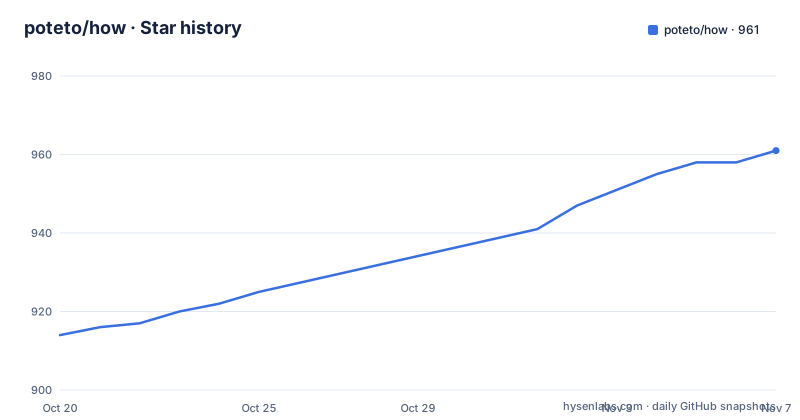
- poteto/how961 ★ · +47
| Repository | 2026-10-20 | 2026-11-07 |
|---|---|---|
| poteto/how | 914 | 961 |
47 Stars in the last 18 days, measured from the daily GitHub snapshot. Compare with other projects
Editorial analysis
A skill is prompt templates, and this one is mostly prompts
How is a Cursor plugin that adds the /how skill, and the pitch is that you ask how a subsystem, feature or flow works and the agent produces a clear architectural explanation at the level of a senior engineer onboarding onto a new area.
The repository structure makes the nature of the thing obvious.
how/
├── .cursor-plugin/
│   └── plugin.json
└── skills/
    └── how/
        ├── SKILL.md
        └── references/
            ├── explainer-prompt.md
            ├── explorer-prompt.md
            ├── critic-prompt.md
            └── critique-rubric.md
There is a plugin manifest, a SKILL.md file, and four reference documents. There is no library, no binary, no build step and no runtime component in the top level entries, which are the .agents directory, the .cursor-plugin directory, the LICENSE, the README and the skills directory.
SKILL.md holds the top-level routing logic, namely the simple versus complex decision and the explain versus critique decision. The references folder holds the prompt templates that the agent hands to each subagent, plus the critique rubric used during the critique pass.
That division is the whole design. The reusable knowledge lives in the templates rather than in code, which means the behaviour of the skill changes when you edit a markdown file, and the cost of customising it is editing prompts rather than writing a plugin. It also means the tool is portable in a way most editor plugins are not, since a prompt is just text, and portable in a way most Cursor plugins are not since the format is not tied to the Cursor API.
The .agents directory at the root is worth noting for anyone who has looked at the wider agent tooling ecosystem, where agent instruction files are being placed at the repository root so a coding assistant picks up project conventions automatically.
Two modes, and the router decides which one you get
The skill has two modes, and the documentation says they are picked automatically from your question.
Explain is the default. It explores the codebase and produces a structured explanation with sections for Overview, Key Concepts, How It Works, Where Things Live, and Gotchas.
Critique explains first, then spawns multiple independent critics across different models to surface architectural problems.
That section list is the most useful thing in the repository for an evaluator, because it tells you what the output looks like. Where Things Live is the section that turns an explanation into something you can act on, since it names the files rather than describing the design in the abstract. Gotchas is the section that a human onboarding would not write, because a human reads the code and a generator does not, so the failures that come from not reading carefully are exactly what a fixed structure is for.
The example prompts show the intended range of questions. How does message virtualization work? Walk me through what happens when a user sends a message? How is the auth service structured? Also critique the design. How does the auth middleware check permissions?
Three of those five are explanation questions and one asks for a critique outright, which suggests the automatic routing is a convenience rather than something you need to learn. The examples also span levels: a single mechanism, a multi-step flow across the system, a whole service, and a specific function.
Critique is the mode with a different cost profile, and it is worth being clear about why the design makes critics independent. The documentation says the skill spawns multiple independent critics across different models, and that the critique pass uses a rubric. Independence across models matters because a single model asked to critique its own explanation tends to soften, and asking several models reduces the chance that one agreeable pass becomes the finding.
Fan-out for complex questions, single agent for simple ones
The mechanism for hard questions is decomposition, and the documentation describes it precisely.
For complex questions that span multiple files or services, the skill decomposes the question into 2 to 4 parallel exploration angles and spawns explorer subagents that gather findings in parallel. A synthesis agent then reconciles their findings into a single coherent explanation. Simple questions skip the fan-out and run end to end in a single agent.
Four files map onto the four roles. The explorer-prompt.md is what each exploration subagent receives. The explainer-prompt.md is what the synthesising agent receives. The critic-prompt.md is what each critic receives, and the critique-rubric.md is the rubric used during the critique pass.
The reconciliation step is the part that makes this more than a parallel search. Running three agents over three angles of a question produces three partial descriptions, and naive concatenation of those is often worse than one mediocre answer because it repeats itself and contradicts itself. The documentation puts the burden of merging into a synthesis agent, and the fact that this is a distinct stage with its own prompt template rather than an instruction inside the explorer prompt suggests the author found the merge hard enough to separate it out.
The 2 to 4 range for angles is also a deliberate constraint. More angles means more context spent on each, and for a question that is really two questions you get duplication; for a question that is genuinely four separate mechanisms, capping at four means some are missed. The cap is a cost budget, and the skill accepts that.
For simple questions, running end to end in one agent is both faster and better, because there is nothing to reconcile and a single agent has the whole question in one context.
What this is for, and where it stops
The use case is the one the title names: onboarding. A team or a new engineer joining an unfamiliar area of a codebase can ask how a subsystem works and get back a structured map instead of an afternoon of grepping.
That is a real problem, and the structured output format is a reasonable answer to it. A hand written document about a subsystem goes stale, and a new person reading the code has to reconstruct the map themselves. An agent that reads the code fresh each time and produces the same five sections is more likely to be current, and the Gotchas section is the kind of thing that only survives in the heads of people who already work there.
The limitation is the one inherent to the approach, and it should be stated plainly. The explanation is produced by an agent, from the code it read, at the level of detail it inferred. There is no signal in the documentation that the skill verifies its claims, and the output is prose rather than something checkable. An agent asked how authentication works will produce a confident and coherent account, and if it missed the token refresh path, nothing in the output will say so.
So this is an accelerator for reading, not a substitute for reading. It gives you a map of the area faster than you would have drawn one yourself, and it is wrong in the way that fluent prose is wrong, which is that you have to check it.
The second limitation is the editor dependency. This is a Cursor plugin, with a .cursor-plugin directory and a plugin.json manifest. There is no CLI, no language server, no web interface. A team on a different editor gets nothing, and a team that wants the behaviour in CI, where a new dependency arrives and a stale explanation is most costly, gets nothing either. The prompt templates are portable, since they are markdown, but the plugin wrapper is not, and converting the skill into whatever your own agent setup expects means reading the templates and rebuilding the routing.
Licence, maintenance and what to check before adopting it
The licence is MIT, stated plainly in the repository documentation and carried in the LICENSE file at the root. That is a permissive licence with attribution requirements and no copyleft obligations, and for a set of prompt templates the terms are not the interesting part. This is not legal advice.
The interesting part is what MIT lets you do, which is modify the prompts and redistribute the result without asking. The routing logic in SKILL.md and the four templates are the whole product, so forking it and rewriting the section list, say changing Gotchas into a Migration Notes section, is a legal and normal thing to do.
There are no GitHub releases, so there is no version history to consult and no changelog to track against. The last push was on 2026-04-14, which is more than six months before today, so the repository has not been touched in that period. There is no statement in the documentation about a roadmap, a compatibility range for Cursor versions, or a support policy.
That combination suggests a specific reading. This looks like a personal tool that was published rather than a product with a maintenance commitment, and the honest way to adopt it is to treat it as a starting point for your own prompts rather than as something you will receive updates to. Fork it, adjust the templates to match how your codebase is actually structured, and you remove the dependency on the upstream entirely.
The .agents directory at the root suggests the author is working within a broader convention for agent instructions, so if you adopt this you may find it sits alongside other instruction files that also want to shape the agent's behaviour, and it is worth checking they do not fight each other over the same territory.
Editorial conclusion
How suits a team already working in Cursor who needs a repeatable answer to how does this subsystem work, and whose onboarding pain is reading unfamiliar code rather than shipping features. It does not suit a team on a different editor, because the plugin is tied to the Cursor plugin format, and it does not replace understanding a codebase, because the output is an explanation produced by an agent that may confidently describe code it read only partly. Before adopting it, read the prompt templates in the references folder, since they are the actual product and they define what the explanations will and will not emphasise, and decide whether spawning critics across several models during a design review is a cost you want your team to pay by default.
Frequently asked questions
What is the How Cursor plugin?
It is a Cursor plugin that adds the /how skill, so you can ask how a subsystem, feature or flow works and the agent produces a structured architectural explanation at the level of a senior engineer onboarding onto a new area. It works in Explain mode by default and Critique mode when you ask for a design critique.
What sections does a How explanation contain?
In the default Explain mode the output has sections for Overview, Key Concepts, How It Works, Where Things Live and Gotchas, with the mode chosen automatically from the question you ask.
How does How handle a question that spans many files?
For complex questions spanning multiple files or services, the skill decomposes the question into 2 to 4 parallel exploration angles and spawns explorer subagents that gather findings in parallel, then a synthesis agent reconciles those findings into one explanation. Simple questions skip the fan-out and run in a single agent.
What files make up the How skill?
A .cursor-plugin directory with plugin.json, and a skills/how directory holding SKILL.md plus a references folder with explainer-prompt.md, explorer-prompt.md, critic-prompt.md and critique-rubric.md. SKILL.md holds the routing logic and the references folder holds the prompt templates.
What licence does the How skill use?
MIT. The documentation states MIT under the License heading and the repository carries a LICENSE file at the root, so the prompt templates can be modified and redistributed with the notice preserved.
Official sources
Add this badge to your README
If you maintain this project, the badge below links readers to this analysis and shows its maintenance status from the daily GitHub snapshot. Paste the markdown into your README; add ?metric=license or ?metric=stars to the image URL for a different field.

[](https://hysenlabs.com/projects/poteto-how)Star history chart for your README
[](https://hysenlabs.com/projects/poteto-how)Was this useful?