oneAnime: the Anime1 client that skips the webview
A clean, ad-free anime viewing app. A third-party anime1 client with danmu (comment overlay) support, with a Material You compliant interface.
At a glance
- What is it?
- oneAnime is a Flutter client for Anime1 with danmaku from the dandanplayer open API, metadata from Bangumi, and no webview during normal playback. What it does not do is download episodes or keep data around longer than its own disclaimer allows.
- Who is it for?
- Adopt oneAnime if you watch Anime1 mainly on Android or on a desktop and want danmaku plus Bangumi-backed metadata inside a Material You client that never hands playback to a browser engine. Leave it if you need offline episodes, update reminders or a web target, since none of those are finished.
- Can I use it commercially?
- Yes, with conditions. GPL-3.0 is a copyleft licence: if you distribute software that includes it, you must release that software's source code under the same licence. Running it internally without distributing it does not trigger that obligation.
- Is it still maintained?
- Yes. The repository last received commits 57 days ago.
- What is it written in?
- Mainly Dart, according to GitHub's language statistics.
Answers come from the project's GitHub data, last synced on October 22, 2026, and from our analysis. They are not legal advice.
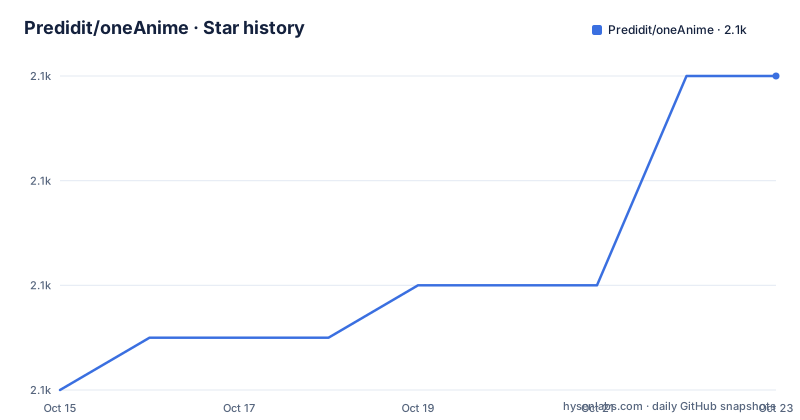
Star history
- Predidit/oneAnime2,142 ★ · +6
| Repository | 2026-10-15 | 2026-10-22 |
|---|---|---|
| Predidit/oneAnime | 2.1k | 2.1k |
6 Stars in the last 7 days, measured from the daily GitHub snapshot. Compare with other projects
Editorial analysis
Why oneAnime avoids a webview during normal playback
oneAnime is a Flutter client for Anime1 that follows Material You styling, and its own Q&A takes the wrapper-browser question head on: asked whether the app uses webview technology and does not want a wrapped browser, the answer is that no webview is loaded while the app runs normally, and that the maintainers dislike wrapped browsers as much as the reader does.
What runs instead is a set of separate paths covering the catalogue, search, the airing timetable, subtitles, episode playback, playback speed, the video player, hardware acceleration, high refresh rate adaptation, online updating, colour schemes, a watchlist and danmaku. Five platforms are named as supported: Android, Windows, macOS, iOS and Linux, with the iOS entry carrying a self-signing requirement. Two roadmap boxes are still empty, downloads and update reminders.
Part of the Anime1 interaction code is borrowed from AnimeOne, credited in the acknowledgements, which fixes one dependency in place: talking to the streaming site is reimplemented rather than delegated to a browser engine. That choice costs work on every platform, and it is also the reason a build needs a network the team considers good.
Anime1 sends no cover art, so the catalogue stays plain
A second Q&A explains why entries in the catalogue carry a bare synopsis instead of a finished cover: Anime1's own site architecture and design do not give clients polished cover images, and the answer states plainly that a third-party developer can do nothing about it. That is a ceiling on presentation quality that no amount of Flutter work inside the client can lift.
Subtitles sit oddly beside this. The feature list marks anime subtitles as delivered, yet the README never names which service serves the subtitle files. Bangumi is credited for metadata, dandanplayer for danmaku, and Anime1 for the site interaction itself, so the subtitle path is the one link in that chain left unnamed.
Importing metadata from an external source does not fix the covers either. Richer text arrives from Bangumi, but the images live only where Anime1 serves them, and a client cannot draw what the upstream site never sends.
Three services behind one interface: Anime1, Bangumi, dandanplayer
The acknowledgements split the data flow into three pieces with three different owners. Anime1 supplies the site interaction and the video streams, the Bangumi open API supplies anime metadata, and the dandanplayer open API supplies danmaku interaction. Local storage comes from hive, which is where a watchlist has to live.
Split that way, each layer has its own failure surface. Metadata enrichment sits with Bangumi, comments sit with dandanplay, and playback depends on whatever Anime1 hands over, so a change at either open API lands in the client without any change to Anime1 and without a single upstream to negotiate with.
For an engineer this is the shape that matters more than the feature list. Adding a field to the catalogue is a Bangumi question, adding a comment overlay is a dandanplayer question, and neither is a scraping question.
Cross-platform playback leans on media-kit and an out-of-tree avbuild patch
Media playback is delegated rather than written in the client. Cross-platform media capability comes from media-kit, and the harder half, non-standard video streams, comes from an out-of-tree patch applied to avbuild, the build system credited at wang-bin/avbuild. When a stream format sits outside what a stock decoder handles, the fix sits outside the upstream tree as well, which is why a change in avbuild can quietly affect this client.
Checked items around that player include hardware acceleration and high refresh rate adaptation, both of which matter on the desktop targets where the client has to feel native rather than emulated. Playback speed control is marked as done next to the player and episode selection.
What is not written down matters just as much here. No per-platform decoder path, no hardware acceleration backend and no list of which stream formats the avbuild patch actually covers appear anywhere in the repository, so a reader who needs to know whether an unusual container will play has no answer to find.
Where oneAnime builds come from, and what compiling one yourself costs
End users are pointed at the project's release tab, and the README gives no install command, no package manager entry and no container recipe. Two upstream addresses are worth keeping on hand: the download tab itself, and the separate repository holding the trimmed opencc bridge.
https://github.com/Predidit/oneAnime/releases
https://github.com/Predidit/open_chinese_convert_bridge
Compiling from source is a different story with real prerequisites. A build needs a good network environment, and anyone located in mainland China may need to set an appropriate mirror address. On top of that, the package the README names as `flutter_open_chinese_conventer` does not support the Windows platform, so the team compiled the opencc dynamic library themselves and published that trimmed implementation separately. The README spells the package with conventer rather than converter, which is worth checking against the registry before a first build.
Compiling a Windows 10 1806 build and getting a broken search box has a documented fix. Produce `opencc.dll` from Predidit/open_chinese_convert_bridge, drop it into the oneAnime build output directory, and search optimization returns.
Code is published under GPL-3.0, and the last push landed on 2026-08-27 with the repository still open. The disclaimer gives no warranty of fitness, reliability or accuracy, and it asks users to respect local law and third-party intellectual property.
Platform floors, an iOS self-signing step, and a web folder nobody lists
The platform list carries hard numeric floors: Android 10 and above, Windows 10 1806 and above, macOS 10.15 and above, plus iOS and Linux. The iOS entry is annotated with a self-signing requirement, which sits awkwardly beside a checklist where online update is already ticked, because a self-signed build is precisely the case where an app store is not handling version delivery.
The repository root disagrees with that list in a smaller way. Alongside the android, ios, linux, macos and windows folders there is a `web/` directory, and the supported platform list never names a web target anywhere.
The root also carries the usual Flutter scaffolding: `pubspec.lock` committed for repeatable dependency resolution, `analysis_options.yaml` and `devtools_options.yaml` for linting, and `test/` and `tool/` for Dart side work. Embedded assets include the Mi Sans font, which Xiaomi developed and owns, so anyone shipping a fork inherits that decision along with the code.
Two empty roadmap boxes: no episode downloads, no update reminders
Three boxes on the feature list remain open: anime downloads, update reminders, and a catch-all line for more to come. That matters when sizing the client against a real viewing routine, because an update reminder is what turns an airing timetable into a habit, and a download box is what turns streaming into offline use. Neither is there today.
The disclaimer adds a constraint unusual for a viewing client. Data and cache produced by use are supposed to be cleared within 24 hours, and longer use requires authorization from the relevant rights holder. A watchlist kept in hive and cached catalogue pages therefore sit inside that 24-hour expectation rather than comfortably outside it.
What remains is a browse and watch client: catalogue, search, timetable, subtitles, danmaku, watchlist and a player, with local persistence and no offline story attached to it.
Going straight to the API services instead of the oneAnime client
A workable alternative already sits inside the credits. dandanplay exposes the open API that oneAnime calls for danmaku, and Bangumi exposes the open API it calls for metadata, so anyone who wants comments over an existing player can aim their own tooling at those endpoints and skip this client altogether.
That route gives up everything oneAnime wraps around them: a Material You interface across Android, Windows, macOS, iOS and Linux, a catalogue and search layer handling Anime1 interaction, an airing timetable, subtitles, a watchlist kept in hive, and a player with hardware acceleration and high refresh rate adaptation. It keeps only two data endpoints and a browser tab.
The closer comparison is AnimeOne, credited here as the source of some of the Anime1 interaction code. oneAnime reuses part of that code and builds a multi-platform Flutter client on top of it, while its danmaku layer comes from the dandanplayer open API rather than from that codebase, which is the clearest single difference between the two approaches.
Editorial conclusion
Adopt oneAnime if you watch Anime1 mainly on Android or on a desktop and want danmaku plus Bangumi-backed metadata inside a Material You client that never hands playback to a browser engine. Leave it if you need offline episodes, update reminders or a web target, since none of those are finished. Before compiling anything yourself, check whether your network needs a mirror address and whether the opencc.dll built from Predidit/open_chinese_convert_bridge has to sit in the build output directory for Windows search to work.
Frequently asked questions
Does oneAnime play video inside a webview like a wrapper browser?
No. The project Q&A states that the app does not load a webview while running normally, and that the maintainers dislike wrapped browsers too.
Why are the covers in the oneAnime catalogue so plain?
Anime1 does not hand clients polished cover images, and the Q&A says a third-party developer can do nothing about it, so entries show a synopsis only.
How do I fix missing search optimization in a Windows build I compiled myself?
Builds need a good network, and users in mainland China may need a suitable mirror address. Because the package named flutter_open_chinese_conventer does not support Windows, compile opencc.dll from Predidit/open_chinese_convert_bridge and place it in the build output directory.
Which platforms does oneAnime support?
Android 10 and above, Windows 10 1806 and above, macOS 10.15 and above, Linux, and iOS with a self-signed build.
Can oneAnime download episodes for offline viewing?
Not yet. Anime downloads and update reminders are still unchecked boxes on the feature and development plan list.
Official sources
Add this badge to your README
If you maintain this project, the badge below links readers to this analysis and shows its maintenance status from the daily GitHub snapshot. Paste the markdown into your README; add ?metric=license or ?metric=stars to the image URL for a different field.

[](https://hysenlabs.com/projects/predidit-oneanime)Star history chart for your README
[](https://hysenlabs.com/projects/predidit-oneanime)