Zangetsu: three modes, four APK builds, and an empty tech stack section
Free, open-source app for anime, movies, series, manga and light novels — on Android, Android TV and iOS (beta).
At a glance
- What is it?
- A GPL Flutter app for keeping track of anime, movies, manga and light novels, with a separate reader or player per mode and a TV interface built for a remote. It hosts nothing, its own page repeats that four times, and the Tech Stack section it advertises is blank.
- Who is it for?
- Zangetsu suits someone who wants a library, a progress tracker and a reader across a phone, a TV and a tablet, and who is comfortable choosing an ABI and occasionally adding a source. Read the iOS caveat first, because the extension ecosystem that Android users rely on is exactly what iOS removes, and the iOS build is beta through TestFlight while Windows is still in progress.
- Can I use it commercially?
- Yes, with conditions. GPL-3.0 is a copyleft licence: if you distribute software that includes it, you must release that software's source code under the same licence. Running it internally without distributing it does not trigger that obligation.
- Is it still maintained?
- Yes. The repository received new commits within the last day.
- What is it written in?
- Mainly Dart, according to GitHub's language statistics.
Answers come from the project's GitHub data, last synced on November 15, 2026, and from our analysis. They are not legal advice.
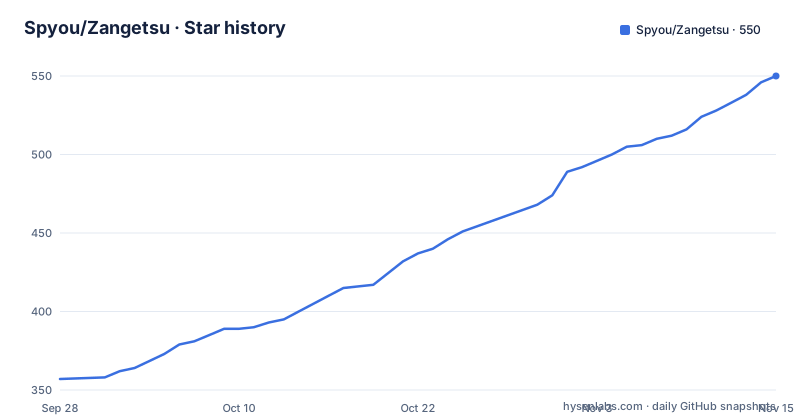
Star history
- Spyou/Zangetsu550 ★ · +193
| Repository | 2026-09-28 | 2026-11-15 |
|---|---|---|
| Spyou/Zangetsu | 357 | 550 |
193 Stars in the last 48 days, measured from the daily GitHub snapshot. Compare with other projects
Editorial analysis
Three modes, each with its own reader
The app is organised by media type rather than by screen. There are three modes, Streaming, Manga and Novel, and each one carries its own sources and its own reader or player, which is why a manga page and a video page feel like different applications rather than tabs in one.
On top of those sits a full Android TV interface built for a remote rather than a touchscreen. That is the part that distinguishes it from a phone app that happens to run on a television, and it is why the download table offers a separate TV build instead of expecting the phone build to stretch.
The stated focus is discovery, tracking, syncing and personal library management, and the four screens the page names are Home, Search, Details and My List. Progress and history are the things it promises to carry between devices, and the note under the overview puts that first: keep your lists, progress and history in sync wherever you go.
Content types are five: anime, movies, series, manga and light novels.
Four APK files and one in-app update check
There is no store listing to go through. The page points at the GitHub Releases page and offers four files, named with the same pattern, Zangetsu-vX.Y.Z followed by the build suffix.
The arm64-v8a build is the recommended one for modern 64-bit devices. armeabi-v7a is for older 32-bit hardware. The universal build works everywhere and is explicitly the larger of the options, which is the honest trade. The tv build is the fourth, for Android TV devices.
The FAQ answers the same question from the other direction: use arm64-v8a on a modern phone, and if you are unsure or hit compatibility issues, take universal instead. That is the fallback, not the default, which means the size argument is real rather than theoretical.
Updates do not require leaving the app. Zangetsu checks GitHub Releases for new versions and can update itself from Settings, then Check for updates, so the ABI decision is one you make once.
iOS is where the extension model breaks
The platform table lists Android as available, Android TV as available, iOS as beta through TestFlight, and Windows as in progress, and the checklist underneath says the same in a different form: Android and Android TV released, iOS beta done, iOS release and Windows release not started.
The reason for the iOS limitation is stated rather than left for you to discover. CloudStream, Aniyomi and Mihon extensions cannot be loaded on iOS, because iOS does not allow that kind of plugin. What does work is named just as explicitly: Zangetsu's own JavaScript sources, the player, downloads and trackers.
That is the trade to understand before switching. On Android the app can be pointed at community-built sources; on iOS the app's own sources are the entry point, so a user arriving from an Android setup loses the part of the ecosystem that is not their own code.
The js_harness directory at the top level is consistent with that split, though what it does is not described anywhere in what is readable here.
The Tech Stack section is linked and empty
The navigation bar at the top of the page links to Overview, Screenshots, Download, Tech Stack, FAQ, Communities and License. The Tech Stack section exists in the document and contains nothing at all, which means the one part of the page that would answer what the app is built from is the part that is blank.
The directory listing has to stand in for it. The presence of pubspec.yaml, pubspec.lock, .metadata, analysis_options.yaml and devtools_options.yaml identifies it as a Dart and Flutter project with platform folders for android/, ios/, tvos/ and a web_reset/. l10n.yaml points to localization being handled at build time.
Then there are the directories that describe the architecture rather than the framework: extractors/, providers/, supabase/, cloudflare/, js_harness/, third_party/, assets/, tool/ and tools/.
So the stack is inferable but not stated. A reader looking for the frameworks behind the three modes has to reconstruct it from directory names, which is a strange gap on a page that takes care to name the APK ABI for each device class.
tool/ and tools/ sit side by side, and so do two licences
A few details of the top level are worth reading as intent rather than as clutter.
Two tool directories exist, tool/ and tools/, and there is no documented reason for the split. Two licence files exist too: LICENSE, which the page names as GNU GPL-3.0, and LICENSE-Apache-2.0.txt. Paired with a third_party/ directory, that reads as the project's own code under the GPL with vendored code kept under its original Apache terms, which is the usual arrangement, though nothing in what is readable here says so.
The governance files are thorough: CONTRIBUTING.md, SECURITY.md, NOTICE.md, a Contributor License Agreement at CLA.md, and an AI_POLICY.md that sits next to a Flutter project with an AI-written contribution history. announcements.json suggests in-app release announcements, and test/ suggests the app is tested rather than shipped untested.
The cloudflare/ and supabase/ directories together point at a hosted component, and given that syncing lists across devices is a headline feature, that is where the sync story lives. None of it is documented on the page.
No content, and the page says so four times
The FAQ answer is unambiguous. Zangetsu does not host, provide, distribute or maintain streaming content or extensions; it is a tracking and management tool only.
The disclaimer repeats it in a highlighted block, then adds three more positions. User responsibility: users are solely responsible for how they use the app and for the third-party services and extensions they choose, and must comply with applicable law, copyright and intellectual property rights. No liability: the developer disclaims liability for misuse, legal issues or violations arising from user actions, with legal concerns about third-party services directed to their creators. Services: Zangetsu integrates only with official APIs of supported services, and third-party extensions are the responsibility of their creators.
Four repetitions of the same boundary is unusual, and the reason is structural rather than rhetorical. An app whose Streaming mode pulls from sources someone else maintains has to be able to point at a written position, and that position has to survive contact with a user who says the app told them where to look.
The core language used is integration with official APIs, which is also why the extension question in the iOS section matters: official APIs are the path the project claims to stay on.
Support runs through Discord, GitHub issues and Telegram
Three community channels are linked from the page, and the FAQ names two of them as the support path: the Discord server for questions and the GitHub issue tracker for bugs. The third is a Telegram channel, which is where a stream-adjacent audience usually ends up.
A Reddit community at r/ZangetsuOfficial is linked as well, so there are four places to find the project, none of them a documentation site. Nothing on the page links a wiki, a support matrix or a per-platform troubleshooting guide, and the Tech Stack section that could have carried some of that context is empty.
Two smaller elements sit at the bottom. A visitor counter links to a third-party counting service rather than to anything self-hosted, and the acknowledgements section links the contributors graph with a general note of thanks. Both are the kind of page furniture that dates a README without harming it.
What matters for anyone evaluating the project is that the bug report path is a real issue tracker rather than a comment section, and that the copyright line names a single author, Krishna Vishwakarma.
Three releases in five days, one of them the stable line
The release trail is short and fast. v2.1.2 shipped as a beta on 16 September 2026, v2.1.3 followed as a beta on 18 September, and v2.2.0 landed on 20 September. The last push is dated 1 October 2026 on the default branch main.
The naming separates the beta builds from the stable one in the release titles themselves, which matters when you are deciding whether a bug you hit is a known beta problem. The project also links a latest-release badge, which means a sideloaded install tracks that tag rather than a branch.
Licensing is GNU GPL-3.0 with the licence file included, and the copyright line reads Krishna Vishwakarma, 2026. The recorded homepage is zangetsu.online, and no other site is described, so what that page contains is not covered by anything written here.
For an app distributed as APK files rather than through a store, that combination of a fast beta cadence, an in-app update check and a GPL licence is a reasonable shape, as long as you read the release titles before installing a build labelled beta.
Editorial conclusion
Zangetsu suits someone who wants a library, a progress tracker and a reader across a phone, a TV and a tablet, and who is comfortable choosing an ABI and occasionally adding a source. Read the iOS caveat first, because the extension ecosystem that Android users rely on is exactly what iOS removes, and the iOS build is beta through TestFlight while Windows is still in progress. Before installing, check which build matches your device, since the universal APK is larger, and remember that the project ships no code that fetches anything itself, so legal responsibility for the sources you add stays with you.
Frequently asked questions
Does Zangetsu host or stream any content?
No. It is a tracking and management tool only, and it does not host, provide, distribute or maintain streaming content or extensions. It integrates only with official APIs of supported services.
Which Zangetsu APK should I download?
The arm64-v8a build for a modern 64-bit Android device, which is the recommended one. Use armeabi-v7a on older 32-bit hardware, the universal build if you are unsure or hit compatibility issues at the cost of a larger file, and the tv build for Android TV.
What cannot Zangetsu do on iOS?
It cannot load CloudStream, Aniyomi or Mihon extensions, because iOS does not allow that kind of plugin. Zangetsu's own JavaScript sources, the player, downloads and trackers do work, and the iOS build is in beta through TestFlight.
Is Zangetsu free and how do I report a problem?
It is fully open source under the GPL-3.0 licence. Bugs go to the GitHub issue tracker and questions to the Discord server, and the app can update itself from Settings, then Check for updates.
Official sources
Add this badge to your README
If you maintain this project, the badge below links readers to this analysis and shows its maintenance status from the daily GitHub snapshot. Paste the markdown into your README; add ?metric=license or ?metric=stars to the image URL for a different field.

[](https://hysenlabs.com/projects/spyou-zangetsu)Star history chart for your README
[](https://hysenlabs.com/projects/spyou-zangetsu)Was this useful?