pixi: a Cargo-shaped package manager sitting on top of the conda ecosystem
Powerful system-level package manager for Linux, macOS and Windows written in Rust – building on top of the Conda ecosystem.
At a glance
- What is it?
- pixi gives you a lock file, a Cargo-like command line and per-project environments for Python, C++, R and anything else the conda ecosystem packages, with the whole binary written in Rust on top of rattler. The parts worth reading are the ones that are not the interface: an install script that edits your shell rc file, distro packages that are not quite in the stable repo, and a pyproject.toml with no Python project in it.
- Who is it for?
- pixi suits a team that works across languages and wants one lock file and one environment file per project instead of a language-specific tool per language, and that is willing to deal with the conda ecosystem's package sources rather than a PyPI-only world.
- Can I use it commercially?
- Yes. BSD-3-Clause is a permissive licence: you can use, modify and sell software built on it, as long as you keep its copyright and licence notices.
- Is it still maintained?
- Yes. The repository received new commits within the last day.
- What is it written in?
- Mainly Rust, according to GitHub's language statistics.
Answers come from the project's GitHub data, last synced on November 14, 2026, and from our analysis. They are not legal advice.
Star history
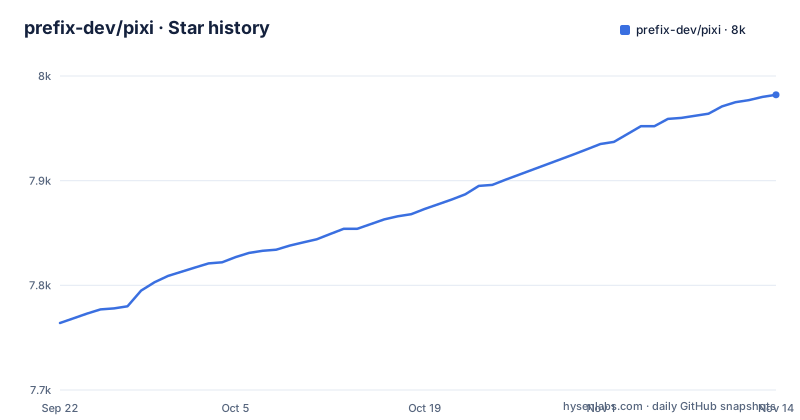
- prefix-dev/pixi7,982 ★ · +218
| Repository | 2026-09-22 | 2026-11-14 |
|---|---|---|
| prefix-dev/pixi | 7.8k | 8k |
218 Stars in the last 53 days, measured from the daily GitHub snapshot. Compare with other projects
Editorial analysis
One lock file and a Cargo-like command line, over conda packages
The pitch is in the overview: pixi is a cross-platform, multi-language package manager and workflow tool built on the foundation of the conda ecosystem, giving developers an experience similar to cargo or npm, but for any language.
What that means concretely is in the highlights. It supports multiple languages including Python, C++ and R using conda packages, with the available packages found on prefix.dev. It is compatible with all major operating systems, Linux, Windows and macOS including Apple Silicon. It always includes an up-to-date lock file. It provides a clean and simple Cargo-like command line interface, and it lets you install tools per-project or system-wide.
The implementation detail that explains the behaviour is that pixi is entirely written in Rust and built on top of the rattler library, which is Conda's own Rust library. So the conda ecosystem is not an optional backend you enable; it is the substrate.
Developed at prefix.dev, and released under BSD-3-Clause.
The status section states that pixi is ready for production, with the team's stated commitment being to keep file-format changes compatible with previous versions.
The install script writes to your rc file, and Windows needs a policy change
The install instructions are short, and the mechanism is worth reading before you paste anything.
On macOS and Linux:
curl -fsSL https://pixi.sh/install.sh | sh
# or with brew
brew install pixi
The script downloads the latest version of pixi, extracts it, and moves the binary to `~/.pixi/bin`, creating that directory if needed. It also updates your `~/.bashrc` to include `~/.pixi/bin` in your PATH, which means you may need to restart your terminal or source your shell.
There is a shell-specific variant, because zsh has been the default login and interactive shell on macOS since Catalina:
curl -fsSL https://pixi.sh/install.sh | zshwhich updates `~/.zshrc` instead.
On Windows, from PowerShell, possibly as administrator:
powershell -ExecutionPolicy ByPass -c "irm -useb https://pixi.sh/install.ps1 | iex"That `-ExecutionPolicy ByPass` is the part to notice: it changes what PowerShell is allowed to run for that command. The README anticipates the objection and tells you to inspect the script first, with `powershell -c "irm -useb https://pixi.sh/install.ps1 | more"`, before executing it. There is also `winget install prefix-dev.pixi`.
Completion is wired per shell, and Nushell needs a directory created
Shell completion is documented for six shells, and the shape of the command is the same everywhere: `pixi completion --shell <name>`. What differs is how you wire the output into your shell.
Bash, at the end of `~/.bashrc`:
eval "$(pixi completion --shell bash)"Zsh, at the end of `~/.zshrc`:
eval "$(pixi completion --shell zsh)"PowerShell, in `Microsoft.PowerShell_profile.ps1`, located by querying `$PROFILE`:
(& pixi completion --shell powershell) | Out-String | Invoke-ExpressionFish pipes straight into source, `pixi completion --shell fish | source`.
Nushell is the one that needs preparation, because it autoloads from a vendor directory:
mkdir $"($nu.data-dir)/vendor/autoload"
pixi completion --shell nushell | save --force $"($nu.data-dir)/vendor/autoload/pixi-completions.nu"
Elvish uses `eval (pixi completion --shell elvish | slurp)` in `~/.elvish/rc.elv`. In every case the README asks you to restart the shell or source the config file afterwards.
Arch ships it in extra, Alpine needs the testing repository
There is a repology badge linking per-distribution versions, and two distributions are called out by name.
On Arch Linux, pixi is in the extra repository:
pacman -S pixiOn Alpine, the README is more careful. `pixi` is available for Alpine Edge, and it can be installed via apk after enabling the testing repository:
apk add pixiThe two conditions in that sentence are both load-bearing: the package is listed for the edge branch, and the channel it comes from is testing. So an Alpine install is not a stable-channel package today, and the README does not claim otherwise.
That is the pattern across the whole install story, and it is worth holding onto when you evaluate the project. The Homebrew and winget paths are mainstream channels; the curl script is self-service; the distro packages depend on which repository the packager chose to target.
For a machine you control, the curl route is the most predictable, because it downloads the binary the project builds rather than whatever a distribution decided to package.
Building from source is one cargo line, on Rust edition 2024
Since pixi is 100% written in Rust, it can be installed, built and tested with cargo:
cargo install --locked --git https://github.com/prefix-dev/pixi.git pixiThe `--locked` flag matters: it means the `Cargo.lock` in the repository is honoured rather than re-resolved, so a source install produces the dependency set the maintainers committed.
The workspace tells you what that entails. The root manifest uses resolver 3, edition 2024, and a rust-toolchain file sits at the root. Members are `crates/*`, and the default member is `crates/pixi` alone, which is why a workspace-wide command does not touch everything.
Several directories are explicitly excluded from the workspace with reasons in the manifest: `crates/pixi_allocator` because it is only pulled in for certain features, and `docs`, `examples`, `pixi-build-backends`, `pytest-temp`, `tests/data` and `trampoline` because they are standalone projects that should not be part of the workspace.
The dependency list is where the scope shows: `archspec`, `clap` with `clap_complete` for the command line, `deno_task_shell` for task running, `comfy-table` and `indicatif` for output, `insta` for snapshot tests, and an HTTP cache layer built on cacache.
The pyproject.toml contains no Python project, only test tooling
This is the detail that makes the repository readable once you notice it. The `pyproject.toml` at the root begins with a comment saying that the Python packaging ecosystem parses this file with TOML 1.0 parsers, then states that there is no Python project here and that the file is for configuring tools used in Python tests.
What is configured: `inline-snapshot` with a format command of `pixi run -e lint ruff format --stdin-filename {filename}` and a test directory of `tests/integration_python`, so the Python tests reformat through pixi itself. pytest gets `addopts = "--timeout=600 --durations=0"`, a `slow` and an `extra_slow` marker, `testpaths` pointing at `tests/integration_python`, and a retention count of 2 with a policy of keeping failed runs.
The comment explaining that last pair is the most telling: temp directories live in `pytest-temp/`, set via `PYTEST_DEBUG_TEMPROOT`, so they stay on the same filesystem as the cache, which is faster than `/tmp` on a different filesystem.
Ruff is configured with a line length of 100 and `target-version = "py313"`.
So Python here is a test language for a Rust project, and the tooling around it is deliberately thin.
A release is a script that rewrites five files and pushes a tag
Version bumping is declared in the same pyproject file, under `tbump`.
The current version is 0.83.0, matched by an explicit semver regular expression with an `rc` group for release candidates. The commit message template is `Bump version: {new_version}` and the tag template is `v{new_version}`.
Then it lists the files it rewrites: `CITATION.cff` is replaced wholesale, `crates/pixi/Cargo.toml` is edited with the search pattern `^version = "{current_version}"`, the docs page for the GitHub Action gets `pixi-version: v{current_version}`, and the Dockerfile gets an `ARG PIX...` line. The comment above the block notes that the current version gets updated when tbump runs.
So the release process is a file rewrite plus a tag, which is why the citation file and the docs version string cannot drift from the binary.
The published releases are v0.83.0 on 2026-10-22, v0.82.1 on 2026-10-21 and v0.82.0 on 2026-10-14, and the last push to main was on 2026-11-02. Version 0.83 with releases days apart is a fast-moving tool that has not yet reached 1.0.
Editorial conclusion
pixi suits a team that works across languages and wants one lock file and one environment file per project instead of a language-specific tool per language, and that is willing to deal with the conda ecosystem's package sources rather than a PyPI-only world. It does not suit a project that needs dependencies built from source today, since that is listed as upcoming work, and it does not suit you if you want the published binary to stay byte-identical across a major jump, since the guarantee is about file format compatibility rather than exact resolution. Verify three things before you adopt it: which install route you use and what it touches, since the curl-to-shell script writes to your rc file and the Windows route needs a PowerShell execution policy change, which distro packages are actually in a stable channel, because the Alpine entry needs the testing repository enabled, and whether the features on your roadmap, publishing your own conda package or source dependencies, are on the list of things that do not exist yet.
Frequently asked questions
What is Pixi for Python?
pixi is a cross-platform, multi-language package manager and workflow tool built on the conda ecosystem, and Python is one of the languages it handles, alongside C++ and R. It resolves conda packages found on prefix.dev, always keeps an up-to-date lock file, and can install tools per-project or system-wide through a Cargo-like command line. It is written in Rust on top of the rattler library.
How do I install pixi on Linux or macOS?
Run `curl -fsSL https://pixi.sh/install.sh | sh`, or `brew install pixi` if you prefer Homebrew. The script downloads the latest pixi, extracts it, moves the binary to `~/.pixi/bin` and updates `~/.bashrc` to put that directory on your PATH, so restart the terminal or source your shell afterwards. On zsh use `curl -fsSL https://pixi.sh/install.sh | zsh` so it edits `~/.zshrc` instead.
Does pixi require a separate conda installation?
The README describes no conda installation step. pixi is entirely written in Rust and built on the rattler library, which is Conda's own Rust library, and the install scripts described download only the pixi binary into `~/.pixi/bin`. Arch packages come from the extra repository with `pacman -S pixi`, and Alpine packages come from the testing repository with `apk add pixi` after enabling testing.
Official sources
Add this badge to your README
If you maintain this project, the badge below links readers to this analysis and shows its maintenance status from the daily GitHub snapshot. Paste the markdown into your README; add ?metric=license or ?metric=stars to the image URL for a different field.

[](https://hysenlabs.com/projects/prefix-dev-pixi)Star history chart for your README
[](https://hysenlabs.com/projects/prefix-dev-pixi)Was this useful?