ruffle-rs/ruffle: no versioned release, Java to build, and a macOS install that tracks HEAD
A Flash Player emulator written in Rust
At a glance
- What is it?
- Ruffle is a Flash Player emulator written in Rust that targets desktop and the browser through WebAssembly, and its release channel is a dated nightly rather than a version. The build needs Java because the ActionScript 3 builtin classes are built with it, the macOS Homebrew tap builds from the repository head with no version at all, and the workspace splits rendering into several crates behind a single default target.
- Who is it for?
- Use Ruffle if you have Flash content you need to keep running, and if you accept that the project says in its own words that it is not finished, because it supports the three ActionScript versions well rather than completely. Do not plan around a stable release, because the tags are dated nightlies and the manifest is still pre one.
- Can I use it commercially?
- Check first. The repository uses a licence we do not classify automatically, so read its LICENSE file before any commercial use.
- Is it still maintained?
- Yes. The repository received new commits within the last day.
- What is it written in?
- Mainly Rust, according to GitHub's language statistics.
Answers come from the project's GitHub data, last synced on November 13, 2026, and from our analysis. They are not legal advice.
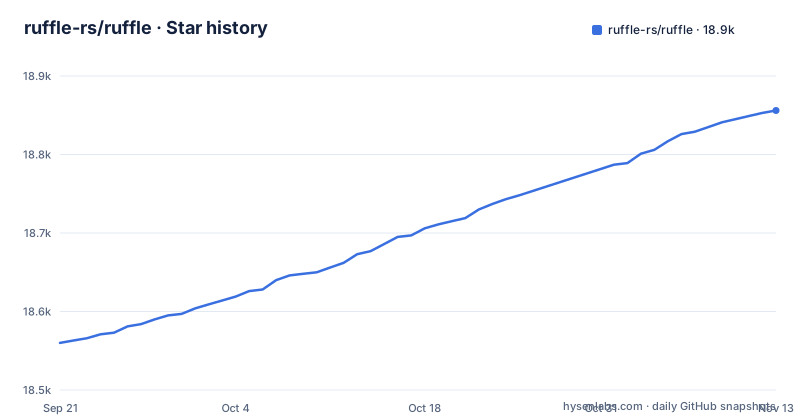
Star history
- ruffle-rs/ruffle18,856 ★ · +296
| Repository | 2026-09-21 | 2026-11-13 |
|---|---|---|
| ruffle-rs/ruffle | 18.6k | 18.9k |
296 Stars in the last 53 days, measured from the daily GitHub snapshot. Compare with other projects
Editorial analysis
The release channel is a dated nightly, and the manifest is still pre one
The three most recent releases are dated nightlies, one per day, each named for its date and titled with the same date. There is no version number in any of them.
The workspace manifest has one, and it is 0.7.1. So the two answers to what version is this are a date and a pre-release number, and neither is a tag you would recognise from a packaged release.
The README is consistent with that. It says the easiest way to try Ruffle is the web demo page, where you click a button to select a file, and that nightly builds are available for desktop and web platforms, with a link to the downloads page's nightly section and to a wiki page for detailed instructions. The project status paragraph adds the other half: it supports the three ActionScript versions pretty well, but it is still not finished by any means, and issues go to the tracker.
So the distribution model is a rolling build with a nightly channel, and the honest framing is a project you track rather than a version you depend on.
Building needs a JDK, because the ActionScript 3 builtin classes are built with one
The prerequisites list is two items and the second one surprises people.
The first is the latest stable channel of Rust. The second is Java, available on the path as a command, and the reason is given in the same line: it is required for building the library containing the builtin Flash classes for ActionScript 3.
That connects directly to the workspace. Among the members is a crate whose name says it builds the player global library, which is the ActionScript 3 standard library. It is generated rather than hand written, and the Java runtime is what generates it.
Both Linux package lists carry the consequence. The Debian and Ubuntu list ends with a headless Java runtime package and a compiler. The Fedora list installs a headless OpenJDK package and a compiler. Neither list installs a browser or a graphics stack beyond the development headers for audio, input devices, font configuration, freetype and OpenSSL.
So a machine can install a nightly binary and play a SWF with no JDK anywhere, and a machine that wants to build the emulator itself needs a Java runtime it will never otherwise have a reason to install.
The macOS install tracks the repository head, so there is no versioned macOS build
There is a separate note for macOS, and it is about updates rather than installation.
The desktop application for macOS is installed from a Homebrew tap that the project maintains, with a single command that installs it. Then the note says that because it is HEAD-only, you will need to run an upgrade command with a flag to fetch the head each time you want to update.
Read that carefully and it is a stronger statement than it looks. The tap does not point at a release; it points at the repository's current commit. So the Homebrew route does not correspond to any dated nightly, and there is no way to roll back to a known state through the package manager, because it builds the tip.
That is a reasonable choice for a project whose channel is a nightly, and it is a poor fit for a team that wants to say which build it is running. The desktop application built from source has the same property, since it is built from whatever the working tree contains, but there at least you control the commit.
Five distribution channels, and the browser two of them run through extension review
The badge row at the top of the README points at five places you can get Ruffle, and they are not the same kind of thing.
There is a browser add-on for Firefox and a browser extension in the Chrome Web Store. There is a Flatpak listing. There is a package on the JavaScript registry, which is the web build for embedding. And there is a package in the Arch User Repository, whose name marks it as a nightly binary build rather than a versioned one.
The consequence is four different update latencies from one source repository. A change merged on the default branch reaches the site and the downloadable builds quickly. It reaches a Flatpak and a distribution package when whoever packages it runs again. It reaches a browser user when the extension is reviewed and published, which is a process outside the project's control and outside the repository entirely.
For a project whose entire reason to exist is preserving access to content that is no longer supported, that asymmetry is the one that matters: a fix to a content-blocking bug can be live on the web build and behind an extension review at the same time.
One emulator, five rendering backends, and a Flash compatible string type
The structure section lists ten directories, and two of them explain more about the design than the feature list would.
There is a core directory for the emulator and common code, a parser directory for SWF files and ActionScript, a desktop client, a web client and browser extension, a rendering directory described as holding various rendering backends for both desktop and web, video decoding backends, a Flash Video decoder, two utilities, and a directory holding what the README calls a Flash compatible implementation of strings.
That last one is the interesting entry. A separate crate for strings means the language's own string semantics are being reimplemented rather than borrowed from Rust's, which is a sign of how closely the emulator tracks the original runtime rather than approximating it.
The workspace manifest turns the rendering entry into a number. Under render there are five separate crates: one for canvas, one built on a shader translation library, one called after the shading language it targets, one on the GPU abstraction the desktop client uses, and one for WebGL. Video has two, video/software and video/external. The web client additionally has its own crate for the Safari extension.
So the shape is one emulator with a plugin point at every place a platform differs, and adding a capability that a new device needs means adding a crate rather than a configuration.
The default member is the desktop app, so a plain cargo build gives you one target
The workspace manifest has a default members list and it contains exactly one entry, the desktop crate. The resolver is set to the second version.
That single line explains the shape of the build instructions. A plain build in the repository produces the desktop application and nothing else. The web and browser extension have their own instructions, in a separate directory in the repository, and the Android application has instructions in a separate project altogether, which is a different repository with its own contribution guide.
So there are three build instructions in three places for three targets, plus the macOS note and the two utility tools. The member list itself is just over thirty entries and groups them by role: the core and its macros and its builtin library builder, the desktop and web clients, the parser, the video decoder, the strings crate, the two utilities, the frontend utilities, the render backends, the video backends, and a tests group that includes a runner, two format-specific suites, a socket-oriented suite and a testing framework. There is also a tools group holding a component named for the source language, a fuzzer, and a stub reporting tool.
The root also carries a configuration file for dependency auditing, which pairs with the README's note that Ruffle depends on third party libraries under compatible licences.
Screenshots need a GPU, and the bulk scanner is the only coverage tool documented
Two utilities are documented, and both are for people working on the emulator rather than people using it.
The scanner exists for a specific job. If you have a collection of real world files to test against, it may be used to benchmark the parser's capabilities. Given a folder and an output filename it attempts to read all of the files and reports on the success of that task, writing a comma separated file:
cargo run --release --package=ruffle_scanner -- scan folder/with/swfs/ results.csvThat is the only documented way to measure how much of a real corpus the parser handles, and its output is a pass or fail per file rather than a quality metric.
The exporter does the opposite job: given a file, it captures an image of it. And it carries a limitation stated plainly: it currently requires hardware acceleration, but it can be run headless with no window. So a machine with no working GPU cannot produce a reference screenshot, which is a real constraint for anyone writing a rendering test.
The desktop application itself is launched the same way, with a release flag and a package name, optionally followed by a file path, and omitting the release flag gives you a debug build.
Editorial conclusion
Use Ruffle if you have Flash content you need to keep running, and if you accept that the project says in its own words that it is not finished, because it supports the three ActionScript versions well rather than completely. Do not plan around a stable release, because the tags are dated nightlies and the manifest is still pre one. Check four things before you commit: how you will get updates, since the browser extensions go through two extension stores, one channel is a nightly-only distribution package, and the macOS Homebrew install is from the repository head with no version; whether your environment can build, since Java is on the prerequisite list alongside Rust; which rendering backend your platform needs, because the backends are separate crates; and whether you need the utilities, since taking a screenshot from a SWF currently requires hardware acceleration. The licence is a choice between two permissive licences, the last push was 2026-11-02, and the latest nightly was published on 2026-11-03.
Frequently asked questions
What is a ruffle?
In this repository Ruffle is an Adobe Flash Player emulator written in Rust, targeting both the desktop and the web through WebAssembly. It supports ActionScript 1, 2 and 3, and the project's own status statement says it is still not finished by any means. It is licensed under a choice of the Apache 2.0 licence or the MIT licence.
how to use ruffle
The README says the easiest way to try it is the web demo page, where you click a button to select a file. Nightly builds are published for desktop and web platforms, and a wiki page has detailed instructions. For the browser there are add-ons for Firefox and Chrome, and there is a Flatpak listing and a JavaScript package.
how to use ruffle emulator
For the desktop application it is a single command with a release flag and the desktop package name, optionally followed by the path to a file, and omitting the release flag builds in debug mode. The desktop build also has four optional feature flags for profiling and for render debug labels.
how to install ruffle
The README describes getting a nightly build from the downloads page for desktop and web, a browser add-on for Firefox, a Chrome Web Store extension, a Flatpak listing, or a package on the JavaScript registry. The macOS route is a Homebrew tap installed from the repository head, which the README notes has to be re-updated with a fetch flag each time.
how to use ruffle yarn
Nothing in the repository concerns yarn. It is a Rust project: the top level holds a cargo lock file, a cargo workspace manifest listing just over thirty members, a cargo configuration directory, a directory for a fuzzer, and a configuration file for dependency auditing.
Official sources
Add this badge to your README
If you maintain this project, the badge below links readers to this analysis and shows its maintenance status from the daily GitHub snapshot. Paste the markdown into your README; add ?metric=license or ?metric=stars to the image URL for a different field.

[](https://hysenlabs.com/projects/ruffle-rs-ruffle)Star history chart for your README
[](https://hysenlabs.com/projects/ruffle-rs-ruffle)Was this useful?