Stalwart mail server 1.0: one Rust codebase for IMAP, JMAP, SMTP and groupware, and where it asks more of you
All-in-one Mail & Collaboration server. Secure, scalable and fluent in every protocol (IMAP, JMAP, SMTP, CalDAV, CardDAV, WebDAV).
At a glance
- What is it?
- Stalwart bundles mail transport, mailbox access, calendars, contacts, file storage, spam filtering and encryption into one Rust server with pluggable storage. It reached 1.0 at the end of October 2026, several of its JMAP and DKIM features track IETF drafts, and its official container build covers only two CPU architectures.
- Who is it for?
- Stalwart suits administrators who want to replace a stack of separate mail, spam and groupware daemons with one server, and who can run it on amd64 or arm64 Linux with one of its supported stores. It is a poor fit for anyone whose clients must speak only stable, finished standards for calendars and files, or who needs a 1.x release line with a long track record, since 1.0.0 shipped on 2026-10-26 with two patch releases within a week.
- Can I use it commercially?
- Not without permission. GitHub finds no licence file in the repository, and without a licence all rights are reserved by default: you may read the code but not reuse it. Check the README, or ask the authors, before using it.
- Is it still maintained?
- Yes. The repository last received commits 4 days ago.
- What is it written in?
- Mainly Rust, according to GitHub's language statistics.
Answers come from the project's GitHub data, last synced on November 14, 2026, and from our analysis. They are not legal advice.
Star history
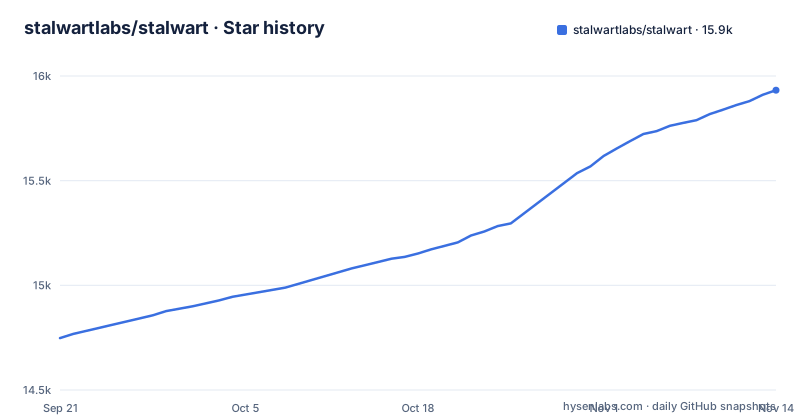
- stalwartlabs/stalwart15,932 ★ · +1,184
| Repository | 2026-09-21 | 2026-11-14 |
|---|---|---|
| stalwartlabs/stalwart | 14.7k | 15.9k |
1,184 Stars in the last 54 days, measured from the daily GitHub snapshot. Compare with other projects
Editorial analysis
Every protocol lives in its own crate but ships as one server
Stalwart is a Rust Cargo workspace, and its member list reads like a protocol map. There are separate crates for imap and imap-proto, jmap and jmap-proto, smtp and smtp-proto, pop3, managesieve, dav and dav-proto, scim and scim-proto, plus groupware, calcard and sieve. Supporting crates handle storage (store, s3), the directory, a coordinator, the spam filter, natural language processing (nlp), text extraction, telemetry and tracing (trc), and cryptography.
The binary that comes out of this is a single server called stalwart, built with `-p stalwart`. Mail submission and relay over SMTP, mailbox access over IMAP4rev2, IMAP4rev1, POP3 and JMAP, Sieve script management over ManageSieve, and calendars, contacts and files over CalDAV, CardDAV and WebDAV all run from it. For an administrator this replaces the usual arrangement of a separate MTA, IMAP server, filter and groupware service, each with its own configuration and user database.
The trade is concentration. One process carries every user-facing protocol, so a bad upgrade or a misconfiguration affects mail delivery, mailbox access and calendars together rather than one service at a time. Not every crate is part of the default build either: s3 and crypto are workspace members but are absent from default-members, so a plain `cargo build` in the workspace does not compile them, while the release Dockerfile turns features on explicitly.
Several JMAP, DKIM and autoconfig features implement drafts, not final RFCs
The protocol list mixes published standards with work in progress, and the distinction matters for client compatibility. JMAP for Mail, JMAP for Sieve Scripts, JMAP for Contacts, JMAP Sharing, and the WebSocket, Blob Management and Quotas extensions point to published RFCs. Other features point to IETF drafts: JMAP Object Metadata (draft-ietf-jmap-metadata-04), JMAP for Calendars (draft-ietf-jmap-calendars-32), JMAP for File Storage (draft-ietf-jmap-filenode-17), DKIMv2 (draft-ietf-dkim-dkim2-spec, including post-quantum signatures), and account discovery through PACC and autoconfig drafts.
Two consequences follow. First, a draft can change before it is finalized, so behavior built against today's version may need to move when the standard settles, and clients written against a different draft revision may not interoperate. Second, client support is the real bottleneck. A server that speaks JMAP for Calendars is only useful if your calendar client does too; for most users the practical calendar and contact paths will be CalDAV, CalDAV Scheduling and CardDAV, which point to published RFCs.
For mail authentication, the stable pieces are DKIMv1, SPF, DMARC and ARC, with DANE, MTA-STS and SMTP TLS reporting for transport security. DKIMv2 signing is something receiving servers also have to understand, so it does not replace DKIMv1 for deliverability.
Storage backends are pluggable, but the main image leaves FoundationDB out
Stalwart separates storage from protocol handling. The supported backends are RocksDB, FoundationDB, PostgreSQL, MySQL, SQLite, S3-compatible object storage, Azure and Redis. Full-text search is available in 17 languages through a built-in engine, or through Meilisearch, ElasticSearch, OpenSearch, PostgreSQL or MySQL. Attachments in PDF, Microsoft Office, OpenDocument, EPUB and RTF formats are extracted and indexed.
Which backends you actually get depends on how the binary was compiled. The repository's main Dockerfile builds with `--no-default-features` and then enables an explicit feature list:
RUN RUSTFLAGS="$(cat /flags.txt)" cargo build --target "$(cat /target.txt)" --release -p stalwart --no-default-features --features "sqlite postgres mysql rocks s3 redis azure nats enterprise"FoundationDB is not in that list. The repository carries a separate Dockerfile.fdb, so a FoundationDB deployment needs the image built from that file rather than the standard one. The list also includes nats and enterprise, which means the standard image compiles in features beyond the storage drivers.
The flexibility has a cost in planning. A single-node SQLite or RocksDB setup is simple to run but ties you to one machine, while distributing across PostgreSQL, S3 and Redis spreads state over several services you also have to back up and monitor. Pick the store before migrating users, since moving mail between backends is a separate project.
The container build stops on anything other than amd64 and arm64
The Dockerfile cross-compiles from the build host's platform using cargo-chef on a Rust slim Trixie image. A case statement on TARGETPLATFORM maps linux/arm64 to aarch64-unknown-linux-gnu and linux/amd64 to x86_64-unknown-linux-gnu, each with a matching cross linker. Any other platform hits `exit 1`, so building this image for 32-bit ARM boards or other architectures fails outright rather than producing a degraded image.
The runtime stage is debian:trixie-slim with ca-certificates, curl and libcap2-bin installed. It creates a system group and user named stalwart with uid and gid 2000, a nologin shell and no home directory, and prepares /etc/stalwart for configuration and /var/lib/stalwart for data.
That user setup has a direct operational consequence. If you bind-mount host directories into /etc/stalwart or /var/lib/stalwart, the host paths must be readable and writable by uid 2000, or the server cannot use them. Anyone running a rootless container runtime with user namespace remapping needs to check how uid 2000 maps on the host.
Outside containers, the repository root carries an install.sh script, and the project points to its get-started guide at stalw.art/docs/install/get-started. There is also a docker-bake.hcl file for multi-target image builds.
The spam filter can call out to hosted AI models
Spam and phishing filtering is built in rather than delegated to a separate daemon. It combines a rule set, a statistical classifier with collaborative filtering, automatic training and address book integration, DNS blocklist checks against IPs, domains and hashes, Pyzor digest-based filtering, greylisting to defer unknown senders, spam trap addresses, trusted reply tracking, and sender reputation by IP address, ASN, domain and email address. Phishing protection covers homographic URL attacks and sender spoofing.
On top of that sits an AI spam classifier that supports OpenAI-compatible endpoints, Anthropic, Google Gemini and Ollama models. This is the part that needs a policy decision before you turn it on. Classifying a message with a hosted model means sending message data to that provider, which may conflict with data protection obligations for some organizations. An OpenAI-compatible endpoint or Ollama gives you the option of a model you run yourself, but then you carry the cost of hosting it.
The inbound pipeline is also scriptable. Throttling and filtering rules, Sieve scripts, MTA hooks and milter integration all apply on the way in, so existing milter-based tools can stay in the chain while you evaluate the built-in filter.
Per-user encryption at rest changes who can read stored mail
Stalwart can encrypt each user's mailbox at rest with that user's own OpenPGP key or S/MIME certificate. It also runs an encryption gateway that encrypts outgoing mail for remote recipients under an opportunistic or a required policy, with no software needed on the sender's side.
To find recipient keys, it queries Web Key Directory, keys.openpgp.org, HKP keyservers, and DNSSEC-validated OPENPGPKEY and SMIMEA records. It harvests keys from S/MIME signatures and Autocrypt headers on authenticated incoming mail, validates S/MIME certificates against bundled roots, custom trust anchors and revocation lists, and supports post-quantum encryption with ML-KEM for OpenPGP (RFC 9980) and S/MIME (RFC 9936).
The consequence is a shift in responsibility. For messages encrypted under this feature, the matching private key is needed to decrypt the body and attachments. Headers remain readable, messages are processed before storage encryption, and enabling it does not retroactively encrypt existing mail. Losing the private key can make encrypted content unrecoverable. A required policy on the gateway also means outgoing mail to a recipient with no discoverable key cannot go out encrypted, so test that policy against your real correspondents before enforcing it.
Multi-tenancy, quotas and automated DNS for hosting several domains
Stalwart is built to host more than one organization. It supports multi-tenancy with domain and tenant isolation, and disk quotas per user and per tenant. Address handling covers aliases, mailing lists, subaddressing and catch-all addresses. The workspace includes SCIM crates for directory provisioning alongside the directory crate.
Two features reduce the manual work that usually comes with adding a domain. Automated DNS management handles records on the server's side, and DKIM keys are rotated and managed automatically. For clients, automatic account configuration works through PACC, autoconfig and Microsoft's autodiscover, so mail clients that support those mechanisms can set themselves up from an email address.
Outbound delivery runs through distributed virtual queues with delayed delivery, priority delivery, quotas, routing rules and throttling, plus envelope rewriting and message modification. That is the machinery a hosting provider needs to keep one tenant's traffic from crowding out another's. Because PACC and autoconfig are drafts, test autodiscovery with the actual clients your tenants use.
Version 1.0 shipped days ago, and upgrades have their own folder
The 1.0 line is new. v1.0.0 was released on 2026-10-26, v1.0.1 on 2026-10-28 and v1.0.2 on 2026-11-02, and the last push to main was on 2026-11-02. The project is moving quickly, and two patch releases inside a week after a major release means early adopters are still finding issues that need fixing.
The repository has an UPGRADING/ directory next to CHANGELOG.md, which is where version-to-version migration steps belong. Read it before moving an existing installation onto 1.x, and pin your deployment to an exact release tag rather than tracking main or a floating image tag.
Licensing deserves a check too. The repository metadata does not report a license, the README's license badge links to the GNU AGPL 3.0 page, and the repository carries a LICENSES/ directory. The standard Docker image is compiled with an enterprise feature flag. If you plan to offer Stalwart as a service or modify it, read the files under LICENSES/ to see which terms apply to which parts before you build on it. Security reports follow the process in SECURITY.md and SECURITY_PROCESS.md.
Editorial conclusion
Stalwart suits administrators who want to replace a stack of separate mail, spam and groupware daemons with one server, and who can run it on amd64 or arm64 Linux with one of its supported stores. It is a poor fit for anyone whose clients must speak only stable, finished standards for calendars and files, or who needs a 1.x release line with a long track record, since 1.0.0 shipped on 2026-10-26 with two patch releases within a week. Before deploying, read the UPGRADING notes, confirm the license terms in LICENSES/, and choose a storage backend you can back up.
Frequently asked questions
How do I install Stalwart?
The repository root includes an install.sh script and a Dockerfile that builds images for linux/amd64 and linux/arm64. The project's get-started guide is at stalw.art/docs/install/get-started.
Which databases can Stalwart mail server use for storage?
Stalwart supports RocksDB, FoundationDB, PostgreSQL, MySQL, SQLite, S3-compatible storage, Azure and Redis. The main Dockerfile does not compile FoundationDB support; the repository has a separate Dockerfile.fdb for that.
Does Stalwart include spam filtering?
Yes. Stalwart has a built-in spam and phishing filter with rules, a statistical classifier, DNSBL checks, Pyzor, greylisting and an optional AI classifier that supports OpenAI-compatible, Anthropic, Google Gemini and Ollama models.
Official sources
Where developers are discussing it
Posts on Hacker News, dev.to and Lobsters that link to this repository, found by our scan of those communities. 1 in the last 30 days; newest first.
- Stalwart Mail Reaches v1.0.0Hacker News · Oct 26, 2026 · 5 points · 0 comments
Add this badge to your README
If you maintain this project, the badge below links readers to this analysis and shows its maintenance status from the daily GitHub snapshot. Paste the markdown into your README; add ?metric=license or ?metric=stars to the image URL for a different field.

[](https://hysenlabs.com/projects/stalwartlabs-stalwart)Star history chart for your README
[](https://hysenlabs.com/projects/stalwartlabs-stalwart)Was this useful?