prettier/vim-prettier for Vim Formatting
A Vim plugin for Prettier
At a glance
- What is it?
- prettier/vim-prettier is a Vim and Neovim plugin that invokes Prettier with configurable formatting, pragma-aware autosave, asynchronous execution, and project-local executable resolution. It suits Vim users who want Prettier through editor commands, but its beta release and explicit editor matrix should be checked before adoption.
- Who is it for?
- Adopt prettier/vim-prettier if your team edits Prettier-supported files in Vim and accepts maintaining a Node.js-based plugin with a beta package version. Do not choose it as a standalone formatter service or assume that every editor and platform is covered.
- Can I use it commercially?
- Yes. MIT is a permissive licence: you can use, modify and sell software built on it, as long as you keep its copyright and licence notices.
- Is it still maintained?
- Yes. The repository last received commits 6 days ago.
- What is it written in?
- Mainly Vim Script, according to GitHub's language statistics.
Answers come from the project's GitHub data, last synced on November 7, 2026, and from our analysis. They are not legal advice.
Star history
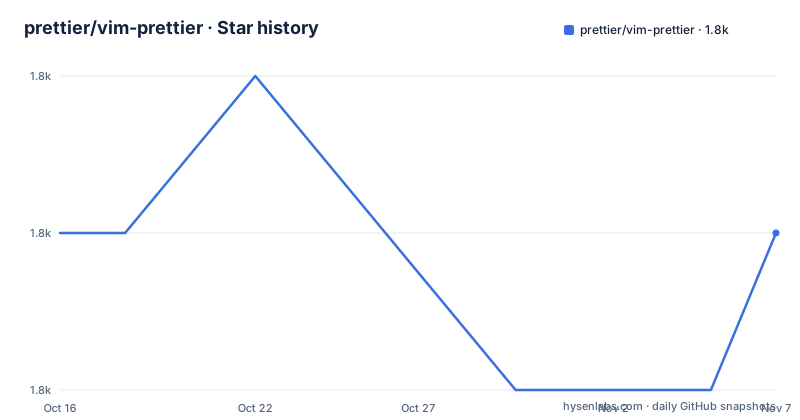
- prettier/vim-prettier1,832 ★ · +0
| Repository | 2026-10-16 | 2026-11-07 |
|---|---|---|
| prettier/vim-prettier | 1.8k | 1.8k |
0 Stars in the last 22 days, measured from the daily GitHub snapshot. Compare with other projects
Editorial analysis
Why the Vim wrapper exists
prettier/vim-prettier addresses a specific gap between Prettier and editors that do not provide a built-in integration. It gives Vim and Neovim users commands for formatting a whole buffer, a selected fragment, or an asynchronous buffer, while also providing autosave integration and a way to query the resolved Prettier executable. The target audience is therefore not people looking for a JavaScript formatter itself. It is Vim users who already rely on Prettier and want editor commands, local configuration discovery, and a consistent integration layer.
The plugin does not reimplement Prettier. It calls the Prettier CLI, so the formatting result still depends on the selected Prettier version, project configuration, plugins, and the language support of that installation. The README states that project-local Prettier, configuration, and plugins take precedence over vim-prettier's bundled fallback. That distinction matters when a repository has its own formatting policy. A global editor setup can still use the repository's local toolchain instead of silently formatting with a different baseline.
The plugin supports common Prettier-related filetypes in the documented vim-plug configuration, including JavaScript, TypeScript, CSS, Less, SCSS, JSON, GraphQL, Markdown, Vue, YAML, HTML, PHP, and XML. This is a filetype loading list, not a promise that every parser or plugin will work in every project. Prettier's own language support remains the underlying limit.
Executable resolution and formatting data flow
The central design choice is executable resolution. The README lists four checks in order: a user-defined Prettier CLI path in Vim configuration, a search through the current buffer's parent directories for a Prettier installation inside `node_modules`, a global Prettier installation, and finally the locally installed vim-prettier executable. This ordering favors a deliberately configured path, then a project dependency, then a machine-wide installation, and only then the plugin's bundled fallback.
When a formatting command runs, Vim supplies the buffer or selection to the resolved CLI. The plugin passes the command through its Prettier interface and replaces the edited text with the returned result. The exact transport is not described in the README, so it would be unsafe to claim whether the buffer is written through a temporary file, standard input, or another mechanism. What is documented is the observable distinction between the commands. `:PrettierPartial` sends the entire buffer but tells Prettier to format only the selection, preserving indentation level while requiring the whole file to be valid. `:PrettierFragment` sends only the selected text as a fragment of the current file type. The README says this can be faster, but it will not preserve indentation.
That difference creates a real operational choice. Whole-buffer formatting is safer for syntax-sensitive projects when the selection depends on surrounding structure. Fragment formatting is useful when editing an isolated expression or block, but the user accepts a different indentation context. The plugin offers `:Prettier` for normal invocation and `:PrettierAsync` for Vim 8 or newer, allowing users to choose whether the editor should wait for the formatter.
Installing vim-prettier and completing a first format
The simplest documented installation uses Vim 8 or newer package directories and Git. The plugin must be placed under `~/.vim/pack/plugins/start`, and `packloadall` must be present in the `.vimrc`. The clone command installs the repository, while `packloadall` makes packages in the start directory load at startup.
mkdir -p ~/.vim/pack/plugins/start
git clone https://github.com/prettier/vim-prettier ~/.vim/pack/plugins/start/vim-prettier
Add this Vim configuration line if the editor does not already load package directories automatically:
packloadallFor vim-plug users, the documented configuration installs dependencies after cloning and limits loading to selected filetypes:
Plug 'prettier/vim-prettier', {
  \ 'do': 'npm install --omit=dev',
  \ 'for': ['javascript', 'typescript', 'css', 'less', 'scss', 'json', 'graphql', 'markdown', 'vue', 'yaml', 'html', 'php', 'xml'] }
This setup assumes Node.js and npm are installed globally. A user who prefers loading the plugin for every filetype can use the shorter documented form:
Plug 'prettier/vim-prettier', { 'do': 'npm install --omit=dev' }After installation, open a supported file and run the normal formatting command:
:PrettierThe default manual mapping is `<Leader>p`, although the README shows how to replace it with a project-specific mapping:
nmap <Leader>py <Plug>(Prettier)The README states that Prettier runs on autosave by default when the configured filetype has an `@format` pragma in the header. To enable the broader autoformat setting, the configuration can be explicit:
let g:prettier#autoformat = 1
let g:prettier#autoformat_require_pragma = 0
Those two settings together allow autosave without an `@format` or `@prettier` tag. This behavior can affect every matching buffer, so the first test should use a file whose formatting is easy to inspect.
Autosave rules and command boundaries
The pragma controls are not merely conveniences. By default, auto formatting is tied to configured filetype patterns that support the `@format` annotation. `g:prettier#autoformat` enables the feature, while `g:prettier#autoformat_require_pragma = 0` removes the tag requirement. Teams that want repository-wide formatting can use both settings, but then every opened supported buffer may become subject to formatting on save.
There is also `g:prettier#autoformat_config_present = 1`. The README says this toggles auto formatting based on whether a configuration file can be found in the buffer directory or a parent directory. It overrides `g:prettier#autoformat`, so this is a separate mode rather than an additional filter. The documented default search list follows Prettier's file-based configuration names and retains the legacy `.prettierrc.config.js` entry. The README specifically says the list does not include `package.json` or `package.yaml`, because those files count as Prettier configuration only when they contain a Prettier field. An editor should rely on the repository's current documentation rather than assume every config file is detected.
The command set also provides diagnostics without changing formatting policy. `:PrettierVersion` reports the plugin version, `:PrettierCliPath` reports the resolved executable path, `:PrettierCliVersion` reports the CLI version, and `:PrettierCli <q-args>` sends arguments to the resolved CLI. These commands are useful when a project has multiple installations. They can identify whether a local `node_modules` copy or a global binary is actually being used.
For selection work, the two partial commands are intentionally different. `:PrettierPartial` retains the whole-file context but requires valid surrounding code. `:PrettierFragment` sends only the selection and does not preserve indentation. Users should choose based on whether the selection is syntactically valid in context or can be parsed as an isolated fragment.
Compatibility, maintenance, and upgrade boundaries
The repository is not archived, and its last push was on 2026-10-09. That supports a current maintenance status at the repository level, but the package version in `package.json` is `2.0.0-beta.1`. The repository has no GitHub releases, so the absence of release objects does not mean there are no versioned package states. It does mean users should not expect a conventional release history from GitHub releases.
The README describes a 2.0.0 beta compatibility policy based on tested fixtures. It names Vim 8.2 latest patch, latest stable Vim, Neovim 0.9 latest patch, and latest stable Neovim as tested editors. User installations are tested with Node.js 20.x and `npm install --omit=dev`. Development and CI use the checked-in Yarn v1 lockfile with `yarn install --frozen-lockfile` for reproducible test runs. These are documented boundaries, not evidence that every Vim build, operating system, Prettier plugin, or parser is supported.
The root `Dockerfile` is explicitly deprecated and retained for historical reference. It uses Alpine 3.8, an unpinned `testbed/vim:latest` base image, and legacy editor versions. The README recommends the pinned Docker editor runner instead:
yarn test:editors:dockerA single target can be selected with one of these documented commands:
scripts/docker-editor-matrix.sh vim-8.2
scripts/docker-editor-matrix.sh vim-stable
scripts/docker-editor-matrix.sh nvim-0.9
scripts/docker-editor-matrix.sh nvim-stable
The runner defaults to `linux/amd64`, and the README warns that Neovim targets assume x86_64 release archives. This is a concrete limitation for maintainers checking compatibility on another architecture. The project is MIT licensed, so redistribution and modification are governed by that license, but this review does not provide legal interpretation.
An alternative command can be used at buffer level. The README gives this example for a CSS and SCSS alternative:
au FileType css,scss let b:prettier_exec_cmd = "prettier-stylelint"The plugin searches for that executable using the same resolution process and falls back to `prettier` if it cannot find it. This is a direct integration point for an alternative formatter wrapper, rather than a claim that every Prettier plugin has identical behavior.
When vim-prettier is the wrong tool
vim-prettier is a poor fit for editors that do not use Vim or Neovim, for teams that require formatting without Node.js, or for projects that need a standalone CI formatting gate. The plugin is an editor wrapper, so its documented commands do not replace a repository-level formatting command in automation. The README does not document a standalone CLI installation or a documented rollback procedure for the current beta line.
It is also a questionable choice when users expect selection formatting to behave like full-file formatting. `:PrettierFragment` deliberately does not preserve indentation, while `:PrettierPartial` requires the entire file to be valid. A team working on incomplete, syntactically broken files may prefer the asynchronous or full-buffer command, but even those choices are tied to the state of the buffer and the resolved CLI.
The beta designation deserves a separate adoption decision. The repository's compatibility documentation is specific, but the package version remains `2.0.0-beta.1`, and the README contains a note about using `release/0.x` when an older fallback is wanted. Projects that require a stable release policy should inspect their own version and upgrade constraints before depending on the current line.
A real alternative is to call Prettier directly from the editor or from the project's existing task runner. That approach avoids this plugin's autosave and command layer, but it also gives up `:PrettierAsync`, `:PrettierPartial`, `:PrettierFragment`, executable diagnostics, and vim-prettier's project-oriented resolution order. The choice is between editor integration convenience and fewer moving parts, not between two equivalent formatters.
Editorial conclusion
Adopt prettier/vim-prettier if your team edits Prettier-supported files in Vim and accepts maintaining a Node.js-based plugin with a beta package version. Do not choose it as a standalone formatter service or assume that every editor and platform is covered. Verify executable resolution, autosave behavior in a representative file, and the documented compatibility targets before standardizing it.
Frequently asked questions
How do I install prettier/vim-prettier with vim-plug?
Add the documented `Plug 'prettier/vim-prettier'` entry with `'do': 'npm install --omit=dev'`. The setup assumes Node.js and npm are installed globally, and the filetype list can limit which files load the plugin.
What is the difference between :PrettierPartial and :PrettierFragment?
`:PrettierPartial` sends the entire buffer while formatting only the selection, so indentation level is preserved and the whole file must be valid. `:PrettierFragment` sends only the selection, which can be faster but will not preserve indentation.
How does prettier/vim-prettier choose the Prettier executable?
It checks a user-defined CLI path first, then a `node_modules` installation in the buffer's parent directories, then a global installation, and finally the locally installed vim-prettier executable. `:PrettierCliPath` reports the resolved path.
Official sources
Add this badge to your README
If you maintain this project, the badge below links readers to this analysis and shows its maintenance status from the daily GitHub snapshot. Paste the markdown into your README; add ?metric=license or ?metric=stars to the image URL for a different field.

[](https://hysenlabs.com/projects/prettier-vim-prettier)Star history chart for your README
[](https://hysenlabs.com/projects/prettier-vim-prettier)Was this useful?