Nez: a 2D framework for MonoGame and FNA that installs from source
Nez is a free 2D focused framework that works with MonoGame and FNA
At a glance
- What is it?
- Nez puts a scene/entity/component engine, collision, deferred lighting, pathfinding and a tilde-key debug console on top of MonoGame or FNA, but you add it as a project reference rather than a package, and every bundled shader assumes OpenGL.
- Who is it for?
- Nez suits a solo developer or a small team shipping a 2D game on MonoGame or FNA who wants collision, deferred lighting, pathfinding, coroutines and a live entity inspector on day one instead of after a month of plumbing. It is the wrong choice for a DirectX project, for a shop that consumes engine code as a versioned package, or for a team that needs a support commitment behind its engine.
- Can I use it commercially?
- Yes. MIT is a permissive licence: you can use, modify and sell software built on it, as long as you keep its copyright and licence notices.
- Is it still maintained?
- Yes. The repository last received commits 114 days ago.
- What is it written in?
- Mainly C#, according to GitHub's language statistics.
Answers come from the project's GitHub data, last synced on October 23, 2026, and from our analysis. They are not legal advice.
Star history
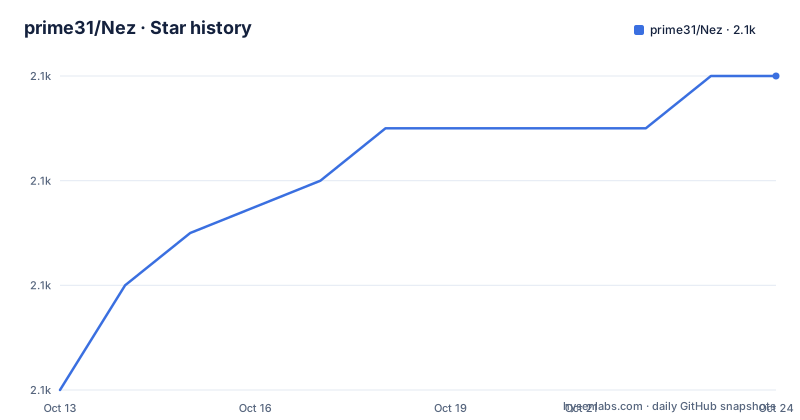
- prime31/Nez2,090 ★ · +6
| Repository | 2026-10-13 | 2026-10-23 |
|---|---|---|
| prime31/Nez | 2.1k | 2.1k |
6 Stars in the last 10 days, measured from the daily GitHub snapshot. Compare with other projects
Editorial analysis
SpatialHash sits behind every collision query you make
Collision in Nez is answered before your code asks for it. A SpatialHash keeps the broadphase work out of sight, so a raycast or an overlap check only walks what is nearby instead of the entire Scene. On top of that sit three shape tests, AABB, circle and polygon, each usable as a collision or as a trigger.
Three answers to one question is the first trade-off. Most 2D work only needs trigger overlap, and the built-in tests cover it in the moment it is asked. When objects must push, slide and settle, the framework hands off to Farseer Physics, a Box2D derivative added as an optional project reference. When you want soft, stretchy bodies, Verlet bodies give you constraint driven squish instead.
Pick the narrowest answer that solves the problem. Importing a full simulation to detect a door opening buys nothing you needed, and it adds a dependency the rest of your project now compiles against.
The tilde key opens a console built from attributed methods
Press the tilde key and Nez drops into a console the way Quake did. Any static method marked with a console attribute becomes a command, so the command set is code you own rather than a config file you edit. Typing `help` lists every command, and `help COMMAND` explains one of them.
Out of the box that console carries a visual physics debugger, an asset tracker and a basic profiler. The `inspect ENTITY_NAME` command goes further: it opens a component inspector for a live entity where fields and properties can be edited and methods invoked from a button click. Dear ImGui panels are wired the same way, through attributes on your own code, and they ship as a separate assembly in `Nez.ImGui`, with `Nez.FNA.ImGui` for the FNA build.
The catch is that none of this is runtime configuration. Adding a command means editing a static method and recompiling, so treat the console as a development build feature rather than a menu you can ship and switch on.
Renderers sort by render layer first, then depth
Draw order in Nez is explicit. Renderables are sorted by render layer first and by layer depth second, and that comparison can be replaced with a custom sorter when the default two key ordering stops fitting your scene. Renderers and PostProcessors are added and removed as needed, so an effect is a pipeline edit rather than a rewrite of draw code.
Sitting on that pipeline are a deferred lighting engine with normal map support and both runtime and offline normal map generation, sprite animations, scrolling and repeating sprites, sprite trails, and a line renderer whose end caps can be rounded or cut sharp. The particle system imports Particle Designer files at runtime. The tween system moves any int, float, Vector, quaternion, color or rectangle field or property, scheduled through `Core.startCoroutine` when a task has to span frames.
Asset lifetime is per Scene: load what a scene needs and Nez unloads it when you change scenes. That is convenient right up to the point where one asset is genuinely shared between two scenes, and the README does not explain how that case is handled.
NSON resolves types while it parses, unlike plain JSON
Nez.Persistence covers three formats: JSON, a binary format, and NSON, described as a strongly typed, human readable JSON like syntax. The JSON and NSON paths resolve references automatically and deal with polymorphic classes, so a save file can carry a base type field and rebuild the concrete class on load without a hand written factory.
Two scheduling primitives sit right beside it. `Core.startCoroutine` spreads a large task across multiple frames, and `Core.schedule` handles delayed and repeating work, which covers animation timing without pulling in a separate tween runner. The `Emitter` class attaches to Nez's own core events and to any class you write.
MonoGame underneath supplies draw calls, input and content loading. Coroutines, a scheduler, an event emitter and typed save data come from Nez, which is the honest dividing line when you weigh this framework against plain MonoGame. Persistence keeps its own README inside the repository, and the rest of these subsystems are documented one page at a time under the FAQs folder.
A project reference, not a package, wires Nez into a game
Start from a `Monogame Cross Platform Desktop Project`, clone or download the Nez repository, and add `Nez.Portable/Nez.csproj` to your solution as a reference from the main project. If you are on MonoGame 3.8 the file changes to `Nez.Portable/Nez.MG38.csproj`, which is a different project file rather than a different package version. Finally, make the game's main class, `Game1.cs` in a default project, subclass `Nez.Core`.
Effects and PostProcessors need assets you copy in yourself: `DefaultContent/effects` into `Content/nez/effects`, and `DefaultContent/textures` into `Content/nez/textures`. Set Build Action to Content on both and enable `Copy to output directory` so they land in the compiled game. The README points at the Nez.Samples csproj as the worked example.
A source build still depends on a package restore even though the published package is retired, and the failure mode is a missing `project.assets.json`. The fix, from the repository root, is:
msbuild Nez.sln /t:restoreOpenGL shaders close the DirectX desktop template door
Every shader in Nez is compiled for OpenGL, so the DesktopGL template is the one to start from and the DirectX template cannot be used. This is a deliberate limit rather than an oversight: OpenGL is the only backend supported out of the box, chosen so one build covers Android, iOS, Mac, Linux and Windows.
Mobile needs one more call before touch input does anything, and it is easy to miss while testing on a desktop:
Input.Touch.EnableTouchSupport()FNA is the other route, with its own dependency chain. Install the FNA native libraries as the FNA documentation describes, clone this repository recursively, then open `Nez/Nez.sln` and build it so the packages refresh. Clone FNA separately, add a reference to FNA and `Nez.FNA` in your project, and add `Nez.FNA.ImGui` or `Nez.FNA.FarseerPhysics` when you need those parts. Only the FNA path tells you to clone recursively; the MonoGame steps do not mention it, and the repository root carries a `.gitmodules` file either way.
Plain MonoGame is the real alternative, and it is thinner
The alternative worth naming is MonoGame on its own, and the difference is architectural rather than a longer feature list. MonoGame gives you a game loop, a graphics context, input and content loading, and no Scene, no entity system and no console. Nez adds a Scene that owns entities, components that own behaviour, and a console that reads your own attributed methods.
Inside the framework the physics choice is a real fork. The built-in AABB, circle and polygon tests answer overlap and trigger questions immediately, which is cheap and stateless. Farseer Physics, the Box2D derivative, runs a simulation that keeps resolving contacts across frames, and that is what stacking and sliding need. Verlet bodies work from distance constraints between particles instead, which is where the squishy, constraint to particle behaviour comes from.
Pathfinding has the same shape of decision: Astar and breadth first search cover tilemaps or your own custom format, and which one fits is a grid question the framework leaves open.
NuGet badges outlived the package they point at
The README opens with a NuGet version badge and a download count badge, then its NuGet install section says the packages are long since deprecated and tells you to use the source. Those two blocks contradict each other, and the second one is the instruction you should follow. Only two build notes exist to describe what changed: 0.9.4 from 2019-09-08 was named for PascalCase formatting, and 0.9.1 from 2018-09-26 was the first NuGet package.
The same gap runs through the feature list. Runtime normal map generation, Particle Designer import at runtime and the `inspect` component inspector are all promised, and nothing in the repository ties them to a packaged build. `tag_and_release.sh` and `appveyor.yml` sit at the root, so the tooling to cut a build is in the tree even though 0.10.0 from 2019-09-21 remains the newest packaged version.
Licensing splits in two at the root as well: `LICENSE` covers the framework under MIT, and a separate `UI_LICENSE` sits beside it for the Nez.UI code. The last push was on 2026-07-01, so source keeps moving while the packaged artefacts do not, which means a project that wants reproducible builds has to pin a commit.
Editorial conclusion
Nez suits a solo developer or a small team shipping a 2D game on MonoGame or FNA who wants collision, deferred lighting, pathfinding, coroutines and a live entity inspector on day one instead of after a month of plumbing. It is the wrong choice for a DirectX project, for a shop that consumes engine code as a versioned package, or for a team that needs a support commitment behind its engine. Before committing, build `Nez.Portable/Nez.csproj` against your own MonoGame version, confirm the `Content/nez/effects` copy step survives your content build, and pin a commit.
Frequently asked questions
How do I install Nez in a new MonoGame project?
Clone or download the repository and add `Nez.Portable/Nez.csproj` to your solution as a project reference, using `Nez.Portable/Nez.MG38.csproj` if you are on MonoGame 3.8. Make your main Game class subclass `Nez.Core`. The NuGet packages are long since deprecated, so there is no package to add.
Can I use Nez with FNA instead of MonoGame?
Install the FNA native libraries as the FNA documentation describes, clone the Nez repository recursively and build `Nez/Nez.sln` so the packages refresh. In your game project, add a reference to FNA and `Nez.FNA`, then optionally `Nez.FNA.ImGui` or `Nez.FNA.FarseerPhysics`.
Why does my Nez build fail with a missing project.assets.json file?
The source build needs a package restore before it compiles. Run `msbuild Nez.sln /t:restore` in the root Nez folder and rebuild.
Which MonoGame template should a Nez game use on Windows?
Use the DesktopGL template, because all Nez shaders are compiled for OpenGL and the DirectX template cannot be used. Nez supports only OpenGL out of the box, to stay compatible across Android, iOS, Mac, Linux and Windows. On mobile you also need to call `Input.Touch.EnableTouchSupport()`.
What licence does Nez ship under?
The framework is under MIT in the `LICENSE` file at the repository root. A separate `UI_LICENSE` file sits beside it for the Nez.UI code, so check both before shipping user interface work.
Official sources
Add this badge to your README
If you maintain this project, the badge below links readers to this analysis and shows its maintenance status from the daily GitHub snapshot. Paste the markdown into your README; add ?metric=license or ?metric=stars to the image URL for a different field.

[](https://hysenlabs.com/projects/prime31-nez)Star history chart for your README
[](https://hysenlabs.com/projects/prime31-nez)Was this useful?