Prime Agent: a terminal coding agent built on a persistent Python REPL and refinable harness state
GitHub describes it as A self-improving RLM agent for coding workflows and long-running autonomous tasks.. The repository metadata lists TypeScript as its primary language. The metadata lists the MIT license. This article stays within the project description and details documented in the GitHub repository README.
At a glance
- What is it?
- Prime Agent from Prime Intellect is an open-source coding and research agent that runs model-written Python in a persistent REPL, keeps agents alive in a background daemon, and can refine its own supplemental prompts. It executes with your user permissions and is explicitly not a sandbox.
- Who is it for?
- Prime Agent is for developers who want a terminal agent that keeps long tasks alive across disconnects and can accumulate reusable skills, and who will run it only inside a disposable clone or an external sandbox. It is the wrong tool for untrusted repositories on your main machine, since the project says its isolation is not a security sandbox.
- Can I use it commercially?
- Check first. The repository uses a licence we do not classify automatically, so read its LICENSE file before any commercial use.
- Is it still maintained?
- Yes. The repository received new commits within the last day.
- What is it written in?
- Mainly TypeScript, according to GitHub's language statistics.
Answers come from the project's GitHub data, last synced on November 13, 2026, and from our analysis. They are not legal advice.
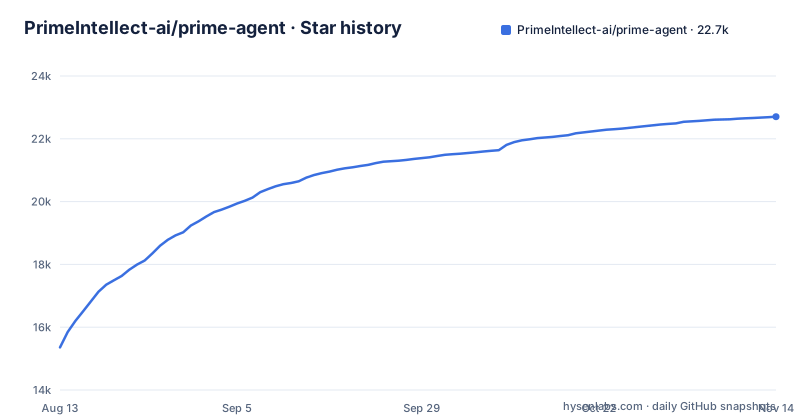
Star history
- PrimeIntellect-ai/prime-agent22,687 ★ · +7,331
| Repository | 2026-08-13 | 2026-11-13 |
|---|---|---|
| PrimeIntellect-ai/prime-agent | 15.4k | 22.7k |
7,331 Stars in the last 92 days, measured from the daily GitHub snapshot. Compare with other projects
Editorial analysis
Two abstractions: a Recursive Language Model and a Continual Harness
Prime Agent is described as an open-source coding and research agent for general and long-running work, built around two ideas. The Recursive Language Model treats context as variables, called prompt-as-a-variable, and treats tools such as recursive subagents as function calls inside a persistent REPL. The Continual Harness stores supplemental prompts, memories, skill descriptions and reusable subagent specifications as durable state that the agent can refine through small, evidence-backed updates, local to the session by default.
In plain terms, the model does not just chat. It writes Python that runs in a long-lived interpreter, and the working context lives in that interpreter instead of a single chat window. The consequence is that behaviour depends on code the model generates, which is why the safety notes below matter.
Installation pipes a remote script into your shell
The one-command installer for the latest stable version fetches a script and hands it to sh:
curl -fsSL https://app.primeintellect.ai/prime-agent/install.sh | shOn Windows, the PowerShell equivalent is:
irm https://app.primeintellect.ai/prime-agent/install.ps1 | iexThe Windows installer downloads the latest stable Windows x64 build and verifies its checksum before installation. Running either command executes whatever the server returns at that moment, so read the script first if you work on a managed machine. The Windows build is x64 only, which excludes Windows on Arm. The repository also contains install-rust.sh and install.ps1, so the scripts can be inspected there.
Worker and kernel processes are not a security sandbox
On first launch you run /login to choose a subscription or API-key provider. Prime Agent works in the current directory and can run commands and modify files there, so the project advises using a disposable clone, a clean worktree or another checkpoint you can inspect and restore.
A warning in the README is blunt: Prime Agent executes model-generated Python and project commands with your user permissions. Its worker and kernel processes improve lifecycle isolation and recovery, but they are not a security sandbox. The consequence is that a malicious instruction hidden in a repository, a skill or a document could run code as you. Review changes, use only trusted repositories, instructions and skills, and run anything untrusted in an external sandbox or restricted environment.
/refine edits supplemental state and leaves the base prompt alone
The harness can improve itself through /refine, which reviews the current trajectory and can apply small, evidence-backed updates to supplemental harness state. It never rewrites the immutable base system prompt, and recorded snapshots support rollback. Because the Continual Harness is local to the session by default, a refinement made in one session does not silently change another.
This limits the damage a bad refinement can do, but it does not remove the need to look at what changed. Updates are small and evidence-backed according to the project, not guaranteed correct. Skills are importable Python packages, and a built-in skill creator can turn recurring workflows into project or personal skills, so a refined habit can harden into reusable code that you should review like any other.
A daemon keeps agents running, and one environment variable is read only once
Sessions run in the background. Daemon-backed agents keep running when the terminal disconnects and can be reattached later, and running agents can message and orchestrate one another. The management commands include:
prime-agent agents                   # Browse running, idle, and saved sessions
prime-agent attach <agent>           # Reattach to a running session
prime-agent status                   # Inspect background service state
prime-agent shutdown [--force]       # Stop every agent, worker, and background service
For servers behind a custom certificate authority, set NODE_EXTRA_CA_CERTS to a PEM bundle. Each transport reads the variable once, when its first client starts, and the daemon keeps the environment it began with. After changing it you must run prime-agent shutdown, otherwise the old value stays in effect and TLS failures persist.
Clipboard copying over SSH and tmux can fail without telling you
Prime Agent uses a local clipboard tool such as pbcopy when one exists. Inside tmux it asks the attached client to forward a clipboard buffer if that client advertises the Ms capability, which works with tmux's default set-clipboard external setting. Without tmux, remote copies request delivery with OSC 52.
The weak point is confirmation. Terminal requests cannot confirm that your local clipboard changed, so Prime Agent reports them as unconfirmed. Nested tmux servers can still block delivery, and an outer tmux with set-clipboard external can reject the inner server's request. The fix given is tmux set -s set-clipboard on on the outer server, or native terminal selection followed by Cmd-C. macOS Terminal.app does not support OSC 52, and iTerm2 needs its setting allowing applications in the terminal to access the clipboard.
Slack and Google connectors need credentials you create yourself
Slack connects from /mcp or with /mcp login slack inside the agent, after which you can search your workspace and use Slack tools. A Slack connector guide in docs covers OAuth setup and troubleshooting.
Google Drive and Google Sheets use Google's official MCP servers, and the setup asks more of you. You bring your own Google OAuth client, add the servers under mcpServers with clientId, clientSecret, callbackPort and scopes, and then run /mcp login with the server name. That means a Google Cloud project and an OAuth client of your own before the connector works, and a client secret to store in your configuration. The Google Workspace guide in docs describes the Cloud setup and the tool mapping.
Pre-1.0 releases, a Rust workspace and no detected license
The newest releases are v0.10.2 on 2026-10-28 and v0.10.1 on 2026-10-21, plus a nightly tag labelled v0.10.2-beta.12. The last push was on 2026-11-02. A version below 1.0 and a rolling nightly channel both signal that commands and behaviour may shift between updates.
The repository is more than the TypeScript that GitHub reports as its main language. A Cargo workspace lists crates such as pa-agent, pa-core, pa-daemon, pa-tui and pa-cli, and comments mention keeping output byte-compatible with the TypeScript daemon. GitHub reports the license as NOASSERTION, while the Cargo workspace declares MIT and a LICENSE file is present. Read that file before redistributing.
Editorial conclusion
Prime Agent is for developers who want a terminal agent that keeps long tasks alive across disconnects and can accumulate reusable skills, and who will run it only inside a disposable clone or an external sandbox. It is the wrong tool for untrusted repositories on your main machine, since the project says its isolation is not a security sandbox. Version 0.10.2 is pre-1.0, so expect change, and read the license file because GitHub reports no license identifier.
Frequently asked questions
what is prime agent
Prime Agent is an open-source coding and research agent for general and long-running work. It combines a Recursive Language Model in a persistent Python REPL with a Continual Harness of refinable state.
how to install prime agent
Run curl -fsSL https://app.primeintellect.ai/prime-agent/install.sh | sh for the latest stable version. Then start prime-agent in your project directory and use /login to choose a provider.
how to install prime agent on windows
In PowerShell, run irm https://app.primeintellect.ai/prime-agent/install.ps1 | iex. It downloads the latest stable Windows x64 build and verifies its checksum before installation.
is prime agent open source
The README calls it open source and the Cargo workspace declares MIT, but GitHub reports the license as NOASSERTION. Read the LICENSE file in the repository to confirm the terms.
Official sources
Where developers are discussing it
Posts on Hacker News, dev.to and Lobsters that link to this repository, found by our scan of those communities. 0 in the last 30 days; newest first.
- Self-improving RLM agent for coding workflows and long-running autonomous tasksHacker News · Oct 11, 2026 · 1 points · 0 comments
Add this badge to your README
If you maintain this project, the badge below links readers to this analysis and shows its maintenance status from the daily GitHub snapshot. Paste the markdown into your README; add ?metric=license or ?metric=stars to the image URL for a different field.

[](https://hysenlabs.com/projects/primeintellect-ai-prime-agent)Star history chart for your README
[](https://hysenlabs.com/projects/primeintellect-ai-prime-agent)Was this useful?