tuxedo optimizes for size in a project that advertises speed, and ships its own todo files
A fast, keyboard-driven terminal UI for todo.txt.
At a glance
- What is it?
- The Rust terminal client for todo.txt has a release profile tuned for the smallest binary, a repository root that carries done.txt and an inbox lock file, five prebuilt targets with no Windows on ARM, and a theme format where one missing field makes the whole file skipped at startup.
- Who is it for?
- tuxedo earns a place if your task list is a plain text file you want to keep owning and you would rather read and edit it with vim keys than through a web app, and the file format is the reason rather than the interface. Three things are worth checking before you commit.
- Can I use it commercially?
- Yes. MIT is a permissive licence: you can use, modify and sell software built on it, as long as you keep its copyright and licence notices.
- Is it still maintained?
- Yes. The repository last received commits 6 days ago.
- What is it written in?
- Mainly Rust, according to GitHub's language statistics.
Answers come from the project's GitHub data, last synced on November 15, 2026, and from our analysis. They are not legal advice.
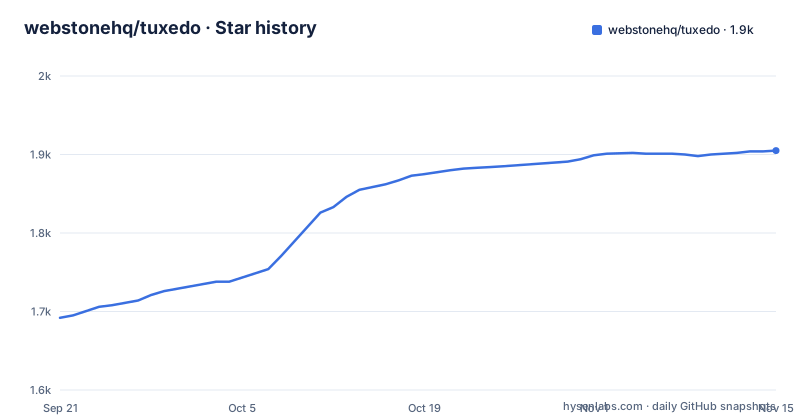
Star history
- webstonehq/tuxedo1,905 ★ · +213
| Repository | 2026-09-21 | 2026-11-15 |
|---|---|---|
| webstonehq/tuxedo | 1.7k | 1.9k |
213 Stars in the last 55 days, measured from the daily GitHub snapshot. Compare with other projects
Editorial analysis
The release profile optimizes for size in a project that advertises speed
The description calls the tool fast, and the release profile in Cargo.toml is tuned for something else.
[profile.release]
strip = true
lto = true
codegen-units = 1
panic = "abort"
opt-level = "z"
opt-level set to z optimizes for size rather than for instruction throughput, codegen-units set to 1 gives the optimizer the whole program to work with, link time optimization is on, symbols are stripped so the shipped binary carries no symbol table, and panics abort instead of unwinding. Every one of those is a defensible choice for a single static binary you copy onto a PATH, and together they produce the smallest artifact rather than the fastest redraw. The runtime cost of the last line is that there is no unwinding path, so anything that relies on catching a panic loses it. The package itself is plain Rust with anyhow for errors and chrono for dates.
The repository root carries done.txt and an inbox lock file
The top level of the tree is not only source. It holds done.txt, a completed-tasks file, and inbox.txt.tuxedo-lock, a lock file named after an inbox. Neither is a fixture under a test directory and neither has a README explaining it. Both names line up with a runtime behaviour the documentation describes: archiving with the capital A key moves completed tasks to a done.txt sitting next to your file, and phone captures land in a sibling inbox.txt first. So the root of a published repository contains the two files that mechanism produces, left where a local run put them, plus a lock that a capture session would have created. Alongside them sit examples with a screenshot generator, a shell script for printing release asset downloads, and the automation configs: a Nix flake and lock file, a mise manifest and lock, and a lefthook configuration.
Phone capture opens a listener on your LAN and writes into an inbox
Pressing s puts a QR code on screen pointing at a small progressive web app served from your own machine on the local network, and tasks typed on the phone appear in the list. The details that matter are in how the data arrives. Captures are written to a sibling inbox.txt first rather than straight into your task file, which means any tool that can append one line becomes a capture source: a shell command, an iOS Shortcut, a cron job. The HTTP side is a small server, with tiny_http pinned at 0.12 in the dependencies, so nothing about this needs a daemon, a database or a cloud account. What it does need is a listening socket reachable from the phone, on a network other devices share, and the lock file beside the inbox is the artifact that guards concurrent appends.
A theme file missing one field is skipped at startup
Beyond the five built-in themes, tuxedo loads any .toml file dropped into the themes directory under your config home, joined into the picker in sorted filename order. The field rules are strict rather than layered. Every field is required, and a file that misses one, carries a colour that will not parse, or has a name that collides with another theme is skipped with a warning at startup rather than partially applied. Colours take two forms: a hex value, or the keywords reset and transparent, which inherit your terminal's own background so a custom text palette can sit over a wallpaper or blur. The reference table has around twenty fields, from bg and panel through cursor, the four priority colours and a catch-all for priorities E through Z, to matched for search highlights. One of them is a trap: selection is documented as set to the same value as selected, so a theme that sets one and forgets the other is an incomplete file, not a partial theme.
Five prebuilt targets and none of them is Windows on ARM
The prebuilt list covers two Linux targets, two Apple targets and one Windows target: x86_64 and aarch64 for Linux, x86_64 and aarch64 for macOS, and x86_64-pc-windows-msvc. There is no aarch64 Windows archive in the list, so a Windows machine on ARM falls back to a source build, and the Rust 2024 edition requirement makes that a recent stable toolchain rather than an old one. Each archive ships with a sha256 checksum, which is the only integrity artefact mentioned. The install section offers four routes: the Homebrew cask, a release archive put on your PATH, a cargo install from the git URL, and a clone followed by a release build and running the binary from the target directory. The cargo line carries no locked flag, so the build resolves dependencies from the manifest rather than from the committed Cargo.lock.
The natural-language add is a local rewrite you have to approve
You can type prose into the add prompt instead of assembling a todo.txt line yourself.
Pay rent monthly on the first, show 3 days before due, project homeTuxedo rewrites that into canonical todo.txt, which is recurrence expressed in plain words, a lead time before the due date and a project tag, and then it waits for you to review and save. The documentation is careful about what this is not: local, offline, no AI service. So the rewrite is rule-based, it happens on your machine, and the output is a proposal rather than a write. That design has a consequence worth knowing, since a rule-based rewrite can only recognise the phrasings it knows, and the sample sentence is the vocabulary. Anything it cannot map stays as prose, which the review step is where you catch.
Atomic writes with a reload inside 250 ms while idle
The project describes writing a temporary file and then renaming it. On a filesystem that provides atomic replacement, concurrent readers opening the path see the old or new file rather than a partially written replacement. Atomic rename alone does not guarantee the new data survives a crash; that also depends on syncing and filesystem behavior. Conflict is handled by watching rather than by locking the editor out: if another process, whether a sync client, an editor or a script, modifies the file, tuxedo reloads on your next keypress, or within about 250 milliseconds while idle, and flashes a notice. The file watcher is the notify crate at version 8. Archiving is the same mechanism, with the capital A key moving completed tasks into done.txt next to your file. That hardcoded name sits next to the command line, which also honours a DONE_FILE environment variable alongside TODO_DIR and TODO_FILE, so the scripting path and the interface path can disagree about where finished work goes. Undo goes back 50 levels, and chord prompts like gg, dd, fp and fc share a 600 millisecond window.
Editorial conclusion
tuxedo earns a place if your task list is a plain text file you want to keep owning and you would rather read and edit it with vim keys than through a web app, and the file format is the reason rather than the interface. Three things are worth checking before you commit. The release profile trades speed for a smaller binary, so if you want the fastest possible redraw rather than the smallest download, that is the wrong build. Phone capture opens a listener on your LAN and writes into an inbox file next to your list, so decide whether you want that on a shared network. And if you write your own theme, every field is mandatory, which means a partial file is skipped with a warning rather than merged with the defaults.
Frequently asked questions
What is tuxedo and what file does it read?
A keyboard-driven terminal UI for the todo.txt format, in Rust, distributed as a single static binary. It reads and writes the standard plain-text format, so the file stays editable with any other tool.
Does tuxedo need an AI service for natural-language task entry?
No. Type prose into the add prompt and tuxedo rewrites it locally and offline into canonical todo.txt for you to review and save, with no AI service involved.
Which platforms have prebuilt tuxedo binaries?
Five targets: x86_64 and aarch64 for Linux, x86_64 and aarch64 for macOS, and x86_64-pc-windows-msvc. Each archive ships with a sha256 checksum, and a source build needs a recent stable Rust toolchain on the 2024 edition.
How do I add a custom theme to tuxedo?
Drop a toml file into the themes directory under your config home, and it joins the picker in sorted filename order. Every field is required, so a file missing one, or with an unparseable colour or a colliding name, is skipped with a warning at startup.
How does tuxedo handle edits made by another program?
Writes are atomic, going through a temporary file and a rename. If another process changes the file, tuxedo reloads on your next keypress or within about 250 ms while idle and flashes a notice.
Can I use tuxedo's command line in scripts?
Yes. The binary carries a todo.txt-cli compatible command line with add, ls, do, pri and archive among the commands, supports json output, and reads the TODO_DIR, TODO_FILE and DONE_FILE environment variables.
Official sources
Add this badge to your README
If you maintain this project, the badge below links readers to this analysis and shows its maintenance status from the daily GitHub snapshot. Paste the markdown into your README; add ?metric=license or ?metric=stars to the image URL for a different field.

[](https://hysenlabs.com/projects/webstonehq-tuxedo)Star history chart for your README
[](https://hysenlabs.com/projects/webstonehq-tuxedo)Was this useful?