Mineflayer: the Minecraft bot framework whose README and package.json disagree on Node
Create Minecraft bots with a powerful, stable, and high level JavaScript API.
At a glance
- What is it?
- Mineflayer hands JavaScript, and Python as well, a high level API for building Minecraft bots: entity tracking, block queries, physics, inventory, crafting, digging and chat, across versions 1.8 to 26.1. Two practical wrinkles show up early. The install page asks for Node 18 while the manifest requires Node 22, and the README npm publishes is a copy of docs/README.md.
- Who is it for?
- It fits if you write automation against a Minecraft server in Node and want block queries, movement and inventory handling instead of raw protocol work. Leave it if you need a packaged Python library or a fully stable surface, because Python users are pointed at examples and a Colab notebook, and part of the reference is filed as unstable_api.md.
- Can I use it commercially?
- Yes. MIT is a permissive licence: you can use, modify and sell software built on it, as long as you keep its copyright and licence notices.
- Is it still maintained?
- Yes. The repository last received commits 1 day ago.
- What is it written in?
- Mainly JavaScript, according to GitHub's language statistics.
Answers come from the project's GitHub data, last synced on November 14, 2026, and from our analysis. They are not legal advice.
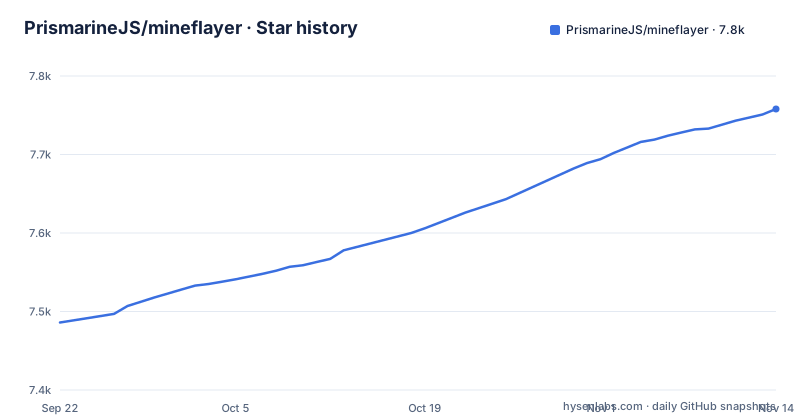
Star history
- PrismarineJS/mineflayer7,758 ★ · +272
| Repository | 2026-09-22 | 2026-11-14 |
|---|---|---|
| PrismarineJS/mineflayer | 7.5k | 7.8k |
272 Stars in the last 53 days, measured from the daily GitHub snapshot. Compare with other projects
Editorial analysis
The install page says Node 18, package.json engines says Node 22
Installation is two commands:
npm install mineflayer
npm update
The first line is what you want. The second is how you move the package and its dependencies forward once it is installed, which matters here because the library follows Minecraft versions and arrives often. The Node requirement is where the documentation and the manifest part company. The install page tells you to install Node.js >= 18 from nodejs.org, and the package manifest declares engines node >=22. Those are different floors, and the manifest is the one npm reads. Practical effect: on Node 18 or 20 you are installing a package that declares it does not support your runtime, and npm will say so or refuse depending on how strict your environment is set up. Check your Node version against 22 before you blame a dependency for misbehaving.
Leave out version and auth and Mineflayer guesses both for you
Two defaults do a lot of work in the getting started path. Without a version specified, the server version is guessed automatically, and without auth specified the mojang auth style is guessed. The starting snippet keeps the real decisions visible in its comments:
const mineflayer = require('mineflayer')

const bot = mineflayer.createBot({
  host: 'localhost', // minecraft server ip
  username: 'Bot', // username to join as if auth is `offline`, else a unique identifier for this account. Switch if you want to change accounts
  auth: 'microsoft' // for offline mode servers, you can set this to 'offline'
  // port: 25565,              // set if you need a port that isn't 25565
  // version: false,           // only set if you need a specific version or snapshot (ie: "1.8.9" or "1.16.5"), otherwise it's set automatically
  // password: '12345678'
port, version and password all sit commented out, so the arguments you will actually change are the ones the example hides.
Microsoft auth caches tokens on disk under your username
Set auth to microsoft and the bot is prompted to log in to microsoft.com with a code in your browser. After you sign in there, the bot obtains and caches authentication tokens under the username you specified, so you do not have to sign in again. Where those tokens land is the part worth planning for: by default they are cached in your user's .minecraft folder, and if profilesFolder is specified they go there instead. Account switching is a matter of changing the username you pass, since the cached tokens are keyed by it. The consequence for a shared machine is that credentials for your Minecraft account are sitting on disk in a folder other tooling also touches, and a second bot with a different username will trigger another browser sign-in rather than reusing what is already cached.
Joining a Realms server means writing a selector function
Realms work through a realms object rather than a host name, because the account has to be offered the list of realms it can join and something in your code has to choose. The selector is pickRealm, a function handed an array of Realms and expected to return the one you want:
const client = mineflayer.createBot({
  username: '[email protected]', // minecraft username
  realms: {
    // This function is called with an array of Realms the account can join. It should return the one it wants to join.
    pickRealm: (realms) => realms[0]
  },
  auth: 'microsoft'
})
The sample returns realms[0], which is a decision placeholder rather than a real one. Note also that the username field here holds an email address with the comment calling it the Minecraft username, and auth is microsoft, so the credentials are account level. Whichever realm you pick, the same microsoft sign-in and token caching from the plain server path apply, so this is not a lighter weight route into a session.
The viewer option named port is passed 3007 and commented as the server port
Debugging a bot visually comes from the separate prismarine-viewer project, which can display in a browser window what your bot is doing. You install it on its own:
npm install prismarine-viewerand wire it into the bot:
const { mineflayer: mineflayerViewer } = require('prismarine-viewer')
bot.once('spawn', () => {
  mineflayerViewer(bot, { port: 3007, firstPerson: true }) // port is the minecraft server port, if first person is false, you get a bird's-eye view
})
Read that inline comment carefully, because it is the trap in this snippet. It says the port is the minecraft server port, while the value passed is 3007 and the Minecraft server port in the other snippet on this page is 25565. The option is the port you will connect your browser to, and 3007 is simply the value the example uses. Set firstPerson to false and you get a bird's-eye view instead of the first person one. Getting this wrong costs you a connection refused rather than a broken world, which is at least a clean failure.
The API reference is split, and part of it is labelled unstable
The documentation set is broader than a single reference page. There is a tutorial for people new to Node.js and mineflayer, FAQ.md, api.md as the main reference, unstable_api.md beside it, history.md as the changelog, and an examples directory. The split matters more than it sounds. Anything documented in unstable_api.md is explicitly outside the promise of stability, so code built on it can change in a minor release. Releases move fast: 4.37.1 landed in May 2026, 4.38.0 in August and 4.39.0 in September, and the current manifest sits at 4.39.0 with the last push dated 2026-10-27. The sensible habit follows from those two facts. Pin your version, read history.md before upgrading, and keep the surface you depend on out of the unstable file.
The README npm publishes is a copy of docs/README.md
One script in package.json explains where the published page comes from:
cp docs/README.md README.mdThat is the prepublishOnly step, and it means docs/README.md is the source of the README that npm shows, and the repository's top level has no README.md of its own. If you are fixing a typo, updating an install instruction or correcting the Node version, docs/README.md is the file to edit. The repository mirrors the pattern elsewhere too. Translated READMEs sit in ru/, es/, fr/, tr/, zh/ and br/, the API reference and tutorial are .md files beside the code, and a Google Colab notebook lives at docs/mineflayer.ipynb for people who want to try the library without a local setup.
Python is offered through examples and a notebook, not a package
The one line description promises more than one language: a high level JavaScript API, also usable from Python. The support that comes with that promise is specific. Python users are pointed at a directory of Python examples and at a Google Colab notebook that runs in a browser, and the installation instructions are npm commands for the Node package. What the dependency list shows is a Node library with many Prismarine pieces underneath, including minecraft-protocol for the wire, minecraft-data for version data, and separate modules for physics, world, chunk, entity, item, recipe, nbt, biome, block, registry, windows and chat. So Python is a way in for people who already work that way, not a parallel supported distribution.
Editorial conclusion
It fits if you write automation against a Minecraft server in Node and want block queries, movement and inventory handling instead of raw protocol work. Leave it if you need a packaged Python library or a fully stable surface, because Python users are pointed at examples and a Colab notebook, and part of the reference is filed as unstable_api.md. Before pinning a version, read history.md, and make sure your runtime is Node 22 or newer rather than trusting the 18 on the install page.
Frequently asked questions
What is mineflayer used for?
Creating Minecraft bots through a high level API. The feature set covers entity knowledge and tracking, block knowledge and world queries, physics and movement with bounding boxes, attacking entities and using vehicles, inventory management, crafting, chests, dispensers and enchantment tables, digging and building, activating blocks, using items and chat, on Minecraft versions from 1.8 to 26.1.
how to install mineflayer
Install Node.js first, then run npm install mineflayer, and use npm update later to move the package and its dependencies forward. The README asks for Node 18 or newer while package.json declares engines node >=22, so the manifest is the stricter of the two.
Is Mineflayer still actively developed?
The repository is not archived and the last push is dated 2026-10-27. Releases 4.37.1, 4.38.0 and 4.39.0 arrived in May, August and September 2026, the manifest is at version 4.39.0, and history.md holds the changelog.
What programming language is Mineflayer?
JavaScript, published to npm as mineflayer with index.js as the main entry point and index.d.ts for types. It is written as a Node library and is also usable from Python, with Python examples in the examples directory and a Google Colab notebook in docs.
is mineflayer free
The license field in package.json is MIT. The package is installed from npm like any other Node dependency, with minecraft-protocol, minecraft-data and the prismarine modules listed as its dependencies.
Official sources
Add this badge to your README
If you maintain this project, the badge below links readers to this analysis and shows its maintenance status from the daily GitHub snapshot. Paste the markdown into your README; add ?metric=license or ?metric=stars to the image URL for a different field.

[](https://hysenlabs.com/projects/prismarinejs-mineflayer)Star history chart for your README
[](https://hysenlabs.com/projects/prismarinejs-mineflayer)Was this useful?