Motrix v2: A Download Manager Rebuilt Around an Open Protocol and Plugin Sandbox
Motrix is a full-featured desktop download manager with a clean interface that handles HTTP, FTP, BitTorrent, and Magnet links on Windows, macOS, and Linux.
At a glance
- What is it?
- Motrix v2 (Turbo) splits its download core from the UI, exposes JSON-RPC over MDXP, and runs plugins in QuickJS sandboxes. The current release is 2.2.1, and the README tells v1 users to back up their profile and downloads and describes a desktop Migration Assistant that imports selected v1 tasks as paused records.
- Who is it for?
- Adopt Motrix v2 if you want a download manager that separates its core from the UI, exposes a real JSON-RPC protocol (MDXP), and lets you write sandboxed plugins in QuickJS without touching Node.js.
- Can I use it commercially?
- Check first. The repository uses a licence we do not classify automatically, so read its LICENSE file before any commercial use.
- Is it still maintained?
- Yes. The repository last received commits 4 days ago.
- What is it written in?
- Mainly JavaScript, according to GitHub's language statistics.
Answers come from the project's GitHub data, last synced on November 13, 2026, and from our analysis. They are not legal advice.
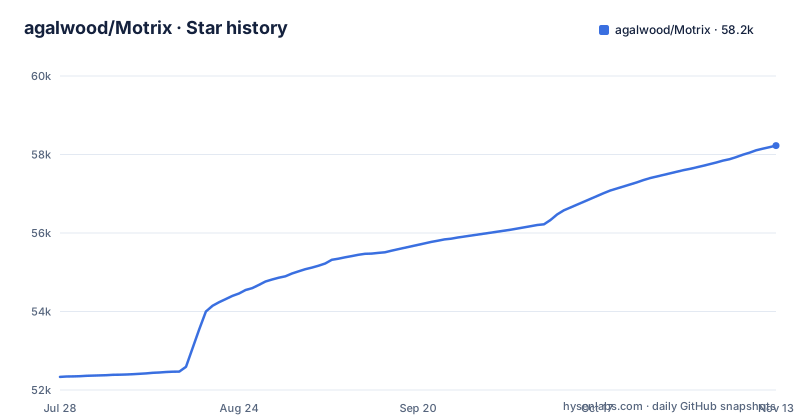
Star history
- agalwood/Motrix58,226 ★ · +5,892
| Repository | 2026-07-28 | 2026-11-13 |
|---|---|---|
| agalwood/Motrix | 52.3k | 58.2k |
5,892 Stars in the last 108 days, measured from the daily GitHub snapshot. Compare with other projects
Editorial analysis
What Motrix v2 Actually Changes
Motrix v1 was a desktop download manager. Motrix v2, branded as Motrix Turbo, is a rebuild from the ground up with Electron, React, and TypeScript. The key architectural move is that the download core is independent of the UI. That means the same engine runs as a desktop app on macOS, Windows, and Linux, or as a headless server on Node.js or in Docker with a web UI. The README positions this as a way to serve NAS devices and home servers. For an engineer, the practical effect is that you can drive downloads without ever opening a window. The protocol that makes this possible is MDXP, or Motrix Download eXchange Protocol, built on JSON-RPC 2.0. The protocol is open and defined in a separate npm package, @motrix/mdxp, which includes Zod types and helpers for bidirectional connections.
The MDXP Protocol and How Clients Talk to the Core
MDXP is not just a name in a README. The repository lists @motrix/mdxp as a shared protocol library that defines JSON-RPC 2.0 wire schemas and Zod types. The CLI and browser extensions communicate with the app over this protocol, while plugins run in isolated sandboxes. The CLI quick start shows the pattern: you install @motrix/cli globally, then run commands like motrix add https://example.com/file.iso --save-dir ~/Downloads, motrix list, and motrix watch --stats, which streams live progress as NDJSON. The CLI also supports pairing with remote instances via motrix pair --name my-nas. That pairing is described as secure device-code pairing for the headless server. The browser extension, for Chrome, Edge and Firefox, intercept downloads and hand them off to Motrix over native messaging, with a pairing step. So the data flow is: a client (the CLI or a browser extension) sends a JSON-RPC request over MDXP to the core, which performs the actual transfer. This is a clean separation, and it means you could write your own client against the protocol, as long as you respect the Zod schemas.
Plugin Sandboxing with QuickJS: What You Can and Cannot Do
Plugins are a major part of v2. They run in QuickJS-based plugin sandboxes with fine-grained permissions, and the README describes them as running in isolated sandboxes. Instead, they hook into lifecycle events: beforeCreate, beforeFinalize, afterComplete, and onError. They can contribute callable commands and settings, and access the runtime through a virtual module called motrix:plugin-api. The plugin manifest is motrix-plugin.json, which the SDK's validate command checks. The official built-in plugins include Filename Template, Page Scraper, and URL Resolver, all signed as .moext packages. The Plugin SDK provides a scaffolder: pnpm create motrix-plugin my-plugin, then pnpm dev to watch-build and launch Motrix with the plugin, and pnpm exec motrix-plugin validate to check the manifest. The sandbox is a real constraint, but it is also what makes the marketplace feasible without turning the app into a security hole.
Installation and First Run: Desktop, CLI, and Docker
The README points to GitHub Releases: it says to download v2.2.1 from GitHub Releases. For the CLI, you need Node.js 22 or later and run npm install -g @motrix/cli. The CLI automatically discovers a local desktop app and can pair with remote instances. For a headless server, the README describes a Docker-ready headless server with secure device-code pairing for remote CLI and agent clients, and the repository includes a compose.yaml for it. The web UI is included for NAS devices. The README also mentions handlers for motrix:// and magnet: links, plus .torrent file associations, so the desktop app integrates with the OS. The release notes for 2.2.1 are at docs/release-notes/2.2.1.md, and the README says to back up your Motrix profile and downloads before upgrading.
The Beta Risk: Data Migration Is Not Validated
The upgrade caveats are in the README's Motrix 2.2.1 section, which says to back up your existing Motrix profile and downloads before upgrading. The bundled engine upgrades its SQLite database to schema 6 and keeps a pre-upgrade backup, and older engines cannot open schema 6, so keep that backup if you may need to downgrade. The desktop Migration Assistant imports selected v1 tasks as paused records and preserves the original files, and resuming downloads requires a separate explicit action. Windows in-place BitTorrent activation requires a supported local NTFS volume and explicit authorization. The README links a migration guide at docs/legacy-migration.md and says to keep the original v1 profile.
Maintenance and Upgrade Costs: What the Repo Shows
The repository is not archived, and the last push is dated 2026-11-02, with v2.1.1 on 2026-10-29, v2.2.0 on 2026-11-01 and v2.2.1 on 2026-11-03. That suggests active development, but it also means the API and protocol may still shift between releases. The README lists a plugin registry at dl.motrix.app/registry/plugins.json, which is a public JSON feed for the marketplace. If you build plugins, you will need to track changes to the manifest schema and the MDXP schemas. package.json declares the license as MIT, although GitHub's license detection reports NOASSERTION, so read the LICENSE file; the repository also carries THIRD_PARTY_NOTICES.md and a THIRD_PARTY_LICENSES directory for bundled dependencies. The CLI requires Node.js 22 or later, which is a recent version; if your environment is on an older LTS, you will need to upgrade. The headless server runs in Docker, which adds a container management layer to your upgrade process. Overall, the maintenance cost is moderate: you are tied to the release cadence, and the protocol schemas are the contract you must watch.
Alternatives and Where Motrix Fits
The obvious alternative is aria2, a command-line download utility that also supports HTTP, FTP, and BitTorrent, and has a JSON-RPC interface. The difference is that aria2 is a single binary with no built-in GUI, no plugin system, and no official headless web UI; you would need to build your own frontend or use a third-party one like AriaNg. Motrix v2 gives you the web UI, the plugin sandbox, and the official CLI out of the box. Another alternative is qBittorrent, which is a full GUI application with a web UI and an API, but it is primarily a BitTorrent client, not a general download manager for HTTP and FTP. Motrix's advantage is the unified core for all protocols plus the MDXP protocol for automation. However, if you only need a simple, stable download manager and do not care about plugins or headless operation, Motrix v1 or a mature tool like Free Download Manager might be less risky. The key difference in approach is that Motrix v2 is designed as a platform, not just an app, which is both its strength and its source of complexity.
Editorial conclusion
Adopt Motrix v2 if you want a download manager that separates its core from the UI, exposes a real JSON-RPC protocol (MDXP), and lets you write sandboxed plugins in QuickJS without touching Node.js. Be careful if you rely on v1 data: the README says to back up your Motrix profile and downloads before upgrading, notes that the bundled engine upgrades its SQLite database to schema 6, which older engines cannot open, and says the desktop Migration Assistant imports selected v1 tasks as paused records. Before you commit, verify that your existing downloads and settings are backed up, test in a separate OS account or Docker data directory, and confirm that the plugin registry at dl.motrix.app/registry/plugins.json is reachable from your network. Only then replace your current download tool.
Frequently asked questions
What is Motrix used for?
It is a desktop and headless download manager for HTTP, FTP, BitTorrent, magnet links and more, with a download core kept independent of the UI. The same core runs as a desktop app on macOS, Windows and Linux, or as a headless server on Node.js or in Docker with a web UI for NAS devices and home servers.
How do I use motrix?
Install the official client with npm install -g @motrix/cli, which needs Node.js 22 or later, then add a URL with motrix add, inspect work with motrix list, follow progress with motrix watch --stats, and use motrix pair --name for a remote or headless instance. The browser extension for Chrome, Edge and Firefox hands downloads off in one click.
Is the motrix app safe?
Plugins use QuickJS-based sandboxing with fine-grained permissions, and the README describes them as running in isolated sandboxes. The three official plugins ship as signed .moext packages, and the headless server uses secure device-code pairing for remote clients.
How to install motrix?
The README says to download v2.2.1 from GitHub Releases, to read the full release notes at docs/release-notes/2.2.1.md, and to back up your Motrix profile and downloads before upgrading. For a server you can run the headless build on Node.js or in Docker, and the command line client installs with npm install -g @motrix/cli.
Official sources
Add this badge to your README
If you maintain this project, the badge below links readers to this analysis and shows its maintenance status from the daily GitHub snapshot. Paste the markdown into your README; add ?metric=license or ?metric=stars to the image URL for a different field.

[](https://hysenlabs.com/projects/agalwood-motrix)Star history chart for your README
[](https://hysenlabs.com/projects/agalwood-motrix)Was this useful?