Probot dispatches GitHub webhook events through app.on, app.onAny and app.onError
🤖 A framework for building GitHub Apps to automate and improve your workflow
At a glance
- What is it?
- Probot is a TypeScript framework for building GitHub Apps in Node.js. It owns webhook dispatch and the Octokit client your handler receives, and leaves permissions and deployment to GitHub and to you.
- Who is it for?
- Probot earns a look when your automation must run as a GitHub App with repo-scoped permissions and webhook events, and it is the wrong base if you need hosting, a permission manifest or an opinion on app scaffolding, none of which this repository provides. Check the version gap before pinning anything: package.json carries 0.0.0-development, and the newest release is v14.3.6 from 2026-11-02, so the version string in the clone says nothing about the release you install.
- Can I use it commercially?
- Yes. ISC is a permissive licence: you can use, modify and sell software built on it, as long as you keep its copyright and licence notices.
- Is it still maintained?
- Yes. The repository last received commits 4 days ago.
- What is it written in?
- Mainly TypeScript, according to GitHub's language statistics.
Answers come from the project's GitHub data, last synced on November 15, 2026, and from our analysis. They are not legal advice.
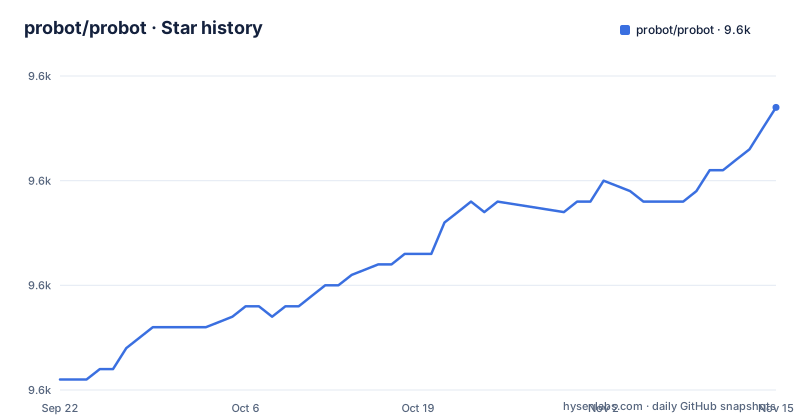
Star history
- probot/probot9,637 ★ · +26
| Repository | 2026-09-22 | 2026-11-15 |
|---|---|---|
| probot/probot | 9.6k | 9.6k |
26 Stars in the last 54 days, measured from the daily GitHub snapshot. Compare with other projects
Editorial analysis
Nine lines of the README example decide most app designs
Everything a first Probot app touches fits in the example the README gives: a default export that takes the app object, one `app.on` binding for a single webhook, one `app.onAny` for the catch-all, and one `app.onError`.
export default (app) => {
  app.on("issues.opened", async (context) => {
    const issueComment = context.issue({
      body: "Thanks for opening this issue!",
    });
    return context.octokit.issues.createComment(issueComment);
  });

  app.onAny(async (context) => {
    context.log.info({ event: context.name, action: context.payload.action });
  });

  app.onError(async (error) => {
    app.log.error(error);
  });
};
Three decisions hide in those lines. The event name is a dotted string such as `issues.opened`, so subscribing to one action is a separate choice from subscribing to the whole topic. `context.issue` builds the comment payload and `context.octokit` sends it, which means API work goes through Octokit rather than hand-rolled fetch calls. And `app.onError` is where the example logs errors, through `app.log.error`.
The setup guide is on probot.github.io, the build is two npm scripts
Setup instructions are not in this repository. The README sends anyone building an app to probot.github.io/docs/ and states that this repository hosts the code for the npm Probot package that all Probot Apps run on.
From a clone, the two commands that matter come straight from package.json: `build` compiles the TypeScript project, and `start` runs the CLI entry point that the `bin` field also exposes under the name `probot`.
npm run buildnode ./bin/probot.js`main` resolves to lib/index.js and `types` to ./lib/index.d.ts, so the build output is what both Node and TypeScript see. Note what the README leaves out: it never says what the `probot` command does once you run it, how an app declares its permissions or webhook events, or where such an app should be hosted. Those answers live on the documentation site, not in this tree.
Permission scope is granted on GitHub, not inside your handler
Probot cannot grant itself access. GitHub Apps are installed directly on organizations and on user accounts, they are granted access to specific repositories, and they come with granular permissions and built-in webhooks. The permission list lives in the app's settings on GitHub, not in the TypeScript you write.
That moves a real decision out of your code. Whether the app can read a private repository, comment on an issue in a fork, or receive organization events is settled when someone installs it, and widening it means a fresh grant that the user sees.
Docker and Redis appear in one test script and nowhere else
Redis shows up in the scripts of package.json through `redis:start`, `redis:stop` and `test:redis`, and the last one starts a container, runs the suite against it and tears the container down afterwards.
npm run redis:start && REDIS_URL=127.0.0.1 vitest run --testTimeout 10000 ; npm run redis:stop`redis:start` runs `docker run -p 6379:6379 --name probot-redis -d --rm redis`, so that path needs Docker and a free port 6379.
The default test script is `vitest run`, with no Redis and no environment variable, so nothing in the ordinary path requires a container. One practical effect: a reader who reaches for `test:redis` on a machine without Docker gets an error about Docker rather than about Probot.
package.json says 0.0.0-development while npm carries v14.3.2
The version in the tree and the version on the registry do not match. package.json declares `"version": "0.0.0-development"`, the placeholder that a publish step overwrites, while the latest releases attached to this project are v14.3.6 on 2026-11-02, v14.3.5 on 2026-10-31 and v14.3.4 on 2026-10-30.
Two different codebases therefore answer to the same name. Installing from npm gives you a published release such as v14.3.6. Cloning the default branch gives you the working tree, whose last push was on 2026-10-31, before the newest release. The project is not archived.
That gap decides how you read the tree. A working tree can differ from an installed copy, so `npm test` in the clone exercises the checked-out source rather than the published package. Pin the published version if you want reproducible builds, or track the branch deliberately and accept the churn.
The published files list and jsr.json are two distribution stories the README skips
Several distribution details live in files the README never mentions. The published `files` array is lib, bin, static and views, with an explicit exclusion of `!lib/index.jsr.*`, and the repository root carries jsr.json next to package.json. Two package manifests in one tree, and no explanation here of the jsr side or who consumes it.
Look at which entries are published and which are checked in: lib and views are in the list but neither appears among the top-level entries, while src/, test/, docs/ and static/ do. Both are produced rather than committed, which is the usual consequence of the build step.
API documentation is generated too. The `doc` script runs typedoc with .typedoc.json and the plugin .typedoc/typedoc_ga.mjs, and a .typedoc/ folder is checked in next to a docs/ directory.
Apps live outside this repository, next to an example mounted as middleware
This is the framework, not an app, and the README says so: the code here is the npm package every Probot App runs on. Applications live elsewhere, with repositories tagged `probot-app` offered as examples and the probot/ideas repository named as the place to propose a new app.
Two root entries hint at how people are expected to run it. A .codesandbox/ directory means the framework is meant to be tried in a browser sandbox, and example/node-middleware.mjs is an example file whose name suggests running an app as Node middleware, though the README never describes it.
Licensing is ISC, and the package keywords are probot, github-apps, github, automation, robots and workflow. A version 14 package with a generated reference and a per-file example is an ordinary dependency to reach for, and the version skew described earlier is the thing to settle first when you pin it.
Editorial conclusion
Probot earns a look when your automation must run as a GitHub App with repo-scoped permissions and webhook events, and it is the wrong base if you need hosting, a permission manifest or an opinion on app scaffolding, none of which this repository provides. Check the version gap before pinning anything: package.json carries 0.0.0-development, and the newest release is v14.3.6 from 2026-11-02, so the version string in the clone says nothing about the release you install.
Frequently asked questions
What does probot do?
Probot is a framework for building GitHub Apps in Node.js, written in TypeScript. GitHub Apps listen to webhook events sent by a repository or an organization, and Probot uses its internal event emitter to run actions based on those events.
How do I start building a Probot app?
The README points you to probot.github.io/docs/ for the setup walkthrough and states that this repository holds the code for the npm package the apps run on. Inside the clone, `npm run build` compiles the project and `node ./bin/probot.js` is what `npm start` executes.
Which version of probot does npm install?
The repository's package.json declares the placeholder version 0.0.0-development, which a publish step replaces. The latest releases listed for the project are v14.3.6 on 2026-11-02, v14.3.5 on 2026-10-31 and v14.3.4 on 2026-10-30.
Does probot need Redis to run?
Redis appears only in the redis:start, redis:stop and test:redis scripts, where the test run is pointed at 127.0.0.1 through REDIS_URL. The default test script is `vitest run`, which sets no such variable and starts no container.
What permissions does a probot app get?
Permission scope comes from GitHub, not from Probot code. GitHub Apps can be installed on organizations and on user accounts, are granted access to specific repositories, and come with granular permissions and built-in webhooks.
Official sources
Add this badge to your README
If you maintain this project, the badge below links readers to this analysis and shows its maintenance status from the daily GitHub snapshot. Paste the markdown into your README; add ?metric=license or ?metric=stars to the image URL for a different field.

[](https://hysenlabs.com/projects/probot-probot)Star history chart for your README
[](https://hysenlabs.com/projects/probot-probot)Was this useful?