Elpaca installs elisp packages in parallel, and keeps the sources
An elisp package manager
At a glance
- What is it?
- Elpaca is a package manager for Emacs Lisp that replaces the built-in package.el, and the two ideas that separate it from the built-in are parallelism and the fact that it keeps a checkout of every package it installs. That checkout is what makes a package a directory you can read, edit and build, rather than a compiled file dropped into a load path.
- Who is it for?
- Elpaca fits an Emacs user who installs packages from source and wants the source on disk, since the build and source directories are part of the model rather than a side effect, and it fits anyone whose package.el has become slow because everything installs serially. It does not fit a user who wants the standard Emacs experience, because Elpaca deliberately expects package.el to be disabled and a piece of installer elisp to run before anything else.
- Can I use it commercially?
- Yes, with conditions. GPL-3.0 is a copyleft licence: if you distribute software that includes it, you must release that software's source code under the same licence. Running it internally without distributing it does not trigger that obligation.
- Is it still maintained?
- Yes. The repository last received commits 7 days ago.
- What is it written in?
- Mainly Emacs Lisp, according to GitHub's language statistics.
Answers come from the project's GitHub data, last synced on November 7, 2026, and from our analysis. They are not legal advice.
Star history
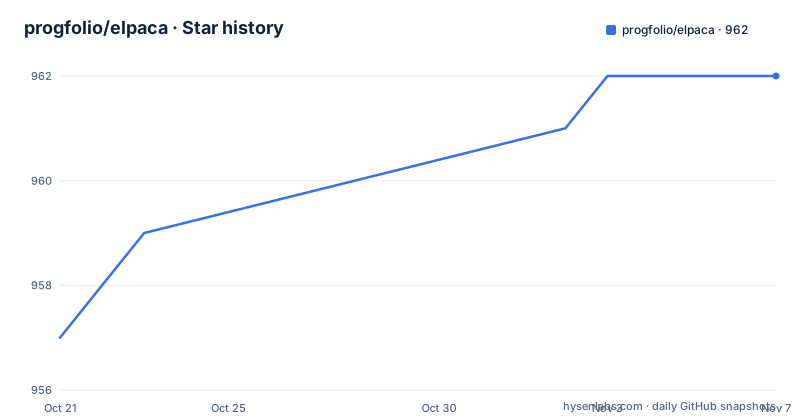
- progfolio/elpaca962 ★ · +5
| Repository | 2026-10-21 | 2026-11-07 |
|---|---|---|
| progfolio/elpaca | 957 | 962 |
5 Stars in the last 17 days, measured from the daily GitHub snapshot. Compare with other projects
Editorial analysis
A replacement for package.el
Elpaca is an elisp package manager that allows users to find, install, update and remove third-party packages for Emacs, and it is explicitly a replacement for the built-in Emacs package manager, package.el. The tagline in the header is blunt about the direction of travel, that it chews data and spits packages. The feature list explains the differences that matter in daily use. Packages are installed asynchronously, in parallel, for fast and non-blocking installations. There is a flexible UI for finding and operating on packages. Packages are downloaded from their sources for convenient elisp development, which is the distinction that separates Elpaca from a plain archive fetcher. Thousands of elisp packages are supported out of the box, with MELPA, NonGNU and GNU ELPA and the Org and org-contrib archives named, and it is easy for users to create their own ELPAs. The manual and the wiki carry the detail on usage, customisation and development.
Sources, builds and recipes
The installer block at the top of the installation section is where the model becomes visible, because it defines the directories everything else hangs off. There is a directory for Elpaca itself under the user-emacs-directory, a builds directory inside it, and a sources directory inside that. The order list describes how Elpaca itself is obtained, with a repository, a reference that defaults to nil, a clone depth, an inherit setting of ignore, a files list with defaults and an exclusion for extensions, and a build step that skips the activation. The same shape is what a user writes for their own packages, where the elpaca macro takes a package and options. The distinction between a source and a build is the heart of the design. The source is a checkout, and the build is a compiled and processed version of it, and a package can be rebuilt from its source at any time, which is what makes editing a package locally a normal workflow rather than a hack.
Installing means editing your init file
The requirements are Emacs 27.1 or newer and git. The installation itself is a block of elisp that has to be added to the init file, and the README is emphatic that it must come before any calls to other Elpaca functions or macros. It clones Elpaca into a subdirectory of the user-emacs-directory, then builds and activates it, doing the work with a bootstrap buffer, a git clone, a checkout, a byte recompilation of the directory and a call to generate autoloads. There are two footnotes that matter in practice. Windows users must be able to create symlinks, or they have to enable the no symlink mode, which the documentation shows as a commented line to uncomment on systems which cannot create symlinks:
;; Uncomment for systems which cannot create symlinks:
;; (elpaca-no-symlink-mode)
And package.el has to be disabled in the early-init file, because otherwise the two package managers fight:
(setq package-enable-at-startup nil)The README also says to remove anything related to package.el from the init file, for example calls to package-activate-all.
Fetch, review, then merge
The quick start table is the operational heart of the tool, and it maps each operation to both a key sequence in the UI mode and a completing read command, which is a detail that matters for anyone scripting Elpaca. Finding packages is the g m keys or the elpaca-info command. Trying a package, meaning installing it for the current session only, is i x or elpaca-try. Fetching updates is f x, merging is m x, updating is p x, rebuilding is r x, deleting is d x, viewing logs is g l, visiting the package source directory is v, visiting the build directory is the control prefixed v, and browsing the package website is b. The footnote under the table is the philosophy. Update is an alias for pull, and it is encouraged to fetch, review and then merge package updates rather than pulling, which is the same discipline a git user already has. It also notes that packages installed through those commands are not loaded in subsequent Emacs sessions, so the elpaca macro in the init file is what installs a package permanently.
The macro is how a package becomes permanent
The README gives the pattern for a package you want installed at startup, with a comment that points at the recipes section of the manual for the details. The example installs use-package support, and the second line is a nested option that enables the use-package ensure support mode for Elpaca:
(elpaca elpaca-use-package
  ;; Enable use-package :ensure support for Elpaca.
  (elpaca-use-package-mode))
So the macro takes a package name and a list of options, and the options configure how that package is built and activated. This is the piece that makes the two halves of the tool fit together, since the manager UI is for experimenting and the macro is for declaring what should be there when Emacs starts. The documentation also points at an example init.el and an early-init.el in the doc directory for people who want to try Elpaca without rewriting their configuration from scratch.
The source tree, and how the tests run
The repository is a flat set of elisp files with a name per concern, which is the shape of a package that predates the module system. There is elpaca.el as the entry point, elpaca-file.el and elpaca-git.el for the two sources Elpaca knows how to fetch, elpaca-info.el for package metadata, elpaca-log.el, elpaca-manager.el and elpaca-ui.el for the interface, elpaca-process.el for the asynchronous queue processing, elpaca-tar.el for archive handling, and three menu modules, elpaca-menu-elpa.el, elpaca-menu-melpa.el and elpaca-menu-org.el, one per supported archive. The elpaca-test.el file is part of the shipped sources rather than being hidden in a test directory, which suggests the test support is a library other things can use. The Makefile is short and shows the workflow, with a default target that runs clean, autoloads, compile and test, a compile step that byte compiles the elisp in batch mode, an autoloads step that generates the autoloads file, and a test step that loads the ert runner and runs the tests in the test directory with the quiet flag set. There is also a Dockerfile that builds against a specific Emacs version image, fetches the early-init and init example files, and patches the reference into the init file.
Releases and the state of the project
The releases are v0.2.0 published on 2026-05-23 and v0.1.0 on 2026-03-07, so the project is young and pre one point zero, and the last push to the repository was on 2026-10-10 with the repository not archived. The default branch is master, the licence is GPL-3.0, and the primary language is Emacs Lisp. The gaps between releases are wide for a tool that people are encouraged to put at the top of their init file, and the fact that the installer pins an installer version, with the elpaca-installer-version variable set to 0.12 in the snippet, means the bootstrap logic is versioned separately from the package releases and can move on its own. The practical reading for someone considering the switch is that Elpaca is a well-structured replacement with a clear model, and that the documentation, in the manual and the wiki, is where the remaining questions are answered.
Editorial conclusion
Elpaca fits an Emacs user who installs packages from source and wants the source on disk, since the build and source directories are part of the model rather than a side effect, and it fits anyone whose package.el has become slow because everything installs serially. It does not fit a user who wants the standard Emacs experience, because Elpaca deliberately expects package.el to be disabled and a piece of installer elisp to run before anything else. It does not fit a team that treats the init file as something that should be portable between machines without a package manager in the loop. Before you switch, read the quick start table, because the command that installs a package for the current session is not the one that installs it permanently, and note the release state, with v0.2.0 published on 2026-05-23 and the last push on 2026-10-10.
Frequently asked questions
What does Elpaca do?
It is an elisp package manager that lets you find, install, update and remove third-party Emacs packages, and it is a replacement for the built-in package.el. It installs packages asynchronously and in parallel, and it keeps the sources so packages can be edited and rebuilt locally.
What do I need to install Elpaca?
Emacs 27.1 or newer and git. The installation is a block of elisp that must be added to the init file before any other Elpaca calls, it clones Elpaca into a subdirectory of the user-emacs-directory, and it builds and activates it.
Do I have to disable package.el?
Yes. The documentation says to disable package.el in the early-init file with package-enable-at-startup set to nil, and to remove anything related to package.el from the init file, for example calls to package-activate-all.
What is the difference between fetching, merging and updating a package?
Fetching downloads the changes, merging applies them to the installed package, and updating is an alias for pulling. The project encourages fetching, reviewing and then merging rather than pulling directly, the same way a git user reviews before merging.
Is Elpaca still updated?
The repository is not archived and the last push was on 2026-10-10, with v0.2.0 published on 2026-05-23 and v0.1.0 on 2026-03-07. The licence is GPL-3.0 and the package requires Emacs 27.1 or newer.
Official sources
Add this badge to your README
If you maintain this project, the badge below links readers to this analysis and shows its maintenance status from the daily GitHub snapshot. Paste the markdown into your README; add ?metric=license or ?metric=stars to the image URL for a different field.

[](https://hysenlabs.com/projects/progfolio-elpaca)Star history chart for your README
[](https://hysenlabs.com/projects/progfolio-elpaca)Was this useful?