projectdiscovery/naabu: a port scanner whose release notes argue with its own Dockerfile
A fast port scanner written in go with a focus on reliability and simplicity. Designed to be used in combination with other tools for attack surface discovery in bug bounties and pentests
At a glance
- What is it?
- A Go port scanner for attack surface discovery, six thousand stars deep, where the interesting details live in three deprecated flags, a passive mode that quietly disables features, and a cgo-free claim the build files do not fully corroborate.
- Who is it for?
- naabu is a good scanner to judge on its flags rather than its feature list, because the flags are where the real behavior lives and several of them are marked deprecated inside the same list that documents them. Three things are worth settling before you build on it.
- Can I use it commercially?
- Yes. MIT is a permissive licence: you can use, modify and sell software built on it, as long as you keep its copyright and licence notices.
- Is it still maintained?
- Yes. The repository last received commits 1 day ago.
- What is it written in?
- Mainly Go, according to GitHub's language statistics.
Answers come from the project's GitHub data, last synced on October 24, 2026, and from our analysis. They are not legal advice.
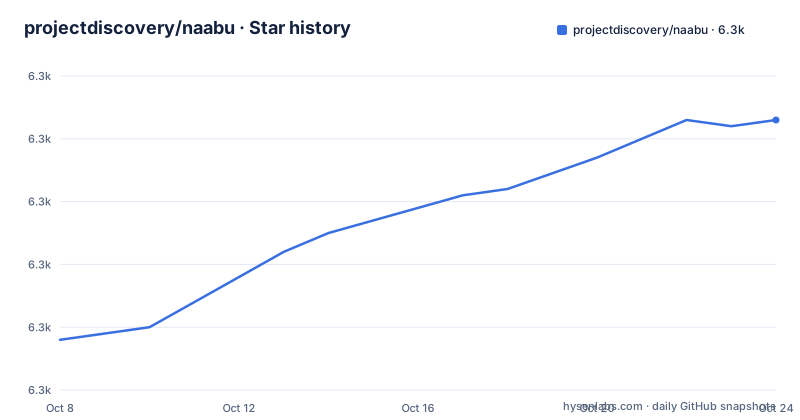
Star history
- projectdiscovery/naabu6,323 ★ · +35
| Repository | 2026-10-08 | 2026-10-24 |
|---|---|---|
| projectdiscovery/naabu | 6.3k | 6.3k |
35 Stars in the last 16 days, measured from the daily GitHub snapshot. Compare with other projects
Editorial analysis
What this tool does and where it stops
naabu is a port scanning tool written in Go, and the repository description states its purpose plainly: fast and reliable port enumeration, designed to be used in combination with other tools for attack surface discovery in bug bounties and pentests. The README is more blunt about the division of labor. It says naabu is a really simple tool that does fast SYN, CONNECT and UDP scans on a host or list of hosts and lists all ports that return a reply.
That last sentence is the whole scope. naabu answers one question, which is whether a port replies. It does not identify what is running there by default, and it is not trying to be Nmap. The repository carries 6,260 stars, 721 forks and one open issue, is licensed MIT, is written in Go, and was last pushed to on 2026-09-21.
The feature list in the README adds the dimensions worth knowing about. Scanning is probe based across SYN, CONNECT and UDP. There is DNS-based port scanning with automatic IP deduplication, which matters when several names resolve to the same address. IPv6 scanning is present and labeled experimental, as is host discovery. Passive port enumeration is available through the Shodan InternetDB API. Service identification by port number and service version detection through nmap-service-probes are both opt-in. Custom UDP payloads can be sent during CONNECT scans, and native UDP service probes are powered by nmap-service-probes. Input can arrive as STDIN, a host list, IPs, CIDRs or ASNs, and output can be JSON, TXT or stdout.
That combination of a small core job and many opt-in layers is the design. The question for an evaluator is which layers you actually need, because each one changes the scan's timing, its privileges and its traffic.
The flag list is the real documentation
The README publishes the full help output, and reading it top to bottom tells you more about the tool's design intent than the prose does.
PORT:
   -port, -p string            ports to scan (80,443, 100-200)
   -top-ports, -tp string      top ports to scan (default 100) [full,100,1000]
   -exclude-ports, -ep string  ports to exclude from scan (comma-separated)
   -ports-file, -pf string     list of ports to scan (file)
   -port-threshold, -pts int   port threshold to skip port scan for the host
   -exclude-cdn, -ec           skip full port scans for CDN/WAF (only scan for port 80,443)
   -display-cdn, -cdn          display cdn in use
Several decisions are visible there. The default is the top 100 ports, not all of them, and the accepted values are `full`, `100` and `1000`, so a full sweep is opt-in. Ports accept ranges inline. A port threshold can skip the port scan entirely for a host once enough ports have answered, which is a useful early-stop for wide sweeps. The two CDN flags are worth pausing on: rather than accepting that a CDN answers everything, naabu can recognize one and narrow the scan to ports 80 and 443, which is how you avoid reporting a CDN edge as if it were the origin.
The rate-limiting block is the other place intent shows.
RATE-LIMIT:
   -c int     general internal worker threads (default 25)
   -rate int  packets to send per second (default 1000)
Two independent controls, concurrency and packet rate, both with defaults chosen to be polite. That matters for anyone about to run this across a network they do not own.
And the scan type default is worth noting because it is easy to assume otherwise.
-scan-type, -s string type of port scan (SYN/CONNECT) (default "c")The default is CONNECT, not SYN. CONNECT scans complete the handshake, so they work without raw socket access, which means naabu's out-of-the-box configuration runs without elevated privileges. SYN scans are faster and quieter because they never finish the handshake, but they need raw packet capability, so asking for one changes what you can run as an unprivileged user.
Passive mode changes the shape of the scan
The `-passive` flag is the one most likely to surprise you, because enabling it disables several other things without warning you at the prompt.
The flag is documented as displaying passive open ports using the Shodan InternetDB API, and it automatically enables stream mode. That second clause is the important one, because stream mode is documented as disabling resume, nmap, verify, retries and shuffling. So a passive scan is not a normal scan with an extra data source bolted on. It is a different mode of operation that gives up the reliability machinery.
The reason is structural rather than incidental. A passive scan asks an external database what ports were already observed open, so there is no packet sending, no connection state to resume, nothing to retry if a response is missed, and no reason to shuffle target order. Every one of those features exists to manage an active conversation with a remote host, and there is no conversation here.
The practical consequence is that passive mode cannot be combined with the verification and retry behavior you would want on an active scan, and it cannot feed results into the nmap integration. If you are building a pipeline that expects a consistent output shape, run passive and active as separate passes and merge the results yourself.
The wider input layer is worth understanding at the same time. The dependency list in `go.mod` includes ipranger for IP range expansion, mapcidr for CIDR work, dnsx for DNS resolution and uncover for querying search-engine-backed sources. Automatic IP deduplication during DNS port scans comes from the same family of helpers, which is why naabu can accept hostnames and still avoid scanning one address three times.
The proxy support is newer than most of the rest. `-proxy` accepts a SOCKS5 address in either `ip[:port]` or `fqdn[:port]` form, `-proxy-auth` takes `username:password`, and `-dns-order` controls the sequence in which resolvers are tried, accepting `l`, `p`, `lp` or `pl` and defaulting to `l`. Including `p` enables proxy-based resolution, so name lookups travel through the proxy rather than leaking to your local resolver.
The nmap integration and the flags replacing it
naabu has three separate ways to interact with Nmap, and they are at three different stages of their lifecycle.
The first is the oldest, and it is marked deprecated in the flag list itself.
   -nmap                            invoke nmap scan on targets (nmap must be installed) - Deprecated
   -nmap-cli string                 nmap command to run on found results (example: -nmap-cli 'nmap -sV')
`-nmap` takes no argument and hands the discovered hosts to nmap. `-nmap-cli` takes an arbitrary command string, which is strictly more flexible and is what the deprecation points you toward. The example given in the help text is `-nmap-cli 'nmap -sV'`. If you are configuring naabu today, use `-nmap-cli` and ignore the bare `-nmap`.
The second and third are naabu's own service detection, which is the more interesting direction because it moves work out of Nmap entirely.
SERVICES-DISCOVERY:
   -sD, -service-discovery           identify services by port number
   -sV, -service-version             detect service versions using nmap-service-probes
   -sV-fast                          only probe port-hinted services (faster, skips fallback)
   -sV-timeout duration              timeout for service version probes (default 5s)
   -sV-workers int                   number of concurrent service version workers (default 25)
   -sV-probes string                 custom nmap-service-probes file path (auto-detected from local nmap install if empty)
   -uP, -udp-probes                  send protocol-specific payloads on UDP scans using nmap-service-probes
`-sD` is the cheap option and does nothing more than map a port number to a service name, so its accuracy is bounded by how well the port matches its usual occupant. `-sV` does real work, sending nmap-service-probes payloads and reading the responses to guess a version, with a five second per-probe timeout and twenty-five concurrent workers by default. `-sV-fast` narrows that to services the port number hints at, skipping the fallback probes, which is the flag to reach for on a large scan. `-sV-probes` takes a path to a custom probes file and auto-detects one from a local nmap installation when left empty, which is a helpful fallback but also a subtle dependency on nmap being installed.
The v2.5.0 release notes show this area maturing: a CPE field was added to the Service struct specifically for Nmap service detection. A CPE field is what lets a downstream tool match a detected service against a vulnerability database, so the scan output became more useful to other programs without changing how the scan works.
The cgo-free claim and what the build files show
The v2.6.0 release notes announce, first among the new features, that naabu was made cgo-free. That is a significant claim for a network tool, because cgo is traditionally what binds a Go program to libpcap, and libpcap is what raw packet capture and SYN scanning need. A cgo-free scanner implies the packet handling was moved to something pure Go.
The dependency list corroborates that something changed. `go.mod` includes `github.com/Mzack9999/gopacket`, a fork, pinned to a commit dated 2026-07-20, and Mzack9999 is also the author credited with both the cgo-free change and the predictive scanning addition in the same release.
The Makefile is consistent with a static build.
GOCMD=go
GOBUILD=CGO_ENABLED=0 $(GOCMD) build
GOMOD=$(GOCMD) mod
GOTEST=$(GOCMD) test
The build target uses `CGO_ENABLED=0`, and the link flags strip debug symbols and the symbol table with `-s -w`. That is what a portable static binary looks like.
The Dockerfile is where the story gets less tidy.
FROM golang:1.27.1-alpine AS build-env
RUN apk add --no-cache build-base libpcap-dev
WORKDIR /app
COPY . /app
RUN go mod download
RUN CGO_ENABLED=0 go build ./cmd/naabu
The build stage installs `build-base` and `libpcap-dev`, the development headers for libpcap, even though the build it runs immediately afterward is explicitly `CGO_ENABLED=0`. Both statements are in the same file. The most likely reading is that the headers are vestigial from before the cgo-free change, left in place because removing them was never tested, but you cannot confirm that from the repository alone.
What you can confirm is the shape of the claim: the Go build is set to disable cgo, so the resulting binary does not link libpcap dynamically and should not need the runtime library. If you are auditing a deployment, the actionable step is to build the binary yourself with `CGO_ENABLED=0` and inspect it with a tool like `file` or `ldd` rather than trusting either the changelog or the Dockerfile. The release image still installs nmap, libcap, bind-tools, nmap-scripts and ca-certificates, so the container is not claiming to be minimal, it is claiming to work with nmap present.
Deprecated flags, the dev branch, and an aging release
Two things about this repository's shape are easy to miss and both affect how you pin a version.
The first is the default branch. It is `dev`, not `main`. Anyone who runs `git clone` without specifying a ref gets the development branch, which is not the code behind any published tag. For a security tool where scan behavior matters, that is the wrong default. Clone a tag, or at minimum check `git describe --tags` after you clone.
The second is the release timeline. The newest tag is v2.6.1, published 2026-05-05, and its entire release body reads as a version bump with a link to the compare view. The substantive release was v2.6.0 on 2026-04-23, which is where the cgo-free work, predictive scanning, Windows SYN support via npcap and SOCKS5 DNS resolution all landed. v2.5.0 came on 2026-03-09 with the CPE field and a fix making SYN scans wait for the timeout after sending packets.
That leaves a gap of roughly four months between the v2.6.1 tag and the 2026-09-21 push. Development has continued on `dev` without producing a new tag, so the commits you get by cloning the branch head are newer than anything you can install from a release.
The deprecations are worth cataloguing at the same time, because they show which interfaces are being retired. Beyond `-nmap`, the host discovery block marks one flag as deprecated in favor of an inverse.
HOST-DISCOVERY:
   -sn, -host-discovery           Perform Only Host Discovery
   -Pn, -skip-host-discovery      Skip Host discovery (Deprecated: use -wn/-with-host-discovery instead)
   -wn, -with-host-discovery      Enable Host discovery
The logic inverted. The old default was to skip host discovery and let `-Pn` say so explicitly, and the new spelling expresses the same idea as `-wn` enabling it. Nmap users will find this familiar, and scripts written against `-Pn` will keep working but are on borrowed time. Host discovery also accepts probe types modeled on Nmap's, including TCP SYN ping, TCP ACK ping, ICMP echo and ICMP timestamp, which is another place the tool deliberately mirrors Nmap's vocabulary rather than inventing its own.
The single open issue is also unusual next to 721 forks, and is consistent with a project that has moved discussion to its Discord rather than the tracker. The README links that Discord in its navigation bar, so issues on this repository may not be the fastest route to an answer.
Editorial conclusion
naabu is a good scanner to judge on its flags rather than its feature list, because the flags are where the real behavior lives and several of them are marked deprecated inside the same list that documents them. Three things are worth settling before you build on it. First, the cgo question: the v2.6.0 release notes say naabu was made cgo-free, yet the Dockerfile still installs `build-base` and `libpcap-dev` in its build stage and `go.mod` depends on a gopacket fork, so read the Dockerfile and the Makefile rather than trusting the changelog. Second, check your Go toolchain against `go.mod`, which declares 1.25.0 while the build image ships 1.27.1. Third, note that the default branch is `dev` and the newest tag is v2.6.1 from May 2026, several months behind the last push, so clone a tag rather than the branch head if you need reproducible behavior. To evaluate it fairly, start with a plain CONNECT scan, compare the results against nmap on the same hosts, then turn on service detection to see how much the extra probes actually cost you.
Frequently asked questions
Does naabu need root privileges to scan ports?
Not with the default configuration. The scan type flag defaults to CONNECT, which completes the TCP handshake and therefore needs no raw socket access. SYN scans are faster and quieter because they leave the handshake unfinished, but they require raw packet capability, so switching to `-scan-type s` changes what privileges you need.
What does the -passive flag disable?
Passive mode queries the Shodan InternetDB API and automatically enables stream mode, which the help output documents as disabling resume, nmap, verify, retries and shuffling. It is a separate mode of operation rather than an extra data source, so it cannot be combined with the active scan's reliability features or its nmap integration.
Should I use -nmap or -nmap-cli?
Use `-nmap-cli`. The bare `-nmap` flag is marked Deprecated in the published help output, and `-nmap-cli` takes an arbitrary command such as `-nmap-cli 'nmap -sV'`, which covers the old behavior and more. For service identification without invoking nmap at all, `-sD` maps ports to service names and `-sV` sends nmap-service-probes payloads to guess versions.
Is naabu really cgo-free as the v2.6.0 notes claim?
The release notes say it was made cgo-free and the Makefile and Dockerfile both build with `CGO_ENABLED=0`, which supports the claim for the resulting binary. The Dockerfile nonetheless installs `build-base` and `libpcap-dev` in the build stage, and `go.mod` depends on a gopacket fork. Build it yourself and inspect the binary rather than trusting either source alone.
Official sources
Add this badge to your README
If you maintain this project, the badge below links readers to this analysis and shows its maintenance status from the daily GitHub snapshot. Paste the markdown into your README; add ?metric=license or ?metric=stars to the image URL for a different field.

[](https://hysenlabs.com/projects/projectdiscovery-naabu)Star history chart for your README
[](https://hysenlabs.com/projects/projectdiscovery-naabu)Was this useful?