projectdiscovery/notify for streaming security tool alerts
Notify is a Go-based assistance package that enables you to stream the output of several tools (or read from a file) and publish it to a variety of supported platforms.
At a glance
- What is it?
- projectdiscovery/notify is a Go package and command-line program that routes file, pipe, or tool output to chat, email, push, and webhook providers. It fits security workflows that need multiple lines or complete findings distributed through existing notification channels.
- Who is it for?
- Adopt projectdiscovery/notify when an existing scanner or file already contains the output that should reach Slack, Discord, Telegram, email, push services, or custom webhooks. Do not adopt it as a scanner, queue, or alert-management system because it publishes input rather than discovering security issues itself.
- Can I use it commercially?
- Yes. MIT is a permissive licence: you can use, modify and sell software built on it, as long as you keep its copyright and licence notices.
- Is it still maintained?
- Yes. The repository last received commits 3 days ago.
- What is it written in?
- Mainly Go, according to GitHub's language statistics.
Answers come from the project's GitHub data, last synced on November 7, 2026, and from our analysis. They are not legal advice.
Star history
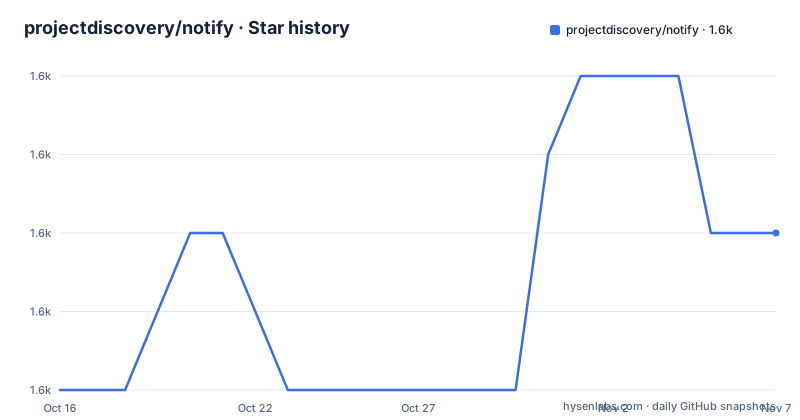
- projectdiscovery/notify1,623 ★ · +2
| Repository | 2026-10-16 | 2026-11-07 |
|---|---|---|
| projectdiscovery/notify | 1.6k | 1.6k |
2 Stars in the last 22 days, measured from the daily GitHub snapshot. Compare with other projects
Editorial analysis
Why projectdiscovery/notify sits after a scanner
projectdiscovery/notify solves the delivery problem that appears after another program has produced useful output. A security tool may print findings to standard output, while an operator needs those findings in a team chat, an email thread, a push notification, or a private webhook. Notify acts as the publishing layer between those two parts. It does not scan hosts, validate vulnerabilities, or decide whether a result is severe. Its job begins with input and ends with a provider request.
The package is aimed at users who already use command-line tools and need a shared notification destination. It can consume a file or pipe input, which makes it suitable for sending a saved result set or forwarding live output. Providers include Slack, Discord, Telegram, Pushover, email through SMTP, Microsoft Teams, Google Chat, Gotify, and custom webhooks. A single notification may use multiple providers, while provider IDs can divide output among destinations such as `recon` and `vulns`.
This separation has a practical benefit. The producing tool does not need provider-specific integration code, and operators can change destinations through configuration. It also creates a clear trust boundary. Webhook URLs, API tokens, SMTP passwords, and chat credentials reside in Notify's provider configuration rather than in each scanner. That does not make plaintext secrets safe. It makes secret handling a separate operational concern.
How input moves through projectdiscovery/notify
Based on the repository layout and README, the command lives under `cmd/`, while reusable package code is split between `pkg/` and `internal/`. The repository defines the Go module as `github.com/projectdiscovery/notify` and requires Go 1.21. This is relevant because notification formatting and provider dispatch belong to the Go package, while the installed `notify` binary supplies the operational interface.
Input can arrive line by line or through bulk processing. Line-oriented mode matches streaming output because Notify can publish each incoming line without waiting for the producer to finish. Bulk mode treats input as a larger unit, but the documented `-char-limit` option imposes a maximum character count per message, defaulting to 4000. The exact internal buffering strategy is not described, so the distinction should not be interpreted as an unlimited queue.
Provider configuration defines the transport and presentation. For Slack, the YAML includes a channel, username, format string, emoji, and webhook URL. Discord and Telegram use similar provider-specific fields. Telegram also exposes a parse mode with `None/Markdown/MarkdownV2/HTML`. Custom webhooks can select an HTTP method, add headers, and use `{{data}}` or JSON formatting. Multiple providers can be selected, and `-delay`, `-rate-limit`, and `-proxy` control delivery pressure and network routing.
The architecture is therefore a small transformation pipeline: read bytes, apply configured formatting, split or aggregate messages according to the selected mode, then dispatch through one or more providers. The README does not document retries, delivery acknowledgements, persistence, or rollback. A failed provider request should not be treated as a guaranteed event queue.
Installing projectdiscovery/notify and sending a file
The documented installation method uses Go and installs the latest published package version for the `notify` command:
go install -v github.com/projectdiscovery/notify/cmd/notify@latestThis requires Go and places the installed command through Go's installation mechanism. The README does not state the resulting directory, so users should rely on the Go toolchain's configured install path rather than an assumed location.
Before a real delivery, create the default provider file at `$HOME/.config/notify/provider-config.yaml`. A minimal documented Slack entry identifies the channel, display name, format, and incoming webhook:
slack:
  - id: "recon"
    slack_channel: "recon"
    slack_username: "test"
    slack_format: "{{data}}"
    slack_icon_emoji: ":ghost:"
    slack_webhook_url: "https://hooks.slack.com/services/XXXXXX"
The `id` is used by the CLI's `-id` option, while `slack_format` keeps the input data in the outgoing message. The webhook shown here is only a placeholder and must be replaced with an actual Slack incoming webhook. The README does not document file-permission rules for this configuration.
Create a file containing the text to publish, then use the documented file-input example:
notify -i test.txtThe flag table describes this as the input file for Notify. With the provider configuration in place, the destination should receive the configured content from `test.txt`. Before sending sensitive findings, inspect the file and configuration because successful delivery sends their contents to every selected provider.
Choosing delivery behavior for security findings
The flags expose several choices that matter when output contains hosts, endpoint paths, vulnerability names, or other sensitive details. `-silent`, `-verbose`, `-no-color`, and `-char-limit` affect presentation and logging, while `-msg-format` adds custom formatting around the data. The documented example is `notify -mf Hey {{data}}`, which shows that `{{data}}` is the insertion point rather than a Go template being inferred from this example.
The default line-oriented behavior is a better fit for a live stream when each discovered result should appear promptly. Bulk mode is the alternative when the destination should receive grouped content. Its usability depends on `char-limit`: a value larger than what a provider accepts may fail at the destination, while a small limit can force messages to be split or otherwise constrained by Notify.
Provider IDs provide a basic form of routing. The README examples use `-id recon,scans`, suggesting that multiple IDs can be selected. The documentation does not explain filtering rules that automatically classify each line by type. If `recon` should receive only reconnaissance results and `vulns` should receive only vulnerability records, that separation must already exist in the input format, upstream command, or provider-side handling. Notify should not be credited with semantic classification unless a custom configuration implements it.
`-rate-limit` limits HTTP requests per second, and `-delay` waits between notifications. These settings help control bursts, but the README does not describe retry queues or delivery confirmation. For noisy scanners, a sensible review therefore includes both message volume and whether a destination can keep up.
Docker and source builds for controlled environments
The repository contains a two-stage Dockerfile. The builder uses `golang:1.21.4-alpine`, copies the repository into `/app`, downloads modules, and builds `./cmd/notify`. The final image uses `alpine:3.18.2`, installs `bind-tools` and `ca-certificates`, copies the binary to `/usr/local/bin/`, and sets `notify` as the entrypoint. This structure is useful when the runtime should include only the compiled executable rather than the Go build environment.
The Makefile provides `build`, `test`, and `tidy` targets. Its build target creates a local `notify` executable from `cmd/notify/notify.go`, with static external linking when the host operating system is not Darwin. The test target invokes Go tests across the repository. Since no execution results are available, the documented existence of a test target does not establish test coverage or current compatibility.
Source builds create a maintenance responsibility. Developers changing Notify must track the Go module dependencies in `go.mod`, while operators choosing `@latest` also accept whatever version the package manager resolves at installation time. The README offers `-update` and `-disable-update-check`, but it does not describe pinned releases, update signatures, or an upgrade migration procedure. Environments with controlled change management should therefore verify the selected release and configuration compatibility before replacing an existing binary.
Where projectdiscovery/notify is the wrong publishing choice
The main limitation is the absence of documented delivery guarantees. Notify accepts input and publishes to providers, but the README does not explain retries, dead-letter handling, message persistence, exactly-once delivery, or recovery after a process failure. It is consequently the wrong choice when notifications must survive outages as a durable audit queue or must be reconciled against a source system.
It is also the wrong tool for deduplication and incident management. Provider IDs can select destinations, but the README does not document deduplication keys, acknowledgement tracking, ownership assignment, or alert state. A system requiring searchable findings, response workflows, escalation timers, or suppression rules needs a separate incident or case-management layer.
A direct custom webhook can be easier than adding Notify when an input tool already accepts an HTTP endpoint, emits a provider-compatible payload, and needs only one fixed destination. In that case, Notify adds another configuration surface and runtime process. It earns its place when normalization across several providers, provider IDs, formatting, rate limiting, or uniform proxy handling justifies that layer.
Secret management is another boundary. The example YAML places webhook URLs, API tokens, and SMTP passwords directly in the provider configuration. The project is MIT licensed, but the README does not document environment-variable substitution, secret references, encryption, or recommended file permissions. Operators must account for credentials separately. Licence terms do not resolve disclosure policy or secret-storage obligations.
projectdiscovery/notify maintenance and licensing boundary
The repository is not archived, and its last push was on 2026-10-14. That fact supports continued source activity, but it does not by itself describe release cadence. The listed releases are v1.0.7 from 2024-11-01, v1.0.6 from 2024-02-08, and v1.0.5 from 2023-05-27. Engineers should therefore distinguish recent repository work from the age of the latest listed tagged release.
The module uses Go 1.21. Upgrading can include rebuilding against the current toolchain, reviewing dependency changes in `go.mod`, and validating every configured provider. The documented `-update` command updates Notify, while `-disable-update-check` suppresses automatic checks. The README does not publish a compatibility matrix, migration notes, or a provider-specific upgrade procedure.
The repository identifies the project under the MIT licence. That is a permissive open source licence, but this review does not interpret its legal effect. Adoption still requires checking the actual `LICENSE.md` and organisation policy, especially when the binary is modified or redistributed. Provider services also have their own API limits and terms, which are outside Notify's licence and are not documented in the README.
Editorial conclusion
Adopt projectdiscovery/notify when an existing scanner or file already contains the output that should reach Slack, Discord, Telegram, email, push services, or custom webhooks. Do not adopt it as a scanner, queue, or alert-management system because it publishes input rather than discovering security issues itself. Before deployment, verify that provider credentials are protected, provider-specific IDs route each message correctly, and line-oriented delivery keeps within destination message limits. The MIT-licensed project is appropriate to inspect and modify, but the last tagged release shown is v1.0.7 from 2024-11-01, so adoption should account for operating a Go tool whose latest published release is nearly two years old.
Frequently asked questions
How do I install projectdiscovery/notify?
The README documents installing the command with `go install -v github.com/projectdiscovery/notify/cmd/notify@latest`. The repository also contains a Makefile build target and a Dockerfile for source-based builds.
Can projectdiscovery/notify stream output from another command?
Yes. The README lists pipe input and line-by-line posting as supported features, and describes streaming output from several tools as the package's purpose. It does not document a dedicated shell command example for piping.
Which notification providers does projectdiscovery/notify support?
The README lists Slack, Discord, Telegram, Pushover, SMTP email, Microsoft Teams, Google Chat, Gotify, and custom webhooks. Notify can use a single provider or multiple providers.
Does projectdiscovery/notify retry failed notifications?
The README does not document retry behaviour, persistence, or delivery guarantees. It documents delay and HTTP request rate limiting, but those controls do not establish guaranteed recovery after failure.
Official sources
Add this badge to your README
If you maintain this project, the badge below links readers to this analysis and shows its maintenance status from the daily GitHub snapshot. Paste the markdown into your README; add ?metric=license or ?metric=stars to the image URL for a different field.

[](https://hysenlabs.com/projects/projectdiscovery-notify)Star history chart for your README
[](https://hysenlabs.com/projects/projectdiscovery-notify)Was this useful?