PropertyTools: WPF controls for property grids, enums and small annoyances
Custom controls for WPF: PropertyGrid, DataGrid, multi-select TreeView, ColorPicker and more
At a glance
- What is it?
- PropertyTools is a C# library of custom WPF controls whose centrepiece is a PropertyGrid that edits the properties of an object or of a collection of objects, surrounded by a set of small controls that each fix a specific irritation in the stock toolkit. It is MIT licensed and ships as the PropertyTools.Wpf package on NuGet for .NET Framework 4.6.2 and .NET 8 through 10 on Windows.
- Who is it for?
- Adopt PropertyTools if you are building a Windows desktop tool in WPF and need an object editor, a spreadsheet-like grid or a tree list with multi-selection, and you would rather take a dependency than write those controls. Do not adopt it for a large data grid, because the README states plainly that the DataGrid is not virtualized, and do not adopt it for a web or cross-platform application, since the whole library is WPF.
- Can I use it commercially?
- Yes. MIT is a permissive licence: you can use, modify and sell software built on it, as long as you keep its copyright and licence notices.
- Is it still maintained?
- Yes. The repository last received commits 11 days ago.
- What is it written in?
- Mainly C#, according to GitHub's language statistics.
Answers come from the project's GitHub data, last synced on November 6, 2026, and from our analysis. They are not legal advice.
Star history
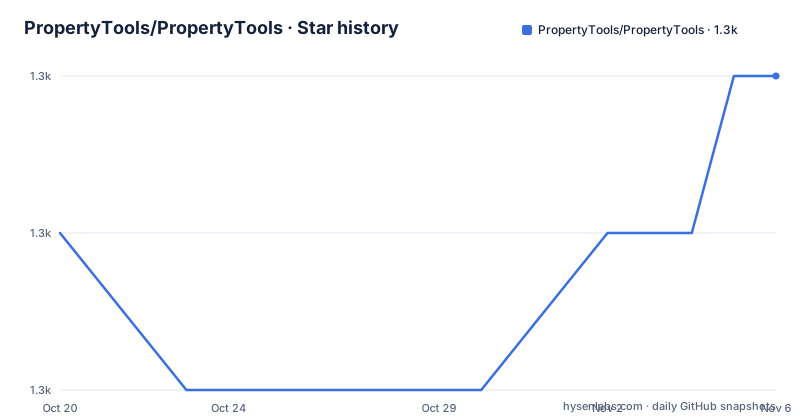
- PropertyTools/PropertyTools1,333 ★ · +1
| Repository | 2026-10-20 | 2026-11-06 |
|---|---|---|
| PropertyTools/PropertyTools | 1.3k | 1.3k |
1 Stars in the last 17 days, measured from the daily GitHub snapshot. Compare with other projects
Editorial analysis
A control library built around one hard problem
PropertyTools is a set of custom controls for the Windows Presentation Foundation, and the description names the main ones: a PropertyGrid, a DataGrid, a multi-select TreeView, a ColorPicker and more.
The PropertyGrid is the control that everything else orbits. It shows the properties of an object or of a collection of objects, which is the thing every configuration screen needs and which the stock WPF toolkit does not provide. Once you have that, a set of smaller controls starts to make sense, because they are all the pieces you would otherwise write next to it.
The control list in the README is unusually explicit about what each one is, and every entry is marked Stable, which is a good sign for a library that has been in use for a long time. PropertyGrid shows properties of an object or a collection of objects. DataGrid is a data grid with an Excel feel. TreeListBox is a ListBox that looks and feels like a TreeView, supporting multi-select and drag-drop. ColorPicker is a colour picker. And then the rest are the odds and ends of desktop UI work.
The project is published to NuGet as PropertyTools.Wpf, and the supported frameworks are listed: Microsoft .NET Framework 4.6.2, and Microsoft .NET 8, 9 and 10 on Windows. The repository has a Source/ directory, a docs/ directory, an Images/ directory holding the screenshots, and a GitVersion.yml, which is how the package version is derived.
The DataGrid, and the caveat that is in the table
The DataGrid is described as a data grid with an Excel feel, and the table entry carries a parenthetical note that is worth more than the description: the control is not virtualized.
Virtualization is the technique where a grid only creates the row containers that are actually on screen, recycling them as you scroll. Without it, a grid with ten thousand rows creates ten thousand rows of controls, and the memory and the layout time both go with them. The note tells you this control prioritises the feel of a spreadsheet over the behaviour of a data grid over large data sets, and that is a reasonable trade for a configuration and administration tool.
It is also a decision that should drive whether you adopt the control. A grid of hundreds of rows of settings is exactly the use case this control is good at. A grid of a hundred thousand records is not, and no amount of liking the Excel feel will change that.
The other grid-adjacent control is TreeListBox, a ListBox that looks and feels like a TreeView, with multi-select and drag-drop. It exists because the stock ListBox and the stock TreeView are different controls with different behaviours, and a settings tree with checkboxes and drag-and-drop wants to be one thing rather than two.
The small controls that each fix one irritation
The rest of the list is a catalogue of the small annoyances of WPF application development, and reading it is a good way to guess what a project using this library is building.
For editing in place, EditableTextBlock is a TextBlock that can be changed into a TextBox, useful for in-place editing in TreeViews. FormattingTextBox is a TextBox where you can bind the formatting string, and TextBlockEx is a TextBlock that contains a style for the disabled state, which is the kind of detail that a theme has to handle and a developer would otherwise write by hand.
For choosing things, RadioButtonList is a collection of radio buttons that binds to an enum, and CheckBoxList is a collection of check boxes for editing Flags enum bit fields. EnumMenuItem is a collection of checkable menu items that binds to an enum, so the same enum appears correctly in a toolbar, a menu or a settings pane. PopupBox is a restyled ComboBox where you can put anything in the popup view, which is how you get a combo box that shows a rich preview instead of a string.
For input, FilePicker and DirectoryPicker are a TextBox with a browse button for files and for directories. SpinControl is a numeric up and down spinner. LinkBlock is a hyperlink on a TextBlock. DockPanelSplitter is a splitter for DockPanels, which the stock toolkit does not provide in the form a docking UI needs.
And SliderEx is the most specific of them: a Slider that calls IEditableObject.BeginEdit and EndEdit when the thumb is dragged, so that a slider bound to an editable object participates in the same transaction and undo behaviour as a text field.
Enums and flags as first class UI
Three of the controls exist for one reason, which is that binding an enum to a UI is more annoying than it should be, and the result is that every project writes the same converter.
RadioButtonList gives you a group of radio buttons bound to an enum value, so the enum members become the choices and the current value becomes the selection, with no converter and no view model property per option. EnumMenuItem does the same thing for a menu, with checkable items. CheckBoxList handles the harder case, an enum with the Flags attribute, where several members can be set at once, and a group of check boxes is the only UI that expresses that state honestly.
This is a small feature that turns into a repeated cost. A codebase with a dozen enum-backed settings ends up with a dozen bespoke converters or a dozen little view models, and the converters are where the binding bugs live, particularly the Flags case, where a naive implementation loses the bits that are not represented by a check box.
Taken together with the PropertyGrid, the picture is coherent. The PropertyGrid edits arbitrary objects, and these controls are the hand-tuned versions for the cases where a generic editor is not what you want, where you want the enum to look like a set of radio buttons rather than a text field.
Four target frameworks and a version number from git
The supported frameworks list is the practical constraint. Microsoft .NET Framework 4.6.2 covers the long tail of existing business applications, and .NET 8, .NET 9 and .NET 10 on Windows cover the current ones. Since WPF itself is Windows-only, the Windows qualifier on the modern targets is a statement of the platform rather than a restriction of the library, but it does mean the library is not an option for anything that is not a Windows desktop application.
Covering both .NET Framework and the current .NET releases in one package is not a small maintenance task, and the repository shows the apparatus for it. There is a GitVersion.yml at the root, which is a tool that derives the version number from the git history, so the package version follows the tags rather than being edited by hand. There is a CHANGELOG.md, an AUTHORS file, a CONTRIBUTORS file, and a docs/ directory alongside the Source/ tree.
There is also an AGENTS.md and a CLAUDE.md at the root, which tells you that the project expects contributions to be prepared with tooling that reads those files, and a .github/ directory for the workflows. For a library that has been around since the WPF 4.0 era, that is an unusually current set of habits.
Where PropertyTools is the wrong choice
The first wrong-tool case is a large data grid. The README's parenthetical note that the DataGrid is not virtualized is a design statement, not an oversight, and if your table has more than a few thousand rows the control will be slow and memory hungry. That is a case for a virtualised grid, not for this one.
The second is a project that is not WPF. Every control here is a WPF control with a XAML type and a dependency property, and none of it applies to Avalonia, WinUI, WinForms, web front ends or anything else. The library is deep in one UI stack, and a cross-platform team cannot use it.
The third is a team that wants a design system rather than controls. PropertyTools gives you functioning controls, and the styling is the stock WPF look with the occasional restyle such as PopupBox. If your application has a design system of its own, the value of a control library that does not match it is limited to the behaviour, and the behaviour is what you would want to keep.
The fourth is a team that needs a supported product with a support commitment. The visible release history is a single version 1.1.0 tag from 2016, and the current work happens on the develop branch, so the package you get from NuGet may or may not contain the fixes you need. That is a fine arrangement for a widely used library and a poor one for a product with a support contract.
MIT, one old tag, and a develop branch doing the work
The project is MIT licensed, with the LICENSE file at the repository root, and the default branch is develop, which is the branch a contributor would work against.
The release list tells a slightly awkward story. There is a single release, 1.1.0, dated 2016-09-21, and then the commits carry on, with the last push on 2026-08-08. So the packaged versions on NuGet may lag the source, and the version scheme from GitVersion means the number follows the git history rather than a hand-maintained file.
For an adopter, that means the decision is between the published package and a build of the develop branch, and the sensible approach is to try the published package first, since every control in the table is marked Stable, and to check the CHANGELOG.md if a specific fix matters.
What the project has going for it is the shape of the code. A library of small, single-purpose controls with a clear owner for each behaviour, published under a permissive licence, with an online documentation directory and screenshots for every entry in the table, is the kind of dependency that ages well, because adopting it means depending on behaviour rather than on a visual style you would have replaced anyway.
Editorial conclusion
Adopt PropertyTools if you are building a Windows desktop tool in WPF and need an object editor, a spreadsheet-like grid or a tree list with multi-selection, and you would rather take a dependency than write those controls. Do not adopt it for a large data grid, because the README states plainly that the DataGrid is not virtualized, and do not adopt it for a web or cross-platform application, since the whole library is WPF. Before you plan a migration, check the supported frameworks against your project's target, and note that the visible release history is a single 1.1.0 tag from 2016 while the develop branch is where current work lands.
Frequently asked questions
What does the PropertyTools WPF library provide?
A set of custom WPF controls, all marked Stable: a PropertyGrid showing the properties of an object or a collection of objects, a DataGrid with an Excel feel, a TreeListBox that behaves like a TreeView with multi-select and drag-drop, a ColorPicker, and smaller controls such as EditableTextBlock, FilePicker, DirectoryPicker, SpinControl, PopupBox, SliderEx and FormattingTextBox.
Which frameworks does PropertyTools support?
Microsoft .NET Framework 4.6.2, and Microsoft .NET 8, .NET 9 and .NET 10 on Windows. The package is published on NuGet as PropertyTools.Wpf, and the repository uses GitVersion so the version is derived from the git history.
What is the limitation of the PropertyTools DataGrid?
The README notes that the control is not virtualized. It is built for an Excel feel, so it suits configuration and administration tables of hundreds of rows rather than large data sets, where a virtualised grid would be needed.
How do PropertyTools controls handle enums?
RadioButtonList is a collection of radio buttons that binds to an enum, EnumMenuItem is a collection of checkable menu items that binds to an enum, and CheckBoxList is a collection of check boxes for editing Flags enum bit fields.
What licence is PropertyTools released under?
MIT, with the LICENSE file at the repository root. The visible release history is a single 1.1.0 tag from 2016-09-21, the default branch is develop, and the last push was on 2026-08-08.
Official sources
Add this badge to your README
If you maintain this project, the badge below links readers to this analysis and shows its maintenance status from the daily GitHub snapshot. Paste the markdown into your README; add ?metric=license or ?metric=stars to the image URL for a different field.

[](https://hysenlabs.com/projects/propertytools-propertytools)Star history chart for your README
[](https://hysenlabs.com/projects/propertytools-propertytools)Was this useful?