Purpur: a Paper fork that you download from an API and build from patches, with no GitHub releases
Purpur is a drop-in replacement for Paper servers designed for configurability, and new fun and exciting gameplay features.
At a glance
- What is it?
- PurpurMC/Purpur is a drop-in replacement for Paper Minecraft servers, aimed at configurability and extra gameplay features. Its builds come from purpurmc.org rather than from GitHub releases, and the source is a patch set you must clone and apply.
- Who is it for?
- Purpur fits server owners who already run Paper and want its configurability and extra gameplay features by swapping the server jar, and plugin authors who want Paper, Spigot and Bukkit API in one dependency. It does not fit anyone who expects a GitHub release, a feature list in the repository, or a precompiled jar from ./gradlew build.
- Can I use it commercially?
- Yes. MIT is a permissive licence: you can use, modify and sell software built on it, as long as you keep its copyright and licence notices.
- Is it still maintained?
- Yes. The repository last received commits 3 days ago.
- What is it written in?
- Mainly Java, according to GitHub's language statistics.
Answers come from the project's GitHub data, last synced on November 15, 2026, and from our analysis. They are not legal advice.
Star history
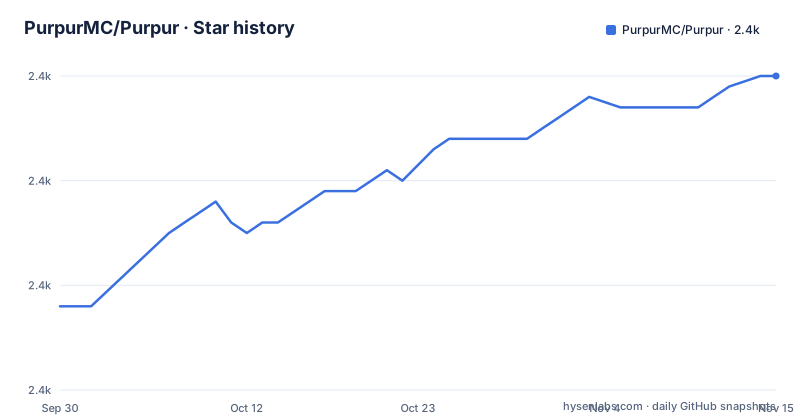
- PurpurMC/Purpur2,440 ★ · +22
| Repository | 2026-09-30 | 2026-11-15 |
|---|---|---|
| PurpurMC/Purpur | 2.4k | 2.4k |
22 Stars in the last 46 days, measured from the daily GitHub snapshot. Compare with other projects
Editorial analysis
Downloads live behind four API endpoints, because GitHub has no releases
The repository has no GitHub releases, so the Releases tab will not give you a server jar. Builds come from the downloads page on purpurmc.org or from a downloads API at api.purpurmc.org. That API has four endpoints, and they form a simple path from a Minecraft version to a file. The first lists the Minecraft versions that have builds, the second lists the builds for one version, the third downloads one specific build, and the fourth downloads the latest build for a version. In the endpoints below, the angle brackets are placeholders you replace. If you script your server updates, the latest endpoint is the one you will call, and it returns whatever build is newest at that moment, so pin a build number when you need a repeatable deployment.
https://api.purpurmc.org/v2/purpur
https://api.purpurmc.org/v2/purpur/<version>
https://api.purpurmc.org/v2/purpur/<version>/<build>/download
https://api.purpurmc.org/v2/purpur/<version>/latest/download
Purpur is a set of patches on top of Paper, so you must clone it and apply them
Purpur describes itself as a drop-in replacement for Paper servers designed for configurability and new gameplay features, built on top of Paper. The source reflects that: the code is not a full server tree but a patch set, and the first step of any build is to apply the patches. The instruction is to clone the repository and, pointedly, not to download it as an archive. Then you run one command in the root directory, and the project is ready for an IDE. A zip download from GitHub does not carry the repository history that a patch-based build expects, so treat the clone as mandatory.
./gradlew applyAllPatchesThe jars from a plain build cannot start a server
A common mistake after compiling is to copy the first jar you find. The build command is ./gradlew build, and it places compiled JARs under purpur-api/build/libs and purpur-server/build/libs. The README states in plain words that these JARs are not used to start a server. To get a server-ready purpurclip jar you run ./gradlew createPaperclipJar instead. To install the purpur-api and purpur dependencies into your local Maven repository you run ./gradlew publishToMavenLocal, and the compiled purpurclip jar then sits in purpur-server/build/libs. If you launch the wrong jar, the server will not come up, so check which task produced the file.
./gradlew build
./gradlew createPaperclipJar
./gradlew publishToMavenLocal
The plugin dependency snippet names version 26.2 while the default branch is ver/26.3
Plugin authors get a Maven repository at https://repo.purpurmc.org/snapshots and an artifact called purpur-api under the group org.purpurmc.purpur. The Maven snippet uses a version range of [26.2.build,) with provided scope, and the Gradle snippet uses compileOnly with 26.2.build.+. Meanwhile the default branch of the repository is ver/26.3. The two numbers do not match, which means the README snippet points at the 26.2 line while development has moved to a branch for 26.3. When you start a plugin, check which version lines the repository actually publishes before you copy the range. The README adds that purpur-api also includes all API provided by Paper, Spigot and Bukkit, so one dependency covers the whole chain.
The repository layout separates the API, the server and a test plugin
The top level shows how the work is divided. purpur-api holds the plugin-facing API, purpur-server holds the server changes, and purpur-checkstyle holds code style rules. A test-plugin directory sits alongside them, and build-data, scripts, gradle and the Kotlin build files build.gradle.kts and settings.gradle.kts drive the build. The repository also ships a .idea folder, an .editorconfig and a CONTRIBUTING.md. Patch authoring is not covered in the README; it sends you to CONTRIBUTING.md for creating a patch. That file is where a contributor must go, and a reader who only wants to run Purpur never needs to open any of these directories.
Patch licences vary, and Paper's licence still applies to what Purpur reuses
The licence statement is narrower than the MIT badge suggests. All patches are licensed under the MIT license, unless otherwise noted in the patch headers. The README then sends readers to PaperMC/Paper and PaperMC/Paperweight for the licence of material used by the project. For a hosting company or a network that redistributes a modified server, the consequence is that you cannot stop at the repository's LICENSE file. You need to open the headers of the patches you touch and read the upstream licences too, because the MIT grant covers Purpur's own patches and not the upstream code underneath them.
The README says configurable but names no setting, and gives no comparison with Spigot
The one-line pitch promises configurability, new fun and exciting gameplay features, and performance. The README gives no list of those features, no config file names and no option values, and it does not compare Purpur with Spigot or Paper beyond calling itself a drop-in replacement. So the question of which is better cannot be settled from this repository; the feature detail is on purpurmc.org, and the Javadoc is linked from the README. The same goes for plugin and mod installation on a running server: the README covers developing against purpur-api, not placing files into a server folder. The last push was on 28 October 2026 and the repository is not archived, but a recent push does not tell you what changed.
Editorial conclusion
Purpur fits server owners who already run Paper and want its configurability and extra gameplay features by swapping the server jar, and plugin authors who want Paper, Spigot and Bukkit API in one dependency. It does not fit anyone who expects a GitHub release, a feature list in the repository, or a precompiled jar from ./gradlew build. Before you switch, confirm on purpurmc.org that your Minecraft version has a build.
Frequently asked questions
What is Purpur for Minecraft servers?
Purpur is a drop-in replacement for Paper servers designed for configurability, new fun and exciting gameplay features, and performance, built on top of Paper. It is released under the MIT license for its patches.
How do I install a Purpur server?
Get a build from the downloads page at purpurmc.org or from the downloads API at api.purpurmc.org. To build it yourself, clone the repository, run ./gradlew applyAllPatches, then ./gradlew createPaperclipJar to produce the server-ready purpurclip jar.
How do I install plugins on Purpur?
The README has no plugin installation steps. It covers plugin development: the purpur-api artifact on repo.purpurmc.org/snapshots includes all API provided by Paper, Spigot and Bukkit.
Official sources
Add this badge to your README
If you maintain this project, the badge below links readers to this analysis and shows its maintenance status from the daily GitHub snapshot. Paste the markdown into your README; add ?metric=license or ?metric=stars to the image URL for a different field.

[](https://hysenlabs.com/projects/purpurmc-purpur)Star history chart for your README
[](https://hysenlabs.com/projects/purpurmc-purpur)Was this useful?