Solaar's udev rules, pip path, and lagging distro packages
Linux device manager for Logitech devices
At a glance
- What is it?
- Solaar is a Linux device manager for Logitech peripherals, and its README is a list of package sources rather than a usage guide. The Makefile and setup.py show where each install path begins and, more usefully, what it leaves out.
- Who is it for?
- Solaar suits a Linux user whose Logitech device needs pairing, a settings change, or a rule, and suits nobody expecting a driver or a Windows tool. Before installing, check which release your distribution package carries against 1.1.20, and read the hosted pages on Rules and Known Issues, because the README covers neither the first pairing nor where your own rule files belong.
- Can I use it commercially?
- Yes, with conditions. GPL-2.0 is a copyleft licence: if you distribute software that includes it, you must release that software's source code under the same licence. Running it internally without distributing it does not trigger that obligation.
- Is it still maintained?
- Yes. The repository last received commits 88 days ago.
- What is it written in?
- Mainly Python, according to GitHub's language statistics.
Answers come from the project's GitHub data, last synced on November 13, 2026, and from our analysis. They are not legal advice.
Star history
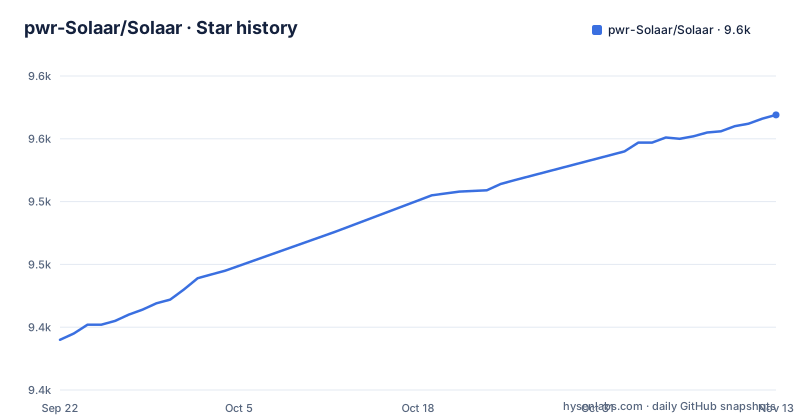
- pwr-Solaar/Solaar9,569 ★ · +179
| Repository | 2026-09-22 | 2026-11-13 |
|---|---|---|
| pwr-Solaar/Solaar | 9.4k | 9.6k |
179 Stars in the last 52 days, measured from the daily GitHub snapshot. Compare with other projects
Editorial analysis
Solaar hears only the messages the input stack discards
The scope limit is stated in the project's own first description: Solaar is not a device driver and responds only to special messages from devices that are otherwise ignored by the Linux input system. That single restriction explains both what the project does well and where it stops. Pairing and unpairing with a receiver, device settings, custom button configuration, and rules fired by those special messages all ride on traffic the kernel input path never consumes, so Solaar adds a layer without displacing a driver. The same restriction sets the ceiling. It cannot repair a device that misbehaves inside the ordinary input path, and it cannot add support for hardware that never sends the messages it understands. Wireless coverage is tied to the Unifying, Bolt, Lightspeed, and Nano receivers; USB and Bluetooth are covered only for many devices, and the README does not enumerate which models fall in that set.
Two udev rule variants, and only one of them ships in the package
The same rule file exists in two directories, and the Makefile keeps separate targets for each. UDEV_RULE_FILE is 42-logitech-unify-permissions.rules, and it is present as both rules.d/42-logitech-unify-permissions.rules and rules.d-uinput/42-logitech-unify-permissions.rules, copied into /etc/udev/rules.d/ by install_udev and install_udev_uinput respectively. The Ubuntu path makes the choice explicitly:
install_ubuntu: install_apt install_udev_uinput install_pipPackaging does not make the same choice. The _data_files function in setup.py yields lib/udev/rules.d with only the rules.d variant, so the uinput rule reaches the system only when the Makefile is run from a checkout:
sudo cp rules.d-uinput/42-logitech-unify-permissions.rules /etc/udev/rules.d/
make reload_udev
Install through setup.py with plain pip instead of the Makefile, and only the rules.d variant is included.
A pip install arrives without the libraries Solaar binds to
install_pip is short, and it installs none of the system packages the program needs:
python -m pip install --upgrade pip
pip install $(PIP_ARGS)
The rest of the build depends on C-level libraries supplied by other targets. On Ubuntu the apt step installs libdbus-1-dev, libglib2.0-dev, libgtk-3-dev, and libgirepository1.0-dev. On Fedora the dnf step installs gtk3, python3-devel, python3-gobject, python3-dbus, python3-pyudev, python3-psutil, python3-xlib, and python3-yaml. The macOS path uses Homebrew:
brew update
brew install hidapi gtk+3 pygobject3 gobject-introspection
The pipx target is the clearest admission that these live outside the wheel, because it passes --system-site-packages so the isolated environment can still see the system copies. A second apt recipe exists for Python 3.13, where the introspection packages are named libgirepository-2.0-dev and gobject-introspection, and install_ubuntu does not call it. The README lists none of these packages, so the dependency step is the one that matters when the GTK or introspection imports go missing.
Freshness depends on which repository serves the build
The package list is split into two tiers, and the difference decides which device support you get. Fedora's standard repositories are named as carrying up-to-date prebuilt packages, and three sources are offered as current alternatives: the Arch solaar package in the extra repository, the Ubuntu and Kubuntu package in the Solaar stable ppa, and the NixOS Flake package in Svenum/Solaar-Flake. Four more are listed as present but possibly several versions behind: a Debian package courtesy of Stephen Kitt, a Ubuntu package from the universe repository, a Gentoo package courtesy of Carlos Silva and Tim Harder, and a Mageia package courtesy of David Geiger. The release record itself is short: 1.1.19 on 2026-01-08, 1.1.20rc3 on 2026-06-17, then 1.1.20 on 2026-06-28. Nothing in the README maps a package repository to a release, so a distribution build can trail the version a new device needs and leave you guessing which gap you hit.
Version and commit strings are produced at build time
setup.py hardcodes neither string. The version is read from a file in the tree:
version = Path("lib/solaar/version").read_text().strip()A commit identifier is then written to lib/solaar/commit, taken from git if a repository is present:
commit = subprocess.check_output(["git", "describe", "--always"], stderr=subprocess.DEVNULL).strip().decode()Without git, the script asks dpkg-parsechangelog --show-field Version and keeps only the text before the first ~ character, which is the way a Debian revision is cut off. If neither source answers, the script prints an exception message and continues without the commit file. The three paths produce different provenance: a checkout build gets a describe string, a Debian source build gets the upstream version, and a plain release archive gets no commit at all. The install target also parameterizes its source, with PIP_ARGS defaulting to the current directory, so a local tree can be installed in place of a published release.
The desktop entry, icons, and translations land outside site-packages
Everything a user sees comes from a short list of paths in _data_files. Scalable icons are globbed from share/solaar/icons/solaar*.svg into share/icons/hicolor/scalable/apps, the light PNG set from share/solaar/icons/solaar-light_*.png into a 32x32 apps directory, and each compiled share/locale/*/LC_MESSAGES/solaar.mo is copied to its own directory. The same function installs share/applications/solaar.desktop, the metainfo file io.github.pwr_solaar.solaar.metainfo.xml, and the udev rule noted above. None of those destinations sit inside the Python package, so an environment built without system site packages has no launcher entry, no themed icon, and no translated strings, and the README never states that these files are part of the installation. This is the second reason a pip install is not equivalent to the Ubuntu path, which copies the udev rule and pulls the system libraries before it installs anything.
The README is a link list, not a usage manual
The project's front page carries no Solaar command, no option, and no configuration path. What it carries is a row of links to the hosted documentation: More Information, Usage, Capabilities, Rules, Manual Installation, and Known Issues. Four bullets name what the program supports, pairing and unpairing of devices with receivers, configuring device settings, custom button configuration, and running rules in response to special messages from devices, but the mechanics for each sit somewhere other than the repository root. The tree holds mkdocs.yml and docs/ for that site, plus RHEL.md, RELEASE.md, tools/, tests/, po/, and a pre-commit configuration. The two rules directories are udev rules for the receiver, not files of Solaar's own rules, and no user rule location appears in the README. Read the hosted Rules and Known Issues pages before the first pairing, and expect the repository to answer packaging questions rather than behavior questions.
Editorial conclusion
Solaar suits a Linux user whose Logitech device needs pairing, a settings change, or a rule, and suits nobody expecting a driver or a Windows tool. Before installing, check which release your distribution package carries against 1.1.20, and read the hosted pages on Rules and Known Issues, because the README covers neither the first pairing nor where your own rule files belong.
Frequently asked questions
What is Solaar?
Solaar is a Linux device manager for many Logitech keyboards, mice, and other devices that connect wirelessly to a Unifying, Bolt, Lightspeed, or Nano receiver, as well as many devices that connect via USB or Bluetooth. It is not a device driver and responds only to special messages from devices that are otherwise ignored by the Linux input system.
How do I install Solaar?
On Ubuntu, the Makefile target install_ubuntu runs install_apt, install_udev_uinput, and install_pip in that order, which installs the development libraries, copies rules.d-uinput/42-logitech-unify-permissions.rules into /etc/udev/rules.d/, and installs the package with pip. Other distributions can take a prebuilt package, the Arch extra package, the Solaar stable ppa, or the Svenum/Solaar-Flake NixOS flake.
How do I install Solaar on Fedora?
Fedora is named as a distribution whose standard repositories carry up-to-date prebuilt Solaar packages. If you build from source instead, the Makefile has a dnf target that installs gtk3, python3-devel, python3-gobject, python3-dbus, python3-pyudev, python3-psutil, python3-xlib, and python3-yaml.
How do I install Solaar on Arch?
Arch users are pointed at the solaar package in the extra repository. Arch is listed among the sources that stay current, not among the repositories that may be several versions behind the current version.
How to use Solaar?
Solaar supports pairing and unpairing of devices with receivers, configuring device settings, custom button configuration, and running rules in response to special messages from devices. The README shows no Solaar command itself, so the step by step material sits on the documentation site under Usage, Capabilities, and Rules.
Official sources
Add this badge to your README
If you maintain this project, the badge below links readers to this analysis and shows its maintenance status from the daily GitHub snapshot. Paste the markdown into your README; add ?metric=license or ?metric=stars to the image URL for a different field.

[](https://hysenlabs.com/projects/pwr-solaar-solaar)Star history chart for your README
[](https://hysenlabs.com/projects/pwr-solaar-solaar)Was this useful?