Pygments: a regex-driven syntax highlighter whose own README warns it can run forever on hostile input
Pygments is a generic syntax highlighter written in Python
At a glance
- What is it?
- pygments/pygments is a generic syntax highlighter in Python covering over 500 languages and text formats. This review covers the execution-time warning, the install and extras, the tox-based docs build, the maintainers and the license.
- Who is it for?
- Use Pygments when you need to highlight many languages from Python and can control the input or isolate the work. Do not run it unguarded on arbitrary user text in a web service, because the project states it gives no guarantees on execution time.
- Can I use it commercially?
- Yes. BSD-2-Clause is a permissive licence: you can use, modify and sell software built on it, as long as you keep its copyright and licence notices.
- Is it still maintained?
- Yes. The repository last received commits 59 days ago.
- What is it written in?
- Mainly Python, according to GitHub's language statistics.
Answers come from the project's GitHub data, last synced on November 24, 2026, and from our analysis. They are not legal advice.
Star history
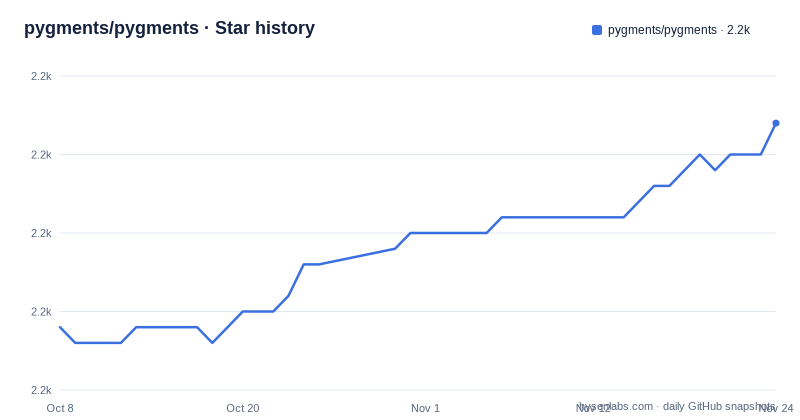
- pygments/pygments2,227 ★ · +13
| Repository | 2026-10-08 | 2026-11-24 |
|---|---|---|
| pygments/pygments | 2.2k | 2.2k |
13 Stars in the last 47 days, measured from the daily GitHub snapshot. Compare with other projects
Editorial analysis
One highlighter for more than 500 languages and text formats
Pygments is a generic syntax highlighter written in Python that supports over 500 languages and text formats. The stated use is code hosting, forums, wikis or any other application that needs to prettify source code. The repository description calls it a generic syntax highlighter, and the PyPI metadata uses the keyword syntax highlighting.
The tree shows how it is organized: the pygments package itself, an external directory, scripts, tests and doc folders, a CHANGES file, an AUTHORS file and a LICENSE file. The project classifies itself as Development Status 6, Mature, with intended audiences of developers, end users and system administrators. That maturity label is a claim from pyproject.toml, so treat it as the maintainers' own description.
The package name in the build metadata is Pygments with a capital P, and the PyPI description is shorter than README.rst on purpose: pyproject.toml points its readme field at description.rst, with a comment explaining that PyPI gets a shorter text. If you look for the full text on PyPI, you will find the shorter one, and the longer README, with the security section, lives in the repository.
Pygments gives no guarantee on execution time, so hostile input can hang or exhaust memory
The Security considerations section is the most important text in the repository. Pygments provides no guarantees on execution time, which matters when processing arbitrary user input. In a web service that uses Pygments for highlighting, some inputs may make the process run forever or use significant amounts of memory. That can be used for a remote denial-of-service attack if the processes are not terminated quickly.
The authors say it is practically impossible to harden Pygments itself. Some regular expressions can result in catastrophic backtracking, and bugs like incorrect matchers can cause similar problems. Finding them automatically would mean solving the halting problem. Two mitigations are recommended: terminate the Pygments process after a reasonably short timeout, since reasonably-sized input should take seconds at most, and limit the number of concurrent Pygments processes to avoid oversubscribing resources.
Long processing times are fixed in a patch release, if you attach an input that reproduces them
The authors treat any bug that causes long processing times with high priority, and say these are the kind of fixes that ship in a patch release. When you report a suspected super-linear execution time, the instruction is to attach an input that reproduces it. A report without that input gives them nothing to run.
The project backs this with extensive unit tests, automated randomized testing and OSS-Fuzz. Even so, the authors write that they will never be able to eliminate all bugs in this area. Read that as a standing limit: a clean fuzzing history does not turn Pygments into a component you can call inline without a timeout. The fix for a slow lexer arrives only after somebody finds the bad input, and your service has to survive until then.
Install with pip, and Windows terminal color needs the colorama extra
Installation works as usual. For published versions, run pip install Pygments. To install from a checkout in editable mode, run pip install -e . instead.
pip install Pygments
pip install -e .
pyproject.toml sets requires-python to >=3.9 and lists classifiers for Python 3.9 through 3.15, on CPython and PyPy, with the operating system marked as independent. One optional extra matters: windows-terminal pulls in colorama >= 0.4.6, so colored terminal output on Windows depends on it. A second extra named plugins is empty and kept for backwards compatibility, so installing it adds nothing. The build backend is hatchling at version 1.27 or newer, which only affects you when you build from source.
The docs build uses tox, and the demo page needs Docker for Pyodide
Documentation lives online at pygments.org, or you can create it with Sphinx through tox:
tox -e docBy default the documentation does not include the demo page, because building it requires Docker to be installed for building Pyodide. To get the demo page, use the other environment:
tox -e web-docThe initial build might take some time, but later builds should be instant because of Docker caching. To view the output, serve it with Python's http.server module, which is required for the demo to work:
python3 -m http.server --directory doc/_build/htmlThe requirements.txt file holds only tox ~= 4.4 and tox-uv ~= 1.29.0 for Python 3.10 and newer, with other requirements installed by tox. A contributor without Docker still gets the docs, just not the interactive demo.
The http.server step is easy to miss. Opening the generated HTML files straight from disk will not make the demo work, so serve the doc/_build/html directory over HTTP first. Contributors who only edit lexers and want to check prose in the docs can stay on tox -e doc and skip the Docker requirement entirely, which keeps the first build short.
Three maintainers carry the project, and contributions are BSD 2-clause
Pygments is maintained by Georg Brandl, Matthäus Chajdas and Jean Abou-Samra. Many lexers and fixes have been contributed by Armin Ronacher, the rest of the Pocoo team and Tim Hatch. The project asks contributors to read the contributing instructions on the website, and development, tickets and pull requests are on GitHub, with continuous testing on GitHub workflows.
The code is distributed under the BSD 2-clause license, and contributors who make pull requests must agree that they are able and willing to put their contributions under that license. pyproject.toml lists AUTHORS and LICENSE as license files. With over 500 languages and a handful of maintainers, expect coverage of a rarely used lexer to depend on whoever contributed it, not on a central team.
Release 2.21.0 landed in August 2026, and nothing in the README compares it to other highlighters
Recent releases are 2.21.0 on 2026-08-17, 2.20.0 on 2026-03-29 and 2.19.2 on 2025-06-21. The repository is not archived and the last push was on 2026-09-27. That is steady activity, with a release every few months.
People search for Pygments next to Chroma, tree-sitter and VS Code, and also for a Pygments vulnerability. The README makes no comparison with other highlighters and says nothing about editor integration. The one risk the project discusses by itself is the execution-time problem described above. If you are choosing between highlighters, test your own input set for runtime and memory, and check the CHANGES file for the lexers you rely on before upgrading.
Editorial conclusion
Use Pygments when you need to highlight many languages from Python and can control the input or isolate the work. Do not run it unguarded on arbitrary user text in a web service, because the project states it gives no guarantees on execution time. Before shipping, wrap every call in a hard timeout and a cap on concurrent processes, and confirm your Python is 3.9 or newer.
Frequently asked questions
What is Pygments?
Pygments is a generic syntax highlighter written in Python. It supports over 500 languages and text formats, for use in code hosting, forums, wikis or other applications that need to prettify source code.
How do I install Pygments?
Run pip install Pygments to get published versions, or pip install -e . to install from a checkout in editable mode. It requires Python 3.9 or newer.
What languages are supported by Pygments?
Pygments supports over 500 languages and text formats. The authors note that many lexers were contributed by people such as Armin Ronacher, the Pocoo team and Tim Hatch.
Official sources
Add this badge to your README
If you maintain this project, the badge below links readers to this analysis and shows its maintenance status from the daily GitHub snapshot. Paste the markdown into your README; add ?metric=license or ?metric=stars to the image URL for a different field.

[](https://hysenlabs.com/projects/pygments-pygments)Star history chart for your README
[](https://hysenlabs.com/projects/pygments-pygments)Was this useful?