Flit: one importable module, one PyPI name, one pyproject.toml
Simplified packaging of Python modules
At a glance
- What is it?
- Flit builds and uploads a Python package by reading its docstring and version attribute straight out of the source module, so a release needs a pyproject.toml but no file manifest. The single module per distribution rule and the backend version range it writes out are the two things to check before you adopt it.
- Who is it for?
- Adopt Flit when a library has one import root, a docstring summary and a version attribute, and you want publishing to be one command. Do not adopt it for a distribution carrying several unrelated top level modules, and do not assume the generated pyproject.toml matches the backend Flit itself uses, because the template pins an older range.
- Can I use it commercially?
- Yes. BSD-3-Clause is a permissive licence: you can use, modify and sell software built on it, as long as you keep its copyright and licence notices.
- Is it still maintained?
- Yes. The repository last received commits 37 days ago.
- What is it written in?
- Mainly Python, according to GitHub's language statistics.
Answers come from the project's GitHub data, last synced on October 23, 2026, and from our analysis. They are not legal advice.
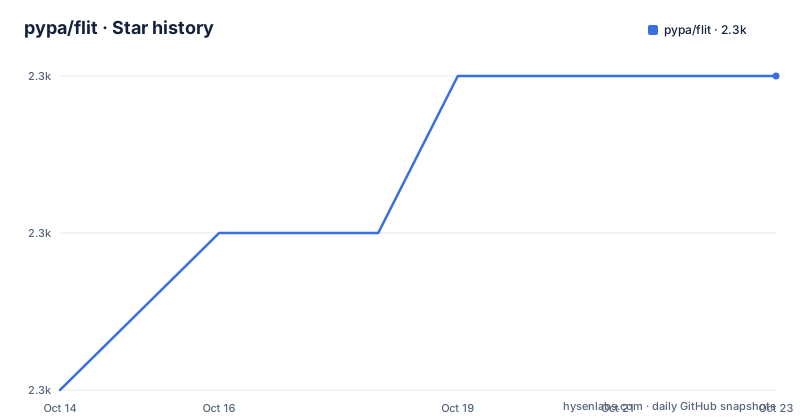
Star history
- pypa/flit2,257 ★ · +2
| Repository | 2026-10-14 | 2026-10-23 |
|---|---|---|
| pypa/flit | 2.3k | 2.3k |
2 Stars in the last 9 days, measured from the daily GitHub snapshot. Compare with other projects
Editorial analysis
One importable module per distribution, named after its import
Flit packages a single importable module or package at a time, and it uses the import name as the name on PyPI. There is no manifest of files to maintain: all subpackages and data files within a package are included automatically. The metadata that a separate config file would normally hold is read from the source instead. The module docstring has to start with a one line summary of what the module is, and the module has to carry a version attribute.
So the shape of a Flit project is narrow on purpose. Either a single file named foobar.py, or a directory holding an importable package, and the name you import is the name people install. That works well for a library with a clean public surface and one import root. It is a real constraint for a repository that has to ship several unrelated top level modules as one download, and the README states the limit in one sentence rather than working around it. Nothing in the documented flow lets you declare two independent modules in one project file, because that file describes exactly one distribution.
flit init reads the docstring and writes the project file
Flit is installed with the Python 3 version of pip, because Flit requires Python 3:
python3 -m pip install flitBefore running any command, the module itself needs the two pieces Flit looks for: a docstring whose first line is a one line summary, and a version attribute set to something like 0.1.
Then flit init runs in the directory containing the module and creates a pyproject.toml. The result looks like this:
[build-system]
requires = ["flit_core >=3.2,<4"]
build-backend = "flit_core.buildapi"

[project]
name = "foobar"
authors = [{name = "Sir Robin", email = "[email protected]"}]
dynamic = ["version", "description"]

[project.urls]
Home = "https://github.com/sirrobin/foobar"
What that file says matters. The dynamic entry listing version and description tells the backend to take both fields from the docstring and the version attribute rather than from the file, so a version number never has to be written in two places. Name, authors and the project urls table are written by hand and can be edited. A project coming from an older Flit setup that still has a flit.ini file converts it with python3 -m flit.tomlify instead of editing TOML by hand.
The generated template pins an older flit_core than Flit itself needs
The template written by flit init asks for flit_core 3.2 or later and below 4, and names flit_core.buildapi as the backend. The pyproject.toml at the root of the Flit repository asks for flit_core 3.11 or later and below 5, and its runtime dependency list requires flit_core 4.1.0 or newer. The tool therefore writes a project file with a narrower, older backend range than the one it needs for itself.
That is the kind of detail a skim misses, and it has a practical effect. A project created with the template and built in an isolated build environment resolves a backend older than the one installed alongside the flit command, because the upper bound excludes the 4.x line the repository depends on. If the build environment already has a newer backend, the range does not silently upgrade it, it constrains what the build is allowed to use.
Two other ranges differ between the same two files. The generated template pins nothing for the interpreter, while the repository file declares a requires-python of 3.8 or newer. The README speaks only of requiring Python 3 as a category. Reading the generated file before the first build is the concrete step here.
flit publish sends a wheel, and sdist installs pull flit back in
Uploading is one command:
flit publishAfter that, people install the package with pip like any other. In most cases pip downloads a wheel, a standard format it knows how to install, and no Flit involvement is needed on the installing machine. The exception is explicit: if someone asks pip for an sdist, pip installs and uses Flit in a temporary environment while it builds. Flit is not only a build tool for its own users, it becomes a build time dependency of anyone installing from source.
For local development there is a separate path that does not go near PyPI:
flit install [--symlink] [--python path/to/python]The symlink flag links your working files instead of copying them, so edits are picked up without reinstalling. The python flag selects the interpreter that receives the install, which matters when the module targets a Python other than the one running Flit.
The sdist carries the test suite while the wheel follows the module
Wheel contents follow the module: one importable module or package, with subpackages and data files inside it taken automatically. Source distributions are configured separately, through a table in pyproject.toml that the repository generates with the flit.sdist_rules module. Flit's own file lists most of its development machinery:
[tool.flit.sdist]
include = [
    "tests/",
    "doc/",
    "flit_core/",
    "tox.ini",
]
exclude = [
    "doc/_build/",
    "flit_core/dist/",
]
That split is worth noting when you read a project file with an include list. Entries such as the test directory and the doc directory affect the source distribution only. They are not a packaging instruction for the wheel, and they do not widen what is importable. A project that copies this shape of table without understanding the scope can ship a source archive larger than it needs while the wheel stays correct.
Only version and description stay out of the project file
The generated project table marks exactly two fields dynamic: version and description. Every other piece of metadata is written literally, which keeps the file the authoritative place for dependencies, the required interpreter and the optional extras. Flit's own file follows that rule, listing flit_core, requests, docutils, tomli-w and pip as dependencies, and separating test and doc extras so that pytest, testpath, responses, sphinx and related packages stay out of a normal install. It also declares a requires-python of 3.8 or newer, which is a firmer floor than the README's statement that Flit requires Python 3.
Command line entry points are declared the same way, in a project scripts table. Flit declares its own as flit = flit:main, and the generated template carries no such entry, so a project that wants a console script adds that table itself, following the scripts section of the documentation the README links. Flit does not generate the wrapper and does not infer entry points from the source tree.
The long description is set once, by pointing readme at README.rst in Flit's own file. For a packaged project it is a plain path in the project file, not something Flit discovers for you.
One module at a time, and no rollback path is documented
Two limits are worth naming before anyone builds a release process on top of this. First, the single module rule. A distribution that needs two independent top level import roots is outside what Flit describes, and there is no flag in the documented flow to widen it.
Second, the README does not document rollback. It shows the publish command and nothing about withdrawing a version that turns out to be broken, and the pyproject.toml files contain no rollback related configuration either. Anyone relying on Flit needs to settle that question with PyPI directly rather than expecting the tool to carry it.
For projects whose shape does not fit, the README points at the rationale page of the documentation for how Flit compares to other Python packaging tools. The architectural difference to weigh first is this one: Flit takes the distribution name from the import and the metadata from the module, so the cost is the one module limit and the benefit is having nothing to keep in sync.
The build backend is chosen by key, not baked into the tool
The build-system table names the backend as data. In Flit's own file that reads build-backend = flit_core.buildapi with a matching requires entry, and the generated template writes the same pair with a different range. Nothing in the command line interface hard codes one backend; the key is the single place a project declares which one builds it, and the requires entry is where that backend's version range is bounded.
This is also why the two ranges in the repository differ without anything being inconsistent at runtime. Flit the command line tool and flit the build backend are separate pieces of software, distributed under different names and pinned separately in the same file. The command line tool imports the backend as an ordinary dependency, so the backend can move independently of the interface.
The rest of the dependency list explains what the interface does at publish time: requests for the network calls to PyPI, tomli-w for writing TOML, docutils for reading the readme, and pip for the local install path. None of that machinery is involved when a wheel is simply built by a backend chosen in the build-system table.
Editorial conclusion
Adopt Flit when a library has one import root, a docstring summary and a version attribute, and you want publishing to be one command. Do not adopt it for a distribution carrying several unrelated top level modules, and do not assume the generated pyproject.toml matches the backend Flit itself uses, because the template pins an older range. Before the first upload, read the generated requires line, confirm the module imports cleanly, and decide whether the source archive should really carry the whole test suite.
Frequently asked questions
Can Flit still distribute a Python 2 module?
Yes, with one condition. Python 2 modules can be distributed using Flit, but they need to be importable on Python 3 without errors, and Flit itself is installed with the Python 3 version of pip.
How do I move an old flit.ini project to pyproject.toml?
Run python3 -m flit.tomlify. It converts an existing flit.ini file, the one used with older versions of Flit, into pyproject.toml.
Why does pip need Flit installed when installing from an sdist?
Wheel installs need nothing extra, because pip knows that format directly. If pip is asked for an sdist, it installs and uses Flit in a temporary environment to build the package.
What does Flit put inside the built package?
A single importable module or package at a time, named after the import name. All subpackages and data files within that package are included automatically, with no file list in the project file.
Does flit init create a console script entry point for my project?
No. The generated pyproject.toml has no project scripts table, so a console script has to be added by hand, following the scripts section of the documentation the README links.
Official sources
Add this badge to your README
If you maintain this project, the badge below links readers to this analysis and shows its maintenance status from the daily GitHub snapshot. Paste the markdown into your README; add ?metric=license or ?metric=stars to the image URL for a different field.

[](https://hysenlabs.com/projects/pypa-flit)Star history chart for your README
[](https://hysenlabs.com/projects/pypa-flit)Was this useful?