Arcade: 2D games layered over pyglet and OpenGL
Easy to use Python library for creating 2D arcade games.
At a glance
- What is it?
- Arcade puts a 2D game layer over pyglet and OpenGL for Python beginners, and its pyproject.toml is unusually blunt about the cost: a hard pin on an unreleased pyglet build, a CPython-only matrix, and physics parked in an extras group.
- Who is it for?
- Arcade fits a beginner or a teaching context where the goal is a playable 2D window in a single Python file, and it fits poorly where the target is 3D, custom shaders or a non-game application. Before adopting it, read the terms file that the packaging points at rather than the badge, check that your environment resolves pyglet==3.0.dev11 on your platform, and confirm that the API you read at api.arcade.academy matches the 3.3.x build you pin.
- Can I use it commercially?
- Check first. The repository uses a licence we do not classify automatically, so read its LICENSE file before any commercial use.
- Is it still maintained?
- Yes. The repository last received commits 9 days ago.
- What is it written in?
- Mainly Python, according to GitHub's language statistics.
Answers come from the project's GitHub data, last synced on November 7, 2026, and from our analysis. They are not legal advice.
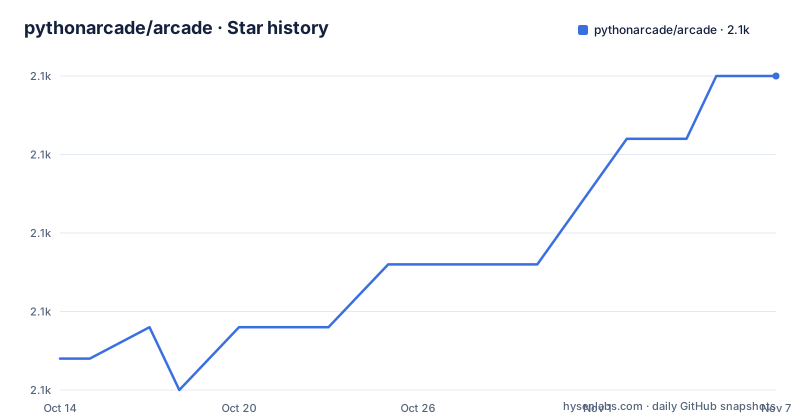
Star history
- pythonarcade/arcade2,100 ★ · +9
| Repository | 2026-10-14 | 2026-11-07 |
|---|---|---|
| pythonarcade/arcade | 2.1k | 2.1k |
9 Stars in the last 24 days, measured from the daily GitHub snapshot. Compare with other projects
Editorial analysis
A rendering layer that hands the window to pyglet
Arcade positions itself as a Python library for 2D video games, written for beginning programmers and for people who want 2D output without first learning a heavier framework. The layering is the part worth noticing. Arcade does not implement a window, an event loop or an OpenGL context. It builds on pyglet, and the README names pyglet and OpenGL as the foundation, with pytiled-parser~=2.2.9 for tile data and pillow>=11.3.0 for image handling. Everything above that base, sprites, cameras, text, GUI widgets, is Arcade's own work. The practical consequence is where you look when something misbehaves: a window that will not open or input that never arrives is a pyglet and driver question before it is an Arcade question, and the file to read is whichever pyglet your environment resolved.
The supported matrix is narrower than the tagline
pyproject.toml sets requires-python to 3.10 and above, and the classifier list enumerates CPython 3.10, 3.11, 3.12, 3.13 and 3.14. There is no PyPy classifier and no 2.x entry, so the real support matrix is far narrower than the phrase "Python library" conveys. Contributors meet a second wall further down the same file: the docs group pins sphinx==9.1.0 and its theme packages behind a python_version marker of 3.12, with a plain comment stating that the doc build requires 3.12 due to Sphinx 9.x. On 3.10 or 3.11 you can install the library and you cannot build its documentation from the same checkout. The version is also declared dynamic, meaning the number you install never comes from pyproject.toml at all.
A production stable classifier above a pyglet development build
One block in pyproject.toml produces the strangest pairing in the repository. The classifier Development Status :: 5 - Production/Stable sits a few lines above dependencies that pin pyglet==3.0.dev11, a development build of the windowing layer. A project that calls itself production stable while refusing to move off a pyglet build that has not shipped has chosen to freeze the underlying API while that layer settles, which is a defensible call and also a manual one: the moment pyglet publishes its own 3.0, somebody has to edit that exact pin. The README does not explain why the pin exists, so treat it as a deliberate constraint rather than a packaging mistake until a maintainer says otherwise on the Discord server it links.
The MIT badge and the file GitHub cannot classify
Licence information here is inconsistent, and the inconsistency sits in the source files: the README badge carries MIT License as its alt text, pyproject.toml declares its licence as a file named license.rst and adds a License :: OSI Approved :: MIT License classifier, yet the repository field reads as a custom licence GitHub cannot classify. The mismatch has a mechanical cause. GitHub derives its own field by parsing the file at the repository root, and it falls back to Other when that parse fails, while the classifier inside pyproject.toml is written by hand by the maintainer and never checked against the prose. For a game whose artwork or audio you do not own, read the terms file that the packaging points at before shipping anything, and treat the badge as decoration rather than as terms.
No pip line anywhere in the README
The README carries no installation command at all. It links the stable documentation at https://api.arcade.academy, points at a separate build under /en/development/, and gives a Discord server plus a maintainer address as contact routes. The package facts therefore have to come from pyproject.toml rather than from prose, and the first block below is the part of that file which decides what a resolver sees:
[project]
name = "arcade"
requires-python = ">=3.10"
The repository root carries uv.lock, .pre-commit-config.yaml and make.py, which is the shape of a uv-driven contributor setup, but none of the entries listed at the top level documents the exact command that consumes them, so that detail has to be settled from the project's own documentation rather than guessed at.
Physics lives in an extras group, not in the core
Collision handling is not part of the base dependency list. The file keeps a separate dependency-groups table whose extras entry pins pymunk~=7.3.0, sitting beside a docs group:
[dependency-groups]
extras = [
    "pymunk~=7.3.0"
]
A base install gives you drawing, input and tile loading, and a game that needs real collision response has to add that extras group on purpose. This is the newer pyproject construct rather than an extras key inside the project metadata, and it keeps the physics binding out of the default install for everyone who only needs sprites to move. Hand-written comments sit directly above these groups, which is a good sign that the file is edited by hand and a warning that a version bump is part of any upgrade you plan.
The default branch is development, so clones start ahead of the docs
The default branch is `development`, which means a fresh clone lands on work in progress rather than on the code behind the stable documentation. The API you read at api.arcade.academy and the API you read under /en/development/ are produced from different points in that branch, and the dated artifacts show the distance: 4.0.0.dev6 was published on 2026-08-07, while 3.3.3 dates to 2025-10-09 and 3.3.2 to 2025-07-04. The last push was on 2026-10-06 and the repository is not archived, so the gap between the two documentation builds is a deliberate release train rather than a stale mirror. Pin your version to the train whose docs you actually read.
Where pyglet on its own is the better fit
pyglet is the real alternative, and the difference is one of layer height rather than of quality. Working against pyglet directly gives you batches, shaders, window and input primitives, and nothing that assumes a game is being built. Arcade sits on that surface and adds sprites, a camera, tile layers, text and GUI widgets, so a project doing 3D work, custom shader work, or no game structure at all pays for conveniences it will never call. The README scopes the library to 2D and does not document 3D support, and it publishes no frame rate or benchmark figures. A benchmarks/ directory exists at the repository root, but no results from it appear in the README, so any performance claim has to come from your own measurements on the target machine.
Editorial conclusion
Arcade fits a beginner or a teaching context where the goal is a playable 2D window in a single Python file, and it fits poorly where the target is 3D, custom shaders or a non-game application. Before adopting it, read the terms file that the packaging points at rather than the badge, check that your environment resolves pyglet==3.0.dev11 on your platform, and confirm that the API you read at api.arcade.academy matches the 3.3.x build you pin. Collision response needs the extras group added for pymunk.
Frequently asked questions
What Python versions does Arcade support?
pyproject.toml requires Python 3.10 or newer, and the classifiers list CPython 3.10 through 3.14. No PyPy classifier is published, and building the documentation from the repository needs Python 3.12 or newer because of the Sphinx 9.x pins.
Does Arcade include a physics engine?
Not in the base install. pyproject.toml places pymunk~=7.3.0 in a dependency-groups extras entry, separate from pillow, pytiled-parser and pyglet, so physics has to be added explicitly.
How do I install Arcade?
The README gives no pip or uv command and instead links the stable documentation at https://api.arcade.academy. The distribution facts, including requires-python >=3.10 and the exact pyglet pin, come from pyproject.toml.
Which licence does Arcade use?
The sources disagree. The README badge and the pyproject.toml classifier both say MIT, while the repository field lists a custom licence GitHub cannot classify, and pyproject.toml points at license.rst as the file holding the terms.
What does Arcade build on?
It builds on pyglet and OpenGL, with pillow for images and pytiled-parser for tile maps. Windowing, the event loop and the OpenGL context belong to pyglet rather than to Arcade.
Official sources
Add this badge to your README
If you maintain this project, the badge below links readers to this analysis and shows its maintenance status from the daily GitHub snapshot. Paste the markdown into your README; add ?metric=license or ?metric=stars to the image URL for a different field.

[](https://hysenlabs.com/projects/pythonarcade-arcade)Star history chart for your README
[](https://hysenlabs.com/projects/pythonarcade-arcade)Was this useful?