PyTorch Tabular: a config-object framework over PyTorch Lightning, and where its version pins bite
A unified framework for Deep Learning Models on tabular data
At a glance
- What is it?
- pytorch-tabular/pytorch_tabular wraps eleven tabular deep learning models behind a TabularModel interface driven by config objects. The model list is wide, but the install order, the tight dependency ranges and the thin README example are the parts to check first.
- Who is it for?
- PyTorch Tabular suits people who already have a pandas table and want to try several neural architectures through one config-driven interface. It is a weaker fit for anyone who needs a documented comparison against gradient boosting, since the model list cites papers rather than results for this library.
- Can I use it commercially?
- Yes. MIT is a permissive licence: you can use, modify and sell software built on it, as long as you keep its copyright and licence notices.
- Is it still maintained?
- Yes. The repository last received commits 36 days ago.
- What is it written in?
- Mainly Python, according to GitHub's language statistics.
Answers come from the project's GitHub data, last synced on November 25, 2026, and from our analysis. They are not legal advice.
Star history
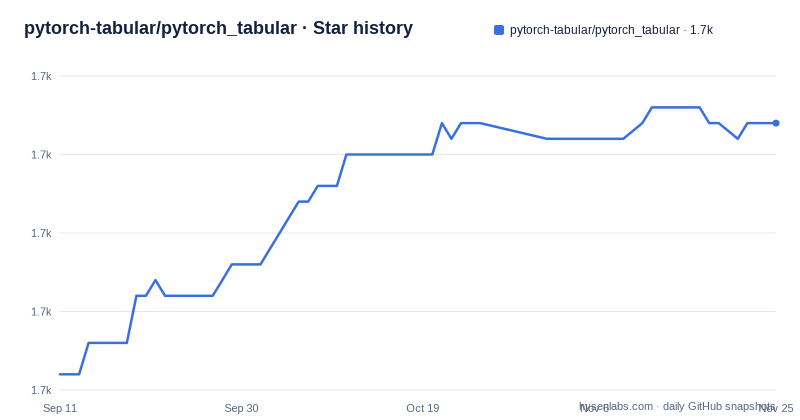
- pytorch-tabular/pytorch_tabular1,697 ★ · +16
| Repository | 2026-09-11 | 2026-11-25 |
|---|---|---|
| pytorch-tabular/pytorch_tabular | 1.7k | 1.7k |
16 Stars in the last 75 days, measured from the daily GitHub snapshot. Compare with other projects
Editorial analysis
Install PyTorch first, because the pip package will not pick your CUDA version
The installation guidance reverses the usual order. Although the package install pulls in PyTorch itself, the recommended path is to install PyTorch first from pytorch.org, choosing the CUDA version that matches your machine, and only then install this library. The reason is practical: a plain dependency pull gives you whatever torch build pip resolves, which may not be the GPU build you need.
Once PyTorch is in place, the full library with extra dependencies, meaning Weights&Biases and Plotly, installs with:
pip install -U “pytorch_tabular[extra]”The bare essentials come from:
pip install -U “pytorch_tabular”If you are on a machine without a GPU, the order matters less, but the extra tracking and plotting packages are still optional. Choose the bare install for a lean environment or a container, and the extra install when you want experiment logging to Weights&Biases out of the box.
Building from source uses the extra install and an older clone address
The source route is a clone followed by a local install:
git clone git://github.com/manujosephv/pytorch_tabularcd pytorch_tabular && pip install .[extra]Two things stand out. The clone address names the manujosephv account, while the repository is listed under the pytorch-tabular organisation, so the address in the install notes and the current home differ. The git:// form is also the old unauthenticated protocol, so if your network blocks it, clone the repository from its current GitHub page instead. The local install also always includes the extra group, so you get Weights&Biases and Plotly even if you wanted the bare library; edit the command if that matters. The pyproject.toml marks the package as Development Status 4, Beta, and the dev extra adds mkdocs-material, pytest and similar tooling for contributors.
Pinned upper bounds on Lightning, pandas and torchmetrics can collide with your environment
The dependency block in pyproject.toml is more constrained than the install line suggests. Python must be at least 3.10 and below 3.15. The listed ranges include pytorch-lightning at 2.0.0 or newer but below 2.7.0, pandas at 1.1.5 or newer but below 3.0.0, scikit-learn at 1.3.0 or newer but below 2.0, scipy at 1.8 or newer but below 2.0, torchmetrics at 0.10.0 or newer but below 1.9.0, and einops at 0.6.0 or newer but below 0.9.0. torch is only floored at 1.11.0, and omegaconf, rich and scikit-base are also required.
The consequence is that this library can force a downgrade. If another package in your project needs pandas 3 or a newer Lightning, pip will either refuse the combination or move something you did not want moved. Put PyTorch Tabular in its own virtual environment when other projects share the machine, and read the resolver output before accepting a change.
Four config objects drive training, and the shown example stops before a model is fitted
The usage example imports TabularModel, a model config such as CategoryEmbeddingModelConfig, and four config classes: DataConfig, OptimizerConfig, TrainerConfig and ExperimentConfig. It then builds the first three:
from pytorch_tabular import TabularModel
from pytorch_tabular.models import CategoryEmbeddingModelConfig
from pytorch_tabular.config import (
    DataConfig,
    OptimizerConfig,
    TrainerConfig,
    ExperimentConfig,
)

data_config = DataConfig(
    target=[
        "target"
    ],  # target should always be a list.
    continuous_cols=num_col_names,
    categorical_cols=cat_col_names,
)
trainer_config = TrainerConfig(
    auto_lr_find=True,  # Runs the LRFinder to automatically derive a learning rate
    batch_size=1024,
    max_epochs=100,
)
optimizer_config = OptimizerConfig()
Three details are worth keeping. The target is always a list, even for one column. You split columns into continuous and categorical yourself, so the framework does not infer types from a dataframe. And auto_lr_find=True runs a learning rate finder before training.
The snippet ends at OptimizerConfig(), and num_col_names and cat_col_names are undefined in it. To see model construction and fitting, use the tutorials and the example scripts.
Eleven model families, with performance claims that belong to the original papers
The available models are a FeedForward network with category embedding, NODE (Neural Oblivious Decision Ensembles), TabNet, Mixture Density Networks, AutoInt, TabTransformer, FT Transformer, GATE (Gated Additive Tree Ensemble), GANDALF, DANETs, and a semi-supervised Denoising AutoEncoder.
The descriptions come from the papers. NODE is described as having beaten well-tuned gradient boosting models on many datasets according to its authors, and GANDALF is described as a pared-down GATE that is more efficient, with very few hyperparameters to tune. These are the original authors' statements. Nothing in the project text gives a benchmark of this library's implementations against XGBoost or any other baseline, so treat the claims as hypotheses for your own data.
Two models cover needs beyond plain prediction. Mixture Density Networks use gaussian components and give a probabilistic prediction out of the box, which matters for regression with uncertainty. The Denoising AutoEncoder is listed under semi-supervised learning and learns feature representations that tolerate noise in the dataset.
Custom architectures and YAML configs are shown through examples, not a reference page
To add a model, the project points to a tutorial called How to implement new models, a notebook under docs/tutorials that is said to cover both basic and advanced architectures. That is the route for anything outside the list above.
The examples folder shows how the pieces are wired. It contains covertype_classification.py, covertype_classification_using_yaml.py, a yaml_config directory, a notebook for the Bank Marketing dataset, and a README. The YAML variant matters if you want settings kept outside Python code, and the dependency list includes omegaconf, which fits that style. The docs folder holds the tutorials and a mkdocs.yml builds them for the ReadTheDocs site, which is the stated home for full documentation.
There is also a Colab link for a basic usage notebook. If you learn best from code, start with the covertype script rather than the short README snippet.
Releases are sparse, though the repository still receives pushes
The repository is not archived, and the last push was on 2026-10-20. Releases are further apart. v1.1.0 was tagged on 2024-01-15, v1.1.1 on 2024-11-29, and v1.2.0 on 2026-01-26, a gap of about fourteen months before the newest one. The pyproject.toml version matches 1.2.0.
What that means for you is a slow release rhythm with work landing between tags. If you need a fix that was merged after v1.2.0, check whether it has reached PyPI, or install from the repository. The package is also published on conda-forge, and the license is MIT.
Editorial conclusion
PyTorch Tabular suits people who already have a pandas table and want to try several neural architectures through one config-driven interface. It is a weaker fit for anyone who needs a documented comparison against gradient boosting, since the model list cites papers rather than results for this library. Before adopting it, install PyTorch for your CUDA version first and check that the pinned Lightning, pandas and torchmetrics ranges coexist with the rest of your environment.
Frequently asked questions
What exactly is tabular data in PyTorch Tabular?
In this library you describe a table by naming a target list plus continuous_cols and categorical_cols in DataConfig. The models then treat the two column groups differently, for example with embedding layers for categorical columns.
What exactly is PyTorch used for in PyTorch Tabular?
PyTorch Tabular is built on PyTorch and PyTorch Lightning. Lightning scales training on GPU or CPU with automatic logging.
How do I install PyTorch Tabular?
Install PyTorch first for your CUDA version, then run pip install -U “pytorch_tabular[extra]” for the full library or pip install -U “pytorch_tabular” for the bare essentials.
Which Python versions does PyTorch Tabular support?
pyproject.toml requires Python at least 3.10 and below 3.15, and its classifiers list 3.10 through 3.14.
Official sources
Add this badge to your README
If you maintain this project, the badge below links readers to this analysis and shows its maintenance status from the daily GitHub snapshot. Paste the markdown into your README; add ?metric=license or ?metric=stars to the image URL for a different field.

[](https://hysenlabs.com/projects/pytorch-tabular-pytorch-tabular)Star history chart for your README
[](https://hysenlabs.com/projects/pytorch-tabular-pytorch-tabular)Was this useful?