qdrant-js couples its minor versions to the engine, so features arrive together
JavaScript/Typescript SDK for Qdrant Vector Database
At a glance
- What is it?
- Three published packages over one Qdrant vector search engine, with a REST client and a gRPC client behind the same facade. The release policy is the detail that shapes your upgrade decisions, and the support matrix quietly rules gRPC out on Cloudflare Workers.
- Who is it for?
- Adopt the REST client if you want one call surface that works in Node, Deno, a browser and Cloudflare Workers, since that is the transport the support matrix is written around. Choose the gRPC client only when you have already committed to gRPC and are running on Node, because Workers get OpenAPI only.
- Can I use it commercially?
- Yes. Apache-2.0 is a permissive licence: you can use, modify and sell software built on it, as long as you keep its copyright and licence notices.
- Is it still maintained?
- Yes. The repository last received commits 14 days ago.
- What is it written in?
- Mainly TypeScript, according to GitHub's language statistics.
Answers come from the project's GitHub data, last synced on November 14, 2026, and from our analysis. They are not legal advice.
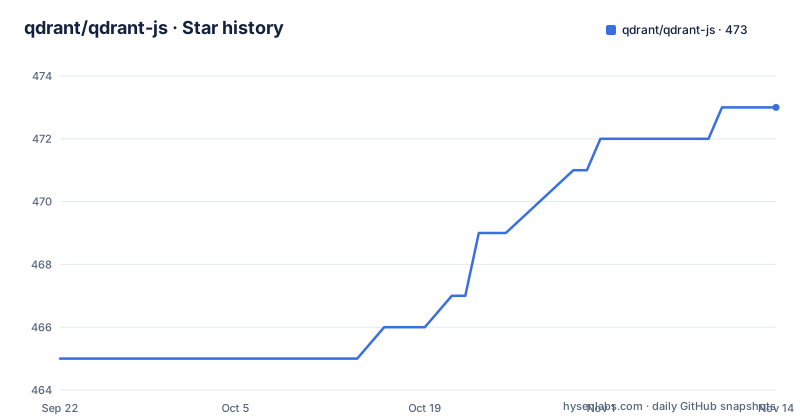
Star history
- qdrant/qdrant-js473 ★ · +8
| Repository | 2026-09-22 | 2026-11-14 |
|---|---|---|
| qdrant/qdrant-js | 465 | 473 |
8 Stars in the last 53 days, measured from the daily GitHub snapshot. Compare with other projects
Editorial analysis
Three packages, and the README links all three to one directory
The repository publishes three npm packages rather than one. `@qdrant/qdrant-js` is the main package with the SDK itself. `@qdrant/js-client-rest` is a lightweight REST client. `@qdrant/js-client-grpc` is the gRPC client.
The split is transport, not abstraction level. The examples all use the REST client, and the request style is a set of facade methods on a client object:
const result = await client.getCollections();
console.log('List of collections:', result.collections);
The word facade is doing real work there. It implies the same call surface sits over either transport, so choosing REST or gRPC is a decision about latency and environment rather than about rewriting your calls.
One oddity is worth noting before you click through. Each of the three package links in the README points at `./packages/qdrant-js/` as its code path. Three published packages and one directory in the links is either a monorepo convention where a single package folder holds all three build outputs, or a link that was never updated. The repository root does have a `packages/` directory, so the shape is right; the specificity is missing.
The client itself is constructed from a URL and an optional key, whether the target is local or Qdrant Cloud.
A patch release never adds a feature, because minor versions belong to the engine
The release policy is two sentences and it is the most consequential thing in the README.
Major and minor versions align with Qdrant's engine releases, while patch versions are reserved for fixes regarding the current minor release. New releases are made from the `master` branch.
Read that as a constraint on you rather than a description of their process. Because a minor bump is reserved for an engine minor, a patch release cannot carry a new capability. If a feature lands in the SDK, it waits for the next engine minor and then arrives in an SDK minor.
The practical consequence is that the SDK version and the engine version move together, and an SDK patch is genuinely safe to take. It also means you cannot get ahead: a team that wants a capability added has to move its engine, not just bump a client.
The recent tags are consistent with the policy rather than with a cadence of their own. v1.17.0 landed in February 2026, v1.18.0 in May, and v1.19.0 in August, which is roughly the engine's own release rhythm rather than a weekly client release. The default branch is `master`, matching the branch named in the release note.
Node 18 for the package you install, Node 22.13 for the repository you clone
Two different runtime floors appear in this repository and they are not the same requirement.
The support section says the TypeScript types are provided alongside the JavaScript sources, for use in Node.js with both ESM and CJS at version 18.0.0 or newer, in Deno, in a browser through the fetch API, and in Cloudflare Workers with OpenAPI only.
The root `package.json` declares a different pair for anyone working inside the monorepo: Node 22.13.0 or newer, and pnpm 11.9.0 or newer, with `packageManager` pinned to `[email protected]`.
Read together they are consistent rather than contradictory. A consumer installing from npm needs Node 18; a contributor building the packages needs a newer Node and pnpm specifically. Both numbers are real and they answer different questions.
What is worth flagging is that a contributor who assumes the support matrix describes the build environment will find the build fails on Node 18, and a consumer who reads the repository `package.json` will conclude the package needs Node 22. The support matrix is the authoritative list for the second case, and it is the first thing in the README.
Cloudflare Workers get OpenAPI only, which quietly rules out gRPC
The support matrix carries one caveat and it is the most useful line in the section.
Cloudflare Workers are listed as OpenAPI only. Every other target on the list gets the full picture: Node.js with both ESM and CJS, Deno, and a browser through the fetch API.
The reason is structural rather than a policy choice. A gRPC client needs a persistent HTTP/2 connection, and Workers do not give you one, so `@qdrant/js-client-grpc` cannot run there at all. The OpenAPI-generated client is what remains, which is why the qualifier attaches to that target rather than to the package.
That has a knock-on effect on package choice that the README does not spell out. If your code has to run in more than one place including a Worker, `@qdrant/js-client-rest` is the only package that can serve all of them, and the gRPC client is an option you give up for portability.
The facade shape helps here. Because the two clients present the same methods, the choice of transport is made in one import rather than at every call site, which is what makes a mixed environment possible at all.
The root package is private and versioned 0.0.0, because changesets version the leaves
The root `package.json` describes a workspace rather than a product. It is marked private, it is named `@qdrant/monorepo`, and its version is `0.0.0`.
Versioning happens one level down through changesets, and the scripts show the whole pipeline. `prepare` runs a preparation script and then builds every package in the workspace. `ci:version` runs the changeset version step, reinstalls without a frozen lockfile, and stages the result. `ci:release` runs a prepublish script and then `pnpm changeset publish`.
That is a conventional changesets setup, and it is what makes the release policy enforceable: a changeset records a bump per affected package, and the maintainers align the resulting minor versions with the engine release they are preparing for.
The workspace shape is confirmed by the root files. A `pnpm-workspace.yaml` defines the package globs, `pnpm-lock.yaml` is the single lockfile, and `tsconfig.base.json` holds the shared compiler settings that each package extends.
One convenience detail for anyone reading the tree: the root version being `0.0.0` does not mean the SDK is pre-release. It is the standard way to say this manifest is not published.
The licence badge points at a different repository
The README's licence badge resolves to a file in a repository that is not this one. It links to `qdrant/qdrant-client`, while the repository you are reading is `qdrant/qdrant-js`.
This repository has its own `LICENSE` at the root, and the licence is Apache-2.0. So the terms are not in doubt, but a badge that resolves to a neighbouring repository is a link that will mislead anyone auditing provenance from a package page.
It fits a pattern. The logo sources in the README also point at the `qdrant/qdrant` repository rather than this one, which is correct there since the logo is shared across the project's repositories. The licence link looks like the same kind of copy rather than a deliberate cross-reference.
The repository is not archived, its last push was on 2026-09-17, and it publishes GitHub releases. For a package whose minor versions track an engine, that release discipline is the thing to watch: an SDK that has not shipped in two months is telling you the engine has not either.
The remaining root files are ordinary for a TypeScript monorepo: an `eslint.config.mjs` flat config, a `.prettierrc.yaml` with a `.prettierignore`, a `.husky/` directory for git hooks, an `.npmrc`, a `.nvmrc` for the Node version, and a `docs/` directory alongside `examples/`.
pnpm inside the monorepo, npm outside it, and knip watching for dead exports
The contributing section draws a line that is easy to miss and saves time if you know it.
Inside the monorepo the project uses pnpm instead of npm or yarn, and you are asked to make sure it is installed locally before running `pnpm install` and the compilation steps, which are said to work for the whole monorepo.
Outside the monorepo, the guidance flips. Anything such as `examples/node-js-basic` is explicitly fine to install and run with npm. The repository has an `examples/` directory, and the pack names `examples/node-js-basic` as one of those.
So an example is not a workspace package, and treating it as one produces a lockfile and an install that do not behave the way the rest of the repository does.
Two other toolchain details are visible in the manifest. `knip` is a dev dependency, which is an unused-export detector, and for an SDK whose whole job is exporting a surface to other people that is a defensible thing to run in CI. `lint-staged` runs prettier and eslint on TypeScript and prettier alone on Markdown and YAML, wired in through husky.
Editorial conclusion
Adopt the REST client if you want one call surface that works in Node, Deno, a browser and Cloudflare Workers, since that is the transport the support matrix is written around. Choose the gRPC client only when you have already committed to gRPC and are running on Node, because Workers get OpenAPI only. Two things to check before you upgrade: which Qdrant engine minor you are on, since the SDK's minor versions track the engine's and a patch will never add a feature, and which package you actually import, since all three are published from this repository and the README's own links send you to the same directory for each of them.
Frequently asked questions
Which qdrant-js package should I install for a JavaScript project?
The README documents @qdrant/js-client-rest as the lightweight REST client, installable with pnpm, npm or yarn. Two others are published: @qdrant/qdrant-js, described as the main package with the SDK itself, and @qdrant/js-client-grpc, the gRPC client.
How do I run a Qdrant instance to test the qdrant-js client against?
Run the Docker container with docker run -p 6333:6333 qdrant/qdrant and construct the client against http://127.0.0.1:6333. A Qdrant Cloud instance is configured the same way with a url and an apiKey.
How often do new qdrant-js versions get released?
Major and minor versions align with Qdrant's engine releases, while patch versions are reserved for fixes within the current minor release. New releases are made from the master branch, and the recent tags were v1.17.0, v1.18.0 and v1.19.0.
Official sources
Add this badge to your README
If you maintain this project, the badge below links readers to this analysis and shows its maintenance status from the daily GitHub snapshot. Paste the markdown into your README; add ?metric=license or ?metric=stars to the image URL for a different field.

[](https://hysenlabs.com/projects/qdrant-qdrant-js)Star history chart for your README
[](https://hysenlabs.com/projects/qdrant-qdrant-js)Was this useful?